
MSBA-242 · Lesson 8 of 12 · 19 min
Monitoring cost and usage
▶ Video coming soon A video version of this lesson is on the way.
An agent that people like gets used more, and in Copilot Studio more use means more cost. In October the HR Leave Assistant used 2,410 billable Copilot Credits, close to Hamish Quarrington's estimate. The Policy Service Assistant was a different story: in its first full week it used almost as many credits as the HR agent used in a month, because every policy lookup was an agent action, every change request ran a flow with a dozen actions, and representatives asked it questions all day. Nobody had done anything wrong; it was simply a busier, heavier agent. Celestine Nwachukwu-Hale, the chief operating officer, asked Rasmus and Hamish for a way to see costs coming before they arrived. This lesson covers how agent usage turns into cost, where to see it, how to allocate and limit it, and how to keep it in proportion to the value the agent delivers.
How agents are billed
Copilot Studio usage is measured in Copilot Credits, the unit that replaced "messages" on September 1, 2025, with the same quantities. Different kinds of work consume credits at different rates. Microsoft publishes a billing-rate table; the rates below are the ones documented in November 2026 and used throughout this course, but rates can change, so check the current table before you estimate.
| Event | Copilot Credits |
|---|---|
| Classic answer (a scripted topic response) | 1 |
| Generative answer | 2 |
| Agent action (a tool or connected agent called by the orchestrator) | 5 |
| Tenant graph grounding (searching Microsoft 365 work data) | 10 |
| Agent flow actions | 13 per 100 actions |
| Content processing | 8 per page |
Several rules affect the totals. Test runs do not consume credits, so testing in the test pane and running evaluations do not add to the bill. Users with a Microsoft 365 Copilot license are not charged for classic answers, generative answers and tenant graph grounding when they use an agent under their own identity in Microsoft 365 Copilot Chat, Teams or SharePoint; agent actions and flows are still billed. Autonomous work, such as flows started by event triggers, is billed even when the agent belongs to someone with a Microsoft 365 Copilot license. These rules mean the same agent can cost quite different amounts depending on who uses it and where.
Ways to pay
Organizations get credits in three ways, and many combine them. Prepaid capacity is bought in advance: a capacity pack provides 25,000 Copilot Credits a month for 200 US dollars, and pre-purchase plans offer discounts of up to 20 percent. Pay-as-you-go bills actual usage to an Azure subscription through a billing plan, which groups one or more environments and sends their Copilot Studio charges to Azure, where they appear in Azure Cost Management. And Microsoft 365 Copilot licenses cover some usage, as described above. Prepaid capacity suits steady, predictable use; pay-as-you-go suits new or variable use and acts as a safety net when prepaid capacity runs out.
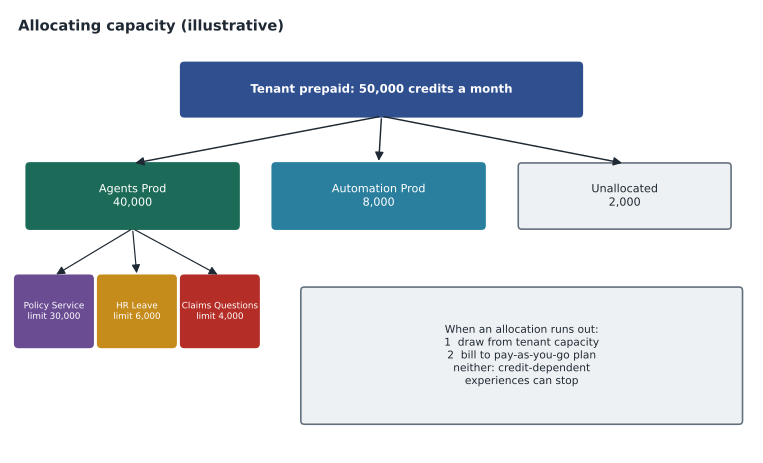
Quillfield bought two capacity packs for its production agent environment, giving 50,000 credits a month, and connected a pay-as-you-go billing plan as overflow. The billing plan pointed at an Azure subscription owned by finance, with an Azure budget alert at an agreed monthly amount.
Where to see usage
Cost data lives in the Power Platform admin center under Licensing, Products, Copilot Studio. Microsoft documented its layout in November 2026 as follows.
| Area | What it shows |
|---|---|
| Summary: capacity summary | Pay-as-you-go credits and prepaid capacity cards |
| Summary: Copilot Credit capacity tab | Consumption by product, a three-month consumption trend, and usage by environment |
| Environments tab | Each environment's consumption, allocation, status (within capacity or overage) and whether pay-as-you-go is used |
| Manage Agents | Billed agents with their limits, month-to-date billed credits and status |
| Download report | Environment, agent or user reports for analysis |
The downloadable environment-level detailed report is the most useful for understanding cost. It lists each agent's usage with the product or AI feature, channel, model, the knowledge source or tool used, and billed and non-billed credits. It does not show usage per conversation, token counts, or why a particular row was not billed. Data is daily for the current month and the previous two full months, and monthly for the past 12 months.
Pay-as-you-go charges also appear in Azure Cost Management against the subscription in the billing plan. For organizations that use Microsoft 365 Copilot pay-as-you-go services as well, the Microsoft 365 admin center has its own cost management views for those services. Finance teams usually want one monthly picture; Hamish built it by combining the Copilot Studio agent report with the Azure cost export.
Allocating and limiting
Prepaid credits are bought and pooled at the tenant level. Administrators can allocate a number of credits to each environment, from the prepaid capacity card or the Copilot Studio management options. An environment without an allocation draws from tenant capacity. Allocation is how you stop one busy environment consuming everything: once the Policy Service Assistant's environment has its share, a spike there cannot starve the automation environment.
Each environment also has an overage setting that decides what happens when its allocation runs out: draw from the available capacity in the tenant, or bill to the pay-as-you-go billing plan. If neither is enabled, the environment can use only its allocated credits, and experiences that depend on credits can stop. Specifically, when an environment has no credits, new agent flow runs are blocked while the agent itself continues to handle interactions that do not need flows. Microsoft's billing documentation also describes enforcement once usage exceeds 125 percent of prepaid capacity, and notes that usage billed through pay-as-you-go is not blocked.
Below the environment, administrators can set a monthly credit limit per agent on the Manage Agents page. As an agent approaches its limit, notifications go to administrators at the environment and tenant level. A limit can be set as a hard stop, which turns the agent off when the limit is reached. Two cautions apply: limits are not applied instantly, so set thresholds with some margin; and an agent's limit does not stop the agent flows it calls, which are measured separately.
Worked problem
Estimating a month for the Policy Service Assistant
Representatives start about 9,000 conversations a month. On average each conversation makes two agent actions and one generative answer. About 900 conversations a month start a change request flow of 12 actions. Estimate monthly credits, ignoring Microsoft 365 Copilot inclusions.
Show solution
- Agent actions: 9,000 conversations × 2 actions × 5 credits = 90,000 credits.
- Generative answers: 9,000 × 1 × 2 credits = 18,000 credits.
- Flow actions: 900 runs × 12 actions = 10,800 actions; 10,800 ÷ 100 × 13 = 1,404 credits.
- Total: 90,000 + 18,000 + 1,404 = 109,404 credits a month.
- Compare with the allocation: well above the 30,000 limit Rasmus first proposed.
Answer: About 109,000 credits a month, dominated by agent actions. The first allocation was far too low. The estimate drove two decisions: a design change to answer common questions from one GetPolicy call instead of two, and a larger allocation backed by pay-as-you-go overflow.
Reducing cost without reducing value
The example shows where cost comes from: agent actions, because each costs five times a generative answer and the orchestrator may call several per conversation. Most savings therefore come from design. Combine tools that are always called together into one, so one action does the work of two. Write tool descriptions precise enough that the orchestrator does not call tools speculatively. Answer stable questions from knowledge rather than a live lookup where accuracy allows. Keep flows lean: a flow with 30 actions where 10 would do costs three times as much for the same result.
Yusra made two changes after the estimate. She extended GetPolicy's lean response to include drivers, so the common "who's on this policy?" question needed one action instead of two, and she rewrote the ListDrivers description so it was called only when a representative asked for driver details specifically. The core test set, rerun after the change, still passed, and the next week's agent report showed agent actions per conversation falling from about 2.1 to 1.4.
| Cost driver | Design response |
|---|---|
| Many agent actions per conversation | Combine tools; sharpen descriptions; avoid speculative calls |
| Long agent flows | Remove unnecessary actions; respond early and do slow work once |
| Tenant graph grounding for every question | Use specific knowledge sources where they suffice |
| Autonomous triggers firing too often | Filter events at the source; batch where possible |
| Large documents processed repeatedly | Process once and store results |
Cost per outcome
Credits alone say little. What matters is cost against value. Hamish reported the Policy Service Assistant's cost as credits per resolved conversation and set it beside the minutes saved per conversation from the contact center's own time studies. At the November agent review, the agent used roughly 11 credits per resolved conversation and saved representatives an estimated four minutes each. At the capacity pack rate of about 0.008 US dollars per credit, that was under ten cents per resolved conversation, a figure Celestine could compare directly with the value of four minutes of a representative's time. Those figures are Quillfield's; another organization's will differ, but the method transfers.
Watch the trend, not just the level. A rise in credits per resolved conversation can mean a design regression, such as a new tool being called needlessly, or a change in what users ask. A fall can mean a successful optimization, or an agent that has started giving up earlier. The agent report and the Monitor page together tell you which.
A cost monitoring routine
Quillfield settled on a routine that took Rasmus about half an hour a week. On Mondays he checked the Environments tab for any environment over or near its allocation, then the Manage Agents page for agents near their limits. Once a month he downloaded the environment-level detailed report, Hamish added it to the cost-per-outcome workbook, and the numbers went into each agent's monthly review. Limits were set at about 120 percent of each agent's expected monthly usage, with notifications at 80 and 100 percent, so a genuine surge produced a warning and a conversation rather than an outage.
Hard stops were used only for experimental agents in development, where switching an agent off was harmless. For production agents that representatives depended on, Quillfield preferred notifications and overflow to pay-as-you-go: an unexpected bill of a few hundred dollars was a smaller problem than 45 people losing a tool mid-shift. Different organizations will make that trade-off differently, but they should make it deliberately.
Explaining cost to the business
Copilot Credits mean little to most business owners. Translate them. Hamish's monthly summary for each agent fitted on one page: credits used and the trend, the equivalent cost at the capacity-pack rate, credits per resolved conversation, the estimated time saved, and a one-line explanation of any change. In November the Policy Service Assistant's line read: "Credits per resolved conversation fell from 15 to 11 after combining policy and driver lookups; usage rose 20 percent as commercial lines joined." Celestine could read that in a minute and see both the cost and the reason.
Be careful with estimates made before launch. They depend on assumptions about volume and behavior that real users will test. State the assumptions with the estimate, compare them with the first month's actual figures, and revise. Quillfield's first estimate for the Policy Service Assistant was too low by a factor of three because it assumed one agent action per conversation; the report showed two. Nobody was blamed for the miss, because the assumption had been written down and was easy to correct.
Credits and licenses together
Organizations with Microsoft 365 Copilot licenses should check how much of their agents' usage those licenses cover. For an internal agent used mainly in Teams by licensed staff, generative answers and tenant graph grounding under the user's identity may not be billed, leaving agent actions and flows as the main cost. For an agent used by unlicensed staff, or on a website, the full rates apply. The environment-level report shows billed and non-billed credits separately, which is the quickest way to see the effect.
Finally, connect cost to the release process. A change that adds a tool, a flow step or a new source of grounding changes the cost per conversation, so Quillfield's deployment note asked the maker to state the expected effect on credits, even roughly. Most changes had none; a few were significant. Asking the question at release time meant cost surprises were caught in the approval rather than in the next month's report.
Common mistakes
MistakeEstimating cost from conversations alone.
InsteadCount agent actions, generative answers, grounding and flow actions separately.
MistakeLeaving every environment to draw on tenant capacity without allocation.
InsteadAllocate capacity so one busy environment cannot starve the others.
MistakeAssuming an agent limit also caps its flows.
InsteadAgent flow usage is separate; plan limits and overflow for flows too.
MistakeUsing hard stops on agents people depend on.
InsteadPrefer notifications and overflow for production; reserve hard stops for experiments.
MistakeReporting credits without value.
InsteadReport cost per resolved conversation beside time or money saved.
Summary and key terms
- Copilot Studio usage is measured in Copilot Credits, with different rates for answers, agent actions, grounding and flow actions; test runs are free.
- Credits come from prepaid capacity, pay-as-you-go billing plans linked to Azure, and Microsoft 365 Copilot inclusions.
- The Power Platform admin center shows capacity, consumption by environment and agent, and downloadable reports under Licensing, Products, Copilot Studio.
- Administrators allocate capacity to environments, choose overage behavior and set monthly limits per agent, with notifications or hard stops.
- Design choices drive cost; report cost per resolved conversation beside value.
- Copilot Credits
- The unit in which Copilot Studio usage is measured and billed.
- Prepaid capacity
- Copilot Credits bought in advance and pooled at the tenant level.
- Billing plan
- A pay-as-you-go arrangement that bills environments' usage to an Azure subscription.
- Allocation
- The number of credits assigned to a particular environment.
- Overage
- Usage beyond an environment's allocation, handled by drawing from the tenant or pay-as-you-go.
- Hard stop
- An agent credit limit that turns the agent off when reached.
Practice problems
Work each problem on paper first, then reveal the answer to check.
Which kind of event dominated the Policy Service Assistant's estimated credits?
Show answer
Agent actions, at five credits each and about two per conversation.
What happens to new agent flow runs when an environment has no credits?
Show answer
They are blocked, while the agent continues to handle interactions that do not need flows.
Why did Quillfield avoid hard stops on production agents?
Show answer
An outage for staff who depend on the agent was worse than a modest overflow charge.
Lesson quiz · 5 questions
Score 60% or more to complete this lesson.
Create a free account to save your progress, take quizzes and earn a certificate.