
MSBA-112 · Lesson 12 of 12 · 19 min
Case study: a quarterly business review
▶ Video coming soon A video version of this lesson is on the way.
Every quarter, each of Quillfield's three business lines presents a quarterly business review to the leadership team: what happened in the quarter, how results compared with plan, what problems appeared and what the line proposes to do next. For the third quarter of 2026, the personal lines review was scheduled for Wednesday, October 21, at 2 p.m. in Teams, with Celestine chairing and Lorne, as chief financial officer, asking his usual questions. Daria Velikova had presented reviews for six years, and she usually spent about two days preparing: a day in spreadsheets, half a day writing, half a day on slides. This time she asked Hamish to help her prepare the whole review with Copilot, from the raw data to the follow-up after the meeting, and to note every place where a human check mattered. This lesson follows that preparation from start to finish. All figures are invented for the case study.
The brief
Celestine's standing brief for the reviews was short: a one-page written summary sent the day before as a pre-read, a deck of no more than ten slides, twenty minutes of presentation and twenty of discussion, and a list of decisions and actions afterward. Daria's raw material was a quarterly export from the policy management system, the contact center's weekly reports from Tomasz, a claims summary from the claims team, the second-quarter review deck, and her own notes from conversations with insurers during the quarter.
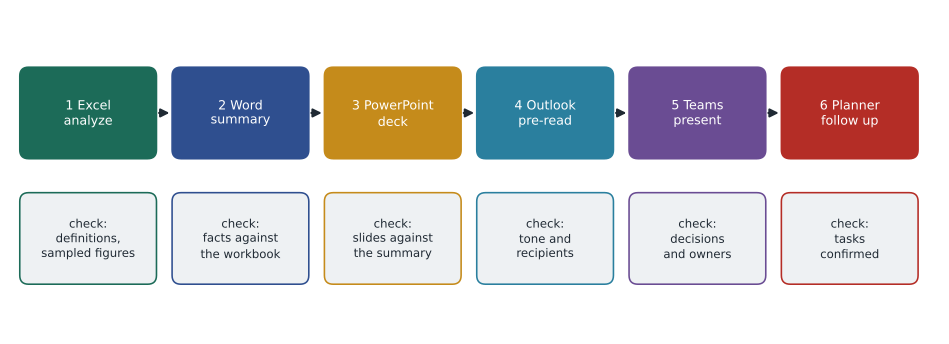
Stage 1: Analyzing the quarter in Excel
Daria opened the policy export in Excel. It had the familiar problems from lesson 3: a title row, merged headers and a column of renewal dates stored as text. She asked Copilot, in editing mode, to clean the sheet into a table, and checked the date conversion on a dozen rows from different months. Then she switched to chat mode and asked a series of questions, each with an explicit definition. "How many personal lines policies were in force on September 30, counting only active policies, not canceled or lapsed?" "What was gross written premium for the quarter, by home and auto?" "What was the retention rate, defined as the number of policies renewed divided by the number of policies due for renewal in the quarter?"
Copilot answered each question and, when asked, built a summary sheet with the figures and two charts. Daria then did what Lorne would do: she picked three numbers and checked each one by a method she controlled. Policies in force matched a count she made with a filter. Written premium matched the finance team's figure to the dollar. Retention did not. Copilot reported 91.4 percent; her own count gave 88.7. When she asked how the rate had been calculated, Copilot explained that it had counted policies due for renewal as those with a renewal date in the quarter, excluding 212 policies that had been canceled before their renewal date. Her definition, and the firm's, counted those as due and not renewed. Neither calculation was absurd, but only one matched the definition used in every previous review. She restated the definition and recorded it in a notes sheet.
| Measure (invented) | Q2 2026 | Q3 2026 | Change |
|---|---|---|---|
| Policies in force, end of quarter | 24,860 | 25,310 | up 450 |
| Gross written premium, home | 9.42 million | 10.08 million | up 7.0 percent |
| Gross written premium, auto | 11.15 million | 11.36 million | up 1.9 percent |
| Retention rate (firm definition) | 89.6 percent | 88.7 percent | down 0.9 points |
| Average contact center wait, personal lines queue | 1 min 52 s | 2 min 31 s | up 39 s |
| Water damage claims reported | 318 | 402 | up 84 |
With the numbers settled, Daria asked Copilot in chat mode what stood out. It suggested three things: home premium growth, the fall in retention, and the rise in water damage claims. It also offered a possible explanation for the retention fall, a price increase from one home insurer in July. Daria knew that was part of the story but not all of it: the longer contact center waits in the same quarter had led to complaints from clients who could not reach anyone about their renewals. She noted both as hypotheses to raise, not conclusions.
Stage 2: Writing the management summary in Word
In Word, Daria asked Copilot for an outline first: "Create an outline for a one-page quarterly review of personal lines for the leadership team, using the attached workbook and the Q2 review. Sections: headline results, what went well, concerns, proposals, decisions requested." She moved concerns ahead of what went well, because the leadership team would want them early, and then asked Copilot to draft each section from the workbook and her insurer notes, with the instruction to say "not found" for any figure not in the sources.
The draft was clear and almost the right length. She checked every figure against the summary sheet, which took ten minutes, and found one problem: the paragraph on retention gave the rate as 91.4 percent. Copilot had drafted from the workbook before she corrected the definition, because she had referenced the file while the old figure was still in a cell. She corrected the figure and asked Copilot to recheck every number in the document against the current workbook, which it did without finding further differences. She then rewrote the proposals section herself. It asked for approval to add two staff to the contact center during the January renewal peak and to fund a water damage prevention campaign for home clients, and those were her proposals, not Copilot's.
Worked problem
Writing the decision request
The summary must end with the decisions Daria wants from leadership. How should she use Copilot for this section?
Show solution
- Decide the requests herself: two temporary contact center staff for January and February, and a budget for the prevention campaign.
- Prompt Copilot with those decisions, their costs from her notes, and the expected benefit stated as she would defend it.
- Ask for a short, neutral section headed "Decisions requested", one numbered item per decision.
- Read it as Lorne would: is every cost sourced, and does any sentence overstate the benefit?
Answer: Copilot drafts the wording; Daria owns the requests, the costs and the claims about benefits. She removed one sentence that promised retention would "recover fully", because she could not support it.
Stage 3: Building the deck in PowerPoint
Because the summary used Word heading styles, it converted cleanly. Daria opened Quillfield's review template, selected the firm's brand kit, and asked Copilot to "create a presentation from the attached quarterly summary for the leadership team: eight slides, one idea per slide, charts from the attached workbook where figures are shown, speaker notes with the detail". Copilot produced eight slides. She replaced two charts with the ones from her Excel summary sheet, because the generated ones used slightly different axis ranges, and checked each slide against the summary.
One slide needed rewriting. Under the heading *Why retention fell*, Copilot had written: "Retention fell because of the July home insurer price increase." The summary had said that the price increase was one likely factor and that longer contact center waits might also have contributed. The slide had turned two hypotheses into one cause. Daria rewrote it as "Two likely factors: a home insurer price increase in July, and longer waits for renewal calls", and updated the speaker note. It was the same kind of distortion that lesson 9 had described, and it would have been exactly the slide Lorne challenged.
Stage 4: Sending the pre-read in Outlook
On Tuesday afternoon, Daria drafted the pre-read email with Copilot in Outlook: "Draft a short email to the leadership team attaching the Q3 personal lines summary. Mention the three headline points and the two decisions requested. Neutral, professional tone." She checked the three points against the summary, used coaching on the draft, which suggested making the decisions more prominent, and accepted the suggestion. Then she checked the recipient list by hand. Copilot had not chosen the recipients, but the email went to a distribution list, and she wanted to be sure it did not include the wider management group, because the contact center staffing proposal had not yet been discussed with the staff affected.
Stage 5: Presenting in Teams with Facilitator
Daria set the meeting's *Allow Copilot and Facilitator* option to *During and after the meeting*, turned on Facilitator, and put the agenda in the invitation: results (ten minutes), concerns (five), proposals (five), discussion and decisions (twenty). At the start, Celestine told the attendees that transcription and Facilitator were on. The agenda timer kept the presentation to twenty minutes, and the discussion produced what such discussions do: questions, objections and, eventually, decisions.
Lorne asked his question. He picked the retention figure and asked where it came from. Daria explained the definition and the 212 canceled policies, and said the earlier draft had shown 91.4 percent because of a different definition. Lorne nodded and moved on. Celestine said afterward that the answer had done more for the proposals than any slide.
Stage 6: Following up
After the meeting, Daria opened Facilitator's notes. They listed three decisions and six action items. One decision was recorded incorrectly: the notes said "Lorne approved the prevention campaign budget", when in fact Lorne had asked for a cost estimate by November 4 before approving it, and Celestine had approved the temporary contact center staff. Daria corrected the notes, checked every action item for an owner and a date, and synced the tasks to Planner, where the preview sync worked as expected. She then asked Copilot in the meeting chat to draft the follow-up message with the corrected decisions and actions, checked it against the notes and posted it.
The final record was short: the temporary contact center staff approved for January and February (Celestine); the prevention campaign budget pending a cost estimate from Pernille and Daria by November 4 (Lorne to decide); Tomasz to report weekly personal lines wait times through the renewal peak; Daria to track retention monthly using the firm's definition.
What the case study shows
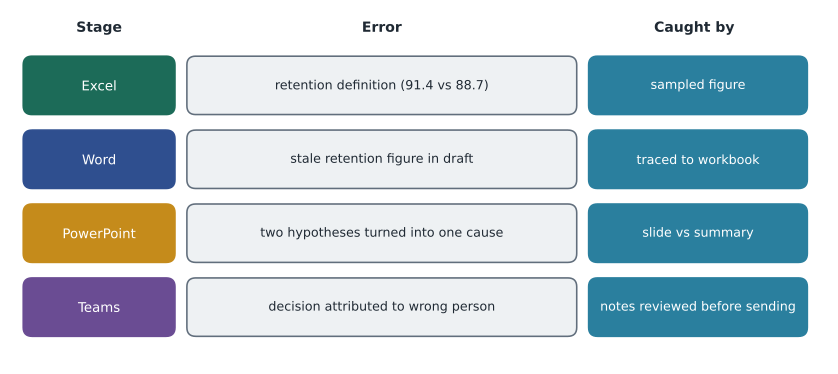
The whole preparation took Daria about a day instead of two. More important than the time was where the errors were caught. Four errors appeared, one each in Excel, Word, PowerPoint and Teams, and each was caught by a check designed for that stage: a sampled figure, traced figures, a side-by-side comparison and a review of the notes before sending. None of the errors was an invention in the dramatic sense. Each was a definition, a stale figure, a distortion or a misattribution, which are the kinds lesson 9 found most common.
The case also shows the division of labor this course has argued for. Copilot did the cleaning, counting, drafting, converting, summarizing and note-taking. Daria decided the definitions, the story, the proposals and the final record, and she checked the specifics at each stage. Her name was on the review, and she could answer for every number in it.
Your turn
To practice the AB-730 skill area, plan a quarterly review for a team or area you know, using the same six stages. For each stage, write down the prompt you would use, the source you would reference, the likely error and the check that would catch it. Then compare your plan with the review checklist below. If you have access to Microsoft 365 Copilot, try one stage with real data you are permitted to use, and time both the work and the checking.
| Stage | Prompt includes | Check before moving on |
|---|---|---|
| Excel analysis | Explicit definitions for every measure | Sample three figures by another method |
| Word summary | Named workbook and prior review; "not found" instruction | Trace every figure to the current workbook |
| PowerPoint deck | Template, brand kit, slide count, charts from the workbook | Compare each slide and note with the summary |
| Outlook pre-read | Headline points and decisions; tone | Check facts and the recipient list |
| Teams meeting | Agenda in the invitation; Copilot and Facilitator settings | Tell attendees; correct the notes |
| Follow-up | Corrected decisions and actions | Every action has an owner and date |
Reflection
After the review, Hamish asked Daria what she would do differently next quarter. She had three answers. She would settle every definition in Excel before opening Word, so no draft could pick up an unfinal figure. She would ask Copilot to keep the summary's qualifications when building the deck, with an explicit instruction such as "keep every 'likely' and 'may' from the summary". And she would add the notes review to her calendar for the hour after every review meeting, because the record was only accurate once she had corrected it. Each answer turned a lesson from this quarter into a step in next quarter's workflow, which is how a personal AI workflow improves over time.
Common mistakes
MistakeAsking for a retention rate without stating the firm's definition.
InsteadState definitions in the prompt and record them with the figures.
MistakeDrafting the summary from a workbook before its figures are final.
InsteadSettle the analysis first, or recheck every figure after changes.
MistakePresenting a slide that turns hypotheses into causes.
InsteadCompare slides with the summary and keep the summary's qualifications.
MistakePosting Facilitator's decisions without review.
InsteadCorrect decisions and owners before sending the follow-up.
Summary and key terms
- A quarterly review can move through Excel, Word, PowerPoint, Outlook and Teams with Copilot at each stage.
- Each stage has a characteristic error and a check that catches it.
- Definitions, stale figures, distortions and misattributions were the errors found, not dramatic inventions.
- Copilot did the mechanical work; the presenter decided definitions, story, proposals and the final record.
- Being able to answer "where does this number come from?" is the real test of an AI-assisted report.
- Quarterly business review
- A regular presentation of a business area's results, problems and proposals to leadership.
- Pre-read
- A document sent before a meeting so attendees arrive informed.
- Retention rate
- The share of policies due for renewal that were renewed, under a stated definition.
- Gross written premium
- The total premium on policies written in a period before deductions.
- Decision request
- A section of a report that states the decisions the author asks leaders to make.
- Hypothesis
- A possible explanation that needs testing before it is treated as a cause.
Practice problems
Work each problem on paper first, then reveal the answer to check.
Why did Copilot's retention rate differ from Daria's?
Show answer
It excluded 212 policies canceled before their renewal date from the policies due; the firm's definition counts them as due and not renewed.
What was wrong with the "Why retention fell" slide?
Show answer
It presented one hypothesis as the cause and dropped the second factor the summary mentioned.
What did Daria check in the pre-read email besides the facts?
Show answer
The recipient list, because the staffing proposal had not yet been discussed with the staff affected.
Lesson quiz · 5 questions
Score 60% or more to complete this lesson.
Create a free account to save your progress, take quizzes and earn a certificate.