
MSAZ-321 · Lesson 2 of 12 · 23 min
Eventhouses and KQL databases
▶ Video coming soon A video version of this lesson is on the way.
The second operations session was on Monday, November 2. Nikolai had created an eventhouse called eh_sensors in FDH Stores [Dev] in October as a placeholder for the freezer pilot; today Ines would give it a proper table, load the October archive into it and set the policies that decide how long data is kept and how fast it can be queried. The live stream from the eventstream would follow on November 10, so the archive was also a rehearsal: by the time live readings arrived, the table, its mapping and its policies would already be tested.
Eventhouses and KQL databases
An eventhouse is a Fabric item built for time-based event data. It is a container: it holds one or more KQL databases, and the databases inside it share the eventhouse's compute and are monitored together. Each KQL database holds tables, functions, materialized views and policies, and each comes with an embedded queryset for exploring and managing data. When an eventhouse is created, Fabric creates a KQL database with the same name inside it, so eh_sensors contained a database also called eh_sensors.
The engine underneath is the same as Azure Data Explorer's, which is why the query language is Kusto Query Language and why so much Azure Data Explorer documentation applies. Data is stored in compressed columns and indexed automatically, and every table is organized by the time each batch of data arrived, which makes queries that filter on recent time very fast. Eventhouses accept structured data, such as CSV, semi-structured data, such as JSON, and free text, such as log lines.
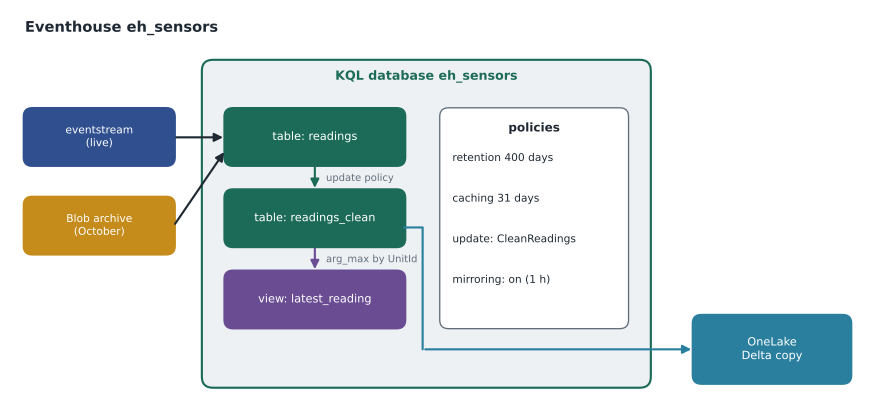
Designing the readings table
KQL tables have a fixed schema with a small set of types: string, int, long, real for floating-point numbers, decimal, bool, datetime, timespan, guid and dynamic for JSON values whose shape can vary. The sensor messages were JSON with five fields: the device id, the temperature in degrees Celsius, the reading time in UTC, the battery level and a firmware version. Ines kept the eventstream's friendlier names from MSAZ-320 and added two columns the stream would not carry: UnitType, freezer or cooler, from a small reference table, and IngestionTime, filled automatically, so that delay could be measured.
.create table readings (
    UnitId: string,
    UnitType: string,
    TemperatureC: real,
    ReadingTime: datetime,
    BatteryPct: int,
    Firmware: string,
    IngestionTime: datetime
)

.create table readings ingestion json mapping "sensor_json"
'['
'  {"column":"UnitId",       "path":"$.deviceId"},'
'  {"column":"TemperatureC", "path":"$.t"},'
'  {"column":"ReadingTime",  "path":"$.ts"},'
'  {"column":"BatteryPct",   "path":"$.bat"},'
'  {"column":"Firmware",     "path":"$.fw"},'
'  {"column":"IngestionTime","transform":"DateTimeFromUnixMilliseconds", "path":"$.enq"}'
']'
Commands that change a database start with a dot and are called management commands; everything else is a query. The mapping tells the engine which JSON path fills which column. In the end Ines filled UnitType by joining to a reference table at query time rather than storing it, because the archive did not contain it and a unit's type never changes, and she let the eventstream set IngestionTime. The listing shows the first version, which is why lesson 11 has a story about a mapping that drifted.
Getting data in
Eventhouses take data from many places. Eventstreams are the main real-time route, writing either directly or after processing. The Get data wizard loads files from a local computer, Azure Storage, Amazon S3 or OneLake, and connects to Event Hubs and Kafka. Pipelines and dataflows can write to KQL tables, and applications can write with software development kits or open-source agents such as Logstash. For the October archive, Ines used Get data with Azure Storage, pointed it at the archive container with a workspace identity that had read access, chose the existing readings table and the sensor_json mapping, and started a one-time ingestion.
The archive held 31 days of readings for 14 units. At one reading every 10 seconds, that is 8,640 readings per unit per day, so a complete archive would have held 14 × 8,640 × 31 = 3,749,760 rows. The load reported 3,748,113. The gap of 1,647 readings was easy to explain once Ines found it: cooler C-04's sensor had been offline for about four and a half hours on October 12 while an electrician worked on the circuit, and 1,647 readings at 10 seconds each is about 4.6 hours.
Worked problem
Checking an archive load for completeness
14 units report every 10 seconds for the 31 days of October. The load contains 3,748,113 rows. How many readings are missing, and how long a gap is that for one sensor?
Show solution
- Readings per unit per day: 86,400 ÷ 10 = 8,640.
- Expected rows: 14 × 8,640 × 31 = 3,749,760.
- Missing: 3,749,760 − 3,748,113 = 1,647 readings.
- \[1{,}647 \times 10 \text{ s} = 16{,}470 \text{ s} \approx 4.6 \text{ hours}\]
Answer: 1,647 readings are missing, about 4.6 hours of one sensor, which matched the electrician's visit to cooler C-04.
Batching and streaming ingestion
Behind the scenes, an eventhouse does not write every arriving record to storage individually; it gathers records into batches, because larger batches compress and index better. The batching policy decides when a batch is sealed: after a period of time, a number of items or a total size, whichever comes first. In Azure Data Explorer the defaults are 5 minutes, 1,000 items or 1 GB of raw data; Fabric uses the same engine, but the policy can be tuned and the current defaults should be checked before relying on them. For a busy table the size or item limit is reached quickly; for a slow trickle, such as 14 sensors, the time limit governs, so data could take minutes to become queryable.
Two things avoid that delay. An eventstream writing to an eventhouse can use direct ingestion, which is designed for low latency, and streaming ingestion can be enabled for a table so that small amounts of data become queryable within seconds without waiting for a batch. The trade-off is efficiency: streaming ingestion suits a steady flow of small records, which is exactly what sensors produce, while a large backfill like the October archive is better loaded in batches. Ines left the archive load to batching and confirmed with Nikolai that the eventstream's eventhouse destination would deliver live readings within seconds.
Retention and caching policies
Every KQL database and table has two policies that control cost and speed. The retention policy sets how long data is kept before it is removed; the term in the command language is the soft-delete period. The caching policy sets how much of that data is kept hot, on fast local storage, for quick queries; older data stays queryable but is read from slower storage. In Fabric, a new KQL database keeps data for 3,650 days, about ten years, and caches the same period, and retention can be set from 1 day up to 36,500 days. The caching period must be less than or equal to the retention period. Both are set from Manage, then Data policies, or with management commands.
| Policy | Controls | Fabric default | Hub setting for readings |
|---|---|---|---|
| Retention | How long data is kept before removal | 3,650 days | 400 days (13 months plus a margin) |
| Caching | How much recent data is hot for fast queries | 3,650 days | 31 days |
| Batching | When ingestion batches are sealed | Time, items or size | Default; streaming for live data |
| Update | Transforms data on arrival into another table | None | readings_clean from readings |
| Mirroring | Writes a Delta copy to OneLake | Off | On, for the facilities history |
.alter table readings policy retention softdelete = 400d

.alter table readings policy caching hot = 31d

.show table readings policy retention
The facilities team wanted a year of detail for insurance claims, and the hourly lakehouse table already kept the long-term summary, so 400 days of raw readings was enough. Most queries looked at the last day or week, so a month of hot cache covered nearly all of them while keeping hot storage small. Policies set on a table override those set on the database, so Ines set them on the table and left the database defaults alone for future tables.
# How much would a year of raw sensor readings take, before and after compression?
units, every_s, bytes_each = 14, 10, 240
per_day = units * 86400 // every_s
raw_mb_day = per_day * bytes_each / 1_000_000
for days in (31, 400):
    raw_gb = raw_mb_day * days / 1000
    compressed_gb = raw_gb / 8            # assume about 8 to 1 compression (illustrative)
print(f"{days:>3} days: {per_day * days:>11,} readings, raw {raw_gb:5.2f} GB, stored about {compressed_gb:4.2f} GB")31 days: 3,749,760 readings, raw 0.90 GB, stored about 0.11 GB 400 days: 48,384,000 readings, raw 11.61 GB, stored about 1.45 GB
What this code does
The program works out how many readings the 14 sensors send in a day and how much raw data that is at 240 bytes a reading. It then scales that to the 31 days kept in hot cache and the 400 days kept in total, and divides by an assumed compression ratio to estimate what the eventhouse actually stores. The output shows that 400 days of every reading is about 12 gigabytes raw and under two gigabytes stored, so storage cost was not what limited the design.
The compression ratio was an assumption; columnar compression of repetitive sensor data is usually high, and the real figure would show in the database's details page once data was loaded. Either way, the numbers were small. Retention was a business decision about how long detail mattered, not a storage constraint.
Update policies
An update policy runs a query whenever data is added to a source table and appends the result to a target table. It is the eventhouse's way of transforming data on arrival, and DP-700 lists processing data with KQL as a skill. Ines used one to build readings_clean: it removed readings outside the sensor's physical range, as the eventstream filter also did, turned the battery level into a low-battery flag below 20, and dropped the firmware column. An update policy acts only on data ingested after it exists, so Ines created readings_clean and its policy before starting the archive ingestion, and the October readings flowed through it too. Keeping the raw table and a cleaned table side by side meant that a mistake in the cleaning logic could be fixed and replayed from the raw data.
.create function CleanReadings() {
    readings
    | where TemperatureC between (-50.0 .. 60.0)
    | extend LowBattery = BatteryPct < 20
    | project UnitId, TemperatureC, ReadingTime, LowBattery, IngestionTime
}

.alter table readings_clean policy update
@'[{"IsEnabled": true, "Source": "readings", "Query": "CleanReadings()", "IsTransactional": false}]'
The IsTransactional setting decides what happens if the policy's query fails. With false, the default, data still lands in the source table and only the target misses it; with true, a failure in the policy also fails the ingestion into the source table, which keeps the two tables consistent at the cost of losing the raw data until the problem is fixed. For sensor readings, losing raw data was worse than a temporary gap in the cleaned table, so Ines kept false and planned to watch for policy failures, which lesson 11 covers.
Materialized views
The back-office screen needed each unit's latest reading, and a query that scanned every reading to find the latest per unit would get slower as the table grew. A materialized view solves this: it is a stored, continuously maintained aggregation over a source table. The view latest_reading uses arg_max to keep, for each unit, the row with the greatest reading time. The engine updates the view as data arrives, so a query against it reads 14 rows instead of millions.
.create materialized-view latest_reading on table readings_clean
{
    readings_clean
    | summarize arg_max(ReadingTime, *) by UnitId
}
Materialized views support a limited set of aggregations, mainly summarize with functions such as count, sum, min, max, arg_max, arg_min and dcount, grouped by columns or time bins. They suit exactly this kind of need: the latest state of each object, or counts per hour, read many times and computed once. Creating a view over existing data can take time, and it can be created with a backfill option so that history is included.
Sharing data beyond the eventhouse
KQL is fast for time-based questions, but analysts at Harrow & Finch worked in Spark, SQL and Power BI. OneLake availability bridges the gap: when turned on for a database or table, the eventhouse writes a copy of the data to OneLake in Delta format, which lakehouses, warehouses, notebooks and Direct Lake semantic models can read. There is no extra storage cost for turning it on. By default the copy may lag by up to three hours while the engine gathers files of a useful size, around 200 to 256 MB; the target latency can be lowered to as little as five minutes, at the cost of more, smaller files. While it is on, tables cannot be renamed, column types cannot be changed and data cannot be deleted or purged, and the database's retention also applies to the OneLake copy.
In the other direction, an eventhouse can query data it does not hold. A database shortcut is a KQL database in one eventhouse that points at a database elsewhere, read-only, so one team's data can be queried from another team's eventhouse. And OneLake shortcuts let KQL query Delta tables in a lakehouse as external tables; with query acceleration turned on, the engine caches and indexes the shortcut data so queries run close to the speed of native tables. Ines turned on OneLake availability for readings_clean with a target latency of an hour, so the facilities team's monthly notebook could read it.
| Need | Feature | Direction |
|---|---|---|
| Spark, SQL or Power BI must read eventhouse data | OneLake availability | Eventhouse to OneLake, as Delta |
| Another eventhouse must query this database | Database shortcut | Read-only reference between eventhouses |
| KQL must query lakehouse Delta tables | OneLake shortcut, optionally with query acceleration | OneLake into the eventhouse |
Compute and permissions
An eventhouse uses capacity while it ingests and answers queries and suspends when idle, waking within seconds. For workloads that cannot accept a few seconds of wake-up, a minimum capacity can be scheduled across the week in one-hour blocks, with autoscale still able to go higher. For the pilot this was unnecessary, since continuous ingestion would keep eh_sensors awake anyway. Workspace roles govern access as for other items: Viewers can query, Contributors can create tables and change policies, and database-level permissions can narrow access further for people outside the workspace.
Common mistakes
MistakeLoad a large archive with streaming ingestion.
InsteadUse batched ingestion for backfills; streaming ingestion suits a steady flow of small records.
MistakeSet caching longer than retention.
InsteadThe caching period must be less than or equal to the retention period.
MistakeScan the whole table to find each unit's latest reading.
InsteadUse a materialized view with arg_max.
MistakeTurn on OneLake availability and then rename the table.
InsteadRenames, type changes and deletes are blocked while OneLake availability is on.
Summary and key terms
- An eventhouse contains KQL databases that share its compute; each database holds tables, functions, views and policies.
- Management commands start with a dot; mappings connect JSON paths to columns.
- Data arrives through eventstreams, Get data, pipelines, dataflows, SDKs and agents; batching governs when data becomes queryable.
- Retention and caching default to 3,650 days in Fabric; caching cannot exceed retention, and table policies override database ones.
- Update policies transform data on arrival; materialized views keep aggregations such as the latest row per key.
- OneLake availability writes a Delta copy for other engines, with a default lag of up to three hours.
- KQL database
- A database inside an eventhouse that holds tables, functions, materialized views and policies.
- Management command
- A KQL command that changes a database, written with a leading dot.
- Retention policy
- How long data is kept before it is removed (the soft-delete period).
- Caching policy
- How much recent data is kept on fast storage for quick queries.
- Update policy
- A rule that runs a query on newly ingested data and appends the result to another table.
- Materialized view
- A stored aggregation over a table that the engine keeps up to date.
- OneLake availability
- An eventhouse setting that writes a Delta copy of KQL data to OneLake.
Practice problems
Work each problem on paper first, then reveal the answer to check.
What does an eventhouse contain?
Show answer
One or more KQL databases that share its compute.
How many rows would a complete October archive for 14 units hold?
Show answer
14 × 8,640 × 31 = 3,749,760.
What are Fabric's default retention and caching periods for a new KQL database?
Show answer
3,650 days each.
What does IsTransactional true change in an update policy?
Show answer
A failure in the policy query also fails ingestion into the source table.
Why use a materialized view for the latest reading?
Show answer
It is maintained as data arrives, so queries read one row per unit instead of scanning the table.
Lesson quiz · 5 questions
Score 60% or more to complete this lesson.
Create a free account to save your progress, take quizzes and earn a certificate.