
LVT-230 · Lesson 1 of 12 · 21 min
Electronic security systems in buildings
Maya Okonkwo's sixth term at Cobalt Line Systems starts on the security crew. For two years she has pulled, terminated and certified cable, and powered the devices that hang off it. Now she works on the systems that use that cable to protect people and property: intrusion alarms, access control and video surveillance. The jobs are familiar. Juniper Point, the condo tower, is getting new card readers on every amenity door, a garage camera system and a lobby intercom. Riverside school has 60 reader doors, 140 cameras and an intrusion panel for after-hours. St. Brendan's Hospital needs a pharmacy alarm and controlled doors on the new east wing. Her new lead is Hollis Tran, who moved over from the fiber crew, and Dev Malhotra signs off the commissioning. This course follows those jobs through one season. This first lesson sets out what the three systems do, how they fit together, who owns each part, and the rules every security installer works under.
Three systems with one purpose
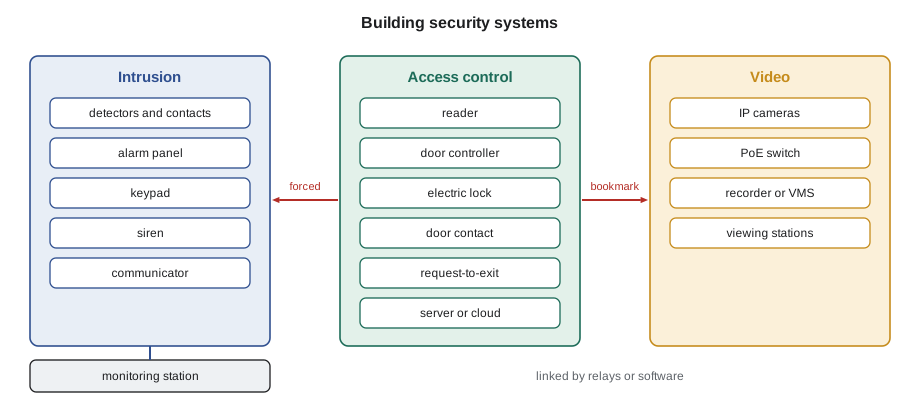
An electronic security system exists to help a building owner protect people, property and information. It does that in three ways. An intrusion alarm system detects someone entering an area when they should not, and raises an alarm, locally and usually at a monitoring station. An access control system decides who may open which door at what time, opens it for them, and keeps a record. A video surveillance system records what happens, lets staff watch live, and provides evidence afterwards. Each can stand alone. In most of the buildings Cobalt Line works in, they are linked: a forced door in the access control system raises an alarm, calls up the nearest camera and writes a bookmark in the video recording.
The three systems have different jobs, and the difference matters for how they are installed. An intrusion system is about detection and response, so it is built for reliability: supervised wiring that reports a cut wire, battery backup, and a communication path to someone who will act. An access control system is about controlled movement, so it has to open reliably for the right people and never trap anyone inside during an emergency. A video system is about evidence and awareness, so what matters is that the image is good enough for its purpose and that the recordings are kept, protected and eventually deleted according to the owner's policy.
The parts of an intrusion alarm system
An intrusion alarm system, sometimes called a burglar alarm, has a control panel at its center. The panel watches a set of zones, each of which is a detector or a group of detectors on one circuit: a door contact, a motion detector, a glass-break detector. Users arm and disarm the system at a keypad or with an app. When an armed zone trips, the panel starts an entry delay for doors people normally use, then sounds a siren or a bell and sends a signal through a communicator to a monitoring station, where an operator follows the owner's instructions: call the keyholder, dispatch a guard, or call police. The panel has a battery so that a power failure does not disarm the building, and the wiring to each detector is supervised so that a cut or shorted wire is reported. Lessons 2 to 4 cover panels, detectors and communication.
The parts of an access control system
An access control system starts at the door. A reader reads a credential: a card, a fob, a phone or, occasionally, a fingerprint. A door controller, usually mounted above the ceiling on the secure side or in a nearby room, decides whether that credential is allowed at that door at that time, and if so it releases an electric lock for a few seconds. A door position switch tells the controller whether the door is open or closed, and a request-to-exit device tells it that someone is leaving, so that it does not report a forced door when a person simply walks out. The controllers report to a server or a cloud service, where the owner's staff add and remove people, set schedules and look at the event log. Lessons 5 to 7 cover the architecture, the readers and credentials, and the locks and life-safety rules that govern every controlled door.
The parts of a video surveillance system
Modern video systems are almost all networked. IP cameras connect to a network switch, which usually powers them with Power over Ethernet, as LVT-220 showed. A recorder or a video management system stores the video, and viewing stations or phones show it. The installer's work is to choose the camera position and lens with the designer, mount and aim the camera, set it up so the image is useful, and make sure the recorder keeps enough video at the right quality. Lessons 8 and 9 cover cameras, lenses, resolution, recording, storage and bandwidth.
Power ties the systems together. Panels, controllers, locks and cameras all need power that keeps working when the building's power fails, for as long as the owner's specification and the relevant standards require. Lesson 10 covers power supplies and batteries, lesson 11 covers integration and training, and the capstone in lesson 12 commissions and hands over the Juniper Point systems.
Who owns what
Security systems involve more parties than most low-voltage work, and each one has a part of the decision. The owner decides what is protected and why, and owns the system and its data. The consultant or designer writes the specification and draws the device layout. Cobalt Line installs, programs and tests to the specification. A monitoring station, under contract to the owner, receives alarms. The local fire and building officials decide whether a locked door is allowed and how it must release. The police may set rules on false alarms. The owner's IT department usually controls the network the cameras and controllers live on. And the people in the building have rights over their own images and movements, protected by privacy law.
| Party | What they decide | What Maya needs from them |
|---|---|---|
| Owner (condo board, school board, hospital) | What is protected, who gets access, how long video is kept | Approved specification, user list, schedules, contacts |
| Designer or consultant | Device locations, products, sequences of operation | Drawings, door hardware schedule, camera views |
| Monitoring station | How alarms are handled | Account number, zone list, call list, test procedure |
| Fire and building officials | Whether and how a door may be locked | Approved door release design, inspection |
| Owner's IT team | Network addresses, VLANs, firewall rules | IP plan, port assignments, accounts |
| Door hardware supplier | Locks, strikes, closers, power transfers | Hardware sets and wiring diagrams |
The installer works for the owner, through the contract, and does not make the owner's decisions. If the condo manager at Juniper Point asks Maya to give a resident's friend a fob, or to show him last night's garage video, the answer is the same: that has to go through the board's process, because the board owns the access list and the recordings, and privacy law limits who may see them. Hollis's rule for the crew is simple: we build and maintain the system; the owner runs it.
Rules the security installer works under
Security work brings rules that ordinary cabling does not. In Texas, the Department of Public Safety's Private Security Program licenses alarm systems companies, which includes companies that install access control and video systems, and requires the people who install them to be registered, with a background check and required training. LVT-110 covered how that fits with Texas's lack of a statewide low-voltage license. The electrical code still applies to every power supply and circuit. Many owners and monitoring stations also require that systems be installed and certificated to UL standards, which the next lessons introduce. Cobalt Line's security technicians also carry the state registration pocket card on every job, and every one of them signs the owner's confidentiality agreement before seeing a drawing.
Two other sets of rules shape every job. The first is life safety: no security device may stop people leaving a building in an emergency, and the fire code sets how locked doors must release. That always comes before security, and lesson 7 is devoted to it. The second is privacy: cameras and access logs record personal information, and the law limits why it may be collected, who may see it and how long it may be kept. The installer is not the privacy officer, but the installer decides where a camera points, and an installer who aims a camera into a resident's window has created a problem no one else can fix.
Privacy in plain terms
In the United States there is no single national privacy law for video. State laws limit recording in places where people expect privacy and, in many states, recording sound without consent; schools and hospitals also have federal rules on student and patient records, and some cities have their own rules. Good practice that owners generally follow is the same everywhere: have a clear reason for each camera, use the least intrusive option that works, put up signs so people know, do not point cameras where people expect privacy, restrict who can view recordings, and keep them only as long as needed. For a condo corporation, a school or a hospital the details differ, and the owner's privacy officer decides how they apply.
For the installer, those principles turn into practical habits. Aim each camera at what the drawing says it should see, and nothing else; if a view takes in a neighbor's window or a washroom door, use the camera's privacy mask and tell the designer. Turn audio recording off unless the owner has specifically decided to use it. Install the signs that the specification calls for. Never copy video, access logs or user lists onto a personal device, and hand over all administrator credentials at the end of the job, as LVT-220 described.
How a security job runs
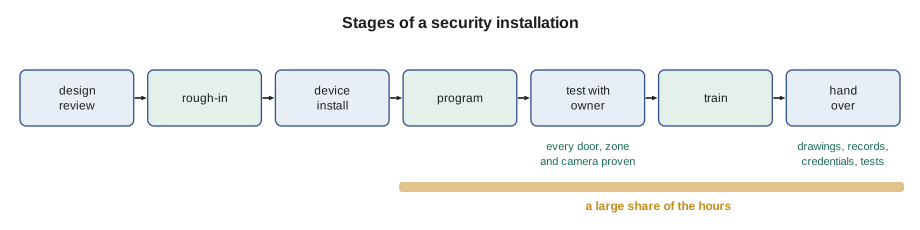
Security projects follow the same overall path as the cabling jobs in earlier courses, with a few extra steps. Before installation, the crew reviews the door hardware schedule and the camera views with the designer, because most problems on security jobs come from a lock that does not suit a door or a camera that cannot see what was intended. Rough-in follows the cabling standards and is often done with the general cabling. Devices go in after the doors, frames and ceilings are finished. Then come programming, testing with the owner, training, and the handover package. A large share of the time goes into the last three, because a security system is only useful if the owner's staff know how to run it.
# Device count and labor estimate for the Juniper Point security scope
devices = {  # device: (count, hours each to mount, terminate and test)
    "card reader door": (22, 6.0),
    "intrusion detector": (36, 0.8),
    "IP camera": (48, 1.5),
    "intercom station": (3, 2.0),
    "power supply cabinet": (6, 4.0),
}
total = 0.0
for name, (n, h) in devices.items():
    total += n * h
    print(f"{name:22s} {n:4d} x {h:3.1f} h = {n * h:6.1f} h")
prog = 0.25 * total              # programming, testing, training: one quarter on top
print(f"install hours:  {total:6.1f}")
print(f"programming, testing and training: {prog:6.1f}")
print(f"crew of two, 8-hour days: {(total + prog) / (2 * 8):5.1f} days")card reader door 22 x 6.0 h = 132.0 h intrusion detector 36 x 0.8 h = 28.8 h IP camera 48 x 1.5 h = 72.0 h intercom station 3 x 2.0 h = 6.0 h power supply cabinet 6 x 4.0 h = 24.0 h install hours: 262.8 programming, testing and training: 65.7 crew of two, 8-hour days: 20.5 days
The estimate is Hollis's rule of thumb, not a quotation; Sanjay prices the real job. It shows something that surprises new technicians: a reader door takes about four times as long as a camera, because of the lock, the door hardware, the power transfer through the frame and the testing of every way the door can be used.
A day on the security crew
On Maya's first day, Hollis takes her through the Juniper Point garage. The specification calls for 14 cameras in the parkade, readers at the two vehicle gates and the three pedestrian doors, an intercom at the visitor entrance, and an intrusion panel that protects the storage lockers after midnight. Hollis points out what will matter later: the gate reader sits where a driver can reach it without leaving the car, the camera at the exit ramp has to see plates in headlight glare, and the stair door to the lobby is an exit, so whatever locks it must let people out without a card. Most of the course is about getting details like those right.
Worked problem
Sorting a request
During the garage walk, the condo manager, Harriet Kwan, asks Maya to turn one of the new lobby cameras toward the street so the board can see who parks in the fire lane, and to give her the administrator password so she can export clips for residents. What should Maya do?
Show solution
- Both requests are the owner's decisions, not the installer's.
- A camera aimed at the street may record people outside the property and changes the approved view; it needs the board's and the designer's approval, and the privacy policy may forbid it.
- Administrator credentials go to the person the board names in writing at handover, not to whoever asks on site.
- Maya writes both requests in her daily report and tells Hollis, who raises them with the designer and the board.
Answer: Maya does neither on the spot. She records the requests and passes them through Hollis to the people who can decide.
Common mistakes
MistakeTreating the three systems as separate jobs.
InsteadPlan the links between intrusion, access and video from the start.
MistakeMaking the owner's decisions on site.
InsteadPass access, video and policy requests to the owner through the lead.
MistakeLocking a door without checking how it must release.
InsteadLife safety comes first; follow the approved door release design.
MistakeAiming a camera wherever it sees the most.
InsteadAim it at what the design intends and mask private areas.
MistakeKeeping a copy of user lists or video for convenience.
InsteadKeep no copies; hand over all records and credentials.
Summary and key terms
- Intrusion detects and alerts, access control decides who opens which door, and video records evidence; they are often linked.
- Intrusion systems are built for reliability: supervised wiring, battery backup and a monitored communication path.
- Access control must open reliably for authorized people and never trap anyone in an emergency.
- The owner owns the system and its data; the installer builds and maintains it.
- Life safety comes before security, and privacy law limits what may be recorded and who may see it.
- Testing, training and handover take a large share of a security job.
- Intrusion alarm system
- A system that detects unauthorized entry and raises an alarm.
- Access control system
- A system that controls which credentials open which doors, and when.
- Video surveillance system
- A system of cameras and recorders that captures and stores video.
- Zone
- A detector or group of detectors that the alarm panel watches as one input.
- Monitoring station
- A staffed facility that receives alarm signals and responds for the owner.
- Credential
- A card, fob, phone or other item a person presents to a reader.
- Privacy mask
- A blocked area in a camera image that is never shown or recorded.
Practice problems
Work each problem on paper first, then reveal the answer to check.
Name the device that tells an access controller someone is leaving.
Show answer
The request-to-exit device.
Who decides how long video is kept?
Show answer
The owner, under its privacy policy and the applicable law.
Why does an intrusion panel have a battery?
Show answer
So that a power failure does not disarm the building or stop it reporting.
A camera view includes a washroom door. What should the installer do?
Show answer
Mask that area and tell the designer.
Lesson quiz · 5 questions
Score 60% or more to complete this lesson.
Create a free account to save your progress, take quizzes and earn a certificate.