
JS-290 · Lesson 2 of 12 · 26 min
Requirements and user stories
▶ Video coming soon A video version of this lesson is on the way.
The second Tuesday, March 20, starts not at the studio but in a van. At 7:40 that morning Tavish rides along with Wendy Ossipov, one of the Food Hub's longest-serving volunteer drivers, on her usual Tuesday round of two bakeries and a grocer. Odalys spends the same morning at Copperleaf Bakery, watching how the staff decide what is left over and how they get in touch with the Food Hub. Mira sits with Lucy for an hour while Lucy works through the rescue spreadsheet and the morning's text messages. By noon the team has three pages of notes and a much better idea of the problem than any of them had a week earlier.
This lesson turns those notes into requirements: statements of what the application must do and how well it must do it. Requirements are the bridge between the people with the problem and the code. If they are vague, the team will build something nobody asked for. If they are too detailed too early, the team will spend March writing documents instead of learning from working software. The skill is to write just enough, in the users' words, to build the next piece and test it.
Watching the work, not just asking about it
Interviews tell you what people think they do. Observation shows what they actually do, and the two are often different. Lucy had said that donors phone her when food is ready. Odalys saw that Copperleaf's staff text a photo of the leftover trays to Lucy's work phone, often after Lucy has gone home, and that the shift lead decides around 3:00 in the afternoon how much bread will not sell. Tavish saw that Wendy keeps a paper list of each donor's back door, the name of the person to ask for, and which ones have a loading bay. None of this appeared in the interviews, and all of it changes what the application must do.
| Observation | Where | What it means for requirements |
|---|---|---|
| Donors send photos of leftover food by text, often after 5:00 p.m. | Copperleaf Bakery | Posting an offer must be quick on a phone, with an optional photo |
| The shift lead knows the amount around 3:00 p.m. for an evening pickup | Copperleaf Bakery | Offers are often posted only a few hours before the pickup window |
| Drivers keep their own notes on back doors and contacts | Wendy's van | Each donor location needs pickup instructions visible to the driver |
| Lucy matches drivers by memory of who lives nearby | Lucy's desk | Drivers should see runs sorted by distance from where they start |
| Chilled sandwiches were carried in a car with no cooler once in February | Lucy's notes | Chilled offers must only be claimable by drivers who have a cooler |
User stories
The team writes its requirements as user stories, a format they used informally in earlier blocks. A user story is one short sentence in the form *As a (kind of user), I want (something), so that (a reason)*. The first part names who benefits, the second says what they can do, and the third explains why it matters. The reason is the part people are tempted to leave out, and it is the most useful part, because it lets the team find a simpler way to meet the same need.
A story is deliberately small and informal. It is, in a phrase often used in agile teams, a placeholder for a conversation. The detail lives in the conversation and in the acceptance criteria attached to the story: the specific conditions that must be true for the story to count as done. Odalys writes the stories on cards, one per story, and the team reads each one aloud to the person it is about. If Lucy or Rosa cannot recognize herself in a story, it is rewritten.
// Check that each story has the three parts: role, want and reason.
const pattern = /^As an? (.+?), I want (.+?), so that (.+)\.$/;
const stories = [
  'As a donor, I want to post leftover food from my phone in under a minute, so that I do not have to call or text Lucy.',
  'As a driver, I want to see open runs sorted by distance from my start point, so that I can pick ones near me.',
  'As a receiver, I want to record the weight and temperature of what arrived.',
  'As Lucy, I want a dashboard.',
];

for (const s of stories) {
  const m = s.match(pattern);
  if (!m) {
    console.log('INCOMPLETE:', s.slice(0, 48) + '...');
    continue;
  }
  console.log(`role=${m[1]} | want=${m[2].slice(0, 30)}... | reason=${m[3].slice(0, 25)}...`);
}role=donor | want=to post leftover food from my ... | reason=I do not have to call or ... role=driver | want=to see open runs sorted by dis... | reason=I can pick ones near me... INCOMPLETE: As a receiver, I want to record the weight and t... INCOMPLETE: As Lucy, I want a dashboard....
What this code does
A regular expression with three capture groups looks for the role, the want and the reason, in that order. The lazy matches stop at the first comma-and-keyword, so the groups split where a reader would split them. Stories that fail the pattern are flagged, which shows the receiver story is missing its reason and the dashboard story is missing almost everything.
The checker is a toy, but the two stories it flags start useful arguments. Why does the receiver want to record weight and temperature? For weight, because Paul reports kilograms rescued to funders; for temperature, because the cold-food rule says chilled food warmer than 40 °F must be refused. With those reasons written down, the team realizes the temperature only matters for chilled offers, so the form can skip it for bread. *As Lucy, I want a dashboard* hides at least three different needs, which become three stories: seeing unclaimed runs early, filling a gap by assigning a driver, and producing the monthly total for Paul.
Good stories: INVEST
A widely used checklist for good stories is INVEST. A good story is *Independent* of other stories where possible, *Negotiable* rather than a fixed contract, *Valuable* to a user, *Estimable* so the team can size it, *Small* enough to finish in a few days, and *Testable* so everyone can agree when it is done. The team uses INVEST as a set of questions when a story feels wrong. A story that cannot be estimated usually hides an unknown. A story that cannot be tested is usually a wish, such as *the app should be easy to use*, which becomes testable only when it is turned into something concrete, such as a donor posting an offer in under a minute on a phone in a usability test.
| Letter | Question to ask | Rescue Runs example of a fix |
|---|---|---|
| Independent | Can it be built and shown without waiting for another story? | Split "post and claim an offer" into posting and claiming |
| Negotiable | Does it leave room to find the simplest solution? | "Sorted by distance" may start as "sorted by area of the city" |
| Valuable | Who benefits, and would they notice? | Drop "admin can change the theme colors" from the first release |
| Estimable | Do we know enough to size it? | A one-day spike on how the portal shares its sign-in |
| Small | Can it be done in a few days? | Split "Lucy's dashboard" into three stories |
| Testable | Can we write its acceptance criteria? | "Easy to post" becomes "under a minute in a test with two donors" |
Acceptance criteria as examples
Acceptance criteria are easiest to agree on when they are written as concrete examples. The team uses the Given, When, Then form: given some starting situation, when the user does something, then a particular result follows. Each example is precise enough to become an automated test later, which is exactly what lesson 8 will do with them.
The most important rules in Rescue Runs are about claiming. Lucy's rules for drivers are short. A driver cannot claim two runs whose pickup windows overlap, though runs that only touch, one ending exactly when the next starts, are fine; this is the same overlap rule the portal uses for hamper-drive plans. A driver may claim at most three runs a day. A chilled offer can only be claimed by a driver whose profile says they carry a cooler. And nobody can claim a run that someone else has already claimed.
// Acceptance examples for claiming, written as data and run against the rule.
const overlaps = (a, b) => a.date === b.date && a.start < b.end && b.start < a.end;

function canClaim(driver, run, claimed) {
  if (run.claimedBy) return 'already claimed';
  if (run.chilled && !driver.cooler) return 'needs a cooler';
  const sameDay = claimed.filter((c) => c.date === run.date);
  if (sameDay.length >= 3) return 'three runs that day already';
  if (sameDay.some((c) => overlaps(c, run))) return 'overlaps another run';
  return 'ok';
}

const wendy = { name: 'Wendy', cooler: true };
const mine = [{ date: '2029-04-10', start: '16:00', end: '17:00' }];
const examples = [
  ['touching windows', { date: '2029-04-10', start: '17:00', end: '18:00' }, 'ok'],
  ['overlapping windows', { date: '2029-04-10', start: '16:30', end: '17:30' }, 'overlaps another run'],
  ['claimed by someone else', { date: '2029-04-10', start: '19:00', end: '19:30', claimedBy: 'Raj' }, 'already claimed'],
];
for (const [name, run, expected] of examples) {
  const got = canClaim(wendy, run, mine);
  console.log(`${got === expected ? 'pass' : 'FAIL'}  ${name}: ${got}`);
}
console.log(canClaim({ name: 'Ilse', cooler: false }, { date: '2029-04-11', start: '09:00', end: '09:30', chilled: true }, []));pass touching windows: ok pass overlapping windows: overlaps another run pass claimed by someone else: already claimed needs a cooler
What this code does
The rule function checks the claiming rules in a fixed order, so the reason given is always the first rule broken. Each acceptance example is a name, a run and the expected reason, and running them prints pass or FAIL like a tiny test suite. Times are compared as strings, which works because every time has the same HH:MM shape.
Writing the examples exposed a question nobody had asked: which rule wins when a run breaks two at once? A driver without a cooler trying to claim a chilled run that overlaps another of theirs could be told either thing. Lucy decides that the cooler message should come first, because it tells the driver about a safety rule rather than a scheduling one. The order of the checks in the code now records her decision.
Non-functional requirements
Stories describe what users can do. Non-functional requirements describe qualities of the whole system: how fast, how available, how secure, how accessible. They are easy to forget because no single user asks for them, and expensive to add late. The team takes most of theirs from decisions the studio has already made, so that Rescue Runs behaves like the rest of the Food Hub's software.
| Quality | Requirement | Where it comes from |
|---|---|---|
| Performance | First screen loads under 120 kB of compressed JavaScript; largest content in under 2.5 s on a mid-range phone | JS-250 budgets |
| Availability | API meets 99.5 in 100 of requests successfully over 28 days | The board SLO from JS-260 |
| Accessibility | WCAG 2.2 Level AA; tested with keyboard and a screen reader | WEB-230 and the Food Hub's accessibility statement |
| Security | Reuse existing sign-in; object-level checks on every request; no secrets in code | JS-240 and WEB-230 |
| Privacy | Drivers see a donor contact only for runs they have claimed; addresses of drivers never shown to donors | WEB-230 data minimization |
| Offline | A driver can mark a pickup done with no signal; it syncs later | The portal's outbox from JS-250 |
The privacy row came from Wendy. On the ride-along she said she was happy for donors to know her first name but did not want them to have her phone number, and that she had once been phoned by a shop at 10 at night. The requirement that donors see only a driver's first name and the time they expect to arrive is hers.
A story map
A pile of story cards is hard to reason about, so the team arranges them into a story map. Across the top runs the backbone: the big steps of a food rescue run in the order they happen, from posting an offer to reporting the month's totals. Under each step go the stories for that step, the most essential at the top. A horizontal line across the map then marks the first release: everything above the line is the smallest version that still works from end to end.
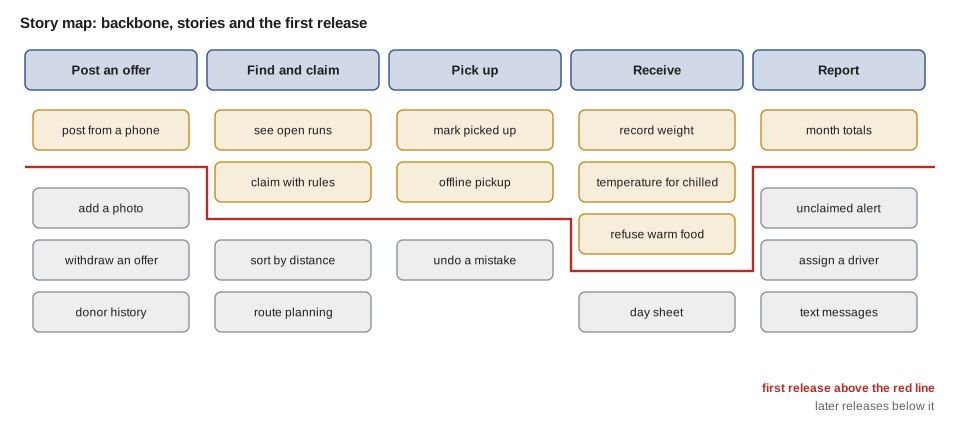
The line is the most useful thing on the map. Without it, teams build the first step completely before starting the second, and run out of time with nothing that works end to end. With it, the first release is thin but complete: a donor can post, a driver can claim, a receiver can log the arrival, and Lucy can see the totals. Odalys calls this walking skeleton first and flesh later.
Prioritizing with MoSCoW
Every story above and below the line also gets a MoSCoW priority: *Must have*, *Should have*, *Could have* or *Won't have this time*. Must-haves are the stories without which the release is pointless. Should-haves are important but the release still works without them. Could-haves are nice if time allows. Won't-haves are agreed to be out of scope for now, and writing them down is how a team says no politely. A common guideline, from the DSDM method that introduced MoSCoW, is that must-haves should take no more than about 60 in 100 of the effort available, so that there is room to absorb surprises.
// Story points by priority; capacity is what the team expects to finish in three sprints.
const stories = [
  ['post offer', 'M', 5], ['claim run', 'M', 5], ['claim rules', 'M', 3], ['pickup done', 'M', 3],
  ['receive and log', 'M', 5], ['month totals', 'M', 3], ['sign-in reuse', 'M', 5],
  ['offer photo', 'S', 3], ['sort by distance', 'S', 5], ['unclaimed alert', 'S', 3],
  ['assign driver', 'C', 3], ['donor history', 'C', 2], ['offline pickup', 'C', 5],
  ['route planning', 'W', 13], ['text messages', 'W', 8],
];
const capacity = 54;

const sum = (p) => stories.filter((s) => s[1] === p).reduce((t, s) => t + s[2], 0);
const must = sum('M');
for (const p of ['M', 'S', 'C', 'W']) console.log(p, sum(p));
console.log(`must-haves use ${Math.round((must / capacity) * 100)} in 100 of capacity`);
console.log(must + sum('S') <= capacity ? 'musts and shoulds fit' : 'shoulds do not all fit');M 29 S 11 C 10 W 21 must-haves use 54 in 100 of capacity musts and shoulds fit
What this code does
Each story carries a MoSCoW letter and a size in story points, and the totals are worked out per letter. The must-haves come to 29 points of a capacity of 54, about 54 in 100, which is inside the guideline. Musts and shoulds together are 40 points, so they fit with 14 points to spare for could-haves or surprises.
Story points are relative sizes, not hours, and lesson 4 explains how the team arrives at them and at the capacity of 54. For now the important result is that the plan has slack. Route planning, which Wendy would love, is a won't-have for this release: it is a hard problem, JS-201 showed how quickly it grows, and the release is useful without it. Text messages are a won't-have too, because the Food Hub has no text service and adding one means a new supplier, new costs and new privacy questions. Both go on a list titled *Later*, which Lucy keeps.
Worked problem
Checking the 60 in 100 guideline
Halfway through planning, Lucy asks to move "offline pickup" (5 points) from could-have to must-have because two donors have no signal at their back doors. With a capacity of 54 points and the must-haves at 29, does the guideline still hold? What if the team also moves "sort by distance" (5 points) up?
Show solution
- New must total: 29 + 5 = 34 points.
- Share of capacity: 34 ÷ 54 ≈ 0.63, about 63 in 100.
- With "sort by distance" too: 34 + 5 = 39 points, 39 ÷ 54 ≈ 0.72, about 72 in 100.
- Both are over 60 in 100, so the team asks what could move down instead.
Answer: One promotion puts the must-haves at about 63 in 100 of capacity, slightly over the guideline; two put them at about 72 in 100, well over. The team accepts offline pickup as a must and moves "month totals" to should-have, because Lucy can get May's total from a query until the screen exists.
Common mistakes
MistakeWriting requirements only from interviews.
InsteadObserve the work as well; people often do things differently from how they describe them.
MistakeLeaving the "so that" out of a story.
InsteadAlways write the reason; it explains the need and allows simpler solutions.
MistakeWriting "easy to use" as a requirement.
InsteadMake it testable, for example "a donor posts an offer in under a minute in a test with two donors".
MistakeBuilding the first step of the workflow completely before the others.
InsteadUse a story map and release a thin version of every step first.
MistakeTreating every story as a must-have.
InsteadUse MoSCoW, keep must-haves near 60 in 100 of capacity, and write down the won't-haves.
Summary and key terms
- Requirements say what the application must do and how well.
- Observation adds what interviews miss.
- User stories name a role, a want and a reason, and are placeholders for conversations.
- Acceptance criteria written as Given, When, Then examples make stories testable and can become automated tests.
- INVEST describes good stories: independent, negotiable, valuable, estimable, small and testable.
- Non-functional requirements cover performance, availability, accessibility, security, privacy and offline use.
- A story map arranges stories under a backbone of workflow steps, and a release line marks the thinnest version that works end to end.
- MoSCoW priorities, with must-haves near 60 in 100 of capacity, keep slack in the plan.
- Requirement
- A statement of what a system must do or how well it must do it.
- User story
- A short statement of a need in the form: as a role, I want something, so that a reason.
- Acceptance criteria
- Conditions that must be true for a story to be accepted as done.
- Given, When, Then
- A way of writing acceptance criteria as a starting situation, an action and a result.
- INVEST
- A checklist for good stories: independent, negotiable, valuable, estimable, small, testable.
- Non-functional requirement
- A requirement about a quality of the whole system, such as speed, availability or accessibility.
- Story map
- An arrangement of stories under the steps of a workflow, with lines marking releases.
- MoSCoW
- A priority scheme: must have, should have, could have, won't have this time.
Practice problems
Work each problem on paper first, then reveal the answer to check.
Why does the team observe work as well as interviewing people?
Show answer
People often describe their work differently from how they do it, and observation reveals needs that interviews miss.
What makes a story testable?
Show answer
Acceptance criteria concrete enough that everyone can agree when it is done, ideally as examples.
What does the release line on a story map mark?
Show answer
The thinnest set of stories that still works from the first workflow step to the last.
Why keep must-haves near 60 in 100 of capacity?
Show answer
To leave room for surprises without dropping something essential.
Try it yourself
Splitting a story
Complete parseStory(text). It returns an object { role, want, reason } for a story in the form As a ROLE, I want WANT, so that REASON.
Accept As a or As an. If the text does not match, return null. Print the results as shown.
function parseStory(text) {
  return null;
}

const a = parseStory('As a receiver, I want to log the weight, so that Paul can report totals.');
console.log(a ? `${a.role} / ${a.want} / ${a.reason}` : 'no match');
const b = parseStory('As an admin, I want everything.');
console.log(b ? `${b.role} / ${b.want} / ${b.reason}` : 'no match');
Try it yourself
Must-have share
Complete mustShare(stories, capacity). Each story is [name, priority, points] with priority M, S, C or W.
Return the must-have points as a whole number in each 100 of capacity, rounded to the nearest whole number.
function mustShare(stories, capacity) {
  return 0;
}

const s = [['a', 'M', 8], ['b', 'M', 5], ['c', 'S', 5], ['d', 'W', 13], ['e', 'M', 3]];
console.log(mustShare(s, 30));
console.log(mustShare(s, 20));
Lesson quiz · 5 questions
Score 60% or more to complete this lesson.
Create a free account to save your progress, take quizzes and earn a certificate.