
JS-290 · Lesson 11 of 12 · 26 min
Documentation and handover
▶ Video coming soon A video version of this lesson is on the way.
The capstone ends on May 31, but Rescue Runs does not. From June 4, three donors and eight drivers will rely on it, and from June onward the team will be back on other work: Mira on her first projects as a full developer, Odalys and Tavish on their next apprenticeship blocks. The people who keep the application running will be Theo for the servers, Gareth for the code, and Lucy for the decisions about how it is used. The afternoon of Tuesday, May 22, after the morning's launch, is about making sure they can.
Gareth's test for documentation is simple. Imagine a reasonably capable person who has never seen the project, at the worst possible moment: Theo at 6:00 on a Saturday morning with an alert on his phone, a new developer in a year asked to add a feature, Lucy asked by Paul why April's numbers look odd, a new driver on their first run. Can they find what they need in under five minutes, written for them, and correct? Documentation that passes that test is worth writing. Documentation nobody can find, or that describes last month's system, is worse than none, because people trust it.
Who reads what
The team lists its readers before writing anything, because each needs something different, in a different place and a different voice. Developers want to know how to run the code and why it is built the way it is. Theo wants to know what each alert means and what to do about it. Lucy wants to know how to do her tasks and what the numbers mean. Donors and drivers want short, plain instructions, ideally inside the app where they need them.
| Reader | Document | Where it lives | Kept up to date by |
|---|---|---|---|
| A developer new to the project | README, architecture overview, ADRs, API reference | The repository, beside the code | Pull requests: a change that alters behavior updates the docs in the same PR |
| Theo, on call | Runbook: alerts, checks, rollbacks, contacts | The repository, linked from every alert | Whoever fixes an incident updates the runbook |
| Lucy, the coordinator | Coordinator guide: tasks, reports, pilot settings | A page in the app's help section | Mira until June, then Gareth on request |
| Donors and drivers | Short guides and in-app hints | The app, and a one-page printout for donors | Lucy, using a simple editing page |
| Paul and the board | Project summary and the monthly report notes | An e-mail and a shared document | Lucy |
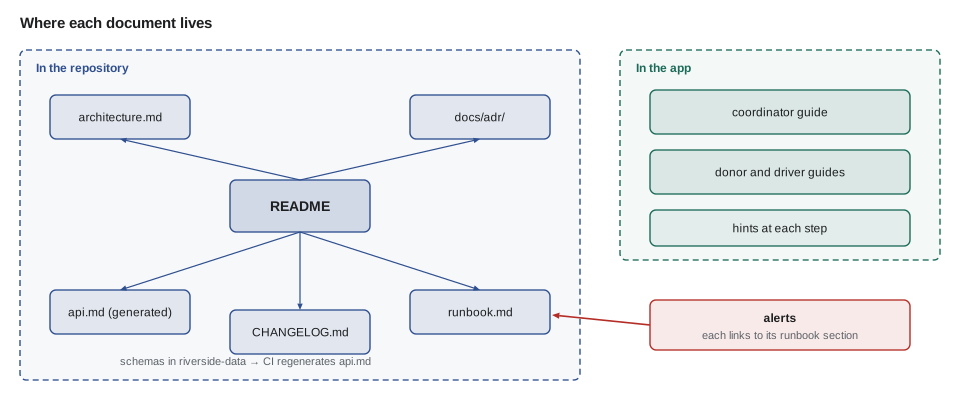
The README
The README is the front door of the code. The team writes it for the developer who joins in a year, and keeps it short: what the service is, how to run it on a laptop in three commands, how to run the tests, where everything else is. Anything longer goes into its own file, linked from the README, so the front door stays readable. Tavish tests the README by asking Sana, who is a designer, not a developer, to follow it on a clean laptop. She gets the service running in 22 minutes, and her two questions become two new lines.
# Rescue Runs service

Rescue Runs coordinates food rescue pickups for the Riverside Community Food Hub:
donors post surplus food, volunteer drivers claim and collect it, and receivers
record what arrived. This folder is the API; the web app is in apps/rescue.

## Run it on your laptop
    docker compose up -d postgres        # PostgreSQL 18 with an empty database
    npm ci && npm run migrate -w services/rescue-runs
    npm run seed -w services/rescue-runs && npm start -w services/rescue-runs

The service listens on http://localhost:3200. Seed data is invented; never
load real names or addresses into a development database.

## Test it
    npm test -w services/rescue-runs     # unit and integration tests (needs the database)

## Find out more
- docs/architecture.md: the containers, the layers and the dependency rule
- docs/adr/: decision records (start with 0001)
- docs/api.md: the API, generated from the schemas in packages/riverside-data
- docs/runbook.md: alerts and what to do about them
- CHANGELOG.md: what changed in each release
- Owners: code Gareth Lindqvist, servers Theo Marchetti, product decisions Lucy Tran
What this code does
The README says in two sentences what the service is, then gives exactly the commands needed to run and test it, with a warning about seed data. Everything else is a link to a longer document, so the first screen of the file answers the questions a newcomer has on day one. The last line names the owners, so a reader knows whom to ask when the documents run out.
API reference generated from the schemas
Hand-written API documentation drifts: someone adds a field to the code and forgets the document. The team avoids the problem by generating the reference from the zod schemas that already validate every request, using zod's built-in conversion to JSON Schema. CI regenerates docs/api.md on every push and fails if the committed file differs from what the schemas produce, so the reference can never be out of date. Theo's PHP application and Westview's developer can read the same JSON Schema files if they ever build against the API.
import { z } from 'zod';

const Receipt = z.strictObject({
  grams: z.number().int().min(1).max(500000).describe('Weight received, in grams'),
  tenthsC: z.number().int().min(-300).max(200).optional()
    .describe('Temperature in tenths of a degree Celsius; required for chilled food'),
  note: z.string().max(300).optional(),
}).describe('POST /api/rescue/v1/runs/{id}/receipt');

const schema = z.toJSONSchema(Receipt);
console.log(`### ${schema.description}`);
for (const [name, p] of Object.entries(schema.properties)) {
  const req = schema.required.includes(name) ? 'required' : 'optional';
  const range = p.minimum !== undefined ? ` ${p.minimum} to ${p.maximum}` : p.maxLength ? ` up to ${p.maxLength} characters` : '';
  console.log(`- ${name} (${p.type}, ${req}${range})${p.description ? ': ' + p.description : ''}`);
}
console.log(`- other fields: ${schema.additionalProperties === false ? 'refused' : 'allowed'}`);
What this code does
The receipt schema is the same one the service uses to validate requests, with a description added to each field. zod converts it to standard JSON Schema, and a few lines of code turn that into a Markdown section with each field's type, whether it is required, its limits and its meaning. Because the documentation is produced from the validator, the two cannot disagree.
$ node api-docs.mjs
### POST /api/rescue/v1/runs/{id}/receipt
- grams (integer, required 1 to 500000): Weight received, in grams
- tenthsC (integer, optional -300 to 200): Temperature in tenths of a degree Celsius; required for chilled food
- note (string, optional up to 300 characters)
- other fields: refused
The runbook
The runbook is written for Theo at 6:00 on a Saturday. Each alert has its own short section, and every alert message links straight to it. A section says what the alert means in one sentence, what users are probably experiencing, the first three things to check with the exact commands, how to roll back, and when to wake someone else. The team writes it from the incidents they rehearsed on staging, not from imagination, and Theo walks through two of them with the runbook in hand before he accepts it.
## rescue-not-ready

Meaning: /healthz/ready has failed for 3 minutes; the service is up but cannot do its job.
Users see: the app's lists do not load; drivers get "Could not load runs".
Food at risk: low. Lucy's spreadsheet and phone still work; tell her if it lasts 30 minutes.

1. Which check is failing?
       curl -s localhost:3200/healthz/ready | jq .
2. Database: if "db" is false, check PostgreSQL and the pool.
       systemctl status postgresql; journalctl -u rescue-runs --since "15 min ago" | grep -i pool
3. Release: if "release" does not match, a deploy stopped halfway. Roll back:
       sudo /srv/rescue-runs/bin/rollback.sh     # points current at the previous release, restarts
4. Still failing after a rollback: page Gareth (code) on the rota; Theo owns the server.

Last rehearsed: 2029-05-18 on staging (database stopped; 6 minutes to diagnose and recover).
What this code does
Each runbook section starts with what the alert means, what users experience and how much it matters, so the reader can judge urgency in seconds. The numbered steps give exact commands in the order that finds the most common causes first, including a one-command rollback. The last line records when the steps were last rehearsed, which tells the reader how much to trust them.
Changelog and release notes
Because every commit follows Conventional Commits, the changelog can be generated rather than written. The release script groups commits since the last tag into features, fixes and breaking changes, skips the ones that do not affect users, such as tests and chores, and writes a dated section. Lucy gets a second, shorter version written for people rather than developers: the same list with technical scopes removed and wording checked by Mira.
// Group Conventional Commit messages into a changelog section.
const commits = [
  'feat(claims): refuse overlapping runs with a clear reason',
  'fix(receipts): link the weight error to its field',
  'test(claims): property tests for the overlap rule',
  'feat(offers): order categories by how often each donor uses them',
  'fix(uploads): remove location data from donor photos',
  'chore(deps): update express to 5.2.1',
  'feat(api)!: report weights in grams only',
];
const sections = { breaking: 'Breaking changes', feat: 'Features', fix: 'Fixes' };
const groups = { breaking: [], feat: [], fix: [] };
for (const c of commits) {
  const m = c.match(/^(\w+)(?:\(([^)]+)\))?(!)?: (.+)$/);
  if (!m) continue;
  const [, type, scope, bang, text] = m;
  const line = scope ? `**${scope}**: ${text}` : text;
  if (bang) groups.breaking.push(line);
  else if (groups[type]) groups[type].push(line);
}
console.log('## 1.1.0 (2029-06-12)');
for (const [k, title] of Object.entries(sections)) {
  if (!groups[k].length) continue;
  console.log(`\n### ${title}`);
  for (const l of groups[k]) console.log(`- ${l}`);
}## 1.1.0 (2029-06-12) ### Breaking changes - **api**: report weights in grams only ### Features - **claims**: refuse overlapping runs with a clear reason - **offers**: order categories by how often each donor uses them ### Fixes - **receipts**: link the weight error to its field - **uploads**: remove location data from donor photos
What this code does
Each commit message is split into its type, optional scope, optional exclamation mark and text by one regular expression. Breaking changes go into their own group whatever their type, features and fixes go into theirs, and tests and chores are left out because users do not notice them. Printing the groups under headings produces the Markdown section that the release script adds to CHANGELOG.md.
Guides for people who are not developers
The donor and driver guides are the documents most likely to be read and least likely to be read carefully. Lucy's advice, from years of writing volunteer instructions, is that nobody reads anything longer than a screen, and that every instruction should start with the thing you do. Odalys writes each guide as a handful of short numbered steps with one screenshot each, and puts a one-line hint inside the app at each step as well, so the guide is a backup rather than a requirement.
Mira adds a quick readability check to the guides' pull requests. It is not a substitute for testing the guides with people, which the team does with two drivers, but it catches the sentences that have grown too long while someone was being thorough.
// A rough readability check: sentence length and long words.
function readability(text) {
  const sentences = text.split(/(?<=[.!?])\s+/).filter(Boolean);
  const words = text.match(/[A-Za-z']+/g) ?? [];
  const long = words.filter((w) => w.length >= 10);
  const longest = sentences.reduce((a, s) => (s.split(/\s+/).length > a.split(/\s+/).length ? s : a), '');
  return {
    sentences: sentences.length,
    wordsPerSentence: Math.round((words.length / sentences.length) * 10) / 10,
    longWords: long.length,
    longest: longest.split(/\s+/).length,
  };
}

const before = 'Once you have arrived at the donor location, which will be shown on the run details screen along with any specific instructions that the donor has provided, please locate the designated contact person and identify yourself as a Food Hub volunteer driver.';
const after = 'Go to the door shown on the run screen. Ask for the contact named there. Say you are the Food Hub driver.';
console.log('before:', readability(before));
console.log('after: ', readability(after));before: { sentences: 1, wordsPerSentence: 42, longWords: 2, longest: 42 }
after: { sentences: 3, wordsPerSentence: 7.3, longWords: 0, longest: 9 }What this code does
The text is split into sentences at full stops, exclamation marks and question marks followed by a space, and into words with a simple pattern. The check reports the number of sentences, the average words per sentence, how many words have ten letters or more, and the length of the longest sentence. The rewritten instruction says the same thing in three short sentences that start with the action.
Privacy notices and data handling
Drivers and donor staff are giving the Food Hub personal information, even if it is only a first name and a work e-mail address, so the handover includes a short privacy notice written with Dev, who wrote the portal's. It says what Rescue Runs collects, why, who can see it, how long it is kept and how to ask for it to be corrected or deleted, using the self-service page WEB-230 recommended. On the US site, Wisconsin has no comprehensive consumer privacy law, but the notice follows the same principles because the Food Hub adopted them for all its systems after the WEB-230 review.
| Data | Who sees it | Kept for |
|---|---|---|
| Driver first name, cooler yes or no, start area | Lucy; donors see the first name only for runs claimed from them | While the volunteer is active, then 2 years, then anonymized |
| Donor staff names and work e-mail addresses | Lucy; drivers see the contact first name only for runs they claimed | While the donor takes part, then removed |
| Offers, runs and receipts | Lucy and receivers; totals in reports | Kept as anonymized records for reporting |
| Donor photos, metadata removed | Drivers who can see the offer | 30 days after the run |
| Logs with request ids | Theo and Gareth | 30 days centrally, 90 days on the server |
The handover
On Thursday, May 24, the team holds a two-hour handover with Theo, Gareth and Lucy. It is not a presentation; each person who will own something after June 1 does their most likely task with the documents while the team watches. Theo follows the runbook for a not-ready alert on staging. Gareth adds a small change, a new food category, from a clean checkout, using only the README and the ADRs. Lucy changes the pilot list, finds the April totals and explains them to Mira as if Mira were Paul. Every place someone hesitated becomes a fix to the documents before the end of the week.
// Handover checklist: each owner does their task with the documents; hesitations become fixes.
const tasks = [
  { owner: 'Theo', task: 'recover from a not-ready alert', minutes: 6, hesitations: ['which log unit name'] },
  { owner: 'Gareth', task: 'add a food category end to end', minutes: 41, hesitations: [] },
  { owner: 'Lucy', task: 'add a donor to the pilot list', minutes: 3, hesitations: [] },
  { owner: 'Lucy', task: 'explain the April totals', minutes: 9, hesitations: ['what counts as missed', 'withdrawn offers'] },
];
let fixes = 0;
for (const t of tasks) {
  fixes += t.hesitations.length;
  const note = t.hesitations.length ? ` -> fix docs: ${t.hesitations.join('; ')}` : '';
  console.log(`${t.owner.padEnd(7)} ${t.task.padEnd(34)} ${String(t.minutes).padStart(2)} min${note}`);
}
console.log(`${fixes} documentation fixes before Friday`);Theo recover from a not-ready alert 6 min -> fix docs: which log unit name Gareth add a food category end to end 41 min Lucy add a donor to the pilot list 3 min Lucy explain the April totals 9 min -> fix docs: what counts as missed; withdrawn offers 3 documentation fixes before Friday
What this code does
Each handover task records who did it, how long it took and where they hesitated. Every hesitation is a sign that a document is missing a sentence or a link, so the script turns the hesitations into a list of fixes. Counting them at the end gives the team a concrete job for the last day instead of a vague sense that the documents are probably fine.
The handover also settles ownership in writing. Gareth owns the code and reviews pull requests. Theo owns the servers and the database and is the escalation point for alerts. Lucy owns product decisions: who is in the pilot, which stories come next from the *Later* list, and when to retire the spreadsheet. Mira will stay on the pull request reviewers' list for three months so that someone who knows the code well is still around while the pilot runs.
Worked problem
A runbook drill
In the drill on May 18, Theo needed 2 minutes to read the alert and open the runbook, 3 minutes to find that the database check was failing, and 1 minute to restart PostgreSQL, after which the service reported ready in 40 seconds. The team's goal for this alert is recovery within 10 minutes. How long did recovery take, and what share of the goal is that?
Show solution
- Time to recovery: 2 + 3 + 1 minutes, plus 40 seconds = 6 minutes 40 seconds.
- In minutes: about 6.7.
- Share of the 10-minute goal: 6.7 ÷ 10 = 0.67, about two thirds.
- The runbook records "6 minutes to diagnose and recover", rounding the 40 seconds into the restart step.
Answer: Recovery took about 6 minutes 40 seconds, two thirds of the goal. The drill also showed that finding the failing check took longest, so the runbook's first command now prints each check on its own line.
Common mistakes
MistakeWriting documentation for an imagined reader.
InsteadList the real readers and test each document with one of them.
MistakeWriting API documentation by hand.
InsteadGenerate it from the schemas that validate requests, and fail CI when it is out of date.
MistakeWriting a runbook from imagination.
InsteadWrite it from rehearsed incidents and record when each section was last rehearsed.
MistakeGiving drivers a long manual.
InsteadWrite a few short steps that start with the action, with hints inside the app.
MistakeEnding a project with a presentation.
InsteadHand over by having each owner do their task with the documents and fixing what slowed them.
Summary and key terms
- Documentation is worth writing when a capable newcomer can find what they need, written for them and correct, in under five minutes.
- Different readers need different documents in different places: the README, architecture notes and ADRs for developers, a runbook for the person on call, guides for the coordinator, donors and drivers.
- The README is short and links to everything else.
- The API reference is generated from the validation schemas and checked in CI.
- The runbook has one section per alert, with meaning, impact, exact commands and the date it was last rehearsed.
- The changelog is generated from Conventional Commits.
- User guides are short and action-first, checked for readability and tested with people.
- A privacy notice explains what is kept, for how long and why.
- The handover has each owner do their task with the documents, fixes every hesitation and records ownership.
- README
- The front-door document of a repository or folder, saying what it is and how to run it.
- Runbook
- Instructions for operating a system, especially for responding to alerts.
- API reference
- A description of every endpoint, field and error of an API.
- JSON Schema
- A standard format for describing the shape of JSON data.
- Changelog
- A dated list of the changes in each release.
- Readability
- How easily a reader can understand a text, influenced by sentence length and word choice.
- Privacy notice
- A plain statement of what personal information is collected, why, who sees it and how long it is kept.
- Handover
- Transferring responsibility for a system to the people who will look after it.
Practice problems
Work each problem on paper first, then reveal the answer to check.
Why does CI fail when docs/api.md differs from the schemas?
Show answer
So the API reference can never be out of date.
What should a runbook section start with?
Show answer
What the alert means, what users are experiencing and how much it matters.
Why are user guides written as short, action-first steps?
Show answer
Nobody reads more than a screen, and starting with the action makes each step easy to follow.
How does the team test its documents at the handover?
Show answer
Each owner does their most likely task using only the documents, and every hesitation becomes a fix.
Try it yourself
Changelog groups
Complete group(commits). Each commit is a Conventional Commit message. Return an object { breaking, feat, fix } of arrays of the message texts after the colon.
A message with ! goes to breaking whatever its type. Other types such as test and chore are left out.
function group(commits) {
  return { breaking: [], feat: [], fix: [] };
}

console.log(JSON.stringify(group([
  'feat(claims): refuse overlaps',
  'fix: link the weight error',
  'chore: tidy',
  'feat(api)!: grams only',
  'fix(uploads): strip metadata',
])));
Try it yourself
Words per sentence
Complete wordsPerSentence(text). Split the text into sentences after ., ! or ? followed by a space, and count words as runs of letters and apostrophes.
Return the average number of words per sentence, rounded to one decimal place.
function wordsPerSentence(text) {
  return 0;
}

console.log(wordsPerSentence('Go to the door shown on the run screen. Ask for the contact named there. Say you are the Food Hub driver.'));
console.log(wordsPerSentence('Tap Picked up. That is all.'));
Lesson quiz · 5 questions
Score 60% or more to complete this lesson.
Create a free account to save your progress, take quizzes and earn a certificate.