
JS-260 · Lesson 7 of 12 · 27 min
Continuous deployment pipelines
▶ Video coming soon A video version of this lesson is on the way.
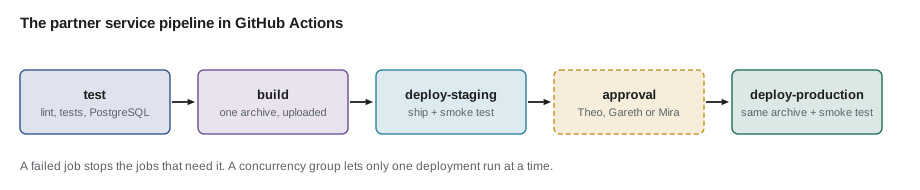
On Tuesday, October 24, the whiteboard in the studio's meeting room has the path from lesson 1 drawn across it again, and today Mira turns it into a file. A pipeline is the automated sequence of steps that takes a commit from the repository to production: test, build, deploy to staging, check, deploy to production, check. JS-210 gave the studio the first part, continuous integration, which runs the linter and tests on every push. Today's lesson adds the rest, so that the steps Theo used to type are run by GitHub Actions, the same way every time, with a person approving the last step.
Integration, delivery and deployment
Three terms are often confused. Continuous integration means merging changes into the main branch often and checking each one automatically. Continuous delivery means that every change that passes the checks produces a release that could go to production at any time, with a person deciding when. Continuous deployment goes one step further: every change that passes goes to production automatically, with no human step. Many teams deploy continuously to staging and deliver continuously to production, and that is the studio's plan: every merge to main reaches staging within minutes, and production needs one click from Theo, Gareth or, during December, Mira.
GitHub Actions in brief
A GitHub Actions workflow is a YAML file in .github/workflows. It names the events that start it, such as a push to main, and defines jobs. Each job runs on a fresh runner, a virtual machine GitHub provides, and consists of steps: shell commands or reusable actions such as actions/checkout. Jobs run in parallel unless one needs another, in which case it waits and runs only if the other succeeded. Files are passed between jobs as artifacts, and a job can be tied to an environment, such as staging or production, which has its own secrets and its own protection rules.
# .github/workflows/partner-orders.yml
name: partner-orders

on:
  push:
    branches: [main]
    paths: ['services/partner-orders/**']
  workflow_dispatch:

permissions:
  contents: read

concurrency:
  group: partner-orders-deploy
  cancel-in-progress: false

jobs:
  test:
    runs-on: ubuntu-24.04
    services:
      db:
        image: postgres:18-bookworm
        env:
          POSTGRES_DB: foodhub
          POSTGRES_USER: partner_app
          POSTGRES_PASSWORD: ci-only-password
        ports: ['5432:5432']
        options: --health-cmd "pg_isready -U partner_app" --health-interval 2s --health-retries 15
    defaults:
      run:
        working-directory: services/partner-orders
    steps:
      - uses: actions/checkout@08eba0b27e820071cde6df949e0beb9ba4906955 # v4.3.0
      - uses: actions/setup-node@49933ea5288caeca8642d1e84afbd3f7d6820020 # v4.4.0
        with:
          node-version-file: services/partner-orders/.nvmrc
          cache: npm
          cache-dependency-path: services/partner-orders/package-lock.json
      - run: npm ci
      - run: npm run lint
      - run: npm test
        env:
          DATABASE_URL: postgres://partner_app:ci-only-password@localhost:5432/foodhub

  build:
    needs: test
    runs-on: ubuntu-24.04
    outputs:
      release: ${{ steps.name.outputs.release }}
    defaults:
      run:
        working-directory: services/partner-orders
    steps:
      - uses: actions/checkout@08eba0b27e820071cde6df949e0beb9ba4906955 # v4.3.0
      - uses: actions/setup-node@49933ea5288caeca8642d1e84afbd3f7d6820020 # v4.4.0
        with:
          node-version-file: services/partner-orders/.nvmrc
      - id: name
        run: echo "release=$(node -p 'require(`./package.json`).version')-${GITHUB_SHA::7}" >> "$GITHUB_OUTPUT"
      - run: npm ci --omit=dev
      - run: tar -czf ../../partner-orders-${{ steps.name.outputs.release }}.tar.gz package.json package-lock.json src node_modules
      - uses: actions/upload-artifact@ea165f8d65b6e75b540449e92b4886f43607fa02 # v4.6.2
        with:
          name: partner-orders-${{ steps.name.outputs.release }}
          path: partner-orders-${{ steps.name.outputs.release }}.tar.gz
          retention-days: 30

  deploy-staging:
    needs: build
    runs-on: ubuntu-24.04
    environment: staging
    steps:
      - uses: actions/download-artifact@d3f86a106a0bac45b974a628896c90dbdf5c8093 # v4.3.0
        with:
          name: partner-orders-${{ needs.build.outputs.release }}
      - run: ./deploy/ship.sh staging partner-orders-${{ needs.build.outputs.release }}.tar.gz
        env:
          DEPLOY_SSH_KEY: ${{ secrets.DEPLOY_SSH_KEY }}
          DEPLOY_HOST: ${{ vars.DEPLOY_HOST }}

  deploy-production:
    needs: [build, deploy-staging]
    runs-on: ubuntu-24.04
    environment:
      name: production
      url: https://riverside-food-hub.example/api/partners/v1/menu
    steps:
      - uses: actions/download-artifact@d3f86a106a0bac45b974a628896c90dbdf5c8093 # v4.3.0
        with:
          name: partner-orders-${{ needs.build.outputs.release }}
      - run: ./deploy/ship.sh production partner-orders-${{ needs.build.outputs.release }}.tar.gz
        env:
          DEPLOY_SSH_KEY: ${{ secrets.DEPLOY_SSH_KEY }}
          DEPLOY_HOST: ${{ vars.DEPLOY_HOST }}
What this code does
The workflow runs on pushes to main that touch the partner service, or when started by hand. The test job runs the linter and tests against a PostgreSQL service container; build names the release from the version and the commit and uploads the archive once; the two deploy jobs download that same archive and run the shipping script for their environment. Every action is pinned to a full commit SHA with its version in a comment, and the token has read-only access to the repository.
A few lines in that file are worth reading closely.
- permissions: contents: read. Every job receives a GITHUB_TOKEN for talking to GitHub. Limiting it to reading the repository means a compromised step cannot push code or change settings.
- concurrency. Two deployments to the same server must never overlap. A concurrency group makes a second run wait for the first; cancel-in-progress: false means a deployment already under way is never stopped halfway.
- Pinned actions. Each uses line names a full commit SHA, not a tag like v4. A tag can be moved to different code, which is how several supply-chain attacks on popular actions have worked; a SHA cannot. GitHub has also offered immutable releases since October 2025, and organizations can require SHA pinning by policy.
- One build, two deployments. The archive is built and uploaded once in the build job. Both deploy jobs download that exact artifact, which is lesson 1's build once, deploy many.
- Environments. deploy-staging and deploy-production use the staging and production environments, each with its own secrets and variables. The production environment has a protection rule requiring approval from a list of reviewers.
// Run jobs in dependency order; a failed job skips everything that needs it.
const jobs = {
  test: { needs: [], result: 'success' },
  build: { needs: ['test'], result: 'success' },
  'deploy-staging': { needs: ['build'], result: 'failure' },
  'deploy-production': { needs: ['build', 'deploy-staging'], result: 'success' },
  'notify': { needs: ['build'], result: 'success' },
};

const outcome = {};
const pending = new Set(Object.keys(jobs));
while (pending.size) {
  for (const name of [...pending]) {
    const { needs, result } = jobs[name];
    if (!needs.every((n) => n in outcome)) continue;          // wait for dependencies
    outcome[name] = needs.every((n) => outcome[n] === 'success') ? result : 'skipped';
    pending.delete(name);
    console.log(name.padEnd(18), outcome[name]);
  }
}test success build success deploy-staging failure deploy-production skipped notify success
What this code does
A job is ready once every job it needs has an outcome. It runs only if all of those succeeded; otherwise it is marked skipped, which is how GitHub Actions treats failed dependencies by default. Because staging failed here, production was never attempted, while the notify job, which needs only build, still ran.
Shipping to the server
The deploy jobs call a script in the repository, deploy/ship.sh, so the same steps can also be run from a laptop in an emergency. The script connects to Theo's server as a dedicated deploy user, whose SSH key can run only the deployment commands, and does five things in order. It uploads the archive and checks its checksum. It unpacks it into a new folder named after the release, beside the previous ones. It runs any database migrations, which must work with both the old and the new code (lesson 11). It switches a symbolic link named current to point at the new folder and restarts the service. And it runs the smoke test; if that fails, it points current back at the previous folder and restarts again.
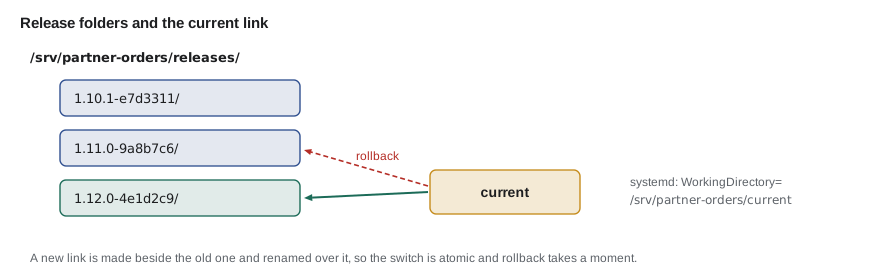
The symbolic link is what makes the switch and the rollback instant. The systemd unit's WorkingDirectory is /srv/partner-orders/current, so restarting the service starts whichever release current points at. Replacing the link is atomic when done by creating a new link and renaming it over the old one, so there is never a moment when current points at nothing.
$ mkdir -p releases/1.11.0-9a8b7c6/src releases/1.12.0-4e1d2c9/src
$ ln -sfn releases/1.11.0-9a8b7c6 current && readlink current
releases/1.11.0-9a8b7c6
$ ln -sfn releases/1.12.0-4e1d2c9 current.next && mv -T current.next current && readlink current
releases/1.12.0-4e1d2c9
$ ls releases
1.11.0-9a8b7c6
1.12.0-4e1d2c9
$ ln -sfn releases/1.11.0-9a8b7c6 current.next && mv -T current.next current && readlink current
releases/1.11.0-9a8b7c6
What this code does
Two release folders are created and current is pointed at the older one. The switch creates a new link beside the old one and renames it into place with mv -T, a single rename that replaces the link atomically. Rolling back is the same operation pointed at the previous folder, which takes a moment because nothing has to be rebuilt or reinstalled.
Smoke tests
A smoke test is a short set of checks run against the real environment right after a deployment, to catch the kind of failure that unit tests cannot: a missing setting, a wrong database address, a broken route in the web server's configuration. It is not a full test suite. It asks a few questions that must all be yes: is the service ready, including its database; is it the release that was just deployed; and does one real request work? The readiness endpoint itself is lesson 9's subject.
// deploy/smoke.mjs: run after every deployment; exit 1 if anything is wrong
const base = process.argv[2];
const expectRelease = process.argv[3];
const checks = [
  ['ready', '/healthz/ready', (b) => b.status === 'ready' && b.db === 'ok'],
  ['release', '/healthz/ready', (b) => b.release === expectRelease],
  ['menu', '/api/partners/v1/menu', (b) => Array.isArray(b.items) && b.items.length === 3],
];

let failed = 0;
for (const [name, path, ok] of checks) {
  let result;
  try {
    const res = await fetch(base + path, { signal: AbortSignal.timeout(3000) });
    if (!res.ok) result = `fail (HTTP ${res.status})`;
    else result = ok(await res.json()) ? 'pass' : 'fail (unexpected response)';
  } catch (err) {
    result = `fail (${err.name})`;
  }
  if (result !== 'pass') failed++;
  console.log(`${name.padEnd(8)} ${result}`);
}
console.log(failed ? `${failed} check(s) failed` : 'all checks passed');
process.exit(failed ? 1 : 0);
What this code does
The script takes the base address and the expected release name and runs three checks, each with a three-second timeout. It checks readiness including the database, confirms the release is the one just deployed, which catches a service that failed to restart and is still running the old version, and makes one real API request. It prints each result and exits with status 1 if any check fails, which is what makes the shipping script roll back.
$ node deploy/smoke.mjs http://127.0.0.1:3192 1.12.0-4e1d2c9
ready    pass
release  pass
menu     pass
all checks passed
$ node deploy/smoke.mjs http://127.0.0.1:3192 1.13.0-77b0e15; echo "exit status $?"
ready    pass
release  fail (unexpected response)
menu     pass
1 check(s) failed
exit status 1
What this code does
A small local server stands in for the partner service so the smoke test can be run for real. Against the release it expects, all three checks pass. Asked to confirm a different release, the release check fails and the script exits with status 1, which is exactly what happens when a restart silently leaves the old version running.
// The shipping script's decision: retry the smoke test, then keep or roll back.
function deploy(release, previous, smokeResults, { retries = 3 } = {}) {
  const log = [`current -> ${release}`, 'restart'];
  for (let attempt = 1; attempt <= retries + 1; attempt++) {
    const ok = smokeResults[attempt - 1] ?? false;
    log.push(`smoke test ${attempt}: ${ok ? 'pass' : 'fail'}`);
    if (ok) return [...log, `deployed ${release}`];
  }
  return [...log, `current -> ${previous}`, 'restart', `rolled back to ${previous}`];
}

console.log(deploy('1.12.0-4e1d2c9', '1.11.0-9a8b7c6', [false, true]).join('\n'));
console.log('---');
console.log(deploy('1.12.0-4e1d2c9', '1.11.0-9a8b7c6', [false, false, false, false]).join('\n'));current -> 1.12.0-4e1d2c9 restart smoke test 1: fail smoke test 2: pass deployed 1.12.0-4e1d2c9 --- current -> 1.12.0-4e1d2c9 restart smoke test 1: fail smoke test 2: fail smoke test 3: fail smoke test 4: fail current -> 1.11.0-9a8b7c6 restart rolled back to 1.11.0-9a8b7c6
What this code does
After switching and restarting, the script gives the service a few tries to pass the smoke test, because a service can take a moment to connect to its database. A pass on any attempt ends the deployment successfully. If every attempt fails, the script points current back at the previous release and restarts, so production is back on a known good version within seconds.
Deploying the static sites
The public site and the portal follow the same pattern with simpler steps, because there is no process to restart. The pipeline builds the site once, uploads the files into a new release folder on the server, switches the web root's link, and then purges the CDN by tag for the HTML that changed; hashed assets need no purge. The previous two releases' asset folders stay on the server for a week, so tabs opened before the deployment can still load their chunks (lesson 4). The portal's smoke test loads index.html, config.json and the main script, and checks that config.json names the right environment.
For Dev's previews, a second workflow runs on every pull request to the public site's repository. It builds the site and deploys it to the static host under a URL containing the pull request's number, then posts the link as a comment on the pull request. Previews are deleted when the pull request is closed. Because a pull request can come from code that has not been reviewed, the preview workflow runs with no access to production secrets at all.
Approvals and who may deploy
The production environment has a required reviewers rule: the deploy-production job pauses until one of the listed people approves it in GitHub. The list is Theo, Gareth and Mira. GitHub records who approved each deployment and when, which replaces Theo's memory as the deployment log. A wait timer of a few minutes can be added so a staging problem has time to show before production is offered, and a rule limiting production deployments to the main branch prevents an unreviewed branch from reaching it.
Approval is a judgment step, so it needs information. The deployment summary that the workflow writes shows the release name, the list of commits since the last production release, the result of the staging smoke test and links to the staging logs. Mira's rule for December is simple: no approvals after 15:00 on a Friday, and none during the hamper drive's Saturday packing day unless something is broken.
// Concurrency: a deployment in progress is never stopped, but a newer waiting run replaces an older waiting one.
function schedule(events) {
  let running = null, waiting = null;
  const out = [];
  for (const e of events) {
    if (e.type === 'start') {
      if (!running) { running = e.run; out.push(`${e.run} starts`); }
      else { if (waiting) out.push(`${waiting} replaced by ${e.run}`); waiting = e.run; out.push(`${e.run} waits`); }
    } else {
      out.push(`${running} finishes`);
      running = waiting; waiting = null;
      if (running) out.push(`${running} starts`);
    }
  }
  return out;
}

console.log(schedule([{ type: 'start', run: 'run 41' }, { type: 'start', run: 'run 42' }, { type: 'start', run: 'run 43' },
{ type: 'finish' }, { type: 'finish' }]).join('\n'));run 41 starts run 42 waits run 42 replaced by run 43 run 43 waits run 41 finishes run 43 starts run 43 finishes
What this code does
Runs in the same concurrency group never overlap: a run that starts while another is in progress waits. With cancel-in-progress set to false, the running deployment always finishes, but only one run waits at a time, so a newer run replaces an older waiting one. The deployment that eventually starts is therefore the newest, which is the one that should reach production.
Worked problem
How long from merge to production?
The partner service's jobs take these times on GitHub's runners: test 2 min 40 s (including starting PostgreSQL), build 1 min 10 s, deploy to staging 50 s including the smoke test, and deploy to production 55 s. Approval takes however long it takes a reviewer to look; suppose 6 minutes. What is the time from merging a change to it running in production, and how does it compare with September's median lead time of about three days?
Show solution
- Test and build: 160 + 70 = 230 s.
- Staging: 50 s, so staging is updated about 280 s, under 5 minutes, after the merge.
- Approval: 6 min = 360 s.
- Production: 55 s.
- Total: 280 + 360 + 55 = 695 s, about 11.6 minutes.
Answer: About 12 minutes from merge to production, almost all of it automated, against about three days of waiting for Theo in September.
Common mistakes
MistakeRebuilding the code in each deploy job.
InsteadBuild once, upload the artifact, and download that same artifact in every deploy job.
MistakeReferring to actions by tag, such as @v4.
InsteadPin each action to a full commit SHA and note the version in a comment.
MistakeLeaving the GITHUB_TOKEN with write access.
InsteadSet permissions to the minimum, such as contents: read, and widen it only per job when needed.
MistakeLetting two deployments run at once.
InsteadUse a concurrency group, and never cancel a deployment in progress.
MistakeReplacing files in the live folder during a deployment.
InsteadUnpack into a new release folder and switch an atomic symbolic link, keeping the previous release for rollback.
Summary and key terms
- A pipeline automates the path from commit to production.
- Continuous integration checks every change, continuous delivery makes each passing change releasable, and continuous deployment releases it automatically; the studio deploys continuously to staging and delivers to production with an approval.
- GitHub Actions workflows define jobs of steps that run on fresh runners, connected by needs, artifacts and environments with their own secrets and protection rules.
- The partner service's workflow tests against a PostgreSQL service container, builds one archive, and deploys it to staging and then, after approval, to production, with least-privilege token permissions, actions pinned by SHA and a concurrency group.
- The shipping script unpacks each release into its own folder, runs migrations, switches an atomic symbolic link, restarts, smoke-tests and rolls back automatically on failure.
- Pipeline
- The automated sequence of steps from a commit to production.
- Continuous delivery
- Keeping every passing change ready to release, with a person deciding when.
- Continuous deployment
- Releasing every passing change to production automatically.
- Workflow
- A GitHub Actions YAML file defining the events that start it and the jobs it runs.
- Runner
- The machine that runs a job's steps, created fresh for each job on GitHub's hosted runners.
- Environment
- In GitHub Actions, a named deployment target with its own secrets, variables and protection rules.
- Smoke test
- A short set of checks against a real environment right after a deployment.
- Symbolic link
- A file that points to another path; switching one is how the studio changes the live release atomically.
Practice problems
Work each problem on paper first, then reveal the answer to check.
Why does the deploy-production job download the archive instead of building it?
Show answer
So the exact files tested in staging are the ones deployed to production.
Why is each action pinned to a commit SHA?
Show answer
A tag can be moved to different code; a SHA always names the same code.
What does the release check in the smoke test catch?
Show answer
A service that failed to restart and is still running the old release.
Why does the preview workflow have no access to production secrets?
Show answer
Pull requests can contain unreviewed code, which must not be able to read them.
Try it yourself
Order the jobs
Complete order(jobs) so that it returns the job names in an order where every job comes after all the jobs it needs. When several jobs are ready at once, take them in the order they appear in the object.
The program prints the order for the studio's static site pipeline.
function order(jobs) {
  return Object.keys(jobs);
}

const jobs = {
  'deploy-production': { needs: ['build', 'deploy-staging'] },
  'deploy-staging': { needs: ['build'] },
  'purge-cdn': { needs: ['deploy-production'] },
  build: { needs: ['lint', 'test'] },
  lint: { needs: [] },
  test: { needs: [] },
};
console.log(order(jobs).join(' -> '));
Try it yourself
Prune old releases
Release folders are named <version>-<sha> and given with the time each was deployed. Complete toDelete(releases, keep, current) so that it returns the names to delete: everything except the keep most recently deployed releases, and never the current one.
Return the names oldest first.
function toDelete(releases, keep, current) {
  return [];
}

const releases = [
  { name: '1.9.2-a41c0de', at: 1700 }, { name: '1.12.0-4e1d2c9', at: 2100 }, { name: '1.10.0-58f1b2e', at: 1800 },
  { name: '1.11.0-9a8b7c6', at: 2000 }, { name: '1.9.1-0c2d9aa', at: 1600 }, { name: '1.10.1-e7d3311', at: 1900 },
];
console.log(toDelete(releases, 3, '1.12.0-4e1d2c9').join(', '));
console.log(toDelete(releases, 3, '1.9.1-0c2d9aa').join(', '));
Lesson quiz · 5 questions
Score 60% or more to complete this lesson.
Create a free account to save your progress, take quizzes and earn a certificate.