
JS-260 · Lesson 1 of 12 · 26 min
From code to production
▶ Video coming soon A video version of this lesson is on the way.
On Tuesday, October 3, 2028, the first session of Gareth's twelfth block with Mira starts with a calendar rather than with code. At the review of the performance work on Friday, September 29, Theo told the team that he will be on parental leave from Monday, December 4 until early January, which is exactly when the December hamper drive runs. Today every deployment of the Food Hub's software goes through Theo's hands: he copies files to the server, runs the commands, watches the logs and, when something goes wrong, puts the old version back by hand. "I want to come back in January and find that nobody needed me," he said. This block is about making that true: turning the work Mira has written over two years into something any of the team can ship safely, check, and undo.
Deployment is everything that happens between code that works on a developer's laptop and code that serves real people. It includes building the code into the files that will run, moving them to where they run, giving them their configuration and secrets, starting them, checking that they work, and being able to go back if they do not. Each of the next eleven lessons takes one part of that path. Today's lesson draws the whole map.
What the Food Hub runs
Gareth asks Mira to list every piece of software the Food Hub depends on that the studio is responsible for, how each one reaches the server today, and what it needs when it changes. The list is longer than she expected.
| Piece | What it is | Where it runs | How it is deployed today |
|---|---|---|---|
| Public site | HTML, CSS, images and a little JavaScript (WEB-101, sped up in JS-250) | Theo's server, served as files by his web server | Theo copies the files from his laptop with rsync |
| Volunteer portal | React single-page app built with Vite, plus its service worker (JS-220, JS-250) | Theo's server under /volunteer/ | Mira builds on her laptop and uploads the dist folder |
| Theo's PHP application | Accounts, volunteers, shifts, counter orders and /api/v1 | Theo's server, with the managed PostgreSQL database | Theo's own scripts and migrations |
| Partner order service | Node.js service for Rosa's kitchen, the agencies and the order board (JS-230, JS-240) | Theo's server, as the systemd service partner-orders | git pull, npm install and a restart, over SSH |
| Reminders script | Node.js script that writes the nightly reminder batch for Theo's mail queue (JS-230) | Theo's server, every evening at 18:00 | Copied with the partner service and started by a timer |
Theo's PHP application has its own deployment process, which Theo built years ago and will hand over separately. The other four pieces are Mira's, and they are the subject of this block. They are typical of a small organization's software: two sets of static files, one long-running server process and one scheduled job, all on one server, with one managed database behind them.
// The pieces the studio deploys, and what each one needs when it changes.
const pieces = [
  { name: 'public site',     build: true,  restart: false, migrations: false, kind: 'static' },
  { name: 'volunteer portal', build: true,  restart: false, migrations: false, kind: 'static' },
  { name: 'partner service', build: false, restart: true,  migrations: true,  kind: 'process' },
  { name: 'reminders script', build: false, restart: false, migrations: false, kind: 'scheduled' },
];

const yes = (b) => (b ? 'yes' : '-');
console.log('piece'.padEnd(17), 'kind'.padEnd(10), 'build', 'restart', 'migrations');
for (const p of pieces) {
  console.log(p.name.padEnd(17), p.kind.padEnd(10), yes(p.build).padEnd(5), yes(p.restart).padEnd(7), yes(p.migrations));
}
const steps = pieces.reduce((n, p) => n + 1 + p.build + p.restart + p.migrations, 0);
console.log(`\n${steps} manual steps if everything changes at once, before any checking`);piece kind build restart migrations public site static yes - - volunteer portal static yes - - partner service process - yes yes reminders script scheduled - - - 8 manual steps if everything changes at once, before any checking
What this code does
Each piece is described by the same few properties, so one loop can print the inventory as a table. Adding true and false to a number counts true as 1, which is how reduce totals the steps: one copy for every piece plus a step for each build, restart and migration. Seeing the steps written down is the first argument for automating them.
Environments
An environment is a complete place where the software runs, with its own configuration, data and address. Most teams have at least three. A developer's local environment is her laptop, where she runs the code while writing it. Production is the real one, used by Rosa, Lucy, the agencies and the public. Between them sits staging, a copy of production that real people do not use, where a new version can be tried with production-like settings before it goes live. The pipeline in lesson 7 adds one more place that behaves like an environment: the short-lived machine in continuous integration where tests run.
| Environment | Who uses it | Data | Address |
|---|---|---|---|
| Local | One developer | Small test data, often generated | localhost |
| CI | The pipeline | Created fresh for each run and thrown away | A temporary machine |
| Staging | The team, and Rosa or Lucy when trying a change | Realistic but not real: copies with personal details removed, or test records | staging.riverside-food-hub.example |
| Production | Everyone | Real data, backed up | riverside-food-hub.example |
JS-230 created a staging copy of the partner service, but it has drifted. It still runs on Node 26, its environment file is missing two settings that production has, and its database was last refreshed in May. A staging environment is only useful if it differs from production in data and addresses, and in nothing else; every other difference is a place where a change can pass in staging and fail in production.
The path from commit to production
Gareth draws the path that every change should follow at the end of the block. A developer commits a change and pushes it to GitHub. Continuous integration, which Mira set up in JS-210, runs the linter and the tests. If they pass, the pipeline builds the code once into an artifact: a fixed set of files, such as the portal's dist folder or a packed copy of the partner service with its dependencies. The same artifact is deployed to staging and checked there, and then, after someone approves it, the same artifact is deployed to production and checked again. If production checks fail, the previous artifact is put back.
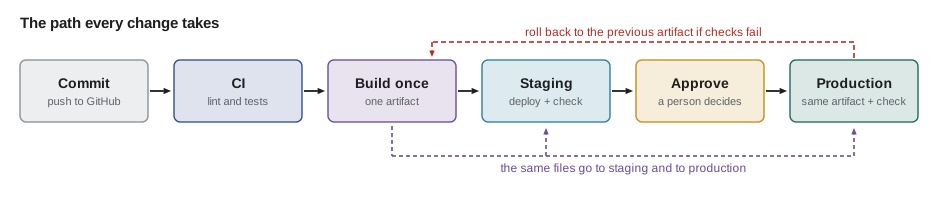
Two ideas in that picture matter more than any tool. The first is build once, deploy many: the files that reach production are exactly the files that were tested in staging, not a second build made later from the same source. A second build can pick up a different dependency version, a different Node version or a different environment variable, and then the tested thing and the shipped thing are not the same. The second is that every step is written down as code in the repository, so that it runs the same way whoever starts it, and so that a change to the process is reviewed like any other change.
What went wrong on September 15
Mira has a fresh example of what manual deployment costs. On Friday, September 15, Theo deployed a version of the partner service that read a new setting, the secret used to sign the order board's tokens. He added the setting to staging but not to production. The service started, the health check that JS-230 set up answered, because it only checked that the process was running, and the order board in the kitchen showed a blank screen for forty minutes until Rosa phoned. Theo had to find the previous commit, check it out, reinstall its dependencies and restart the service by hand, which took most of the forty minutes.
| Time | What happened | What would have prevented it |
|---|---|---|
| 15:02 | Theo runs git pull and npm install on the server | An artifact built and tested in CI |
| 15:04 | Service restarts without the new setting; it starts anyway | Configuration checked at start-up, failing fast (lesson 3) |
| 15:05 | Health check passes: the process answers | A readiness check that tests what the service needs (lesson 9) |
| 15:06–15:40 | The board is blank; nobody is alerted | Error tracking and an alert on failed board requests (lesson 9) |
| 15:41 | Rosa phones the studio | A smoke test after every deploy (lesson 7) |
| 15:46–16:20 | Theo rebuilds the old version by hand and restarts | A one-command rollback to the previous release (lesson 11) |
None of the steps Theo took was careless. Each was reasonable on its own, and he had done them dozens of times. The problem is that a person doing a dozen steps by hand will eventually miss one, and that nothing in the process noticed. The usual name for writing down what happened in an incident, without blaming anyone, and deciding what to change, is a blameless post-incident review; Mira's table is a small one.
Measuring how well a team ships
How can a team tell whether its delivery is getting better? The research program known as DORA (DevOps Research and Assessment) has studied this for over a decade and settled on a few measures that are easy to collect and that move together in teams that deliver well. Two measure speed and two measure stability, and DORA's later reports added a fifth, rework rate, for unplanned fixes.
| Measure | Question it answers | Food Hub, September 2028 |
|---|---|---|
| Deployment frequency | How often does a change reach production? | Nine deployments in the month |
| Change lead time | How long from a commit to it running in production? | Median about three days, waiting for Theo |
| Change failure rate | What share of deployments needs an immediate fix or rollback? | Two of nine |
| Failed deployment recovery time | How long does it take to recover from a failed deployment? | About 40 minutes and about 25 minutes |
The point of the measures is not to compare teams, and certainly not to grade people. It is to notice the effect of changes to the process. Teams that deploy small changes often tend to have lower failure rates, not higher ones, because a small change is easier to test, easier to understand when it fails and easier to undo. The Food Hub's numbers are typical of a process that depends on one careful person.
// Delivery measures from the September 2028 deployment log.
const log = [
  { day: 4,  leadHours: 50, failed: false },
  { day: 6,  leadHours: 75, failed: false },
  { day: 8,  leadHours: 26, failed: false },
  { day: 12, leadHours: 98, failed: false },
  { day: 15, leadHours: 72, failed: true, restoreMin: 40 },
  { day: 19, leadHours: 70, failed: false },
  { day: 22, leadHours: 30, failed: true, restoreMin: 25 },
  { day: 26, leadHours: 120, failed: false },
  { day: 28, leadHours: 66, failed: false },
];

function median(xs) {
  const s = [...xs].sort((a, b) => a - b);
  const m = Math.floor(s.length / 2);
  return s.length % 2 ? s[m] : (s[m - 1] + s[m]) / 2;
}

const failures = log.filter((d) => d.failed);
console.log('deployments in September:', log.length);
console.log('median lead time:', median(log.map((d) => d.leadHours)), 'hours');
console.log('change failure rate:', `${failures.length} of ${log.length}`);
const meanRestore = failures.reduce((t, d) => t + d.restoreMin, 0) / failures.length;
console.log('mean recovery time:', meanRestore, 'minutes');deployments in September: 9 median lead time: 70 hours change failure rate: 2 of 9 mean recovery time: 32.5 minutes
What this code does
The log has one record per production deployment, with the hours from commit to production and whether the deployment failed. The median lead time sorts the nine lead times and takes the middle one, which is less affected by the one change that waited five days than an average would be. The failure rate and the recovery time come only from the failed deployments.
Which Node.js runs in production
One small manual difference caused trouble twice in September: Mira's laptop runs the newest Node.js, staging ran an older one and production another. Node.js has a predictable release schedule. Under the schedule the project adopted in 2026, one new major version is released each April, becomes a long-term support (LTS) release in October, and is supported for 36 months in all. Production should run an LTS release, and every environment, from laptops to CI to the server, should run the same major version.
| Release line | Released | Status in October 2028 | End of life |
|---|---|---|---|
| Node.js 26 | April 2026 | Maintenance LTS | April 2029 |
| Node.js 27 | April 2027 | Active LTS (production today) | April 2030 |
| Node.js 28 | April 2028 | Becomes LTS late in October 2028 | April 2031 |
The version can be pinned in the repository so that tools agree. A file named .nvmrc or .node-version holds the version for version managers such as nvm and fnm; the engines field in package.json states which versions the code supports; and the CI workflow and, in lesson 6, the container image name the same major version. Mira's laptop will run Node 27 for this work, and the move to Node 28 is planned for January, after it has had a few months as an LTS release.
// Does each environment run a Node.js version the project supports?
const engines = { min: 27, max: 27 };   // package.json: "engines": { "node": ">=27 <28" }
const found = {
  'Mira laptop': 'v28.1.0',
  'CI runner': 'v27.6.1',
  'staging server': 'v26.9.0',
  'production server': 'v27.6.1',
};

function major(version) {
  return Number(version.replace(/^v/, '').split('.')[0]);
}

for (const [where, version] of Object.entries(found)) {
  const m = major(version);
  const ok = m >= engines.min && m <= engines.max;
  console.log(where.padEnd(18), version.padEnd(8), ok ? 'ok' : `expected Node ${engines.min}`);
}Mira laptop v28.1.0 expected Node 27 CI runner v27.6.1 ok staging server v26.9.0 expected Node 27 production server v27.6.1 ok
What this code does
The major version is the first number of the version string, after removing the leading v that node --version prints. Each environment is compared with the range the project supports, here exactly Node 27. Two of the four are outside it, which is exactly the kind of difference that makes a change pass in one place and fail in another.
What this block will build
By the end of the block, Mira and Gareth plan to have a pipeline for the four pieces that does the following, each part taught in its own lesson.
- Reproducible builds of the public site and the portal, with content-hashed files and source maps kept private (lesson 2).
- Configuration from the environment, checked when a service starts, with staging and production differing only in their settings (lesson 3).
- A content delivery network in front of the public site and the portal, with preview deployments for Dev (lesson 4).
- A serverless function for one job that suits it, the payment provider's donation notifications (lesson 5).
- Containers for running the partner service and its database the same way on every laptop and in CI (lesson 6).
- A GitHub Actions pipeline that deploys to staging automatically and to production after approval (lesson 7), with secrets kept out of the repository (lesson 8).
- Monitoring, error tracking and logs that would have caught September 15 in a minute rather than forty (lessons 9 and 10).
- Versioned releases and a one-command rollback (lesson 11), all brought together in the capstone (lesson 12).
Worked problem
What manual deployment costs
In September, the nine deployments each took Theo about 35 minutes of commands and checking, and the two failures cost another 40 and 25 minutes of his time to recover. The board outage on September 15 lasted 40 minutes at about 2 p.m. on a Friday, when Rosa's team updates about 12 orders an hour. How much of Theo's time did deployment take in September, and how many order updates were made blind during the outage?
Show solution
- Routine deployment time: 9 × 35 = 315 minutes.
- Recovery time: 40 + 25 = 65 minutes.
- Total: 315 + 65 = 380 minutes, or about 6 hours and 20 minutes.
- Orders updated during the outage: 12 per hour × 40/60 hour = 8 updates with no board.
Answer: About six and a third hours of Theo's month, and eight order updates that the kitchen could not see on the board. An automated pipeline aims to cut the routine time to a few minutes of watching and the recovery time to a minute or two.
Common mistakes
MistakeBuilding again for production after testing in staging.
InsteadBuild once and deploy the same artifact to staging and then to production.
MistakeKeeping the deployment steps in someone's head or a wiki page.
InsteadWrite them as scripts and workflow files in the repository, so they run the same way every time.
MistakeLetting staging drift from production.
InsteadKeep staging the same as production in versions and settings, differing only in data and addresses.
MistakeRunning whichever Node.js version is installed.
InsteadPin one LTS major version in .nvmrc, engines, CI and the server.
MistakeTreating a failed deployment as one person's mistake.
InsteadReview it blamelessly and change the process so the same slip is caught next time.
Summary and key terms
- Deployment is the path from working code to software serving real people: building, moving, configuring, starting, checking and, when needed, undoing.
- The Food Hub's four studio-owned pieces are two sets of static files, one long-running Node service and one scheduled script on Theo's server.
- Changes should pass through local, CI, staging and production environments, with staging differing from production only in data and addresses.
- The key ideas are building once and deploying the same artifact everywhere, and writing every step as code.
- DORA's measures, deployment frequency, change lead time, change failure rate and recovery time, show whether a process is improving.
- Production should run one pinned Node.js LTS line everywhere.
- Deployment
- Getting a version of the software running for its real users, including configuration, checks and the means to undo it.
- Environment
- A complete place where the software runs, with its own configuration, data and address, such as staging or production.
- Staging
- A production-like environment where a new version is tried before it goes live.
- Artifact
- The fixed set of files produced by a build, deployed unchanged to each environment.
- Build once, deploy many
- The rule that the same tested artifact is promoted through environments rather than rebuilt.
- Change lead time
- The time from a change being committed to it running in production.
- Change failure rate
- The share of deployments that need an immediate fix or rollback.
- Long-term support (LTS)
- A Node.js release line that receives fixes for an extended period and is suitable for production.
Practice problems
Work each problem on paper first, then reveal the answer to check.
Why should the files deployed to production be the ones tested in staging, not a fresh build?
Show answer
A fresh build can pick up different dependency versions, Node versions or settings, so what was tested and what ships would not be the same.
What is the only kind of difference staging should have from production?
Show answer
Its data and its addresses; versions and settings should match.
Which two DORA measures are about stability?
Show answer
Change failure rate and failed deployment recovery time.
Why did the September 15 health check not notice the problem?
Show answer
It only checked that the process answered, not that the service could do its work.
Try it yourself
Change failure rate
Complete failureRate(log) so that it returns a string such as 2 of 9 failed (22 in 100), where the number in brackets is the share of failed deployments rounded to the nearest whole number.
Each entry in the log has a failed property. If the log is empty, return no deployments.
function failureRate(log) {
  return '';
}

console.log(failureRate([{ failed: false }, { failed: true }, { failed: false }, { failed: false }]));
console.log(failureRate([{ failed: true }, { failed: true }, { failed: false }]));
console.log(failureRate([]));
Try it yourself
Find the drift
Staging and production should have the same settings. Complete drift(staging, production) so that it returns a sorted array of the setting names that are missing from one of the two objects or have different values.
The program prints the names joined with commas.
function drift(staging, production) {
  return [];
}

const staging = { NODE_VERSION: '26', PORT: '3100', LOG_LEVEL: 'debug', DB_POOL: '10' };
const production = { NODE_VERSION: '27', PORT: '3100', LOG_LEVEL: 'info', DB_POOL: '10', BOARD_TOKEN_SECRET: 'set' };
console.log(drift(staging, production).join(', '));
console.log(drift({ A: '1' }, { A: '1' }).length);
Lesson quiz · 5 questions
Score 60% or more to complete this lesson.
Create a free account to save your progress, take quizzes and earn a certificate.