
JS-201 · Lesson 8 of 12 · 25 min
Searching algorithms
▶ Video coming soon A video version of this lesson is on the way.
Lucy's dashboard has a search box. When she types part of a volunteer's name, the list underneath shows the matches, and when she picks a time of day, the dashboard highlights the shift running at that moment. With 300 volunteers both features felt instant. With the 3,000 records the Food Hub expects by the end of 2027, and every key press running a search, Gareth wants to be sure they still will. The eighth session, on Thursday, September 30, is about searching.
Searching is the problem of finding an item, or the place where it would be, in a collection. The best method depends on two things: whether the data is sorted, and how many times you will search it.
Linear search
Linear search checks the items one at a time from the start until it finds a match or reaches the end. It works on any array, sorted or not, and it is what includes, indexOf, find, findIndex and some do. Its worst case is O(n). findLast and findLastIndex do the same from the end, which is useful when the most recent records are at the end and are the most likely matches.
For a single search, or a small array, linear search is the right choice: it is simple and needs no preparation. It becomes a problem only when it runs many times on a large array. A search box that runs a linear search on 3,000 names for every key press does 3,000 comparisons per key press, which is still fast; the trouble starts when that search sits inside another loop.
const names = ['Okafor', 'Nguyen', 'Haddad', 'Silva', 'Moreau', 'Larsen', 'Tanaka', 'Novak'];
let steps = 0;
function linearSearch(a, target) {
  for (let i = 0; i < a.length; i++) { steps++; if (a[i] === target) return i; }
  return -1;
}

for (const t of ['Okafor', 'Larsen', 'Ahmed']) {
  steps = 0;
  console.log(t, '-> index', linearSearch(names, t), 'after', steps, 'steps');
}
console.log(names.findLast((n) => n.startsWith('N')));Okafor -> index 0 after 1 steps Larsen -> index 5 after 6 steps Ahmed -> index -1 after 8 steps Novak
What this code does
linearSearch compares the target with each name in turn and returns its index, or -1 if it reaches the end without a match. A missing name costs a comparison with every element, which is the worst case. findLast searches from the end and returns the last name beginning with N.
Binary search
If the array is sorted, there is a much faster method. Look at the middle element. If it is the target, stop. If the target is smaller, it can only be in the left half; if larger, only in the right half. Either way, one comparison throws away half of the remaining elements. Repeat on the half that is left. This is binary search, and because the range halves at every step, it needs at most about log₂ n + 1 comparisons.
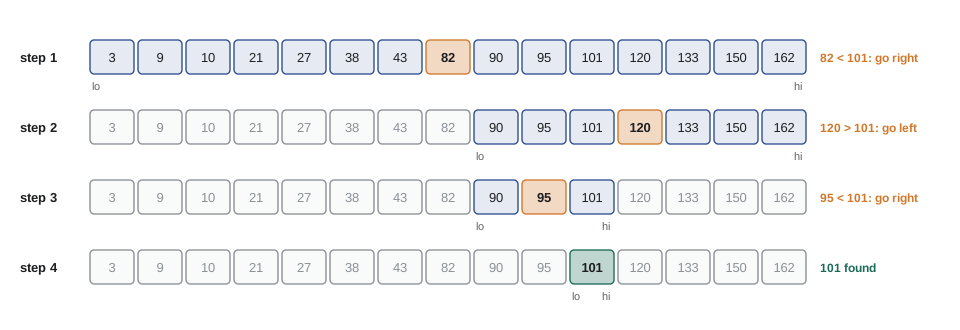
The numbers are striking. A sorted array of 1,000 items needs at most 10 comparisons, and one of 1,000,000 needs at most 20. Doubling the data adds only one comparison. That is O(log n), and it is why sorted data is so valuable.
let steps = 0;
function binarySearch(a, target) {
  let lo = 0, hi = a.length - 1;             // the target, if present, is in a[lo..hi]
  while (lo <= hi) {
    steps++;
    const mid = (lo + hi) >>> 1;
    if (a[mid] === target) return mid;
    if (a[mid] < target) lo = mid + 1;       // the target is to the right
    else hi = mid - 1;                       // the target is to the left
  }
  return -1;
}

const orders = [3, 9, 10, 21, 27, 38, 43, 82, 90, 95, 101, 120, 133, 150, 162];
steps = 0; console.log('101 at', binarySearch(orders, 101), 'in', steps, 'steps');
steps = 0; console.log('3 at', binarySearch(orders, 3), 'in', steps, 'steps');
steps = 0; console.log('100 at', binarySearch(orders, 100), 'in', steps, 'steps');

const million = Array.from({ length: 1000000 }, (_, i) => i * 2);
steps = 0; binarySearch(million, 1999998);
console.log('a million items, worst case:', steps, 'steps');101 at 10 in 4 steps 3 at 0 in 4 steps 100 at -1 in 4 steps a million items, worst case: 20 steps
What this code does
binarySearch keeps lo and hi as the ends of the range where the target could still be. Each step compares the middle element and moves lo or hi past it, so the range halves. Finding 101 takes four steps, a missing number is reported as -1 once the range is empty, and even a million items need only twenty steps.
Getting binary search right
Binary search is famously easy to get almost right. Its correctness rests on an invariant, a statement that is true before every pass of the loop: if the target is in the array, it is somewhere in a[lo] to a[hi]. Each branch must keep that statement true and must make the range smaller. Moving lo to mid instead of mid + 1, for example, can leave the range the same size for ever, and the loop never ends.
The midpoint itself has a famous bug. In languages with fixed-size integers, (lo + hi) ÷ 2 can overflow when lo and hi are both large, a bug that sat in Java's standard library for nearly a decade. JavaScript numbers do not overflow at these sizes, but writing the midpoint as (lo + hi) >>> 1, an unsigned shift that halves and rounds down, is a common and safe habit. The best protection is testing: an empty array, one element, the first and last elements, a missing value smaller than everything, a missing value larger than everything, and duplicates.
Finding where a value belongs
Often the question is not whether a value is present but where it belongs. The lower bound of a target in a sorted array is the first index whose value is greater than or equal to the target. If the target is present, that is the index of its first copy; if not, it is the place to insert it to keep the array sorted. The loop is a slight variation of binary search that never stops early.
// First index whose value is >= target (a.length if there is none). a must be sorted.
function lowerBound(a, target) {
  let lo = 0, hi = a.length;
  while (lo < hi) {
    const mid = (lo + hi) >>> 1;
    if (a[mid] < target) lo = mid + 1;
    else hi = mid;
  }
  return lo;
}

const starts = [480, 540, 540, 600, 660, 780, 840];   // shift start times, minutes after midnight
console.log(lowerBound(starts, 540), lowerBound(starts, 541), lowerBound(starts, 0), lowerBound(starts, 900));

// Keep a sorted list sorted when a new shift is added.
const i = lowerBound(starts, 720);
starts.splice(i, 0, 720);
console.log(starts);

// How many shifts start between 9:00 and 12:00 inclusive?
const count = lowerBound(starts, 12 * 60 + 1) - lowerBound(starts, 9 * 60);
console.log('shifts starting 9:00 to 12:00:', count);1 3 0 7 [ 480, 540, 540, 600, 660, 720, 780, 840 ] shifts starting 9:00 to 12:00: 5
What this code does
lowerBound narrows the range until lo is the first position whose value is at least the target, so 540 gives the first of its two copies and 541 gives the position after them. A target larger than everything gives the array's length. Two lower bounds subtracted count the values in a range, here the shifts starting from 9:00 up to and including 12:00, in O(log n) time.
Inserting with splice still moves the elements after the insertion point, so adding to a sorted array is O(n) even though finding the place is O(log n). For a few thousand items that is fine. For a structure that stays sorted under many insertions, a balanced search tree, from the next lesson, keeps both parts O(log n).
Searching intervals
Lucy's second feature asks which shift is running at a given moment. If the shifts in a day are sorted by start time and do not overlap, the running shift is the last one that starts at or before that moment. That is one less than the lower bound of the first start after the moment, followed by a check that the shift has not already ended.
// First index whose value is >= target (a.length if there is none). a must be sorted.
function lowerBound(a, target) {
  let lo = 0, hi = a.length;
  while (lo < hi) {
    const mid = (lo + hi) >>> 1;
    if (a[mid] < target) lo = mid + 1;
    else hi = mid;
  }
  return lo;
}

const shifts = [
  { area: 'Grocery', start: 480, end: 600 }, { area: 'Kitchen', start: 600, end: 720 },
  { area: 'Counter', start: 720, end: 840 }, { area: 'Garden', start: 900, end: 1020 },
];
const startTimes = shifts.map((s) => s.start);

function runningAt(minute) {
  const i = lowerBound(startTimes, minute + 1) - 1;     // last shift starting at or before minute
  if (i < 0 || minute >= shifts[i].end) return 'no shift';
  return shifts[i].area;
}
const hhmm = (m) => String(Math.floor(m / 60)).padStart(2, '0') + ':' + String(m % 60).padStart(2, '0');
for (const m of [470, 480, 615, 839, 860, 930]) console.log(hhmm(m), runningAt(m));07:50 no shift 08:00 Grocery 10:15 Kitchen 13:59 Counter 14:20 no shift 15:30 Garden
What this code does
runningAt uses lowerBound on the start times to find the last shift that has started by the given minute. It then checks whether that shift has already ended, which covers the gap between 14:00 and 15:00. Each lookup is O(log n), so the dashboard could check every minute of the day without slowing down.
Searching text
The name search box is a different kind of search: Lucy types part of a name, and every name containing it should match. includes on each name checks every position in the name, so the whole search is O(total length of all names). For 3,000 names that is around 30,000 character checks per key press, comfortably fast. Faster text search, for millions of documents, uses structures such as an inverted index, which search engines and databases provide.
The harder part is matching what people mean. Lucy types "emile" and expects to find Émile; she types "ana " with a trailing space. Normalizing both the names and the query first, by trimming spaces, converting to lower case and removing accents, makes the search match the way people think. normalize('NFD') splits an accented letter into its base letter followed by a separate accent mark, and a regular expression can then remove the accent marks.
function fold(s) {
  return s.trim().toLowerCase().normalize('NFD').replace(/[\u0300-\u036f]/g, '');
}
const people = ['Émile Roy', 'Ana Silva', 'Anaïs Côté', 'Ben Okafor', 'Zoë Novak'];
const folded = people.map(fold);                       // fold once, not on every key press

function search(query) {
  const q = fold(query);
  return people.filter((p, i) => folded[i].includes(q));
}
console.log(search('emile'));
console.log(search('ana '));
console.log(search('COTE'));
console.log(search('zoe'));[ "Émile Roy" ] [ "Ana Silva", "Anaïs Côté" ] [ "Anaïs Côté" ] [ "Zoë Novak" ]
What this code does
fold trims the text, lowers its case and splits each accented letter into a base letter plus an accent mark, which the regular expression then removes. The names are folded once in advance, so each key press only folds the short query. The searches now find Émile from emile and Côté from COTE.
Two pointers on sorted data
Sorted data allows another technique: two indexes moving toward each other, or alongside each other, so that a problem that looks like it needs nested loops is solved in one pass. To find two hampers whose weights add up to a target in a sorted list, start one pointer at the lightest and one at the heaviest. If their sum is too small, move the left pointer right to a heavier hamper; if too large, move the right pointer left. Each step rules out one hamper for good, so the search is O(n).
function pairWithSum(sorted, target) {
  let i = 0, j = sorted.length - 1, steps = 0;
  while (i < j) {
    steps++;
    const sum = sorted[i] + sorted[j];
    if (sum === target) return { pair: [sorted[i], sorted[j]], steps };
    if (sum < target) i++;
    else j--;
  }
  return { pair: null, steps };
}

const weights = [5800, 7400, 8200, 9100, 10600, 11800, 12500];   // hamper weights, sorted
console.log(pairWithSum(weights, 17300));
console.log(pairWithSum(weights, 30000));{ pair: [ 8200, 9100 ], steps: 6 }
{ pair: null, steps: 6 }What this code does
pairWithSum starts with the lightest and heaviest hampers and moves one pointer inwards at each step depending on whether the sum is too small or too large. Every step permanently rules out one hamper, so the loop runs at most n minus 1 times. It needs the list to be sorted, unlike the Map method from Lesson 5.
Binary search on the answer
Binary search also works on questions whose answer is a number, as long as the question has a yes-or-no test that switches from no to yes at one point. Rosa plans to send the lunch counter's surplus meals to three pick-up points in a fixed order of trays, and wants the smallest cart capacity that lets the volunteer do it in at most a given number of trips, without reordering the trays. Any capacity above the answer works and any below fails, so the answer can be found by binary search between the heaviest single tray and the total weight.
// Trips needed if each trip carries consecutive trays up to capacity.
function tripsNeeded(trays, capacity) {
  let trips = 1, load = 0;
  for (const t of trays) {
    if (load + t > capacity) { trips++; load = 0; }
    load += t;
  }
  return trips;
}
function smallestCapacity(trays, maxTrips) {
  let lo = Math.max(...trays), hi = trays.reduce((a, b) => a + b, 0), tests = 0;
  while (lo < hi) {
    tests++;
    const mid = Math.floor((lo + hi) / 2);
    if (tripsNeeded(trays, mid) <= maxTrips) hi = mid;   // mid works: try smaller
    else lo = mid + 1;                                   // mid fails: need bigger
  }
  return { capacity: lo, tests };
}

const trays = [12, 8, 15, 6, 9, 14, 7, 11];   // tray weights, in loading order
for (const k of [1, 2, 3, 4]) console.log(k, 'trips:', smallestCapacity(trays, k));1 trips: { capacity: 82, tests: 6 }
2 trips: { capacity: 41, tests: 6 }
3 trips: { capacity: 32, tests: 7 }
4 trips: { capacity: 23, tests: 6 }What this code does
tripsNeeded loads trays in order and starts a new trip whenever the next tray would exceed the capacity. smallestCapacity searches between the heaviest tray and the total, keeping any capacity that works and moving above any that fails, so it homes in on the smallest one that works. Each answer needs only a handful of tests instead of trying every capacity.
Choosing a search strategy
| Situation | Best approach | Cost |
|---|---|---|
| One search in unsorted data | Linear search | O(n) |
| Many exact-match searches | Build a Map or Set once | O(n) once, then O(1) average |
| Many searches for ranges, nearest values or positions | Sort once, then binary search | O(n log n) once, then O(log n) |
| Text containing a phrase, small data | Normalize once, then includes | O(total text length) |
| Pairs or matches in sorted data | Two pointers | O(n) |
| Smallest value that passes a yes-or-no test | Binary search on the answer | O(log range) tests |
For Lucy's dashboard, Mira's plan is a Map from id to volunteer for exact lookups, a folded copy of the names for the search box, and the day's shifts sorted by start time with lowerBound for the clock feature. Each structure costs O(n) or O(n log n) once when the data loads and makes every later search cheap.
Try it yourself
Write binary search
Complete indexOfSorted(a, target) so that it returns the index of target in the sorted array a, or -1 if it is not there, using binary search.
Test it on the first and last elements, a missing value and an empty array.
function indexOfSorted(a, target) {
  return a.indexOf(target);
}

const starts = [480, 540, 600, 660, 780, 840, 900];
console.log(indexOfSorted(starts, 480), indexOfSorted(starts, 900), indexOfSorted(starts, 700), indexOfSorted([], 5));
console.log(indexOfSorted.toString().includes('indexOf(') && !indexOfSorted.toString().includes('lo') ? 'linear' : 'binary');
Try it yourself
Where does the new booking go?
Complete insertSorted(a, value) so that it inserts value into the sorted array a at the position that keeps it sorted, after any equal values, and returns the index used.
Find the position with a binary search for the first value greater than value, then use splice.
function insertSorted(a, value) {
  a.push(value);
  return a.length - 1;
}

const times = [480, 540, 540, 600, 720];
console.log(insertSorted(times, 540), insertSorted(times, 300), insertSorted(times, 800));
console.log(times.join(' '));
Try it yourself
Hampers in a weight range
The weights array is sorted. Complete countBetween(weights, low, high) so that it returns how many weights are at least low and at most high, using the lowerBound function provided twice.
The function should be O(log n), not a loop over the whole array.
// First index whose value is >= target (a.length if there is none). a must be sorted.
function lowerBound(a, target) {
  let lo = 0, hi = a.length;
  while (lo < hi) {
    const mid = (lo + hi) >>> 1;
    if (a[mid] < target) lo = mid + 1;
    else hi = mid;
  }
  return lo;
}

function countBetween(weights, low, high) {
  return weights.filter((w) => w > low && w < high).length;
}

const weights = [5800, 7400, 8200, 8200, 9100, 10600, 11800, 12500];
console.log(countBetween(weights, 8200, 10600), countBetween(weights, 0, 6000), countBetween(weights, 13000, 20000));
Common mistakes
MistakeRunning binary search on unsorted data.
InsteadBinary search only works on sorted data; on anything else it returns wrong answers without any error.
MistakeSetting lo = mid or hi = mid in the classic loop.
InsteadThe range may stop shrinking and the loop may never end. Move past mid.
MistakeSorting the array before every search.
InsteadSorting is O(n log n), worse than one linear search. Sort once and search many times.
MistakeFolding the whole list of names on every key press.
InsteadFold the names once when they load and only fold the query each time.
MistakeAssuming splice into a sorted array is O(log n).
InsteadFinding the place is O(log n), but splice moves the elements after it, which is O(n).
Summary and key terms
- Linear search checks items one at a time, works on any array and costs O(n); includes, indexOf, find and findLast all do it.
- Binary search needs sorted data and halves the range at each comparison, so it costs O(log n), about 20 steps for a million items.
- Its correctness rests on the invariant that the target lies between lo and hi and on shrinking that range every pass; test empty arrays, ends, duplicates and missing values.
- The lower bound is the first index whose value is at least the target, giving the insertion point and, with two calls, the count of values in a range.
- Sorted intervals can be searched for the one containing a moment.
- Text search should normalize case, spaces and accents, folding the data once.
- Two pointers on sorted data solve pair problems in O(n).
- Binary search on the answer finds the smallest value passing a yes-or-no test.
- Choose by whether the data is sorted and how often it is searched.
- linear search
- Checking items one at a time until a match is found or the end is reached.
- binary search
- Searching sorted data by comparing with the middle item and discarding half of the range each time.
- invariant
- A statement that stays true at a chosen point every time a loop runs, used to reason about correctness.
- lower bound
- The first position in a sorted array whose value is greater than or equal to a target.
- insertion point
- The position at which a value can be inserted into a sorted array while keeping it sorted.
- off-by-one error
- A mistake in which a loop or index goes one step too far or stops one step short.
- normalization
- Converting text to a standard form, such as lower case without accents, before comparing it.
- two pointers
- A technique that moves two indexes through sorted data to solve a problem in one pass.
- binary search on the answer
- Finding the smallest or largest value that passes a yes-or-no test by halving the range of possible values.
- inverted index
- A map from each word to the documents containing it, used by search engines.
Practice problems
Work each problem on paper first, then reveal the answer to check.
At most how many comparisons does binary search need for 1,000,000 sorted items?
Show answer
About 20, because 2²⁰ is just over a million.
What does lowerBound return for a target larger than every element?
Show answer
The array's length, which is the position to append it.
How do you count the values from 10 to 20 in a sorted array of whole numbers?
Show answer
lowerBound(a, 21) − lowerBound(a, 10).
Why fold the names once rather than in the filter?
Show answer
Folding every name on every key press repeats the same O(n) work.
What property must a question have for binary search on the answer to work?
Show answer
Its yes-or-no test must switch from no to yes at a single point as the value increases.
Lesson quiz · 5 questions
Score 60% or more to complete this lesson.
Create a free account to save your progress, take quizzes and earn a certificate.