
JS-101 · Lesson 3 of 12 · 22 min
Values, types and variables
▶ Video coming soon A video version of this lesson is on the way.
Lucy Tran's volunteer spreadsheet had been Mira's world for four years. Each row was a person: a name, a phone number, the number of shifts worked, whether they had food-handling training, the date of their last shift. On the next Tuesday, Gareth asked her to describe one row out loud. "Amara Osei, three shifts this month, trained, last shift Saturday," she said. "Good," said Gareth. "Now notice that you used four different kinds of information: a name, a count, a yes or no, and a date. JavaScript cares about those differences too. Today is about the kinds of values a program works with, and how it keeps track of them."
This lesson introduces values and their types, the typeof operator, the three ways of declaring a variable, the rules for naming variables, and the special values undefined and null. By the end you will be able to store information under clear names and predict what kind of value each name holds.
Values and types
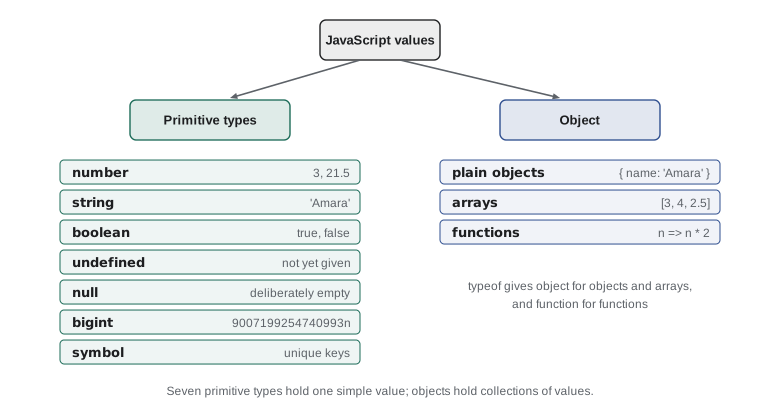
A value is a single piece of data: the number 3, the text 'Amara Osei', the answer true. Every value has a type, which decides what you can do with it. You can multiply two numbers, but multiplying two names makes no sense; you can make text upper case, but not a number. JavaScript has eight types. Seven are primitive types, simple values that cannot be broken into smaller parts. The eighth, object, is for collections of values and is the subject of Lessons 9 and 10.
| Type | Example values | Used for |
|---|---|---|
| number | 3, 21.5, -4, 0.75 | Counts, measurements, money, any arithmetic |
| string | 'Amara', 'Saturday kitchen', '' | Text of any length |
| boolean | true, false | Yes or no answers |
| undefined | undefined | A variable that has not been given a value yet |
| null | null | A value that is deliberately empty |
| bigint | 9007199254740993n | Whole numbers too large for the number type |
| symbol | Symbol('id') | Unique keys, used in advanced code |
| object | { name: 'Amara' }, [1, 2, 3] | Collections of values, including arrays and functions |
Unlike many languages, JavaScript has a single number type for both whole numbers and numbers with a decimal point. 3 and 3.5 are both numbers. Behind the scenes every number is stored in the same 64-bit format, which can hold whole numbers exactly up to about nine thousand million million and decimals with about 15 to 17 significant digits. That is plenty for shift counts and lunch prices. For larger whole numbers, such as some database identifiers, JavaScript has the bigint type, written with an n on the end.
You will use symbol rarely in this course, and only in later courses. The four you need every day are number, string, boolean and the empty values, undefined and null.
Asking for a type with typeof
The typeof operator tells you the type of a value as a string. It is the quickest way to check what a program is really working with, which is often the first step in finding a bug.
console.log(typeof 3);
console.log(typeof 21.5);
console.log(typeof 'Amara Osei');
console.log(typeof true);
console.log(typeof undefined);
console.log(typeof 10n);number number string boolean undefined bigint
What this code does
Each line asks typeof for the type of one value and prints the answer. Whole numbers and decimals both report number, text reports string, true reports boolean and undefined reports undefined. The last value has an n on the end, so it is a bigint.
There is one famous oddity. typeof null gives 'object', not 'null'. This is a mistake from the first version of JavaScript in 1995. By the time anybody noticed, millions of pages depended on it, so it could never be fixed. When you need to check for null, compare with === null instead, as Lesson 4 shows.
console.log(typeof null);
console.log(typeof '3');
console.log(typeof 3);object string number
What this code does
The first line shows the historical quirk: typeof null reports object even though null is a primitive. The next two lines show why the type matters. The value '3' in quotation marks is a string, while 3 without quotation marks is a number.
The difference between '3' and 3 is one you will meet constantly. Quotation marks make a string, whatever is inside them. The string '3' is a piece of text one character long, the digit three, and it behaves like text. The number 3 is a quantity you can do arithmetic with. Values that come from prompt, from forms and from files are strings until you convert them.
Variables
A variable is a name that refers to a value, so that a program can store the value once and use it many times. Lucy's spreadsheet had column headings; a program has variable names. A program that works out a volunteer's hours is far easier to read with a variable called shiftHours than with the number 3.5 scattered through it, and if the shift length changes, you change one line instead of hunting for every 3.5.
Creating a variable is called declaring it. Modern JavaScript declares variables with let or const, followed by the name, an equals sign and the starting value. The equals sign here is the assignment operator: it means "make this name refer to this value", not "is equal to".
const volunteerName = 'Amara Osei';
let shiftsThisMonth = 3;
const trained = true;

console.log(volunteerName, 'has worked', shiftsThisMonth, 'shifts');
console.log('Food-handling training: ' + trained);

shiftsThisMonth = shiftsThisMonth + 1;
console.log('After Saturday:', shiftsThisMonth);Amara Osei has worked 3 shifts Food-handling training: true After Saturday: 4
What this code does
Three variables are declared: a name, a count of shifts and a yes or no answer. The first two log lines print their values with labels. Then the count is replaced with its old value plus one, so the last line prints 4.
The line shiftsThisMonth = shiftsThisMonth + 1; looks impossible if you read the equals sign as "equals". Read it as an instruction instead: work out the value on the right, which is the current count plus one, then make the name on the left refer to that new value. The right side is always worked out first.
let or const?
Both let and const create a variable. The difference is whether the variable can be reassigned, that is, made to refer to a different value later. A let variable can; a const variable cannot. const is short for constant.
Use const whenever a value will not change after it is set: a volunteer's name in a record, the length of a standard shift, a tax rate. Use let for values that will change as the program runs: a running total, a counter in a loop, the answer the user gives this time round. Most experienced developers write const by default and switch to let only when they need to reassign. That way, every let in the code is a signal to the reader: "watch this one, it changes".
Trying to reassign a const stops the program with a TypeError. The listing below shows what happens; the error is the engine protecting you from changing something you said would never change.
const shiftHours = 3.5;
shiftHours = 4;
// TypeError: Assignment to constant variable.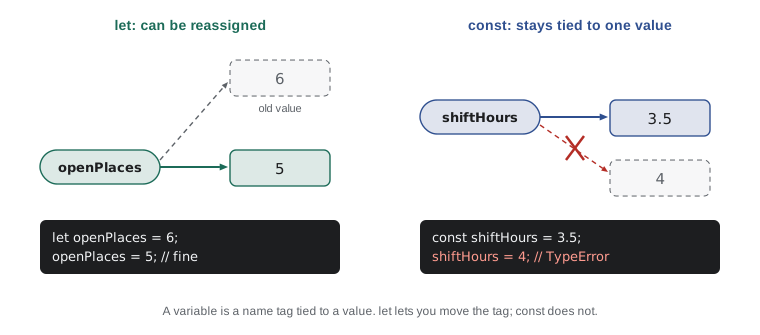
A let variable can also be declared without a starting value. Until you assign one, it holds undefined. A const must be given its value on the same line, because it could never be given one later.
let nextShift;
console.log('Before:', nextShift);
nextShift = 'Thursday grocery';
console.log('After:', nextShift);Before: undefined After: Thursday grocery
What this code does
The let line creates a variable called nextShift but gives it no value, so the first log prints undefined. The next line assigns a string to it. The second log prints that string.
The older var
You will see a third keyword, var, in older code and in many examples online. It was the only way to declare a variable before 2015. var still works, but it has two surprising behaviors that let and const were designed to fix. A var variable is visible throughout the whole function it is declared in, even outside the block of code where it appears, and its declaration is quietly moved to the top of the function, so you can use it before the line that declares it and get undefined instead of an error. Both behaviors have caused countless bugs. This course uses let and const only; when you meet var in old code, read it as a let with extra surprises.
Naming variables
JavaScript has a few firm rules for names, which are called identifiers. A name can contain letters, digits, the underscore _ and the dollar sign character, but it cannot start with a digit and cannot contain spaces or hyphens. A name cannot be one of JavaScript's reserved words, such as let, const, if, for, function, return, class or new. And because JavaScript is case-sensitive, total and Total are two different names.
| Name | Allowed? | Why |
|---|---|---|
| shiftHours | Yes | Letters only, in camelCase |
| shift2 | Yes | Digits are fine after the first character |
| _count | Yes | May start with an underscore |
| 2ndShift | No | Cannot start with a digit |
| shift-hours | No | A hyphen means minus |
| shift hours | No | No spaces |
| const | No | Reserved word |
Beyond the rules there are conventions that every JavaScript developer follows, because they make code from different people look alike. Variable and function names use camelCase: start with a small letter, and start each following word with a capital, as in shiftsThisMonth or openPlaces. Values that are fixed settings for the whole program, such as a tax rate, are often written in upper case with underscores, as in TAX_RATE or MAX_SHIFTS_PER_WEEK. Class names, which you will meet in JavaScript Programming II, start with a capital.
Good names describe what the value means, not what type it is. shiftsThisMonth beats n, count or num. Names of yes-or-no values often start with is, has or can, such as isTrained or hasPhone, so that code reads like a question: if (isTrained). Short names like i are fine for a loop counter that lives for three lines, but anything that matters deserves a real name. Gareth told Mira that he spends more time choosing names than writing any other part of the code, "because the name is the documentation that never gets out of date".
Dynamic typing
In JavaScript, a variable does not have a type; only its value does. A let variable that holds a number can later be given a string. This is called dynamic typing. It makes small programs quick to write, but it also means nothing stops you from accidentally putting the wrong kind of value in a variable.
let answer = 3;
console.log(answer, typeof answer);
answer = 'three';
console.log(answer, typeof answer);
answer = null;
console.log(answer, typeof answer);3 number three string null object
What this code does
One variable holds three different kinds of value, one after another. Each log prints the current value followed by its type. The last line shows the null quirk again: the value is null but typeof reports object.
Being allowed to change a variable's type is not the same as it being a good idea. A variable called shiftsThisMonth should always hold a number. Keeping each variable to one type makes programs much easier to reason about. Many teams go further and use TypeScript, a version of JavaScript with type labels that a checker reads before the code runs; Node.js can now run TypeScript files directly by removing the labels. You will not need TypeScript in this course, but it is worth knowing why it exists.
undefined and null
JavaScript has two values for "nothing", and the difference is about intent. undefined means a value has not been provided: a let that was never assigned, a missing piece of information, a function that returns nothing. JavaScript produces undefined on its own. null means a value is deliberately empty. A programmer writes null to say "I know about this, and there is nothing here", such as a volunteer who has chosen not to give a phone number.
let emergencyContact;
const phone = null;
console.log('Contact:', emergencyContact);
console.log('Phone:', phone);
console.log('Contact is undefined: ' + (emergencyContact === undefined));
console.log('Phone is null: ' + (phone === null));Contact: undefined Phone: null Contact is undefined: true Phone is null: true
What this code does
The contact variable was declared but never given a value, so it holds undefined. The phone variable was set to null on purpose. The last two lines use === to check each one, and both checks give true.
A good habit follows from this: leave undefined for JavaScript, and use null yourself when you need to store an empty value on purpose. When you read data from a form or a file, both may appear, and Lesson 6 shows how to treat them safely.
Try it yourself
A volunteer record
Declare four variables describing a volunteer: volunteerName set to 'Dev Bhatt', shiftsThisMonth set to 5, isTrained set to false and phone set to null. Choose const or let sensibly: only the shift count will change.
Then add 1 to shiftsThisMonth and print the record on one line by joining the values with +, so that the output is exactly Dev Bhatt, 6 shifts, trained: false, phone: null.
// Declare the four variables here

// Add 1 to the shift count, then print
Try it yourself
What type is it?
Lucy's sign-up form gives the program the values below. Print the type of each one with typeof, one per line, in the order given, so that the output is string, number, boolean, undefined, object.
The values are: the text '12', the number 12, the value true, the variable notSet (declared with let but never assigned) and null.
let notSet;
console.log(typeof '12');
// Four more lines
Common mistakes
Mistake'3' and 3 are the same value.
Instead'3' is a string of one character; 3 is a number. They have different types and behave differently with operators such as +.
Mistakeconst means the value can never change in any way.
Insteadconst means the variable cannot be reassigned. Lesson 10 shows that the contents of a const object can still be changed.
Mistakex = x + 1 is impossible, because x cannot equal x + 1.
InsteadThe = sign assigns. The right side is worked out first, and the result becomes the new value of x.
Mistaketypeof null is 'null'.
InsteadIt is 'object', a quirk kept for compatibility. Check for null with === null.
Mistakevar, let and const are interchangeable.
Insteadvar has function scope and hoisting surprises. Use const by default and let when you need to reassign.
Summary and key terms
- Every value has a type.
- JavaScript has seven primitive types (number, string, boolean, undefined, null, bigint and symbol) and one non-primitive type, object.
- One number type holds both whole numbers and decimals. typeof returns a value's type as a string, and typeof null is 'object' because of an old quirk.
- A variable is a name for a value, declared with const when it will not be reassigned and let when it will.
- The = sign assigns: the right side is worked out first. var is the older keyword and is best avoided.
- Names use camelCase, cannot start with a digit and cannot be reserved words.
- JavaScript is dynamically typed, so a variable can hold any type, but keeping each variable to one type is clearer. undefined means no value was provided; null means deliberately empty.
- value
- A single piece of data, such as 3, 'Amara' or true.
- type
- The kind of a value, which decides what can be done with it.
- primitive type
- A type whose values are simple and cannot be broken into parts: number, string, boolean, undefined, null, bigint, symbol.
- typeof
- An operator that returns the type of a value as a string.
- variable
- A name that refers to a value.
- declare
- To create a variable with let, const or var.
- assignment operator
- The = sign, which makes a variable refer to a value.
- camelCase
- The naming style that starts with a small letter and capitalizes each later word, as in shiftsThisMonth.
- dynamic typing
- The rule that a variable can hold values of any type, and that type belongs to the value.
- null
- A value that a programmer uses to mean deliberately empty.
Practice problems
Work each problem on paper first, then reveal the answer to check.
Which keyword should you use for a running total that changes in a loop?
Show answer
let, because the variable will be reassigned.
What does typeof 'false' return?
Show answer
'string', because the quotation marks make it text, even though the text spells a boolean value.
Is shift-count a valid variable name?
Show answer
No. The hyphen would be read as a minus sign. Use shiftCount instead.
What is the value of a variable declared with let but never assigned?
Show answer
undefined.
When would you set a variable to null?
Show answer
When you want to record on purpose that there is no value, such as a volunteer who has not given a phone number.
Lesson quiz · 5 questions
Score 60% or more to complete this lesson.
Create a free account to save your progress, take quizzes and earn a certificate.