
JS-101 · Lesson 1 of 12 · 28 min
What JavaScript is and where it runs
▶ Video coming soon A video version of this lesson is on the way.
On a gray Tuesday afternoon in late October 2026, Mira Castellanos pushed her chair over to Gareth Lindqvist's desk at Brightwater Web Studio in Madison, Wisconsin. Six weeks earlier she had left the front desk of the Riverside Community Food Hub, where she ran the volunteer schedule in spreadsheets, to join the studio as a junior developer apprentice. Since then she had been rebuilding the Food Hub's public website in hand-written HTML and CSS: a home page, a programs page, volunteer and donation pages and a contact form. The pages were nearly finished, and Rhea Bastien, the studio owner, had already passed on the next requests from the Food Hub. Lucy Tran, the volunteer coordinator, wants a shift sign-up page that counts open places and warns volunteers before they double-book. Paul Desrosiers, the executive director, wants a small order calculator for the lunch counter in the community kitchen, where trainees serve soup and sandwiches and customers can add a tip for the youth garden program.
Gareth, the studio's senior developer, read the list twice. "Everything here needs the same thing," he said. "HTML says what is on the page. CSS says how it looks. For a page that calculates, reacts and checks, you need the third language of the web. You need JavaScript." He offered to teach her on Tuesday and Thursday afternoons, using small problems taken from the Food Hub's own work.
This course follows Mira through those afternoons in the fall of 2026 as she learns JavaScript from the first line to a working tip and order calculator for the lunch counter. Each lesson introduces a small set of ideas, shows them in runnable examples and ends with exercises you can check in your browser. You do not need any programming experience, only the comfort with files, folders and HTML that Web Development Fundamentals gave you.
What JavaScript is
JavaScript is a programming language: a precise way of writing instructions that a computer can carry out. A JavaScript program is a list of instructions, called statements, that a JavaScript engine reads and runs one after another. A program can do arithmetic, compare values, make decisions, repeat work, remember information and, in a web page, change what the visitor sees.
JavaScript is best known as the language of web pages. Every major web browser, on phones, tablets, laptops and desktop computers, has a JavaScript engine built in. When a page includes JavaScript, the browser downloads it along with the HTML and CSS and runs it on the visitor's own device. That is why a page can react the moment you click a button: nothing has to travel back to a server first.
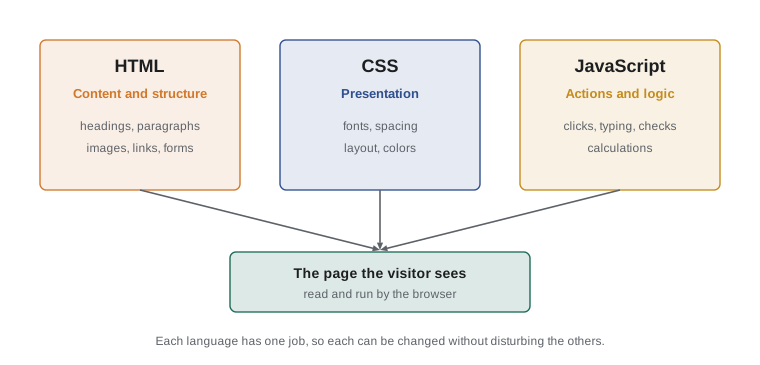
The three web languages divide the work between them. HTML describes the content and structure of a page: the headings, paragraphs, images, links and forms. CSS describes the presentation: colors, fonts, spacing and layout. JavaScript describes the behavior: what happens when the visitor types, clicks, scrolls or submits, and any calculation the page needs to do. Keeping the three apart makes each one easier to read and change, and it is the reason Mira could build the Food Hub's site without writing a line of JavaScript.
JavaScript is not related to Java, despite the name. Java is a separate language, created at Sun Microsystems, that is mostly used for large server programs and Android apps. The name JavaScript was a marketing decision made in 1995, when Java was the most talked-about language in the industry. The two share some punctuation, as many languages do, but they were designed by different people for different jobs. If you search for help, include the word JavaScript in full, or the abbreviation JS, so that you do not end up reading Java answers.
A short history
JavaScript was created in 1995 by Brendan Eich at Netscape, the company behind the most popular browser of the day. Netscape wanted a simple scripting language that web designers could use to make pages respond to visitors, and Eich wrote the first version in about ten days. It was first called Mocha, then LiveScript, and finally JavaScript when the browser shipped.
Other browser makers soon copied the language, and each copy behaved a little differently. To stop the web splitting into incompatible versions, Netscape handed the language to Ecma International, a standards organization in Geneva, in 1996. The standard is called ECMAScript, and its official document is ECMA-262. JavaScript is the everyday name of the language; ECMAScript is the name of the specification that says exactly how it must behave. Browser makers, Node.js and other runtimes all build their engines to match that specification.
For many years the standard changed slowly. The fifth edition, ES5, arrived in 2009. The sixth edition, published in 2015 and often called ES6 or ES2015, was the biggest update in the language's history. It added let and const for variables, arrow functions, template literals, classes, modules and much more. Since 2015 a new edition has been published every June, named after its year: ES2016, ES2017 and so on. Each one adds a handful of features that have been agreed by TC39, the committee of browser makers, companies and invited experts that maintains the language.
The newest edition at the time of writing is ECMAScript 2026, approved by the Ecma General Assembly on June 30, 2026. Among other things, it adds Math.sumPrecise for adding long lists of decimal numbers without rounding drift, Array.fromAsync, Error.isError, and methods for converting byte arrays to and from base64 and hexadecimal text. You will not need any of these in this course, but they show that the language is still growing. This course teaches modern JavaScript: the style that ES2015 introduced and later editions refined. You will see let and const rather than the older var, template literals rather than long chains of +, and arrow functions where they make code clearer.
| Year | Event |
|---|---|
| 1995 | Brendan Eich writes the first version at Netscape; it ships as JavaScript |
| 1997 | First edition of the ECMAScript standard, ECMA-262 |
| 2008 | Google releases Chrome with the fast V8 engine |
| 2009 | ES5 is published; Ryan Dahl releases Node.js, built on V8 |
| 2015 | ES2015 (ES6) adds let, const, arrow functions, classes and modules |
| 2016 onward | A new edition every June, named after its year |
| 2026 | ECMAScript 2026 is approved on June 30; Node.js 26 becomes the long-term support line in October |
Engines and runtimes
A computer's processor cannot read JavaScript directly. It needs a program that reads JavaScript source code and carries out its instructions. That program is a JavaScript engine. Each major browser has its own engine: V8 in Google Chrome, Microsoft Edge, Opera and Brave; SpiderMonkey in Mozilla Firefox; and JavaScriptCore in Apple Safari. All three follow the ECMAScript standard, so the same program gives the same answers in each of them.
Early engines were slow interpreters that worked through a program one statement at a time. Modern engines are far more clever. They start by interpreting your code so that it can begin running straight away, watch which parts run most often, and then compile those parts into fast machine code while the program is running. This technique is called just-in-time compilation, or JIT. You never have to think about it, but it is why JavaScript, once considered a toy language, now runs large applications such as online maps, spreadsheets and video editors.
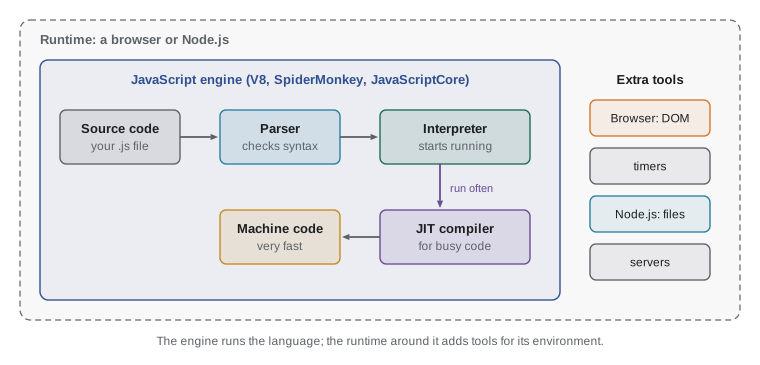
An engine on its own only understands the language itself: numbers, text, variables, functions and so on. It does not know about web pages, files or networks. Those abilities come from the runtime, the larger program that hosts the engine and gives it extra tools. A browser is one runtime. It gives JavaScript the Document Object Model (DOM), so that code can read and change the page, plus tools for timers, network requests and storage.
Node.js is another runtime. Ryan Dahl released it in 2009 by taking the V8 engine out of Chrome and wrapping it in tools for reading files, running web servers and talking to databases. With Node.js, JavaScript runs on servers and on your own computer, outside any browser. Much of the software that web developers use every day, including package managers, build tools and testing tools, is written in JavaScript and runs on Node.js. Two newer runtimes, Deno and Bun, do similar jobs with different design choices.
Node.js publishes a new major version each spring. Even-numbered versions become long-term support (LTS) releases in October and are maintained for about two and a half more years, which is why businesses choose them for real work. As of November 2026, Node.js 26 is the Active LTS line: it was released in May 2026, entered long-term support in October and is scheduled to receive fixes until April 2029. Node.js 24 is in maintenance, receiving only important fixes until April 2028, and Node.js 22 reaches its end of life in April 2027. The Node.js project has also announced that, starting in 2027, it will move to one major release a year. When you install Node.js in the next lesson, choose the current LTS version.
| Runtime | Engine | Typical use |
|---|---|---|
| Chrome, Edge, Opera, Brave | V8 | Web pages in the browser |
| Firefox | SpiderMonkey | Web pages in the browser |
| Safari | JavaScriptCore | Web pages on Apple devices |
| Node.js | V8 | Servers, command-line tools, build tools |
| Deno | V8 | Servers and scripts, with built-in security permissions |
| Bun | JavaScriptCore | Servers and scripts, with a built-in package manager |
The language is the same in every runtime. The extra tools are not. Code that uses document to change a heading only works in a browser, because only a browser has a page. Code that reads a file from disk only works in Node.js, because a browser is not allowed to read your files without asking. In this course you will learn the core language, which works everywhere. The examples print their results to the console, a text area for program output, so that you can concentrate on the language before you start changing pages in The DOM and Browser Events.
Where JavaScript runs today
JavaScript began in the browser, but it has spread much further. Gareth sketched the list on the whiteboard for Mira, starting with the jobs closest to the studio's own work.
In web pages. This is still the main use. Almost every website you visit runs JavaScript, from a simple menu that opens on a phone to a full application such as webmail or online banking. The browser runs it on the visitor's device. This is called client-side or front-end code.
On web servers. With Node.js, Deno or Bun, the same language runs the server that sends pages and data to the browser, stores orders in a database and sends confirmation emails. This is called server-side or back-end code. A developer who knows JavaScript can work on both sides of a web application, which is one reason the language is so popular with small teams.
In tools and apps. Desktop applications such as Visual Studio Code, the code editor many developers use, are built with web technologies and JavaScript. Mobile apps can be written in JavaScript with frameworks such as React Native. Cloud platforms run small JavaScript functions on servers spread around the world, close to the visitor, which is called edge computing.
Inside other programs. Spreadsheets, design tools and automation services often let users write small scripts in JavaScript to extend them. Learning the language opens all of these doors, not just the browser one.
For the Food Hub's requests, Mira needs only the first use: JavaScript running in the browser on the Food Hub's own pages. But Gareth pointed out that the skills carry over. "The arithmetic for a lunch order is the same whether it runs in a browser, on a server or in a spreadsheet script," he said. "Learn the language first. Where it runs is the easy part."
Your first JavaScript statements
The simplest useful statement in JavaScript prints a message. In both browsers and Node.js, the built-in console.log function writes whatever you give it to the console. Text in a program is written between quotation marks and is called a string. Try the first example: press Run and watch the output appear.
console.log('Welcome to the Riverside Community Food Hub');
console.log('Grocery program: Monday to Saturday');
console.log('Lunch counter: weekdays from 11');Welcome to the Riverside Community Food Hub Grocery program: Monday to Saturday Lunch counter: weekdays from 11
What this code does
Three statements run from top to bottom, each printing one line of text in the console. The text between the quotation marks is printed exactly as written, without the quotation marks. The order of the output matches the order of the statements in the program.
Each line of that program is one statement. A statement here has three parts: the name console.log, a pair of parentheses containing what to print, and a semicolon that marks the end of the statement. The engine runs the statements in order, from top to bottom, so the output appears in the same order. This idea, that a program is a sequence of steps carried out one after another, is the foundation of everything else in the course.
You can write strings with single quotes or double quotes; 'Soup' and "Soup" are the same string. This course uses single quotes for plain strings, which is the most common modern style, and switches to double quotes only when the text itself contains an apostrophe. Lesson 5 covers strings in detail.
console.log is not limited to text. Give it a number or a calculation and it prints the result. Give it several values separated by commas and it prints them all on one line with a space between each.
console.log(4.75 + 3.25);
console.log('Volunteer hours this week:', 6 * 1.5);
console.log('Soup', 3.5, 'Sandwich', 5);8 Volunteer hours this week: 9 Soup 3.5 Sandwich 5
What this code does
The first line adds two prices and prints the total, 8. The second prints a label followed by the result of multiplying 6 shifts by 1.5 hours. The third shows that one console.log can print several values: each comma-separated value appears in order with a single space between them.
Look closely at the first result. JavaScript printed 8, not 8.00. A number in JavaScript is just a value; it has no idea that it represents money, so it drops zeros that add nothing. Formatting numbers as prices with two decimal places is a job for later lessons. The program also did the arithmetic before printing. The engine works out the value of 4.75 + 3.25 first and then hands that value to console.log.
Comments, semicolons and spacing
Programs are read by people as well as by computers. A comment is a note in the code that the engine ignores. Two slashes, //, start a comment that runs to the end of the line. Text between /* and */ is a comment that can span several lines. Good comments explain why the code does something, not what it does, because the code already says what.
// Opening hours for the grocery program
const opens = 8;   // 8 in the morning
const closes = 17; // 5 in the afternoon

/* The program is open every day,
   so hours per week is hours per day times 7. */
console.log('Hours per day:', closes - opens);
console.log('Hours per week:', (closes - opens) * 7);Hours per day: 9 Hours per week: 63
What this code does
The engine skips every comment, so only the two console.log lines produce output. Two named values, opens and closes, store the opening and closing hours on a 24-hour clock. The program subtracts them to get 9 hours a day and multiplies by 7 to get 63 hours a week.
That example also slipped in a preview of the next lessons. The word const creates a named value, called a constant, so that the program can refer to it later by name. Writing closes - opens is clearer than writing 16 - 7, because a reader can see what the numbers mean. Lesson 3 explains const and its partner let properly.
Semicolons end statements. JavaScript has a rule called automatic semicolon insertion that adds missing semicolons in most places, so you will see code online written without them. The rule has a few surprising exceptions, though, and code with semicolons is never confused by them. This course always writes them, and you should too while you are learning.
Spaces and blank lines between statements do not change what a program does, but they make a big difference to how easily it can be read. Indent code inside braces by two spaces, leave a blank line between groups of related statements, and put spaces around operators such as + and -. Gareth keeps a simple rule: "Write code for the next person who has to read it. Most of the time, that person is you, three months from now."
JavaScript is case-sensitive
JavaScript treats capital and small letters as different. console.log works; Console.log and console.Log do not, because the engine looks for names exactly as they are spelled. The same applies to every name you create: price, Price and PRICE would be three different names. When a program fails with a message that something "is not defined", check the capital letters first.
When the engine meets something it cannot understand, it stops and reports an error. An error message has a type, such as SyntaxError or ReferenceError, a short description and usually a line number. Errors are normal. Every programmer sees dozens of them a day, and reading them calmly is a skill you will practice throughout the course and study in detail in Debugging JavaScript. In the editor below each example, try changing console.log to Console.log and press Run to see what the browser reports, then change it back.
Try it yourself
A welcome sign for the counter
Paul wants a short welcome message for the screen above the lunch counter. Write a program that prints exactly these three lines, in this order: Welcome to the lunch counter, Today's soup: squash and lentil and Tips support the youth garden.
Use one console.log statement per line. The second line contains an apostrophe, so write that string with double quotes.
// Print the three lines of the welcome sign here
console.log('Welcome to the lunch counter');
How this course runs your code
Every runnable example in this course has a Run button. When you press it, your browser runs the code in a separate, safe area called a Web Worker and shows whatever the program prints. Nothing is sent to a server; the code runs on your own device, in the same JavaScript engine your browser uses for web pages. You can edit any example and run it again, which is the fastest way to learn: change a number, predict the result, then check.
Because the code runs away from the page, it has no access to document or to the page itself, so this course's examples print to the console rather than changing the page. Each run is limited to ten seconds, which protects you from programs that loop forever. Exercises have a Check button that runs your code and compares its output with the expected answer. If a check fails, read the message, change your code and try again; there is no penalty for trying.
Later in the course you will see short listings of HTML pages that load JavaScript, so that you know how code reaches a real web page. Those listings do not have a Run button, because they need a full browser page. You can try them in Node.js or in your own browser after the next lesson. Here is the shape of one, as a preview.
<!-- shifts.html: a page that loads a JavaScript file -->
<!DOCTYPE html>
<html lang="en">
<head>
  <meta charset="utf-8">
  <title>Volunteer shifts</title>
  <script src="shifts.js" defer></script>
</head>
<body>
  <h1>Volunteer shifts</h1>
</body>
</html>
The script element tells the browser to download shifts.js and run it. The defer attribute tells the browser to wait until it has read the whole page before running the script, which is the safe default for most pages. You will open exactly this kind of page in the browser console in the next lesson.
Try it yourself
Hours for a kitchen volunteer
A community kitchen volunteer works from 9 until 17 on a 24-hour clock, on six days in November. Complete the program so that it prints Kitchen hours per day: 8 on the first line and Kitchen hours in November: 48 on the second.
Let JavaScript do the arithmetic: use the constants opens and closes in your calculations rather than typing 8 or 48 yourself.
const opens = 9;
const closes = 17;
// Print the hours per day and per week here
Common mistakes
MistakeJavaScript is a simpler version of Java.
InsteadThe two languages are unrelated. The name was a 1995 marketing choice; they were designed separately for different jobs.
MistakeJavaScript only runs in web browsers.
InsteadBrowsers are the main home of JavaScript, but runtimes such as Node.js, Deno and Bun run it on servers and personal computers.
MistakeConsole.log('Hi') and console.log('Hi') are the same.
InsteadJavaScript is case-sensitive. Only console.log, in small letters, is the built-in function.
MistakeECMAScript is a different language from JavaScript.
InsteadECMAScript is the name of the standard; JavaScript is the everyday name for the language that follows it.
MistakeLeaving out semicolons is always safe because the engine adds them.
InsteadAutomatic semicolon insertion has exceptions. Ending each statement with a semicolon avoids them.
Summary and key terms
- JavaScript is the programming language of the web, alongside HTML for content and CSS for presentation.
- Brendan Eich created it at Netscape in 1995, and Ecma International maintains its standard, ECMAScript, which TC39 updates every June.
- ECMAScript 2026, approved on June 30, 2026, is the latest edition.
- An engine such as V8, SpiderMonkey or JavaScriptCore runs JavaScript, using just-in-time compilation for speed.
- A runtime hosts the engine and adds tools: browsers add the DOM, while Node.js adds files and servers.
- Node.js 26 is the Active LTS line as of late 2026.
- A program is a sequence of statements run from top to bottom, and console.log prints values to the console.
- Comments are ignored by the engine, semicolons end statements, and JavaScript is case-sensitive.
- JavaScript
- The programming language that gives web pages behavior; also used on servers and in tools.
- ECMAScript
- The official standard (ECMA-262) that defines how JavaScript behaves.
- TC39
- The Ecma committee that agrees new features and publishes a new ECMAScript edition each year.
- engine
- The program that reads and runs JavaScript, such as V8, SpiderMonkey or JavaScriptCore.
- runtime
- The environment that hosts an engine and adds tools, such as a browser or Node.js.
- Node.js
- A runtime that runs JavaScript outside the browser, built on the V8 engine.
- statement
- One instruction in a program, usually ended with a semicolon.
- console
- A text area where a program prints output and errors.
- comment
- A note in the code that the engine ignores, written after // or between /* and */.
- string
- A piece of text in a program, written between quotation marks.
Practice problems
Work each problem on paper first, then reveal the answer to check.
Name the three languages of the web and the job each one does.
Show answer
HTML describes content and structure, CSS describes presentation, and JavaScript describes behavior and calculations.
What is the difference between an engine and a runtime?
Show answer
An engine runs the JavaScript language itself. A runtime hosts the engine and adds extra tools, such as the DOM in a browser or file access in Node.js.
What does console.log('Total:', 2 * 4.5) print?
Show answer
It prints Total: 9, with a space between the label and the value.
Why does Node.js recommend LTS versions for real projects?
Show answer
LTS versions receive fixes for about two and a half years after they enter long-term support, so a project can rely on them without upgrading every few months.
Why might Console.log('Hi') fail?
Show answer
JavaScript is case-sensitive, so Console with a capital C is a different name that does not exist, and the engine reports a ReferenceError.
Lesson quiz · 5 questions
Score 60% or more to complete this lesson.
Create a free account to save your progress, take quizzes and earn a certificate.