
JAVA-280 · Lesson 11 of 12 · 25 min
Rollbacks and incident response
▶ Video coming soon A video version of this lesson is on the way.
On Thursday, April 6, the last regular session, Leif ran a fire drill. He had deployed the health service with a deliberate bug on the shop server an hour before Hamza arrived, and the dashboard from lesson 9 showed its error rate climbing. "It is Saturday, 10:15, the shop is full and Odile is on the phone," he said. "Go." Hamza's first instinct was to open the code and find the bug. Leif's rule was the opposite: first stop the damage, then find the cause. This lesson is about both halves, undoing a bad deployment quickly and running an incident calmly.
Mitigate first, diagnose later
During an incident the goal is to restore service, not to understand the bug. The fastest way back is almost always to undo the last change: if a deployment went out at 10:05 and errors started at 10:06, roll back to the previous version, see whether the errors stop, and investigate afterward on a version nobody depends on. A fix written under pressure, deployed through a shortened pipeline, is how one incident becomes two.
Rolling back is only fast if it was prepared before it was needed. That means three things: the previous version's artifact must still exist, the deployment must record which version was running before, and the database must still work with the previous version. The first two were already true from lessons 3 and 6: images are kept in the registry by version, and deploy.sh writes deployed-version. The third is the subtle one, and it comes later in this lesson.
Blue-green deployment
Lesson 6's deployment stopped the old container before the new one was ready, leaving a short gap. A blue-green deployment removes the gap and makes rollback instant. Two copies of the service exist side by side, called blue and green. One is live and receives all traffic through the reverse proxy; the new version is started in the other, checked through its health endpoint, and only then does the proxy switch. The old copy keeps running, idle, so rolling back is switching the proxy back, which takes a second.
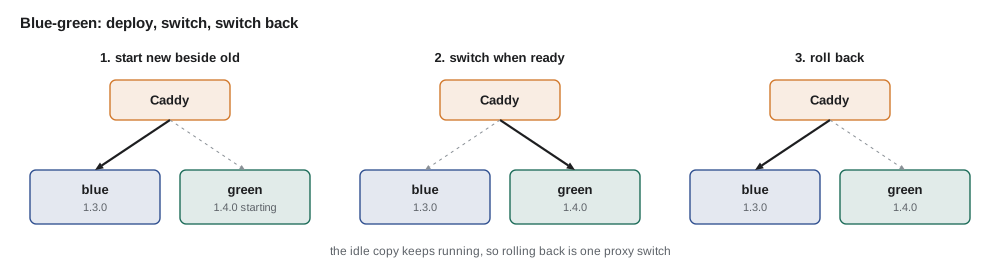
The example models the switch as a small state machine. It never sends traffic to a color that has not passed its health check, and it keeps track of what to roll back to.
import java.util.*;

public class Main {
    static String live = "blue";
    static final Map<String, String> version = new HashMap<>(Map.of("blue", "1.3.0", "green", "-"));

    static String other() { return live.equals("blue") ? "green" : "blue"; }

    static void deploy(String v, boolean healthy) {
        String idle = other();
        version.put(idle, v);
        System.out.println("start " + v + " on " + idle + (healthy ? ": ready" : ": never ready"));
        if (!healthy) {
            System.out.println("  abort; traffic stays on " + live + " (" + version.get(live) + ")");
            return;
        }
        live = idle;
        System.out.println("  switch proxy to " + live + "; " + other() + " (" + version.get(other()) + ") kept for rollback");
    }

    static void rollback() {
        live = other();
        System.out.println("rollback: proxy back to " + live + " (" + version.get(live) + ")");
    }

    public static void main(String[] args) {
        deploy("1.4.0", true);
        rollback();
        deploy("1.4.1", false);
        deploy("1.4.1", true);
        System.out.println("live: " + live + " " + version.get(live));
    }
}start 1.4.0 on green: ready switch proxy to green; blue (1.3.0) kept for rollback rollback: proxy back to blue (1.3.0) start 1.4.1 on green: never ready abort; traffic stays on blue (1.3.0) start 1.4.1 on green: ready switch proxy to green; blue (1.3.0) kept for rollback live: green 1.4.1
What this code does
deploy always starts the new version on the idle color, and only a healthy start moves the live pointer, so a broken version never receives a request. rollback flips the pointer back to the color that still holds the previous version, which is why the old copy must keep running until the new one has proved itself. After the rollback blue is live again, so both attempts at 1.4.1 go to green, replacing the 1.4.0 that was rolled back, while 1.3.0 on blue stays as the fallback.
On the shop server the two colors are two Compose services, booking-api-blue and booking-api-green, and the switch is a one-line change to the Caddyfile followed by caddy reload, which does not drop connections. Memory was the cost: two copies at 768 megabytes each. Leif's server had four gigabytes, so it fitted, and the idle copy was stopped an hour after a successful deployment.
#!/bin/sh
# switch.sh COLOR : point api.secondgear.org at booking-api-COLOR
set -eu
cd /srv/secondgear
COLOR="$1"
curl -fsS "http://booking-api-$COLOR:9090/actuator/health/readiness" >/dev/null
sed "s/booking-api-[a-z]*:8080/booking-api-$COLOR:8080/" Caddyfile > Caddyfile.new
mv Caddyfile.new Caddyfile
docker compose exec -T proxy caddy reload --config /etc/caddy/Caddyfile
echo "$COLOR" > live-color
echo "traffic now on $COLOR"
What this code does
The script checks readiness once more immediately before switching, so it cannot point the proxy at a copy that has died since it was checked. Writing a new file and moving it into place means Caddy never reads a half-written configuration. caddy reload applies the change without dropping open connections, and live-color records the state for the next deployment and for the runbook.
Canary releases
A canary release sends a small share of traffic, say one request in twenty, to the new version, compares its error rate and latency with the old one, and either increases the share or rolls back. It catches problems that only real traffic reveals, while exposing few customers to them. It needs enough traffic for the comparison to mean something: with a few booking requests a minute, a canary of one in twenty would see a handful of requests an hour. Leif mentioned it because Hamza would meet it at larger employers, and because the decision logic is worth knowing.
public class Main {
    record Stats(long requests, long errors, double p95ms) {
        double errorRate() { return requests == 0 ? 0 : (double) errors / requests; }
    }

    static String judge(Stats baseline, Stats canary) {
        if (canary.requests() < 200) return "wait (only " + canary.requests() + " canary requests)";
        if (canary.errorRate() > baseline.errorRate() * 2 + 0.001) return "ROLL BACK (errors)";
        if (canary.p95ms() > baseline.p95ms() * 1.25) return "ROLL BACK (latency)";
        return "promote";
    }

    public static void main(String[] args) {
        Stats base = new Stats(9500, 6, 180);
        System.out.println(judge(base, new Stats(120, 0, 170)));
        System.out.println(judge(base, new Stats(500, 1, 175)));
        System.out.println(judge(base, new Stats(500, 9, 178)));
        System.out.println(judge(base, new Stats(500, 0, 260)));
    }
}wait (only 120 canary requests) promote ROLL BACK (errors) ROLL BACK (latency)
What this code does
The canary is compared with the baseline running at the same time, not with last week, so a busy Saturday affects both equally. A minimum number of requests stops a decision on too little evidence, and the small constant in the error test keeps one unlucky failure from rolling back a version whose baseline had almost none. Latency is judged by the 95th percentile, allowing a quarter more before rolling back.
Feature flags
Sometimes the risky part of a release is one feature, not the whole version. A feature flag is a setting that switches a feature on or off at run time, so the code can be deployed with the feature off and released later by switching it on, the difference between deployment and release from lesson 1. If the feature misbehaves, switching it off is a rollback that leaves everything else in place. The booking API's limit of two active bookings per phone was released this way, so Odile could turn it on once she had told the counter staff.
import java.util.*;

public class Main {
    record Flags(Map<String, Boolean> values) {
        boolean on(String name) { return values.getOrDefault(name, false); }
    }

    static String book(Flags flags, String phone, Map<String, Integer> active) {
        int n = active.getOrDefault(phone, 0);
        if (flags.on("booking.limit-per-phone") && n >= 2) return "409 limit reached for this phone";
        active.merge(phone, 1, Integer::sum);
        return "201 booked (" + (n + 1) + " active)";
    }

    public static void main(String[] args) {
        Map<String, Integer> active = new HashMap<>();
        Flags off = new Flags(Map.of());
        Flags on = new Flags(Map.of("booking.limit-per-phone", true));
        for (int i = 0; i < 3; i++) System.out.println("flag off: " + book(off, "614-555-0142", active));
        active.clear();
        for (int i = 0; i < 3; i++) System.out.println("flag on:  " + book(on, "614-555-0142", active));
    }
}flag off: 201 booked (1 active) flag off: 201 booked (2 active) flag off: 201 booked (3 active) flag on: 201 booked (1 active) flag on: 201 booked (2 active) flag on: 409 limit reached for this phone
What this code does
The flag defaults to off when it is not set, so deploying the code changes nothing until someone switches it on. With the flag on, the third booking for the same phone is refused with 409, the status the API uses for conflicts. Flags should be removed once a feature is settled, or the code fills with switches nobody remembers.
Databases: expand and contract
Code can be rolled back in a second; data cannot. If version 1.4.0 runs a Flyway migration that renames a column, version 1.3.0 no longer finds the column it expects, and rolling back the code breaks the service a second time. Flyway's migrations only go forward, and an undo script written in a hurry is the riskiest code of the night. The answer is to make every migration backward compatible with the previous version of the code, using the expand and contract pattern: first expand the schema in a way both versions can use, deploy the code that uses the new shape, and only in a later release contract the schema by removing what the old version needed.
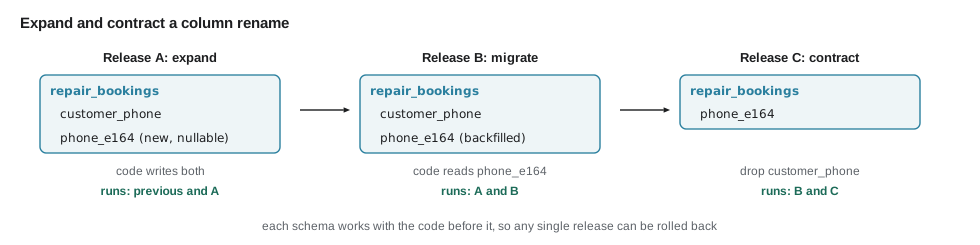
The example checks a proposed migration against the columns the previous code version reads, which is the question to ask before every deployment.
import java.util.*;

public class Main {
    static Set<String> apply(Set<String> columns, List<String> migration) {
        Set<String> after = new TreeSet<>(columns);
        for (String step : migration) {
            String[] p = step.split(" ");
            switch (p[0]) {
                case "add" -> after.add(p[1]);
                case "drop" -> after.remove(p[1]);
                case "rename" -> { after.remove(p[1]); after.add(p[2]); }
            }
        }
        return after;
    }

    static void check(String name, Set<String> schema, List<String> migration, Set<String> previousCodeReads) {
        Set<String> after = apply(schema, migration);
        Set<String> missing = new TreeSet<>(previousCodeReads);
        missing.removeAll(after);
        System.out.println(name + ": " + (missing.isEmpty() ? "safe to roll back" : "UNSAFE, previous version needs " + missing));
    }

    public static void main(String[] args) {
        Set<String> schema = Set.of("id", "bike_tag", "customer_phone", "start_at", "status");
        Set<String> v13reads = Set.of("id", "bike_tag", "customer_phone", "start_at", "status");
        check("V7 rename customer_phone", schema, List.of("rename customer_phone phone_e164"), v13reads);
        check("V7 add phone_e164", schema, List.of("add phone_e164"), v13reads);
        check("V8 drop customer_phone (after 1.5 is everywhere)", apply(schema, List.of("add phone_e164")),
              List.of("drop customer_phone"), Set.of("id", "bike_tag", "phone_e164", "start_at", "status"));
    }
}V7 rename customer_phone: UNSAFE, previous version needs [customer_phone] V7 add phone_e164: safe to roll back V8 drop customer_phone (after 1.5 is everywhere): safe to roll back
What this code does
apply works out the columns after a migration, and check compares them with the columns the previous code version reads. Renaming the column in one step removes a column that version 1.3 needs, so a rollback would fail, while adding a new column leaves the old one in place. Dropping the old column becomes safe only once the previous version in production is one that no longer reads it.
Running an incident
An incident is any unplanned event that harms the service for its users, from a slow page to a complete outage. Large companies have detailed procedures; Second Gear needed a page. Leif's version named three roles, even if one person holds two of them: the incident lead, who decides what to do and keeps a timeline; the person doing the work, who rolls back or restarts; and the person communicating, who tells the shop and, if necessary, customers. At Second Gear, Leif or Hamza leads, and Odile communicates, because she knows what to say to a customer at the counter.
| Severity | Meaning at Second Gear | Response |
|---|---|---|
| SEV1 | Nobody can book; the counter cannot sell parts | Page Leif and Hamza; roll back now; Odile tells the counter |
| SEV2 | Booking works but is slow or some requests fail | Page during opening hours; mitigate within the hour |
| SEV3 | A minor feature is wrong; a workaround exists | Ticket for the next working day |
The runbook that JAVA-260's review asked for became the first thing the incident lead opens. It has a section per alert: what the alert means, what to look at first, how to roll back, and whom to call. It is written for someone tired, at night, who did not write the code.
## BookingApiErrorBudgetBurn

What it means: more than 7 in every 100 booking API requests are failing, now and for the past hour.

1. Look at the dashboard's Errors row. Which endpoints? Since when?
2. Was there a deployment in the last two hours? cat /srv/secondgear/deployed-version and the release page.
   If yes: roll back first (step 4), investigate after.
3. Is the database up? docker compose ps db; Health row on the dashboard.
4. Roll back: ./switch.sh $(cat /srv/secondgear/previous-color)
   Check the error rate falls within five minutes.
5. Tell Odile (SEV1) or post in the shop channel (SEV2) what is happening and when you will update next.
6. Open an incident note with the timeline; schedule the review within a week.
What this code does
Each step is a command or a question with a yes or no answer, so it can be followed without thinking about the design. Rolling back comes before investigating whenever a deployment is a suspect, which is the rule from the start of this lesson. The last step makes sure every incident ends with a review, not just with the service back.
Blameless reviews
After an incident the team writes a short postmortem, also called an incident review: what happened, when, what the impact was, how it was detected and fixed, and what will change so that it does not happen again, or is caught sooner. It is blameless: it asks how the system allowed the mistake, not who made it, because people who fear blame hide the details that a fix needs. Leif's drill ended with Hamza writing one for the deliberate bug, and the timeline gave the two numbers that matter, time to detect and time to restore.
import java.time.*;
import java.util.*;

public class Main {
    public static void main(String[] args) {
        LinkedHashMap<String, LocalTime> t = new LinkedHashMap<>();
        t.put("bad version deployed", LocalTime.of(19, 2));
        t.put("errors start", LocalTime.of(19, 3));
        t.put("alert fires", LocalTime.of(19, 9));
        t.put("Hamza acknowledges", LocalTime.of(19, 11));
        t.put("rollback switched", LocalTime.of(19, 14));
        t.put("error rate normal", LocalTime.of(19, 16));
        t.put("cause found (null version check)", LocalTime.of(19, 48));

        LocalTime start = t.get("errors start");
        t.forEach((what, when) -> System.out.printf("%s  %+3d min  %s%n", when, Duration.between(start, when).toMinutes(), what));
        System.out.println("time to detect:  " + Duration.between(start, t.get("alert fires")).toMinutes() + " min");
        System.out.println("time to restore: " + Duration.between(start, t.get("error rate normal")).toMinutes() + " min");
        System.out.println("time to cause:   " + Duration.between(start, t.get("cause found (null version check)")).toMinutes() + " min (after service was restored)");
    }
}19:02 -1 min bad version deployed 19:03 +0 min errors start 19:09 +6 min alert fires 19:11 +8 min Hamza acknowledges 19:14 +11 min rollback switched 19:16 +13 min error rate normal 19:48 +45 min cause found (null version check) time to detect: 6 min time to restore: 13 min time to cause: 45 min (after service was restored)
What this code does
Each event is measured from the moment errors started, which is when customers began to be affected, not from when someone noticed. The service was restored after thirteen minutes, more than half an hour before the cause was understood, which is what mitigating first looks like in numbers. The six minutes before the alert are the next thing to improve, perhaps with a shorter alert window during opening hours.
Exercises
Try it yourself
Roll back or not?
Complete decide: given the error rate before a deployment and after it (as fractions) and the minutes since the deployment, return roll back if the rate after is more than twice the rate before plus 0.01 and the deployment was less than 120 minutes ago; return investigate if the rate rose that much but the deployment is older; otherwise return fine.
public class Main {
    static String decide(double before, double after, int minutesSince) {
        return "fine";
    }

    public static void main(String[] args) {
        System.out.println(decide(0.002, 0.08, 6));
        System.out.println(decide(0.002, 0.08, 300));
        System.out.println(decide(0.002, 0.010, 6));
        System.out.println(decide(0.0, 0.0, 0));
    }
}
Try it yourself
Mean time to restore
Each incident is given as two times, HH:MM-HH:MM: when the impact started and when service was restored, on the same day. Complete meanMinutes so that it returns the mean duration in whole minutes (rounded down), and main prints it with the longest incident's duration.
import java.time.*;
import java.util.*;

public class Main {
    static long minutes(String incident) {
        return 0;
    }

    static long meanMinutes(List<String> incidents) {
        return 0;
    }

    public static void main(String[] args) {
        List<String> log = List.of("10:06-10:19", "19:03-19:16", "08:40-09:35", "14:00-14:04");
        System.out.println("mean " + meanMinutes(log) + " min, longest "
            + log.stream().mapToLong(Main::minutes).max().orElse(0) + " min");
    }
}
The drill's postmortem had two actions: shorten the alert window to five minutes during opening hours, and add the version check that had caused the bug to the smoke tests. Leif closed the session by saying that the capstone would put all of it together: the pipeline would build, test, publish, deploy blue-green and be rolled back on purpose at least once before anyone trusted it.
Common mistakes
MistakeDebugging in production while customers wait.
InsteadRoll back first when a recent deployment is suspect; investigate on a version nobody depends on.
MistakeStopping the old version before the new one is ready.
InsteadUse blue-green: start beside it, check health, switch, keep the old copy for rollback.
MistakeRenaming or dropping a column in the same release as the code change.
InsteadExpand and contract over several releases so the previous version always works.
MistakeWriting the runbook during the incident.
InsteadWrite it beforehand, one section per alert, as steps someone tired can follow.
MistakeAsking who caused an incident.
InsteadRun a blameless review that asks how the system allowed it and what will change.
Summary and key terms
- During an incident, restoring service comes before finding the cause, and rolling back the last change is usually the fastest way.
- Rollbacks need the previous artifact, a record of what was running and a database the previous version can use.
- Blue-green deployments run the new version beside the old one, switch the proxy only after a health check, and switch back to roll back.
- Canary releases compare a small share of traffic with the baseline and need enough traffic to judge.
- Feature flags separate deployment from release and allow one feature to be switched off.
- Database changes follow expand and contract so every migration stays compatible with the previous code version.
- Incidents have a lead, a doer and a communicator, severity levels, a runbook per alert, and end with a blameless review that measures time to detect and time to restore.
- Rollback
- Returning to the previous version of a service.
- Mitigation
- Restoring service before the cause is understood.
- Blue-green deployment
- Running two copies and switching traffic between them to deploy and roll back.
- Canary release
- Sending a small share of traffic to a new version and comparing it with the old.
- Feature flag
- A run-time switch that turns a feature on or off without deploying.
- Expand and contract
- Changing a database schema in steps so old and new code both keep working.
- Incident
- An unplanned event that harms the service for its users.
- Runbook
- Step-by-step instructions for responding to a specific alert or task.
- Postmortem
- A written review of an incident and the changes that follow it.
- Blameless
- Focused on how the system allowed a failure rather than who caused it.
Practice problems
Work each problem on paper first, then reveal the answer to check.
What should happen first when errors start right after a deployment?
Show answer
Roll back, then investigate.
Why does the idle color keep running after a blue-green switch?
Show answer
So that rolling back is only a proxy switch.
Why can renaming a column break a rollback?
Show answer
The previous code version still reads the old column name.
Who communicates with the shop during a SEV1 at Second Gear?
Show answer
Odile.
In the drill, how long did it take to restore service?
Show answer
Thirteen minutes from the start of errors.
Lesson quiz · 5 questions
Score 60% or more to complete this lesson.
Create a free account to save your progress, take quizzes and earn a certificate.