
JAVA-280 · Lesson 1 of 12 · 27 min
From code to production
▶ Video coming soon A video version of this lesson is on the way.
On Thursday, January 13, 2028, Hamza Belcourt stayed in the back room of Second Gear Cycles after the evening repair night had cleared out. The booking service he was writing in Ingrid Vallancourt's Wednesday sessions was two days old: a Spring Boot 4 project that answered one request with a list of free repair slots. Leif Quarmby, the build and release engineer who had taught Hamza Gradle the year before, put a mug of tea on the bench and wrote one line on the whiteboard: "It works on my laptop" is the start of the job, not the end. This course follows that job for twelve Thursdays, from a project on Hamza's laptop to a service that the shop's website and counter computer can rely on.
Every lesson uses the same service. By April it will be the booking API that the shop's website and counter app call, with its database in StockStore, the PostgreSQL schema Hamza built in the autumn. Leif already runs the shop's server, a small virtual machine he rents for the shop from a hosting company in Columbus, and he wants three things from Hamza before the booking API goes anywhere near it: that the thing deployed is exactly the thing tested, that a deployment can be undone in minutes, and that someone can tell from outside whether it is healthy.
What production means
Production is the environment where real people depend on the software: Odile Branscombe's customers booking a repair, Kofi Amankwah checking which parts are in stock, Tamsin Rhee planning the repair rack. Everything else is practice for it. Production differs from a laptop in ways that matter: it runs for weeks without a restart, it holds data that must not be lost, it is reached over the internet by strangers, and nobody is watching the console when it fails at three in the morning.
Deployment is the act of putting a new version of the software into an environment and starting it. A release is a version that the team has decided is ready for users; it is usually deployed to production, but the two words are not the same. A team can deploy a version to a test environment many times a day and release once a week, or deploy a new version to production with a feature switched off, and release the feature later by switching it on.
| Environment | Who uses it | What it is for at Second Gear |
|---|---|---|
| Local | Hamza, on his laptop | Writing code and running unit tests; a database in a container |
| CI | The build server, on every push | Compiling, testing and packaging the same way every time |
| Staging | Hamza, Leif, Tamsin | Trying a version on a copy of production before customers see it |
| Production | Customers, the counter, Kofi | The real service at api.secondgear.org |
The path from a commit to production
Leif drew the path that every change would follow. A developer commits a change and pushes it. A continuous integration server, CI for short, checks out exactly that commit, compiles it, runs every test and, if they pass, packages the result into an artifact, a file that can be deployed: an executable JAR in lesson 2, a container image in lesson 3. The artifact is stored with a version number. A deployment then takes that artifact, unchanged, to staging and, after checks, to production.
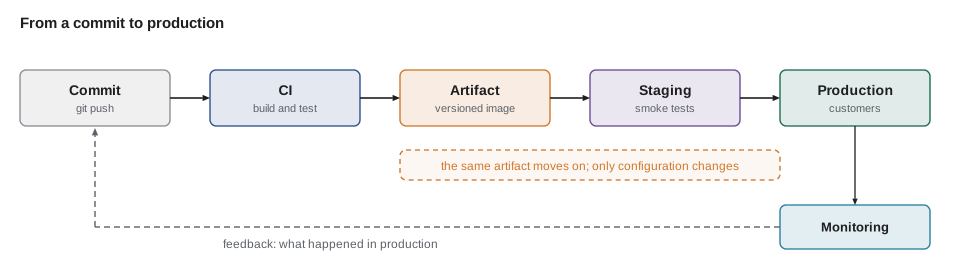
The rule that matters most is in the caption: build once, deploy many. If the JAR for production were rebuilt from the same source on a different machine, it could pick up a different library version or a different compiler, and the thing that passed the tests would not be the thing running. So each environment gets the same artifact and differs only in its configuration: the database address, the passwords, the log level. Lesson 5 is about keeping that configuration outside the artifact.
The next example models the path as a list of stages, each of which either passes or stops the line. It is the shape of every pipeline in this course: a sequence of gates, where a failure at one gate means no later stage runs.
import java.util.*;
import java.util.function.Supplier;

public class Main {
    record Stage(String name, Supplier<String> check) {}

    static boolean run(String commit, List<Stage> stages) {
        System.out.println("pipeline for commit " + commit);
        for (Stage s : stages) {
            String problem = s.check().get();
            if (problem != null) {
                System.out.println("  FAIL " + s.name() + ": " + problem);
                System.out.println("  later stages skipped; nothing was deployed");
                return false;
            }
            System.out.println("  ok   " + s.name());
        }
        System.out.println("  deployed " + commit + " to production");
        return true;
    }

    public static void main(String[] args) {
        int[] failingTests = {0};
        List<Stage> stages = List.of(
            new Stage("compile", () -> null),
            new Stage("unit tests", () -> failingTests[0] == 0 ? null : failingTests[0] + " test(s) failed"),
            new Stage("package jar", () -> null),
            new Stage("deploy to staging", () -> null),
            new Stage("smoke test staging", () -> null),
            new Stage("deploy to production", () -> null));
        run("4f2a9c1", stages);
        failingTests[0] = 2;
        run("7b31e08", stages);
    }
}pipeline for commit 4f2a9c1 ok compile ok unit tests ok package jar ok deploy to staging ok smoke test staging ok deploy to production deployed 4f2a9c1 to production pipeline for commit 7b31e08 ok compile FAIL unit tests: 2 test(s) failed later stages skipped; nothing was deployed
What this code does
Each stage is a name and a check that returns null when all is well or a short description of the problem. The run method goes through the stages in order and returns as soon as one fails, so the second commit, with two failing tests, never reaches packaging or deployment. The one-element array lets the lambdas see a value that main changes between the two runs.
Why small, frequent deployments are safer
Hamza's instinct, like most people's, was to deploy rarely, after a lot of testing, because each deployment felt risky. Leif argued the opposite. A deployment that contains three days of work has three days of changes that might break, and when it does, nobody knows which one. A deployment that contains one change is easy to check and, if it breaks, easy to undo. Research on software delivery, summarized each year in the DORA reports, has found again and again that teams who deploy more often also have fewer failed changes and recover from failures faster.
The DORA research measures delivery with a small set of numbers. Deployment frequency is how often a team deploys to production. Lead time for changes is how long it takes from a commit to that commit running in production. Change failure rate is the share of deployments that cause a problem needing a fix or a rollback. Time to restore, also called failed deployment recovery time, is how long it takes to recover when one does. The first two measure speed and the last two measure stability, and the point of the research is that good teams improve both together.
| Measure | Question it answers | How it is counted |
|---|---|---|
| Deployment frequency | How often do we deliver? | Production deployments per week or per day |
| Lead time for changes | How quickly does a change reach users? | Time from commit to running in production |
| Change failure rate | How often does a deployment hurt? | Failed deployments divided by all deployments |
| Time to restore | How quickly do we recover? | Time from a failure starting to service restored |
The next example computes all four from a small deployment log. Each entry records when the change was committed, when it reached production and whether it failed.
import java.time.*;
import java.util.*;

public class Main {
    record Deploy(LocalDateTime committed, LocalDateTime deployed, boolean failed, Duration restore) {}

    public static void main(String[] args) {
        List<Deploy> log = List.of(
            new Deploy(LocalDateTime.of(2028, 5, 1, 10, 0), LocalDateTime.of(2028, 5, 1, 10, 40), false, Duration.ZERO),
            new Deploy(LocalDateTime.of(2028, 5, 2, 14, 5), LocalDateTime.of(2028, 5, 2, 15, 20), true, Duration.ofMinutes(12)),
            new Deploy(LocalDateTime.of(2028, 5, 3, 9, 30), LocalDateTime.of(2028, 5, 3, 9, 55), false, Duration.ZERO),
            new Deploy(LocalDateTime.of(2028, 5, 4, 16, 0), LocalDateTime.of(2028, 5, 4, 16, 30), false, Duration.ZERO),
            new Deploy(LocalDateTime.of(2028, 5, 5, 11, 10), LocalDateTime.of(2028, 5, 5, 12, 0), false, Duration.ZERO));

        List<Long> leads = log.stream()
            .map(d -> Duration.between(d.committed(), d.deployed()).toMinutes())
            .sorted().toList();
        long failed = log.stream().filter(Deploy::failed).count();
        double restore = log.stream().filter(Deploy::failed)
            .mapToLong(d -> d.restore().toMinutes()).average().orElse(0);

        System.out.println("deployments this week: " + log.size());
        System.out.println("lead times (minutes): " + leads);
        System.out.println("median lead time: " + leads.get(leads.size() / 2) + " minutes");
        System.out.printf("change failure rate: %d of %d (%.0f in 100)%n", failed, log.size(), 100.0 * failed / log.size());
        System.out.printf("mean time to restore: %.0f minutes%n", restore);
    }
}deployments this week: 5 lead times (minutes): [25, 30, 40, 50, 75] median lead time: 40 minutes change failure rate: 1 of 5 (20 in 100) mean time to restore: 12 minutes
What this code does
Duration.between measures each lead time, and sorting the list makes the median simply the middle element. The failure rate is the number of failed deployments over the total, printed as a count out of 100 to keep the line readable. Only failed deployments contribute to the time to restore, which is why the filter comes before the average.
Second Gear will never deploy forty times a day, and it does not need to. The point Leif made was about direction: if a deployment is frightening, do it more often, in smaller pieces, until it is boring.
The twelve-factor rules that matter here
In 2011 a group of engineers at the hosting company Heroku wrote down twelve habits of applications that deploy and scale easily, called the twelve-factor app. Some of the twelve are about platforms that Second Gear will never use, but several are exactly what Leif wanted from the booking API, and the rest of the course keeps returning to them.
| Factor | What it asks | Where this course covers it |
|---|---|---|
| Codebase | One repository, many deployments | Lessons 1 and 4 |
| Dependencies | Declare them all; rely on nothing installed by hand | Lessons 2 and 3 |
| Config | Keep settings in the environment, not in the code | Lesson 5 |
| Build, release, run | Separate building an artifact from running it with configuration | Lessons 2, 4 and 10 |
| Processes | Keep no state in memory that cannot be lost | Lessons 3 and 6 |
| Port binding | The service listens on a port it is given | Lessons 2 and 3 |
| Disposability | Start fast, stop cleanly | Lessons 3, 8 and 11 |
| Dev/prod parity | Keep environments as alike as possible | Lessons 1 and 3 |
| Logs | Write logs as a stream to standard output | Lesson 9 |
Dev/prod parity deserves a closer look, because it is where "works on my laptop" usually breaks. Hamza's laptop ran Java 25 and PostgreSQL 17, but what would the server run? If staging used one Java version and production another, a test on staging would prove less than it seemed to. The example compares the settings of three environments and reports every difference, which is the first check Leif runs when a bug appears in one environment and not another.
import java.util.*;

public class Main {
    public static void main(String[] args) {
        Map<String, Map<String, String>> envs = new LinkedHashMap<>();
        envs.put("local", Map.of("java", "25.0.1", "postgres", "17", "timezone", "America/New_York", "profile", "local"));
        envs.put("staging", Map.of("java", "25.0.1", "postgres", "17", "timezone", "UTC", "profile", "staging"));
        envs.put("production", Map.of("java", "21.0.9", "postgres", "17", "timezone", "UTC", "profile", "prod"));

        Set<String> keys = new TreeSet<>();
        envs.values().forEach(m -> keys.addAll(m.keySet()));
        Set<String> expectedToDiffer = Set.of("profile");

        for (String key : keys) {
            Set<String> values = new TreeSet<>();
            envs.values().forEach(m -> values.add(m.getOrDefault(key, "(missing)")));
            if (values.size() == 1) continue;
            String tag = expectedToDiffer.contains(key) ? "expected " : "MISMATCH ";
            StringBuilder line = new StringBuilder(tag + key + ":");
            envs.forEach((env, m) -> line.append(" ").append(env).append("=").append(m.getOrDefault(key, "(missing)")));
            System.out.println(line);
        }
    }
}MISMATCH java: local=25.0.1 staging=25.0.1 production=21.0.9 expected profile: local=local staging=staging production=prod MISMATCH timezone: local=America/New_York staging=UTC production=UTC
What this code does
The keys of all three maps are gathered in a TreeSet so that they are checked in alphabetical order. For each key the distinct values are counted, and a key with only one value is the same everywhere and is skipped. The profile is meant to differ, but the Java version and the time zone are not, and they are exactly the two differences that cause bugs seen only in production.
The Java mismatch was invented for the example, but the time zone was real. Hamza's laptop used the shop's local time and Leif's server used UTC, so a slot at 9:00 on the laptop would have been stored as 9:00 UTC on the server, hours away from the right time. The fix, which Ingrid's lessons had already asked for, was for the booking service to use an explicit Clock in the shop's zone rather than the machine's default.
Who does what
In a large company, developers write code, an operations team runs it, and the two argue at the border. DevOps is the name for removing that border: the people who build a service also take part in deploying and running it, and they automate the steps between. At Second Gear the border is a bench: Hamza writes the service, Leif runs the server, and both want the same pipeline. Odile, as general manager, decides when a feature is released to customers. Kofi and Tamsin are the first users and the first to notice when something is wrong.
Leif also asked for one document before any code: a deployment checklist, the list of things that must be true before a version goes to production. At first it is a page of text that a person ticks; by the end of the course each line will be a check in the pipeline.
Booking API: production checklist (draft, Jan 13 2028)

[ ] All tests pass on the CI server, not just on a laptop
[ ] The artifact has a version number and was built by CI
[ ] The same artifact passed on staging
[ ] Database migrations are backward compatible with the running version
[ ] No secrets in the repository or in the artifact
[ ] Health endpoint answers UP on staging
[ ] Leif knows the deployment is happening
[ ] We know how to roll back, and the previous version is still available
What this code does
The checklist is written in plain words so that anyone at the shop can follow it. Each line is a question that can be answered yes or no, which is what makes it possible to automate later. The last line, knowing how to roll back, is the one people most often forget until they need it.
What can go wrong
Most production failures are not exotic. Leif listed the ones he had seen most often in his day job, and the course has a lesson for each.
| Failure | Typical cause | Lesson |
|---|---|---|
| It starts on the laptop but not on the server | Missing file, different Java, a dependency not in the artifact | 2, 3 |
| It passed the tests but fails in production | Different configuration or data | 1, 5 |
| A password appears in Git | Configuration committed with the code | 5 |
| It slows down and then dies after days | A memory leak or a heap too small for the container | 7, 8 |
| Nobody notices it is down | No health checks, metrics or alerts | 9 |
| Nobody knows what is running | No version numbers or release notes | 10 |
| A bad version cannot be undone | No rollback plan; a database change that cannot be reversed | 11 |
A last example shows why the pipeline has to check its own assumptions. Leif's rule is that the deployment step refuses an artifact unless CI built it from a commit on the main branch and its tests passed. A deployment script that trusts whatever file it is given will one day be given the wrong one.
import java.util.*;

public class Main {
    record Artifact(String file, String version, String commit, String branch, boolean testsPassed, String builtBy) {}

    static List<String> reasonsToRefuse(Artifact a) {
        List<String> r = new ArrayList<>();
        if (!a.builtBy().equals("ci")) r.add("built by " + a.builtBy() + ", not by CI");
        if (!a.branch().equals("main")) r.add("from branch " + a.branch() + ", not main");
        if (!a.testsPassed()) r.add("tests did not pass");
        if (a.version().endsWith("-SNAPSHOT")) r.add("snapshot version " + a.version());
        return r;
    }

    public static void main(String[] args) {
        List<Artifact> candidates = List.of(
            new Artifact("booking-api-1.0.0.jar", "1.0.0", "4f2a9c1", "main", true, "ci"),
            new Artifact("booking-api-1.1.0-SNAPSHOT.jar", "1.1.0-SNAPSHOT", "9d0e7aa", "slots-page", true, "hamza-laptop"),
            new Artifact("booking-api-1.0.1.jar", "1.0.1", "7b31e08", "main", false, "ci"));
        for (Artifact a : candidates) {
            List<String> r = reasonsToRefuse(a);
            System.out.println(a.file() + ": " + (r.isEmpty() ? "may be deployed" : "refused (" + String.join("; ", r) + ")"));
        }
    }
}booking-api-1.0.0.jar: may be deployed booking-api-1.1.0-SNAPSHOT.jar: refused (built by hamza-laptop, not by CI; from branch slots-page, not main; snapshot version 1.1.0-SNAPSHOT) booking-api-1.0.1.jar: refused (tests did not pass)
What this code does
reasonsToRefuse collects every problem instead of stopping at the first, so the person reading the message can fix them all at once. The JAR built on Hamza's laptop fails three checks, and the CI build with failing tests fails one. Only an artifact built by CI from main with passing tests and a release version may go further.
Exercises
Try it yourself
Is the release ready?
Each line of the checklist below starts with [x] when it is done or [ ] when it is not. Complete report so that it prints ready: 6 of 6 when every item is ticked, and otherwise not ready: 4 of 6 followed by one line missing: ... for each unticked item, in order.
import java.util.*;

public class Main {
    static void report(List<String> lines) {
        // count the ticked lines and list the others
    }

    public static void main(String[] args) {
        report(List.of(
            "[x] All tests pass on the CI server",
            "[x] The artifact was built by CI",
            "[ ] The same artifact passed on staging",
            "[x] No secrets in the repository",
            "[ ] We know how to roll back",
            "[x] Leif knows the deployment is happening"));
        report(List.of("[x] Tests pass", "[x] Built by CI"));
    }
}
Try it yourself
Lead time for one change
Complete leadTime so that it returns the time between a commit and its deployment as text such as 2 h 35 min, or 40 min when it is under an hour.
Use java.time.Duration.
import java.time.*;

public class Main {
    static String leadTime(LocalDateTime committed, LocalDateTime deployed) {
        return "";
    }

    public static void main(String[] args) {
        System.out.println(leadTime(LocalDateTime.of(2028, 1, 13, 18, 20), LocalDateTime.of(2028, 1, 13, 20, 55)));
        System.out.println(leadTime(LocalDateTime.of(2028, 1, 14, 9, 0), LocalDateTime.of(2028, 1, 14, 9, 40)));
        System.out.println(leadTime(LocalDateTime.of(2028, 1, 14, 22, 15), LocalDateTime.of(2028, 1, 15, 8, 15)));
    }
}
Before leaving, Leif photographed the whiteboard. The plan for the term was on it: package the service, put it in a container, build it on every push, keep its secrets out of Git, choose where it runs, tune the JVM, watch it, version it, and practice undoing it. "By May," he said, "deploying should be the least interesting thing you do all week."
Common mistakes
MistakeRebuilding the artifact separately for each environment.
InsteadBuild it once in CI and deploy the same file everywhere, changing only the configuration.
MistakeTreating deployment and release as the same thing.
InsteadDeploy whenever a version is ready; release features to users when the business decides.
MistakeSaving changes up for a large, rare deployment.
InsteadDeploy small changes often so that each is easy to check and to undo.
MistakeLetting environments drift apart in Java version, time zone or database version.
InsteadCompare them regularly and keep them as alike as possible.
MistakeDeploying a file because it is the one at hand.
InsteadDeploy only versioned artifacts built by CI from the main branch with passing tests.
Summary and key terms
- Production is where real users depend on the software, and deployment puts a version into an environment while release makes it available to users.
- Changes pass from a commit through continuous integration to a versioned artifact, which is built once and deployed unchanged to staging and production, with only the configuration differing.
- Small, frequent deployments are safer than large, rare ones, and the DORA measures (deployment frequency, lead time for changes, change failure rate and time to restore) track speed and stability together.
- The twelve-factor habits most relevant here are config in the environment, explicit dependencies, port binding, disposability, dev/prod parity and logs as a stream.
- A deployment checklist written in yes-or-no questions becomes the gates of a pipeline.
- Production
- The environment where real users depend on the software.
- Deployment
- Putting a version of the software into an environment and starting it.
- Release
- Making a version or feature available to users.
- Artifact
- A versioned file produced by the build and deployed, such as a JAR or container image.
- Continuous integration
- Building and testing every change automatically on a shared server.
- Pipeline
- The automated sequence of stages from a commit to a deployment.
- Build once, deploy many
- Deploying the same artifact to every environment instead of rebuilding it.
- Lead time for changes
- The time from a commit to that commit running in production.
- Change failure rate
- The share of deployments that cause a failure needing a fix or rollback.
- Dev/prod parity
- Keeping development, staging and production as alike as possible.
Practice problems
Work each problem on paper first, then reveal the answer to check.
Why should the production JAR not be rebuilt from source on the server?
Show answer
A rebuild could differ from the tested artifact; the same file should move through every environment.
Which two DORA measures describe stability?
Show answer
Change failure rate and time to restore.
What should differ between staging and production?
Show answer
Only configuration such as addresses, passwords and log levels.
Which time zone problem did Hamza find?
Show answer
His laptop used the shop's local time and the server used UTC.
Who decides when a feature is released to customers at Second Gear?
Show answer
Odile, the general manager.
Lesson quiz · 5 questions
Score 60% or more to complete this lesson.
Create a free account to save your progress, take quizzes and earn a certificate.