
JAVA-240 · Lesson 2 of 12 · 23 min
Threads and the thread life cycle
▶ Video coming soon A video version of this lesson is on the way.
On Monday, January 17, 2028, Ingrid starts the session by unplugging the shop's old tablet, the one that shows the repair queue at the counter. "This thing runs one program," she says, "and that program has at least a dozen threads. One draws the screen, one listens to the network, one cleans up memory. You never notice them until one of them gets stuck." Tonight Hamza learns what a Java thread is from the inside: how it is created, the states it passes through, how it finishes and how one thread can ask another to stop.
Platform threads and the operating system
Every Java thread is an object of the class java.lang.Thread. Until Java 21 there was only one kind, now called a platform thread: a thin Java wrapper around a thread of the operating system. The operating system schedules platform threads onto the processor cores, giving each a short time slice and switching between them. Because each platform thread is a real operating system thread, it is relatively expensive: it reserves memory for its stack, often around a megabyte by default, and creating thousands of them strains the machine.
Java 21 added a second kind, the virtual thread, which the JVM itself schedules onto a small number of platform threads. Virtual threads are cheap enough to create by the million, and lesson 8 is about them. Everything in this lesson applies to both kinds: they have the same states, the same start and join methods and the same rules for sharing data.
Creating and starting a thread
There are several ways to give a thread its work. The most common today is to pass a Runnable, usually a lambda, to the Thread constructor. An older style, which you will still see in existing code, extends the Thread class and overrides its run method. Both create the thread object without starting it; nothing runs until you call start.
public class Main {
    static class Restocker extends Thread {
        private final int[] shelf;

        Restocker(int[] shelf) {
            this.shelf = shelf;
        }

        @Override
        public void run() {
            shelf[0] += 12;
        }
    }

    public static void main(String[] args) throws InterruptedException {
        int[] tubes = {3};
        int[] pads = {5};

        Thread lambdaStyle = new Thread(() -> pads[0] += 20);
        Thread subclassStyle = new Restocker(tubes);

        lambdaStyle.start();
        subclassStyle.start();
        lambdaStyle.join();
        subclassStyle.join();

        System.out.println("tubes on the shelf: " + tubes[0]);
        System.out.println("brake pads on the shelf: " + pads[0]);
    }
}tubes on the shelf: 15 brake pads on the shelf: 25
What this code does
Two threads restock two different shelves: one is created from a lambda and the other from a subclass of Thread that overrides run. Both are started, both are joined, and only then does main print. Most new code uses the lambda style, because it keeps the task separate from the machinery that runs it.
Ingrid recommends the Runnable style for a reason that will matter in lesson 6: a task written as a Runnable or a lambda can be handed to an executor, a thread pool or a virtual thread without change. A subclass of Thread is tied to running on its own thread.
start versus run
A common beginner's mistake is to call run instead of start. Calling run is an ordinary method call: the task runs on the current thread, and nothing happens in parallel. Only start asks the JVM to create a new thread and run the task on it. The program below records which thread each task actually ran on. To keep the output repeatable it records whether the task ran on the main thread, rather than printing thread names that might differ.
public class Main {
    public static void main(String[] args) throws InterruptedException {
        Thread mainThread = Thread.currentThread();
        boolean[] onMain = new boolean[2];

        Thread a = new Thread(() -> onMain[0] = (Thread.currentThread() == mainThread));
        Thread b = new Thread(() -> onMain[1] = (Thread.currentThread() == mainThread));

        a.run();
        b.start();
        b.join();

        System.out.println("a.run():   task ran on main thread? " + onMain[0]);
        System.out.println("b.start(): task ran on main thread? " + onMain[1]);
    }
}a.run(): task ran on main thread? true b.start(): task ran on main thread? false
What this code does
The first task is run by calling run directly, and it reports that it ran on the main thread. The second is started with start, and it reports that it ran on a different thread. Calling run is legal but almost never what you want when you write concurrent code.
A thread can be started only once. Once it has run to completion it cannot be restarted, and calling start a second time, even on a thread that is still running, throws an exception.
public class Main {
    public static void main(String[] args) throws InterruptedException {
        Thread t = new Thread(() -> System.out.println("checking stock"));
        t.start();
        t.join();
        t.start();
    }
}
What this code does
The thread runs once and prints its message. The second call to start fails with IllegalThreadStateException, because a Thread object represents one run of one task. To run the task again, create a new Thread or, better, submit the task to an executor.
$ javac Main.java
$ java Main
checking stock
Exception in thread "main" java.lang.IllegalThreadStateException
	at java.base/java.lang.Thread.start(Thread.java:1525)
	at Main.main(Main.java:6)
Names, priorities and daemon threads
Every thread has a name, which appears in error messages and thread dumps. If you do not set one, Java chooses names such as Thread-0 and Thread-1, which tell you nothing when you are debugging a problem at closing time. Give your threads meaningful names. Java 21's thread builders make this easy: Thread.ofPlatform() returns a builder, and name("picker-", 1) gives the threads it creates the names picker-1, picker-2 and so on, in the order they are created.
import java.util.*;

public class Main {
    public static void main(String[] args) throws InterruptedException {
        Thread.Builder builder = Thread.ofPlatform().name("picker-", 1);
        String[] seenBy = new String[3];
        List<Thread> threads = new ArrayList<>();

        for (int i = 0; i < 3; i++) {
            int bin = i;
            threads.add(builder.start(() -> seenBy[bin] = Thread.currentThread().getName()));
        }
        for (Thread t : threads) t.join();

        for (int i = 0; i < 3; i++) System.out.println("bin " + i + " picked by " + seenBy[i]);
    }
}bin 0 picked by picker-1 bin 1 picked by picker-2 bin 2 picked by picker-3
What this code does
A thread builder starts three threads named picker-1, picker-2 and picker-3, one for each bin, and each thread records its own name in its bin's slot. The names are given in the order the builder creates the threads, so bin 0 is always picked by picker-1. The builder's start method creates and starts a thread in one step.
Threads also have a priority, from 1 to 10, which is a hint to the scheduler. Most operating systems treat it as a gentle suggestion or ignore it, so do not use priorities to make a program correct.
A daemon thread is a background thread that does not keep the program alive. The JVM exits when every non-daemon thread has finished, even if daemon threads are still running. Daemon threads suit background housekeeping, such as a thread that refreshes a cached price list every few minutes. Ordinary threads are non-daemon, and a program with a forgotten ordinary thread in an endless loop never exits. Call setDaemon(true) before start; it cannot be changed once the thread is running.
The life cycle of a thread
A thread passes through a fixed set of states, defined by the enum Thread.State. You can ask any thread for its current state with getState, which is mostly useful for monitoring and debugging.
| State | Meaning | How a thread gets there |
|---|---|---|
| NEW | Created but not yet started | new Thread(...) before start |
| RUNNABLE | Running, or ready to run when a core is free | After start, and whenever it is not waiting |
| BLOCKED | Waiting to enter a synchronized block that another thread holds | Trying to take a monitor lock that is taken |
| WAITING | Waiting with no time limit for another thread | join(), wait(), LockSupport.park, a latch or queue with no timeout |
| TIMED_WAITING | Waiting, but only up to a time limit | sleep(ms), join(ms), wait(ms), timed waits on locks and queues |
| TERMINATED | Finished | Its run method returned or threw an exception |
RUNNABLE covers both running on a core and waiting for one: Java does not distinguish them, because the operating system decides moment by moment. A thread waiting for a network reply in ordinary blocking I/O also shows as RUNNABLE, which surprises people reading thread dumps for the first time.
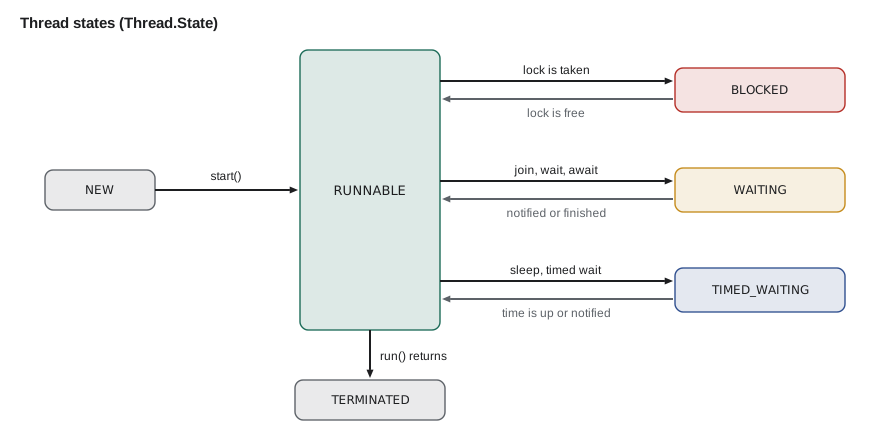
The next program walks one thread through four of those states and prints each one. It uses a CountDownLatch, a simple gate from java.util.concurrent that lesson 11 uses again. The worker thread calls await on the latch and waits there until main calls countDown. Because main keeps checking until the worker has actually reached the gate, the program prints the same four states every time.
import java.util.concurrent.CountDownLatch;

public class Main {
    public static void main(String[] args) throws InterruptedException {
        CountDownLatch gate = new CountDownLatch(1);
        Thread worker = new Thread(() -> {
            try {
                gate.await();
            } catch (InterruptedException e) {
                Thread.currentThread().interrupt();
            }
        });

        System.out.println("before start: " + worker.getState());
        worker.start();
        while (worker.getState() != Thread.State.WAITING) Thread.onSpinWait();
        System.out.println("at the gate:  " + worker.getState());
        gate.countDown();
        worker.join();
        System.out.println("after join:   " + worker.getState());
        System.out.println("is alive?     " + worker.isAlive());
    }
}before start: NEW at the gate: WAITING after join: TERMINATED is alive? false
What this code does
The worker is NEW before start, WAITING while it is stopped at the closed latch, and TERMINATED after main opens the latch and joins it. The loop with Thread.onSpinWait waits until the worker really is at the gate before printing, which is what makes the output repeatable. Polling like this is fine in a small demonstration, but real programs should wait with proper tools rather than spinning.
The BLOCKED state appears when a thread tries to enter a synchronized block that another thread is already inside. You will meet synchronized in the next lesson; for now the program below shows the state by holding a lock in main while a second thread tries to take it.
public class Main {
    static final Object ledger = new Object();

    public static void main(String[] args) throws InterruptedException {
        Thread clerk = new Thread(() -> {
            synchronized (ledger) {
                // record a sale
            }
        });

        synchronized (ledger) {
            clerk.start();
            while (clerk.getState() != Thread.State.BLOCKED) Thread.onSpinWait();
            System.out.println("clerk while main holds the ledger: " + clerk.getState());
        }
        clerk.join();
        System.out.println("clerk after main lets go: " + clerk.getState());
    }
}clerk while main holds the ledger: BLOCKED clerk after main lets go: TERMINATED
What this code does
Main enters a synchronized block on the ledger object and only then starts the clerk thread, which tries to enter a synchronized block on the same object and must wait. While main still holds the lock, the clerk is BLOCKED. As soon as main leaves its block, the clerk can enter, finish and reach TERMINATED.
Sleeping, waiting and joining with a limit
Thread.sleep pauses the current thread for at least the given number of milliseconds; it may sleep a little longer, depending on the scheduler. A sleeping thread is in TIMED_WAITING and uses no processor time. Sleep is useful for simulations and for pacing retries, but using sleep to wait for another thread to finish is a classic bug: you have no idea how long the other thread needs. Use join, or the tools of later lessons, instead.
join also has a timed version. t.join(500) waits for at most half a second. When it returns, the thread may or may not have finished, so check isAlive afterwards. A timed join is how a program avoids hanging forever on a thread that has gone wrong.
Interrupting a thread
Java has no safe way to force another thread to stop. The old Thread.stop method was dangerous, because it could kill a thread halfway through changing shared data, and it no longer works in current Java. Instead, Java uses interruption, a polite request. Calling t.interrupt() sets the thread's interrupt flag. If the thread is sleeping, joining or waiting, the waiting method throws InterruptedException at once. If the thread is busy calculating, nothing happens until the thread checks Thread.currentThread().isInterrupted() itself.
public class Main {
    public static void main(String[] args) throws InterruptedException {
        String[] report = new String[1];
        Thread poller = new Thread(() -> {
            try {
                Thread.sleep(60_000);
                report[0] = "slept the whole minute";
            } catch (InterruptedException e) {
                report[0] = "interrupted while sleeping, so it stopped early";
            }
        });

        poller.start();
        while (poller.getState() != Thread.State.TIMED_WAITING) Thread.onSpinWait();
        poller.interrupt();
        poller.join();

        System.out.println(report[0]);
    }
}interrupted while sleeping, so it stopped early
What this code does
The poller thread starts a one-minute sleep, and main interrupts it as soon as it is sleeping. The sleep ends at once with InterruptedException, and the thread records that it stopped early and returns. The whole program finishes in a fraction of a second instead of a minute.
Handling InterruptedException properly matters. The worst thing to do is to catch it and ignore it, because then the request to stop is lost. Either let it propagate by declaring throws InterruptedException, or, if you cannot, restore the flag with Thread.currentThread().interrupt() so that code further up can still see it. You saw that second pattern in the fakePriceCheck method of lesson 1.
A thread that calculates in a long loop should check the flag itself, for example with a loop condition such as while (!Thread.currentThread().isInterrupted()). Cancellation in Java is always cooperative: the thread being stopped must agree to stop.
When a thread throws
If a thread's run method throws an exception that nothing catches, the thread ends and the exception is passed to the thread's uncaught exception handler. The default handler prints the stack trace to standard error, and the rest of the program carries on as if nothing had happened. The main thread does not see the exception, and join returns normally. This is one reason raw threads are awkward: results and failures do not come back to the thread that started them. Lesson 6 shows how executors and futures fix that, and lesson 11 shows how to install your own handler.
Try it yourself
Squares in their slots
Start three threads with a thread builder named square- numbered from 1. Thread k (0, 1 or 2) stores (k + 4) squared in slot k of an int array. Join all three and print each slot as slot 0: 16.
The program should print slot 0: 16, slot 1: 25 and slot 2: 36.
import java.util.*;

public class Main {
    public static void main(String[] args) throws InterruptedException {
        int[] slots = new int[3];
        Thread.Builder builder = Thread.ofPlatform().name("square-", 1);
        List<Thread> threads = new ArrayList<>();
        // start three threads here
        for (Thread t : threads) t.join();
        for (int i = 0; i < 3; i++) System.out.println("slot " + i + ": " + slots[i]);
    }
}
Try it yourself
A thread that stops when asked
Write a counter thread that loops while it has not been interrupted, adding 1 to a long counter each pass. Main starts it, waits until the counter has passed 1,000, interrupts it and joins it. Then print counter passed 1000: true and the thread's final state.
The program should print counter passed 1000: true and state: TERMINATED.
public class Main {
    static volatile long count = 0;

    public static void main(String[] args) throws InterruptedException {
        Thread counter = new Thread(() -> {
            while (true) {
                count++;
            }
        });
        counter.start();
        while (count <= 1000) Thread.onSpinWait();
        counter.join(200);
        System.out.println("counter passed 1000: " + (count > 1000));
        System.out.println("state: " + counter.getState());
        System.exit(0);
    }
}
Common mistakes
MistakeCalling run instead of start.
InsteadCall start; run executes the task on the current thread.
MistakeCalling start twice on the same Thread.
InsteadCreate a new Thread, or submit the task to an executor, for each run.
MistakeCatching InterruptedException and doing nothing.
InsteadDeclare it with throws, or restore the flag with Thread.currentThread().interrupt().
MistakeUsing Thread.sleep to wait for another thread to finish.
InsteadUse join, a latch or a future, which wait exactly as long as needed.
MistakeLeaving threads with default names such as Thread-7.
InsteadName threads, for example with Thread.ofPlatform().name("picker-", 1), so dumps and logs make sense.
Summary and key terms
- A Java thread is an object of the class Thread; platform threads wrap operating system threads and are fairly expensive, while virtual threads are scheduled by the JVM.
- A task is usually given as a Runnable lambda, and start runs it on a new thread, while run just calls it on the current one.
- A thread can be started only once.
- Threads have names, priorities and a daemon flag; daemon threads do not keep the JVM running.
- Java 21 thread builders such as Thread.ofPlatform().name("picker-", 1) create named threads.
- A thread moves through the states NEW, RUNNABLE, BLOCKED, WAITING, TIMED_WAITING and TERMINATED. sleep pauses, join waits for another thread, and timed versions limit the wait.
- Interruption is a cooperative request to stop: waiting methods throw InterruptedException, and busy threads must check the flag.
- An uncaught exception ends a thread and goes to its uncaught exception handler, not to the thread that started it.
- Platform thread
- A Java thread backed one to one by an operating system thread.
- Virtual thread
- A lightweight Java thread scheduled by the JVM onto a small number of platform threads.
- start
- The Thread method that begins running the task on a new thread.
- Daemon thread
- A background thread that does not stop the JVM from exiting.
- Thread builder
- An object from Thread.ofPlatform() or Thread.ofVirtual() that creates threads with chosen settings.
- Thread state
- One of NEW, RUNNABLE, BLOCKED, WAITING, TIMED_WAITING and TERMINATED.
- BLOCKED
- The state of a thread waiting to enter a synchronized block held by another thread.
- Interruption
- A cooperative request, sent with interrupt, asking a thread to stop what it is doing.
- InterruptedException
- The exception thrown by sleep, join and other waits when the thread is interrupted.
- Uncaught exception handler
- The code that receives an exception that ends a thread.
- CountDownLatch
- A gate that threads wait at until its count reaches zero.
Practice problems
Work each problem on paper first, then reveal the answer to check.
What state is a thread in after new Thread(task) but before start?
Show answer
NEW.
Which state shows a thread that is sleeping for 500 milliseconds?
Show answer
TIMED_WAITING.
What happens if you interrupt a thread that is in a long calculation that never checks the flag?
Show answer
Nothing visible: the flag is set, but the thread keeps calculating until it checks.
Why must setDaemon be called before start?
Show answer
A thread's daemon status cannot change once it is running; it throws IllegalThreadStateException.
After join(500) returns, how do you know whether the thread finished?
Show answer
Call isAlive: false means it has finished.
Lesson quiz · 5 questions
Score 60% or more to complete this lesson.
Create a free account to save your progress, take quizzes and earn a certificate.