
JAVA-240 · Lesson 1 of 12 · 24 min
Why concurrency matters
▶ Video coming soon A video version of this lesson is on the way.
On the first Saturday of April 2027, Second Gear Cycles had eleven people waiting at the counter at once, and the phone did not stop. By the autumn, Odile had a fix for some of it: since November 2027 customers can order parts and book repairs through a short form on the shop's website, and every submission lands as one line in an inbox file. On a quiet weekday there are a dozen lines. On a Saturday morning in spring there will be hundreds. Kofi wrote a small Java program, OrderRun, that reads the inbox, checks each part's price and stock with the shop's supplier, and prints a picking list for the morning. It works, but it is slow: the supplier's price check takes about a second for every order, and OrderRun asks for one price, waits, asks for the next, and waits again.
This course follows Hamza through Ingrid's Monday evening sessions in the winter term of his second year, from Monday, January 10 to Monday, March 27, 2028, in the shop's back room after closing. There is no session on Monday, February 21, which is Presidents' Day and the college's reading week. In the first week of April, Hamza will build OrderDesk, a version of OrderRun that handles many orders at once without losing a single part or double-booking a repair slot, and he will show it to Ingrid, Kofi and Odile on Monday, April 10, before the spring rush. All of this is planned work; the course is written ahead of time, and its examples have been compiled and run on Java 21.
What concurrency means
A program is concurrent when it is organized as several tasks whose lifetimes overlap: one task can start before another has finished. A program runs in parallel when several of those tasks are actually executing at the same instant, on different processor cores. Concurrency is about structure, and parallelism is about execution. A concurrent program on a computer with one core still makes progress on several tasks, because the operating system switches between them many times a second. The same program on a computer with eight cores can run up to eight tasks truly simultaneously.
Ingrid explains it with the repair bench. Tamsin, the lead mechanic, often has three bikes on the go: she puts a wheel in the truing stand, and while the glue on a tube patch sets she adjusts a derailleur on the next bike. That is concurrency: one person, several overlapping jobs, switching when one job is waiting. On a Saturday, Tamsin and two volunteers work side by side, each on a different bike. That is parallelism: several workers, several jobs, at the same time.
Java has supported concurrency since its first version. Every Java program already runs with several threads, even a simple one: the main thread that runs main, plus threads the JVM starts for garbage collection and compilation. In this course you will create your own threads, coordinate them safely and learn the library that most professional Java code uses instead of raw threads.
Why programs wait
Most of the time a program spends is not spent computing. It is spent waiting: for a disk to return data, for a database to answer a query, for a web service on the other side of the country to send a reply. A processor can execute billions of simple instructions per second; a single request to a remote service typically takes from a few milliseconds to a second. During that wait the thread that made the request does nothing useful.
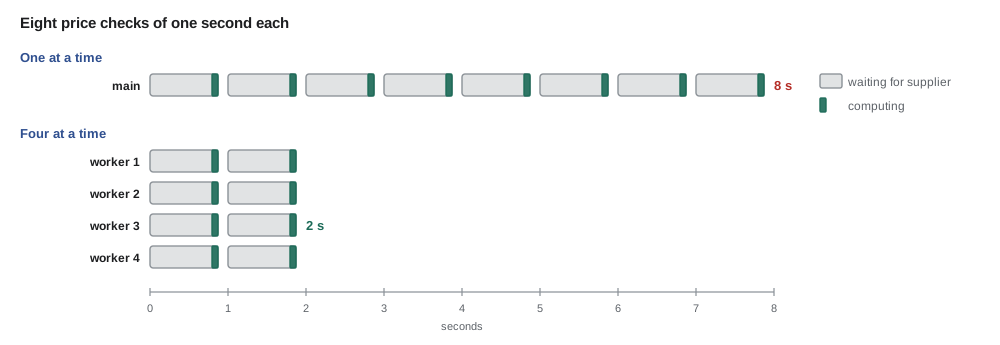
OrderRun shows the problem clearly. Each price check takes about one second, and almost all of that second is the request traveling to the supplier and the reply traveling back. The computer is idle. If eight orders arrive, a program that handles them one after another needs about eight seconds. If the program could send all eight requests and wait for the replies together, it would need little more than one second, because the waits overlap. Nothing about the computer got faster; the program simply stopped waiting in a line.
public class Main {
    public static void main(String[] args) {
        int orders = 8;
        double secondsPerCheck = 1.0;

        double oneAtATime = orders * secondsPerCheck;
        System.out.println("one at a time: " + oneAtATime + " s");

        for (int workers : new int[] {2, 4, 8}) {
            int rounds = (orders + workers - 1) / workers;
            System.out.println(workers + " at once: " + rounds * secondsPerCheck + " s");
        }
    }
}one at a time: 8.0 s 2 at once: 4.0 s 4 at once: 2.0 s 8 at once: 1.0 s
What this code does
This is a model, not a measurement: it calculates how long eight one-second price checks take when they wait in line and when 2, 4 or 8 of them wait together. The number of rounds is the number of orders divided by the number of workers, rounded up. Because the checks spend their time waiting rather than computing, overlapping them cuts the total almost in proportion.
The model assumes the supplier can answer eight requests at once and that nothing else gets in the way. Real systems are messier, and part of this course is about the limits: a supplier that only allows five connections, a shared stock count that two threads try to change at the same moment, a repair slot that two customers try to book together.
CPU-bound and I/O-bound work
Programmers divide work into two broad kinds. CPU-bound work is limited by how fast the processor can calculate: compressing a file, resizing photos of bikes for the website, sorting a large list, working out the best pickup route. I/O-bound work is limited by waiting for input and output: reading files, querying databases, calling web services. The word I/O stands for input/output.
The two kinds benefit from concurrency in different ways. For CPU-bound work, more threads help only up to the number of cores: a computer with four cores can do about four times as much calculation per second as one core, and a hundred threads will not make it do more. For I/O-bound work, threads mostly wait, so a program can usefully have many more threads than cores. While one thread waits for the supplier, the core can run another. OrderRun's price checks are I/O-bound, which is why concurrency can help it so much.
| Kind of work | Limited by | Second Gear example | How many threads help |
|---|---|---|---|
| CPU-bound | Processor speed and number of cores | Resizing 400 product photos | About one per core |
| I/O-bound | Waiting for disks, networks or services | Checking 400 prices with the supplier | Many more than the number of cores |
| Mixed | Both, at different steps | Reading orders, then totaling them | Depends on the slowest step |
Two threads at work
A thread is a single path of execution through a program, with its own place in the code and its own stack of method calls. All the threads of one Java program share the same memory: the same objects, the same static fields. That sharing is what makes threads useful, because they can work on the same data, and also what makes them dangerous, as lesson 3 shows.
The simplest way to create a thread in Java is to give a new Thread object a task to run and call start. The task is a Runnable, which is any code with no inputs and no result, and is usually written as a lambda. The start method returns at once, and the new thread runs the task alongside the thread that started it. Calling join on a thread waits until that thread has finished.
public class Main {
    public static void main(String[] args) throws InterruptedException {
        long[] totals = new long[2];

        Thread first = new Thread(() -> {
            for (int i = 1; i <= 500_000; i++) totals[0] += i;
        });
        Thread second = new Thread(() -> {
            for (int i = 500_001; i <= 1_000_000; i++) totals[1] += i;
        });

        first.start();
        second.start();
        first.join();
        second.join();

        System.out.println("first half:  " + totals[0]);
        System.out.println("second half: " + totals[1]);
        System.out.println("total:       " + (totals[0] + totals[1]));
    }
}first half: 125000250000 second half: 375000250000 total: 500000500000
What this code does
Two threads each add up half of the numbers from 1 to 1,000,000, writing into different slots of the same array. The main thread starts both, then joins each one, so it waits until both have finished before it reads the results. Because each thread has its own slot and main reads only after joining, the output is the same on every run.
Look at three things in that program. First, the work is divided so that the two threads never touch the same variable: one writes totals[0] and the other totals[1]. Second, the main thread prints only after both joins have returned. Third, nothing in the output depends on which thread happened to run first. Those three habits, dividing the work, waiting properly and printing only settled results, will keep many of your concurrent programs correct.
Real waiting, overlapped
The model earlier calculated the benefit of overlapping waits. The next program measures it. Each task pretends to be a price check by sleeping for 300 milliseconds, which is a fair stand-in for waiting on a network. The program runs four such tasks one after another, then runs four of them on separate threads at the same time.
public class Main {
    static void fakePriceCheck() {
        try {
            Thread.sleep(300);
        } catch (InterruptedException e) {
            Thread.currentThread().interrupt();
        }
    }

    public static void main(String[] args) throws InterruptedException {
        long start = System.nanoTime();
        for (int i = 0; i < 4; i++) fakePriceCheck();
        long oneAtATime = (System.nanoTime() - start) / 1_000_000;

        start = System.nanoTime();
        Thread[] threads = new Thread[4];
        for (int i = 0; i < 4; i++) {
            threads[i] = new Thread(Main::fakePriceCheck);
            threads[i].start();
        }
        for (Thread t : threads) t.join();
        long together = (System.nanoTime() - start) / 1_000_000;

        System.out.println("one at a time took at least 1.2 s: " + (oneAtATime >= 1200));
        System.out.println("together took under 1 s:           " + (together < 1000));
    }
}one at a time took at least 1.2 s: true together took under 1 s: true
What this code does
The program times four 300-millisecond sleeps done in sequence and the same four done on four threads at once. It prints true or false answers rather than the raw times, because the exact milliseconds vary from run to run and from computer to computer. Run after run the answers are the same: the sequential version needs at least 1.2 seconds, and the overlapped version finishes in a little over 0.3 seconds.
You may wonder why the program prints true and false instead of the times themselves. Timings are never exactly repeatable: they depend on what else the computer is doing, on how long the JVM takes to start a thread, even on the temperature of the processor. A good habit when you write about performance is to state what you measured, on what kind of computer, and how much it varied. In this course, printed examples never show raw times, so that the output you see is the output you will get.
How much faster can it get?
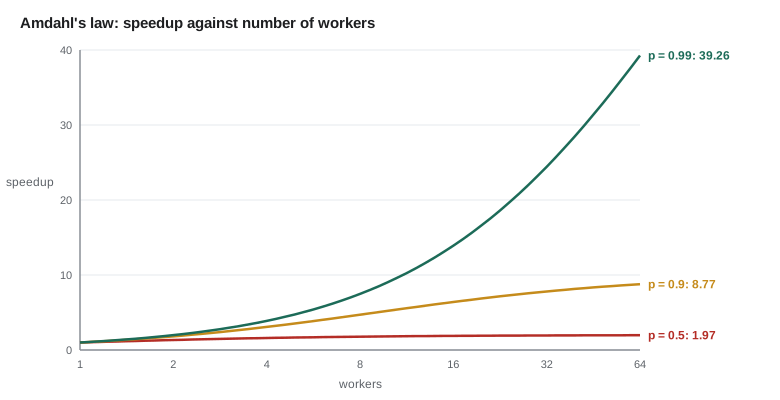
Concurrency rarely speeds up a whole program by the full number of threads, because some part of almost every program must run one step at a time. OrderDesk can check prices in parallel, but it must read the inbox file first and print the picking list last. The computer scientist Gene Amdahl described the limit in 1967. If a fraction p of the work can run in parallel on n workers, and the rest cannot, the best possible speedup is:
If nine tenths of the work can be parallelized (p = 0.9), then with 4 workers the speedup is 1 ÷ (0.1 + 0.225) ≈ 3.08, and with 100 workers it is only 1 ÷ (0.1 + 0.009) ≈ 9.17. Even with infinitely many workers it can never pass 1 ÷ 0.1 = 10, because the one tenth that runs in sequence still takes its time. Amdahl's law is a reminder to look for the part that cannot be split before buying more cores or adding more threads.
public class Main {
    static double speedup(double p, int n) {
        return 1.0 / ((1 - p) + p / n);
    }

    public static void main(String[] args) {
        int[] workers = {1, 2, 4, 8, 100};
        for (double p : new double[] {0.5, 0.9, 0.99}) {
            StringBuilder line = new StringBuilder("p = " + p + ":");
            for (int n : workers) line.append(String.format("  n=%d %.2f", n, speedup(p, n)));
            System.out.println(line);
        }
    }
}p = 0.5: n=1 1.00 n=2 1.33 n=4 1.60 n=8 1.78 n=100 1.98 p = 0.9: n=1 1.00 n=2 1.82 n=4 3.08 n=8 4.71 n=100 9.17 p = 0.99: n=1 1.00 n=2 1.98 n=4 3.88 n=8 7.48 n=100 50.25
What this code does
This program prints the best possible speedup from Amdahl's law for three parallel fractions and five worker counts. With half of the work parallel, even 100 workers barely double the speed. With 99 hundredths parallel, 100 workers give about fifty times the speed, which shows how much the small sequential part matters.
The costs of concurrency
Concurrency is not free, and Ingrid is clear about the costs before Hamza writes a single thread. Every thread uses memory for its stack, often about a megabyte reserved by default for a platform thread. Starting a thread and switching between threads take time. More importantly, concurrent programs are harder to get right. When two threads share data, the program can produce different results on different runs, or fail only once in ten thousand runs on a busy Saturday. Such bugs are called race conditions, and they are the main subject of lesson 3.
There are four classic problems that this course teaches you to recognize and avoid:
- Race conditions: two threads use the same data at the same time and the result depends on the exact timing (lessons 3 to 5).
- Deadlock: two threads each wait forever for something the other holds (lesson 9).
- Starvation: a thread never gets the turn it needs because others keep taking it (lesson 9).
- Visibility problems: one thread changes a value and another thread keeps seeing the old one (lesson 3).
Against those costs stand real benefits. A concurrent server can handle thousands of customers at once. A concurrent order processor can finish the Saturday inbox in minutes instead of hours. A desktop program can stay responsive while it saves a large file. And modern Java, with executors, CompletableFuture and virtual threads, makes the safe way of doing these things much easier than it was even a few years ago.
How this course is built
Each lesson takes one idea and shows it in small, complete programs that you can compile and run yourself. Concurrent programs have a special problem for a course like this: their output can change from run to run. Every program printed with its output in this course has been run several times, and it prints the same thing every time, because it waits for threads properly and prints only settled results. When a lesson needs to show output that varies, such as the result of a race condition, it shows a transcript of several real runs and labels it as such.
The course moves from the bottom up. Lessons 2 to 5 cover threads, shared data, locks and thread-safe collections. Lessons 6 to 8 cover the higher-level tools that real programs use: executors, futures and virtual threads. Lessons 9 to 11 cover what goes wrong and how to find it: deadlock, producer-consumer designs and testing. Lesson 12 brings everything together in OrderDesk.
Try it yourself
How long will the inbox take?
Kofi expects 400 submissions on the first spring Saturday. Each needs one price check of about 1 second. Using the same model as the first example (rounds = orders divided by workers, rounded up), print the time for 1, 5, 20 and 50 workers, one line each in the form 5 workers: 80.0 s.
public class Main {
    public static void main(String[] args) {
        int orders = 400;
        double secondsPerCheck = 1.0;
        for (int workers : new int[] {1, 5, 20, 50}) {
            double seconds = 0;
            System.out.println(workers + " workers: " + seconds + " s");
        }
    }
}
Try it yourself
Three threads, three slices
Split the sum of the numbers from 1 to 900,000 across three threads, each adding 300,000 numbers into its own slot of a long array. Start all three, join all three, then print each slice and the total.
The program should print slice 0: 45000150000, slice 1: 135000150000, slice 2: 225000150000 and total: 405000450000.
public class Main {
    public static void main(String[] args) throws InterruptedException {
        long[] slices = new long[3];
        // create, start and join three threads here
        long total = 0;
        for (int i = 0; i < 3; i++) {
            System.out.println("slice " + i + ": " + slices[i]);
            total += slices[i];
        }
        System.out.println("total: " + total);
    }
}
Common mistakes
MistakeExpecting a program to run n times faster on n threads.
InsteadFind the part that must run in sequence; Amdahl's law sets the ceiling.
MistakeStarting threads and printing results without joining them.
InsteadCall join on every thread before reading what it produced.
MistakeAdding hundreds of threads to speed up CPU-bound work.
InsteadUse about one thread per core for calculation; more threads only add switching.
MistakeTreating timings from one run as exact.
InsteadRepeat measurements, report the range, and never rely on exact milliseconds in output.
MistakeLetting two threads write the same variable without any protection.
InsteadGive each thread its own data, or protect shared data as lessons 3 to 5 show.
Summary and key terms
- A concurrent program has tasks whose lifetimes overlap, and a parallel program runs tasks at the same instant on different cores.
- Most programs spend much of their time waiting for input and output, and overlapping those waits is the main benefit of concurrency for I/O-bound work.
- CPU-bound work benefits from about one thread per core, while I/O-bound work can use many more threads than cores.
- A thread is a path of execution with its own stack; all threads of a program share the same memory.
- Thread.start runs a task alongside the current thread, and join waits for it to finish.
- Amdahl's law shows that the part of the work that must run in sequence limits the possible speedup.
- Concurrency brings costs: memory, switching time, and bugs such as race conditions, deadlock, starvation and visibility problems.
- Concurrency
- Organizing a program as tasks whose lifetimes overlap.
- Parallelism
- Executing several tasks at the same instant on different processor cores.
- Thread
- A single path of execution through a program, with its own stack of method calls.
- CPU-bound
- Limited mainly by how fast the processor can calculate.
- I/O-bound
- Limited mainly by waiting for input and output such as files, databases or networks.
- Runnable
- A task with no inputs and no result that a thread can run.
- join
- A Thread method that waits until the thread has finished.
- Amdahl's law
- A formula for the best possible speedup when only part of the work can run in parallel.
- Speedup
- How many times faster a program runs with more workers than with one.
- Race condition
- A bug in which the result depends on the timing of threads that share data.
Practice problems
Work each problem on paper first, then reveal the answer to check.
Is resizing 400 photos CPU-bound or I/O-bound?
Show answer
CPU-bound: the time goes into calculation.
With p = 0.9 and n = 9, what does Amdahl's law give?
Show answer
1 ÷ (0.1 + 0.1) = 5.
What does Thread.start do that calling run directly does not?
Show answer
It runs the task on a new thread, alongside the caller, instead of on the caller's own thread.
Why does the two-thread sum give the same result every run?
Show answer
Each thread writes its own array slot and main reads only after joining both.
What is the most speedup possible if one fifth of the work is sequential?
Show answer
5 times, however many workers there are.
Lesson quiz · 5 questions
Score 60% or more to complete this lesson.
Create a free account to save your progress, take quizzes and earn a certificate.