
JAVA-201 · Lesson 8 of 12 · 20 min
Iterators and the enhanced for loop
▶ Video coming soon A video version of this lesson is on the way.
Hamza's first attempt at a stocktake clean-up looked simple: loop over the parts and remove every part whose count is zero. It stopped with an exception he had never seen, ConcurrentModificationException, on a program with no concurrency in it at all. The plan for Friday, March 12, 2027 is to look under the enhanced for loop that every lesson so far has used, at the iterator that drives it, and to learn the safe ways to change a collection while walking through it.
What an iterator is
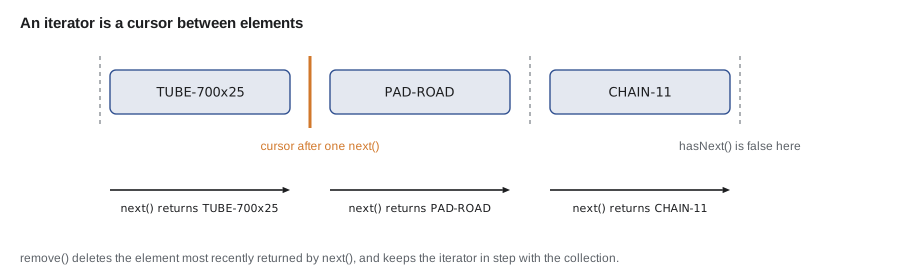
An iterator is an object that walks through a collection one element at a time and remembers where it is. Every Collection has an iterator() method, which comes from the Iterable interface. The Iterator interface has three methods: hasNext() tells you whether there is another element, next() returns it and moves on, and remove() removes the element that next() last returned. Think of the iterator as a cursor that sits between elements.
import java.util.*;

public class Main {
    public static void main(String[] args) {
        List<String> shelfB = new ArrayList<>(List.of("TUBE-700x25", "PAD-ROAD", "CHAIN-11"));
        Iterator<String> it = shelfB.iterator();
        while (it.hasNext()) {
            String code = it.next();
            System.out.println("checking " + code);
        }
        System.out.println("anything left? " + it.hasNext());
    }
}checking TUBE-700x25 checking PAD-ROAD checking CHAIN-11 anything left? false
What this code does
iterator returns a new cursor at the start of the list, and each call to next returns the next code and moves the cursor past it. The loop stops when hasNext reports there is nothing left. The iterator is then used up; walking the list again needs a new one.
The enhanced for loop, unwrapped
The enhanced for loop, for (String code : shelfB), is shorthand that javac expands into exactly the while loop above: it calls iterator() once, then hasNext() and next() on each pass. That is why any class that implements Iterable can be used in a for-each loop, and why the loop works the same way for lists, sets, deques and the key sets of maps. For arrays, the enhanced for loop is expanded into an ordinary counting loop instead, since arrays have no iterator.
| You write | javac generates, in effect |
|---|---|
| for (String code : shelfB) { ... } | Iterator<String> it = shelfB.iterator(); while (it.hasNext()) { String code = it.next(); ... } |
| for (int c : counts) { ... } with an int[] | for (int i = 0; i < counts.length; i++) { int c = counts[i]; ... } |
The enhanced for loop is the clearest way to read every element, and it is the right choice whenever you do not need the index or the iterator itself. It is also the efficient way to walk a LinkedList, because the iterator steps from node to node instead of counting from the start each time, as lesson 3 explained.
ConcurrentModificationException
Here is Hamza's clean-up loop. The collection is changed by calling its own remove method while an enhanced for loop's hidden iterator is still walking it. The iterators of ArrayList, HashMap and most other java.util collections are fail-fast: each collection keeps a count of structural changes, the iterator remembers the count it started with, and next() throws ConcurrentModificationException as soon as the two differ. The name is misleading; no threads are involved.
import java.util.*;

public class Main {
    public static void main(String[] args) {
        List<String> stock = new ArrayList<>(List.of("TUBE-700x25:14", "BELL:0", "PAD-ROAD:6", "GRIPS:0"));
        for (String line : stock) {
            if (line.endsWith(":0")) {
                stock.remove(line);
            }
        }
        System.out.println(stock);
    }
}
What this code does
Removing BELL through the list's own remove method changes the list behind the iterator's back. The next call to next notices that the list's change count no longer matches and throws ConcurrentModificationException. Fail-fast iterators stop the loop immediately rather than skipping or repeating elements without warning.
$ javac Main.java
$ java Main
Exception in thread "main" java.util.ConcurrentModificationException
	at java.base/java.util.ArrayList$Itr.checkForComodification(ArrayList.java:1095)
	at java.base/java.util.ArrayList$Itr.next(ArrayList.java:1049)
	at Main.main(Main.java:6)
Failing fast is a kindness. Without it, removing an element during the walk would shift the later elements left, the loop would skip the one that moved into the removed slot, and you would get a wrong answer with no error at all. There are three correct ways to remove while iterating.
import java.util.*;

public class Main {
    public static void main(String[] args) {
        List<String> a = new ArrayList<>(List.of("TUBE-700x25:14", "BELL:0", "PAD-ROAD:6", "GRIPS:0"));
        Iterator<String> it = a.iterator();
        while (it.hasNext()) {
            if (it.next().endsWith(":0")) it.remove();
        }
        System.out.println("iterator.remove: " + a);

        List<String> b = new ArrayList<>(List.of("TUBE-700x25:14", "BELL:0", "PAD-ROAD:6", "GRIPS:0"));
        b.removeIf(line -> line.endsWith(":0"));
        System.out.println("removeIf:        " + b);

        List<String> c = new ArrayList<>(List.of("TUBE-700x25:14", "BELL:0", "PAD-ROAD:6", "GRIPS:0"));
        List<String> toRemove = new ArrayList<>();
        for (String line : c) if (line.endsWith(":0")) toRemove.add(line);
        c.removeAll(toRemove);
        System.out.println("collect, then removeAll: " + c);
    }
}iterator.remove: [TUBE-700x25:14, PAD-ROAD:6] removeIf: [TUBE-700x25:14, PAD-ROAD:6] collect, then removeAll: [TUBE-700x25:14, PAD-ROAD:6]
What this code does
The iterator's own remove keeps the iterator and the list in step, so it is allowed during the walk. removeIf does the whole job in one call and is usually the clearest choice. Collecting the elements first and removing them afterwards also works, because the list is not changed while it is being iterated.
The same rule applies to maps. To remove entries while looping over a map, use the iterator of its entrySet, or call removeIf on the entrySet, keySet or values view. Changing a value through Map.Entry.setValue is allowed during iteration, because it does not change the structure of the map.
import java.util.*;

public class Main {
    public static void main(String[] args) {
        Map<String, Integer> stock = new TreeMap<>(Map.of("TUBE-700x25", 14, "BELL", 0, "PAD-ROAD", 6, "GRIPS", 0));
        for (Map.Entry<String, Integer> e : stock.entrySet()) {
            if (e.getKey().startsWith("TUBE")) e.setValue(e.getValue() + 10);
        }
        stock.values().removeIf(count -> count == 0);
        System.out.println(stock);
    }
}{PAD-ROAD=6, TUBE-700x25=24}What this code does
setValue changes the tube count during the loop without changing which keys the map holds, so it is allowed. values() is a live view of the map, and removeIf on it removes every entry whose count is zero. The result keeps only PAD-ROAD and the restocked tubes.
ListIterator: both directions and editing
Lists offer a richer iterator, ListIterator, from listIterator(). As well as hasNext and next, it has hasPrevious and previous to walk backwards, nextIndex and previousIndex to report positions, and set and add to replace the last element returned or insert at the cursor. Lesson 3 used it to insert reorder notes; here it rewrites lines in place and then walks back.
import java.util.*;

public class Main {
    public static void main(String[] args) {
        List<String> sheet = new ArrayList<>(List.of("tube", "pads", "chain"));
        ListIterator<String> it = sheet.listIterator();
        while (it.hasNext()) {
            int i = it.nextIndex();
            String name = it.next();
            it.set((i + 1) + ". " + name.toUpperCase());
        }
        System.out.println(sheet);
        while (it.hasPrevious()) {
            System.out.println("back to: " + it.previous());
        }
    }
}[1. TUBE, 2. PADS, 3. CHAIN] back to: 3. CHAIN back to: 2. PADS back to: 1. TUBE
What this code does
nextIndex reports the position of the element that next will return, which numbers the lines from 1. set replaces the element that next just returned without upsetting the iterator. After the forward pass the cursor is at the end, so previous walks back through the list in reverse.
Making your own class Iterable
Any class can join the for-each loop by implementing Iterable<T>, which needs only an iterator() method that returns an Iterator<T>. Kofi's bins on one shelf are numbered, and a Shelf object can let callers loop over its bin labels without exposing how it stores them. The iterator is often written as an anonymous class or a small inner class that holds the cursor position.
import java.util.*;

public class Main {
    public static void main(String[] args) {
        Shelf b = new Shelf("B", 4);
        for (String bin : b) {
            System.out.print(bin + " ");
        }
        System.out.println();
        Iterator<String> it = b.iterator();
        it.next();
        System.out.println("second bin: " + it.next());
    }
}

class Shelf implements Iterable<String> {
    private final String letter;
    private final int bins;

    Shelf(String letter, int bins) {
        this.letter = letter;
        this.bins = bins;
    }

    @Override
    public Iterator<String> iterator() {
        return new Iterator<>() {
            private int next = 1;

            @Override
            public boolean hasNext() {
                return next <= bins;
            }

            @Override
            public String next() {
                if (!hasNext()) throw new NoSuchElementException();
                return letter + "-" + String.format("%02d", next++);
            }
        };
    }
}B-01 B-02 B-03 B-04 second bin: B-02
What this code does
Because Shelf implements Iterable, it can be used directly in an enhanced for loop, which prints its four bin labels. Each call to iterator returns a fresh cursor that starts at bin 1, so the second loop begins again from the start. next throws NoSuchElementException when called past the end, as the Iterator contract requires.
The contract matters: hasNext must not move the cursor and may be called any number of times, and next must throw NoSuchElementException when there is nothing left rather than returning null. If your iterator does not support removal, you can leave out remove; the default version throws UnsupportedOperationException.
import java.util.*;

public class Main {
    public static void main(String[] args) {
        Iterator<String> it = List.of("BELL").iterator();
        System.out.println(it.next());
        System.out.println(it.next());
    }
}
What this code does
The list has one element, so the second call to next has nothing to return. The iterator throws NoSuchElementException instead of returning null. Always guard next with hasNext unless you know the size.
$ javac Main.java
$ java Main
BELL
Exception in thread "main" java.util.NoSuchElementException
	at java.base/java.util.ImmutableCollections$ListItr.next(ImmutableCollections.java:382)
	at Main.main(Main.java:7)
Other ways to walk a collection
Java has more ways to visit every element, each with its uses. forEach takes a lambda and is handy for one-line actions. The classic counting loop with get(i) is fine for an ArrayList when you need the index, but slow for a LinkedList. Streams, covered in JAVA-230, describe whole pipelines of filtering, mapping and collecting. Some collections in java.util.concurrent have weakly consistent iterators that never throw ConcurrentModificationException and may or may not show changes made during the walk; they are designed for use by several threads.
import java.util.*;

public class Main {
    public static void main(String[] args) {
        List<String> codes = List.of("TUBE-700x25", "PAD-ROAD", "BELL");
        codes.forEach(c -> System.out.println("label: " + c));
        for (int i = 0; i < codes.size(); i++) {
            System.out.println((i + 1) + " of " + codes.size() + ": " + codes.get(i));
        }
        long tubes = codes.stream().filter(c -> c.startsWith("TUBE")).count();
        System.out.println("tube codes: " + tubes);
    }
}label: TUBE-700x25 label: PAD-ROAD label: BELL 1 of 3: TUBE-700x25 2 of 3: PAD-ROAD 3 of 3: BELL tube codes: 1
What this code does
forEach runs the lambda once for each code, which suits a short action. The counting loop is useful here because the index is printed, and get(i) is cheap on this list. The stream filters the codes and counts the tube ones in a single expression.
| Way to loop | Can remove elements? | Best for |
|---|---|---|
| Enhanced for loop | no; throws ConcurrentModificationException | reading every element |
| Iterator with while | yes, with it.remove() | removing as you go |
| ListIterator | yes, and set and add | editing a list in place, walking backwards |
| removeIf | yes, it is the removal | removing everything that matches a test |
| forEach(lambda) | no | short actions |
| for with get(i) | carefully, by counting down | when you need the index of an ArrayList |
Try it yourself
Removing sold-out parts
Rewrite removeSoldOut so it removes every line ending in :0 without a ConcurrentModificationException, using an explicit Iterator and its remove method.
The program should print [TUBE-700x25:14, PAD-ROAD:6].
import java.util.*;

public class Main {
    public static void main(String[] args) {
        List<String> stock = new ArrayList<>(List.of("TUBE-700x25:14", "BELL:0", "PAD-ROAD:6", "GRIPS:0"));
        removeSoldOut(stock);
        System.out.println(stock);
    }

    static void removeSoldOut(List<String> stock) {
        Iterator<String> it = stock.iterator();
        while (it.hasNext()) {
            String line = it.next();
        }
    }
}
Try it yourself
An iterable range of bin numbers
Complete the iterator in BinRange so a for-each loop visits every number from from to to, inclusive. hasNext should report whether next has gone past to, and next should return the current number and move on.
The program should print 3 4 5 6 7.
import java.util.*;

public class Main {
    public static void main(String[] args) {
        StringBuilder sb = new StringBuilder();
        for (int bin : new BinRange(3, 7)) sb.append(bin).append(' ');
        System.out.println(sb.toString().trim());
    }
}

class BinRange implements Iterable<Integer> {
    private final int from, to;

    BinRange(int from, int to) {
        this.from = from;
        this.to = to;
    }

    @Override
    public Iterator<Integer> iterator() {
        return new Iterator<>() {
            private int current = from;

            @Override
            public boolean hasNext() {
                return false;
            }

            @Override
            public Integer next() {
                return current;
            }
        };
    }
}
Common mistakes
MistakeCalling list.remove inside an enhanced for loop over the same list.
InsteadUse the iterator's remove, removeIf, or collect first and remove afterwards.
MistakeCalling next without checking hasNext.
InsteadGuard every next with hasNext, or loop with for-each.
MistakeReturning null from next when there are no more elements.
InsteadThrow NoSuchElementException, as the Iterator contract requires.
MistakeLooping over a LinkedList with get(i).
InsteadUse the enhanced for loop or an iterator, which step through the nodes once.
MistakeReusing a finished iterator for a second pass.
InsteadCall iterator() again; each call returns a new cursor at the start.
Summary and key terms
- An iterator walks a collection one element at a time with hasNext, next and remove, and behaves like a cursor sitting between elements.
- Every Collection is Iterable, and the enhanced for loop is shorthand that calls iterator once and then hasNext and next on each pass; for arrays it becomes a counting loop.
- The iterators of the standard collections are fail-fast: changing the collection structurally during the walk, other than through the iterator, causes ConcurrentModificationException, even without threads.
- To remove while iterating, use the iterator's remove, removeIf, or collect and remove afterwards; Map.Entry.setValue is allowed.
- ListIterator can walk backwards, report indexes and set or add elements.
- A class becomes usable in for-each by implementing Iterable and returning an Iterator whose next throws NoSuchElementException at the end. forEach, counting loops and streams are other ways to walk a collection.
- Iterator
- An object that walks a collection one element at a time.
- Iterable
- The interface that lets an object be used in an enhanced for loop, through its iterator method.
- hasNext and next
- The iterator methods that test for and return the next element.
- Enhanced for loop
- The for (T x : collection) loop, which uses the collection's iterator.
- Fail-fast iterator
- An iterator that throws as soon as it detects the collection was changed during the walk.
- ConcurrentModificationException
- The exception a fail-fast iterator throws after an unexpected change.
- removeIf
- A Collection method that removes every element passing a test.
- ListIterator
- A list iterator that can move both ways and set or add elements.
- NoSuchElementException
- The exception next throws when there are no more elements.
- Weakly consistent iterator
- An iterator, used by concurrent collections, that never throws for changes made during the walk.
Practice problems
Work each problem on paper first, then reveal the answer to check.
What does an enhanced for loop over a list turn into?
Show answer
A call to iterator() and a while loop using hasNext and next.
Why does removing from a list inside its own for-each loop throw?
Show answer
The fail-fast iterator sees that the list changed behind its back.
Name two safe ways to remove elements while iterating.
Show answer
The iterator's remove method, or removeIf.
What must next do when there are no more elements?
Show answer
Throw NoSuchElementException.
What does a class need in order to be used in an enhanced for loop?
Show answer
It must implement Iterable and provide an iterator method.
Lesson quiz · 5 questions
Score 60% or more to complete this lesson.
Create a free account to save your progress, take quizzes and earn a certificate.