
JAVA-201 · Lesson 2 of 12 · 21 min
The Collections Framework
▶ Video coming soon A video version of this lesson is on the way.
The plan for Friday, January 22, 2027 is a map of the territory. Kofi has exported the parts list from his spreadsheet so Hamza can try it in Java, and the first question is which container to put it in. Java does not have one container; it has a family of them, designed together and sharing the same few interfaces. That family is the Java Collections Framework, in the package java.util. Knowing its shape is what lets a developer choose the right container in seconds instead of reaching for an array every time.
Interfaces, implementations and algorithms
The framework has three layers. Interfaces describe what a kind of collection can do: List, Set, Queue, Deque and Map. Implementations are concrete classes that do it in a particular way: ArrayList and LinkedList are both Lists, HashSet and TreeSet are both Sets. Algorithms are ready-made static methods, mostly in the classes Collections and Arrays, that sort, search, shuffle, count and copy. Code that is written against the interfaces can swap one implementation for another by changing a single line.
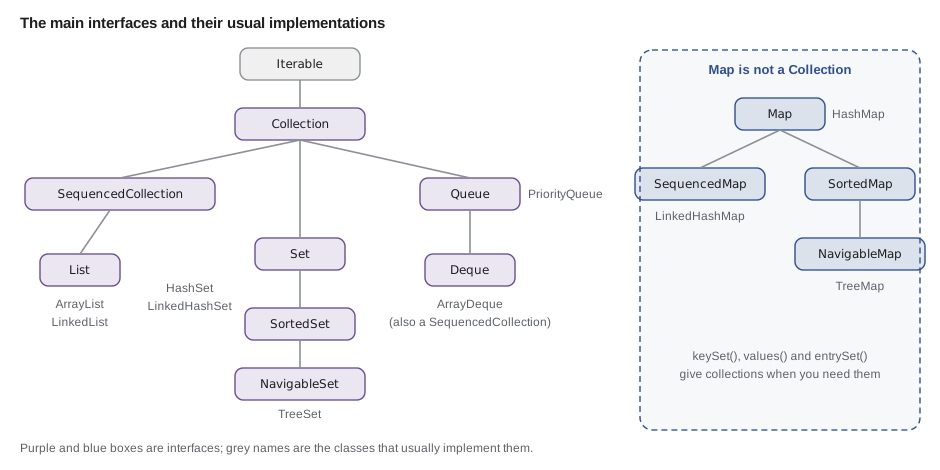
Map, you will see, is not a Collection. A map holds pairs of keys and values rather than single elements, so it has its own interface. It still belongs to the framework, and it can give you its keys, its values and its entries as collections whenever you need them.
What every Collection can do
The Collection interface is the common ground for lists, sets and queues. It has methods to add and remove elements, to ask how many there are and whether one is present, and to step through them. Because Collection extends Iterable, every collection can be used in an enhanced for loop. Lesson 8 shows how that loop really works.
import java.util.ArrayList;
import java.util.Collection;
import java.util.TreeSet;

public class Main {
    public static void main(String[] args) {
        Collection<String> list = new ArrayList<>();
        Collection<String> set = new TreeSet<>();
        for (Collection<String> c : java.util.List.of(list, set)) {
            c.add("tube");
            c.add("pads");
            c.add("tube");
            System.out.println(c.getClass().getSimpleName() + ": " + c + ", size " + c.size()
                    + ", has pads? " + c.contains("pads"));
            c.remove("tube");
            System.out.println("  after remove: " + c);
        }
    }
}ArrayList: [tube, pads, tube], size 3, has pads? true after remove: [pads, tube] TreeSet: [pads, tube], size 2, has pads? true after remove: [pads]
What this code does
The same Collection methods work on an ArrayList and a TreeSet, but the results differ. The list keeps both copies of tube in the order they were added, while the set keeps only one and stores its elements in sorted order. remove takes away one matching element from each.
| Method | What it does |
|---|---|
| add(e) | Adds an element; returns false if a set already had it |
| remove(o) | Removes one matching element; returns true if one was removed |
| contains(o) | Tests whether a matching element is present, using equals |
| size(), isEmpty() | Count of elements, and whether the count is zero |
| addAll, removeAll, retainAll | Bulk add, remove and keep-only-these operations |
| removeIf(test) | Removes every element that passes a test |
| clear() | Removes everything |
| iterator(), stream() | Steps through the elements, one by one or as a stream |
Lists, sets, queues and maps
Each main interface answers a different question about your data. A List is an ordered sequence that allows duplicates and lets you reach any position by index: the order of parts on Kofi's printout. A Set holds each value at most once: the set of shelf labels in use. A Queue hands out elements in a defined order, usually first in, first out: the line of bikes waiting for repair. A Deque, pronounced "deck", is a double-ended queue that can add and remove at both ends. A Map looks up a value by its key: a part's details by its code.
import java.util.*;

public class Main {
    public static void main(String[] args) {
        List<String> printout = new ArrayList<>(List.of("tube", "pads", "chain", "tube"));
        Set<String> shelves = new TreeSet<>(List.of("B-07", "B-14", "B-07", "A-11"));
        Queue<String> repairs = new ArrayDeque<>(List.of("Ana's commuter", "Theo's cargo bike"));
        Map<String, Integer> stock = new TreeMap<>();
        stock.put("TUBE-700x25", 14);
        stock.put("PAD-ROAD", 6);

        System.out.println("List, duplicates kept: " + printout);
        System.out.println("Set, duplicates dropped: " + shelves);
        System.out.println("Next repair: " + repairs.poll() + ", then " + repairs.peek());
        System.out.println("Tubes in stock: " + stock.get("TUBE-700x25"));
    }
}List, duplicates kept: [tube, pads, chain, tube] Set, duplicates dropped: [A-11, B-07, B-14] Next repair: Ana's commuter, then Theo's cargo bike Tubes in stock: 14
What this code does
The list keeps both tubes in order, and the set keeps each shelf label once, sorted. The queue hands out repairs in the order they arrived, with poll removing the first and peek looking at the next. The map finds the tube count directly from its key.
Programming to the interface
Declare variables, fields and parameters with the interface type, and name the implementation only where the object is created: List<String> parts = new ArrayList<>(). The rest of the program then depends only on what a List promises. If you later find that a different implementation suits the data better, you change one line, and nothing else needs to know. Methods that accept a Collection or a List are also more useful, because callers can pass whichever implementation they have.
import java.util.*;

public class Main {
    public static void main(String[] args) {
        List<String> a = new ArrayList<>(List.of("pads", "tube", "chain"));
        List<String> b = new LinkedList<>(List.of("cable", "grip"));
        Set<String> c = new HashSet<>(List.of("bell"));
        System.out.println(countLongNames(a));
        System.out.println(countLongNames(b));
        System.out.println(countLongNames(c));
    }

    static int countLongNames(Collection<String> names) {
        int n = 0;
        for (String s : names) if (s.length() > 4) n++;
        return n;
    }
}1 1 0
What this code does
countLongNames asks only for a Collection<String>, so it accepts an ArrayList, a LinkedList and a HashSet without change. Each call counts the names longer than four letters. Writing the parameter as a concrete class such as ArrayList would have shut out the other two.
Sequenced collections in Java 21
Java 21 added the interfaces SequencedCollection and SequencedMap for collections that have a defined first and last element, such as lists, deques, LinkedHashSet and TreeSet. They give every such collection the same methods: getFirst, getLast, addFirst, addLast, removeFirst, removeLast and reversed. Before Java 21 each type had its own way of doing this, such as list.get(list.size() - 1) for a list and last() for a TreeSet.
import java.util.*;

public class Main {
    public static void main(String[] args) {
        List<String> queueOfDay = new ArrayList<>(List.of("Ana", "Theo", "Mei"));
        System.out.println("First: " + queueOfDay.getFirst() + ", last: " + queueOfDay.getLast());
        queueOfDay.addFirst("Ravi");
        System.out.println("After addFirst: " + queueOfDay);
        System.out.println("Reversed view: " + queueOfDay.reversed());

        TreeSet<String> shelves = new TreeSet<>(List.of("C-03", "A-11", "B-07"));
        System.out.println("First shelf: " + shelves.getFirst() + ", last shelf: " + shelves.getLast());
    }
}First: Ana, last: Mei After addFirst: [Ravi, Ana, Theo, Mei] Reversed view: [Mei, Theo, Ana, Ravi] First shelf: A-11, last shelf: C-03
What this code does
getFirst and getLast work the same way on a List and on a TreeSet, because both are sequenced collections in Java 21. addFirst puts Ravi at the front of the list. reversed returns a view that shows the same list backwards without copying it.
Immutable and unmodifiable collections
List.of, Set.of and Map.of create immutable collections: once made, nothing can be added, removed or replaced, and any attempt throws UnsupportedOperationException. They are ideal for fixed data such as the list of rental bike types, and safe to share because no one can change them. They also refuse null elements. When you need a changeable copy, pass one to a constructor, as in new ArrayList<>(List.of(...)), which the examples above do.
import java.util.List;

public class Main {
    public static void main(String[] args) {
        List<String> bikeTypes = List.of("CITY", "CARGO", "TANDEM");
        System.out.println(bikeTypes);
        bikeTypes.add("TRIKE");
        System.out.println("never printed");
    }
}
What this code does
The list from List.of cannot be changed, so add throws UnsupportedOperationException. The first line prints the list, and then the program stops at the add. Copy the list into a new ArrayList first if you need to change it.
$ javac Main.java
$ java Main
[CITY, CARGO, TANDEM]
Exception in thread "main" java.lang.UnsupportedOperationException
	at java.base/java.util.ImmutableCollections.uoe(ImmutableCollections.java:142)
	at java.base/java.util.ImmutableCollections$AbstractImmutableCollection.add(ImmutableCollections.java:147)
	at Main.main(Main.java:7)
There is a related but different idea. Collections.unmodifiableList(list) returns an unmodifiable view: a wrapper that refuses changes made through it, while the underlying list can still change. A class can return such a view of its private list so callers can read it but not damage it, which is the defensive-copy idea from JAVA-102 without the cost of copying.
import java.util.*;

public class Main {
    public static void main(String[] args) {
        List<String> inner = new ArrayList<>(List.of("tube", "pads"));
        List<String> view = Collections.unmodifiableList(inner);
        List<String> copy = List.copyOf(inner);
        inner.add("chain");
        System.out.println("inner: " + inner);
        System.out.println("view:  " + view);
        System.out.println("copy:  " + copy);
    }
}inner: [tube, pads, chain] view: [tube, pads, chain] copy: [tube, pads]
What this code does
The view shows chain because it looks through to the same list that was changed, while List.copyOf made a separate immutable copy before chain was added. Neither the view nor the copy can be changed directly. Choose a view to share live data read-only, and a copy to freeze it.
The Collections and Arrays utility classes
The class Collections holds static algorithms that work on any list or collection: sort, reverse, shuffle with a seeded Random, max, min, frequency, nCopies and more. Arrays does the same for arrays, and Arrays.asList gives a fixed-size list view of an array. These methods are well tested and usually faster than hand-written loops, so reach for them first.
import java.util.*;

public class Main {
    public static void main(String[] args) {
        List<Integer> counts = new ArrayList<>(List.of(14, 3, 22, 9, 3));
        System.out.println("max " + Collections.max(counts) + ", min " + Collections.min(counts));
        System.out.println("how many 3s: " + Collections.frequency(counts, 3));
        Collections.sort(counts);
        System.out.println("sorted: " + counts);
        Collections.shuffle(counts, new Random(42));
        System.out.println("shuffled with seed 42: " + counts);
        System.out.println(Collections.nCopies(3, "tube"));
    }
}max 22, min 3 how many 3s: 2 sorted: [3, 3, 9, 14, 22] shuffled with seed 42: [3, 9, 14, 22, 3] [tube, tube, tube]
What this code does
Collections finds the largest and smallest counts and how often 3 appears without any loop of ours. sort puts the list in ascending order, and shuffle with a fixed seed gives the same order every time it runs. nCopies builds an immutable list of three tubes.
Choosing a collection
Most choices come down to a few questions. Do you look things up by a key? Use a Map. Must each value appear only once? Use a Set. Do you process items in arrival order or by priority? Use a Queue or a priority queue. Otherwise, a List. Then choose the implementation by whether order matters and how you will access the data. Later lessons explain the costs behind this table.
| You need | Interface | Usual implementation | Choose another when |
|---|---|---|---|
| An ordered sequence with positions | List | ArrayList | rarely; LinkedList is seldom faster in practice |
| Unique values, any order | Set | HashSet | LinkedHashSet to keep insertion order |
| Unique values, sorted | NavigableSet | TreeSet | never, if sorting is needed |
| Lookup by key | Map | HashMap | LinkedHashMap for insertion order, TreeMap for sorted keys |
| First in, first out, or a stack | Deque | ArrayDeque | LinkedList only if nulls are needed |
| Smallest or most urgent first | Queue | PriorityQueue | TreeSet if you also need ordered traversal |
Try it yourself
Unique shelf labels
Kofi's export lists the shelf of every part, so shelves repeat. Complete uniqueShelves so it returns the shelf labels with duplicates removed, in sorted order, by putting them into a TreeSet.
The program should print [A-11, B-07, B-14, C-03] and 4 shelves in use.
import java.util.*;

public class Main {
    public static void main(String[] args) {
        List<String> shelfOfEachPart = List.of("B-07", "B-14", "B-07", "C-03", "A-11", "B-14", "B-07");
        Set<String> shelves = uniqueShelves(shelfOfEachPart);
        System.out.println(shelves);
        System.out.println(shelves.size() + " shelves in use");
    }

    static Set<String> uniqueShelves(List<String> labels) {
        Set<String> out = new TreeSet<>();
        return out;
    }
}
Try it yourself
A read-only view
Complete PartsList.items() so it returns an unmodifiable view of the private list, using Collections.unmodifiableList. The main method tries to change the view and catches the exception.
The program should print [tube, pads], then refused: the list is read-only, then [tube, pads, chain].
import java.util.*;

public class Main {
    public static void main(String[] args) {
        PartsList p = new PartsList();
        p.add("tube");
        p.add("pads");
        List<String> seen = p.items();
        System.out.println(seen);
        try {
            seen.add("hacked");
            System.out.println("changed it!");
        } catch (UnsupportedOperationException e) {
            System.out.println("refused: the list is read-only");
        }
        p.add("chain");
        System.out.println(seen);
    }
}

class PartsList {
    private final List<String> items = new ArrayList<>();

    void add(String name) {
        items.add(name);
    }

    List<String> items() {
        return items;
    }
}
Common mistakes
MistakeDeclaring variables as ArrayList or HashMap everywhere.
InsteadDeclare them as List or Map and name the implementation only at new, so it can be changed in one place.
MistakeCalling add on a list made with List.of.
InsteadList.of is immutable; copy it with new ArrayList<>(List.of(...)) when you need to change it.
MistakeAssuming Collections.unmodifiableList freezes the data.
InsteadIt is a read-only view; the underlying list can still change. Use List.copyOf for a frozen copy.
MistakeExpecting a Map to be usable where a Collection is required.
InsteadMap is not a Collection; use keySet(), values() or entrySet() to get collections from it.
MistakeWriting a loop to find a maximum or count matches.
InsteadUse Collections.max, Collections.frequency and the other tested algorithms.
Summary and key terms
- The Java Collections Framework in java.util is a family of containers designed together.
- Interfaces such as List, Set, Queue, Deque and Map say what a collection can do; implementations such as ArrayList, HashSet, ArrayDeque and HashMap say how; and the Collections and Arrays classes hold ready-made algorithms.
- Map is part of the framework but is not a Collection.
- Every Collection can add, remove, test contains, report its size and be looped over, because Collection extends Iterable.
- Declare variables and parameters with interface types so implementations can be swapped.
- Java 21 added SequencedCollection and SequencedMap, with getFirst, getLast, addFirst, addLast and reversed.
- List.of, Set.of and Map.of make immutable collections, while Collections.unmodifiableList gives a read-only view of a collection that may still change.
- Choose a collection by first picking the interface your problem needs, then the implementation that suits its order and access.
- Collections Framework
- Java's family of collection interfaces, implementations and algorithms in java.util.
- Collection
- The interface shared by lists, sets and queues.
- List
- An ordered sequence that allows duplicates and access by index.
- Set
- A collection that holds each value at most once.
- Queue
- A collection that hands out elements in a defined order.
- Deque
- A double-ended queue that can add and remove at both ends.
- Map
- A collection of key and value pairs, looked up by key.
- Implementation
- A concrete class that provides an interface, such as ArrayList for List.
- Sequenced collection
- A collection with a defined first and last element, from Java 21.
- Immutable collection
- A collection that can never change after it is made, such as one from List.of.
- Unmodifiable view
- A read-only wrapper around a collection that may still change underneath.
- Programming to the interface
- Declaring variables with interface types so the implementation can be changed.
Practice problems
Work each problem on paper first, then reveal the answer to check.
Which interface would you use to look up a part by its code?
Show answer
Map.
Is Map a subtype of Collection?
Show answer
No; it has its own interface, but gives collections through keySet, values and entrySet.
What happens if you call add on a list created by List.of?
Show answer
It throws UnsupportedOperationException.
Why declare a parameter as Collection<String> rather than ArrayList<String>?
Show answer
So callers can pass any kind of collection.
Which Java 21 method returns the last element of a TreeSet or a List?
Show answer
getLast().
Lesson quiz · 5 questions
Score 60% or more to complete this lesson.
Create a free account to save your progress, take quizzes and earn a certificate.