
JAVA-102 · Lesson 2 of 12 · 21 min
Encapsulation, getters and setters
▶ Video coming soon A video version of this lesson is on the way.
Lesson 1 left a gap in the booking design: the status rules lived in Booking's methods, but nothing stopped other code from writing b.status = "READY" and skipping them. The plan for Wednesday, January 20, 2027 is to close that gap. Ingrid's example comes from PartsDesk itself. During Kofi's December trial, she expects, someone will type a negative count, and nothing in JAVA-101's version stops it. Today's tool, encapsulation with private fields, makes such mistakes impossible rather than merely unlikely.
Hiding the fields
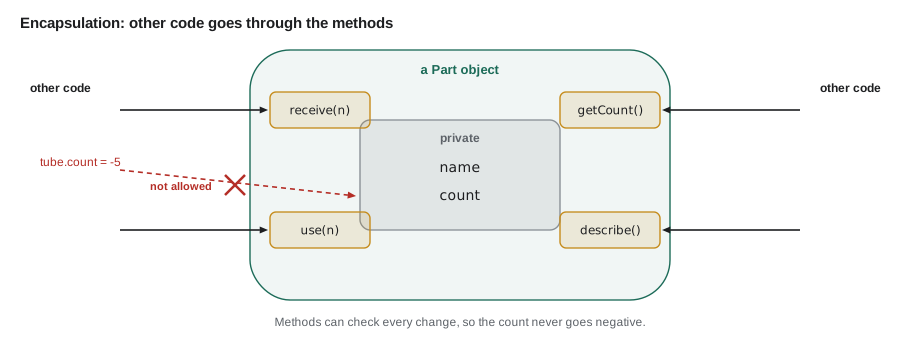
Encapsulation means two things together: keeping an object's data and the code that works on it in one class, and hiding the data so that only that code can change it. Java's tool for hiding is the access modifier private. A private field can be read and written only by code inside the same class. Code anywhere else must go through the class's methods, and those methods can check every change.
public class Main {
    public static void main(String[] args) {
        Part tube = new Part("700x25c inner tube", 15);
        tube.use(4);
        tube.receive(40);
        System.out.println(tube.describe());
        System.out.println(tube.use(80));
        System.out.println(tube.describe());
    }
}

class Part {
    private final String name;
    private int count;

    Part(String name, int count) {
        this.name = name;
        this.count = Math.max(0, count);
    }

    void receive(int amount) {
        if (amount > 0) count += amount;
    }

    String use(int amount) {
        if (amount > count) {
            return "Only " + count + " in stock; nothing taken";
        }
        count -= amount;
        return "Took " + amount;
    }

    String describe() {
        return name + ": " + count;
    }
}700x25c inner tube: 51 Only 51 in stock; nothing taken 700x25c inner tube: 51
What this code does
name and count are private, so the only way to change the count is through receive and use. use refuses to take more than is in stock, so the count can never go negative. If main tried to write tube.count = -5, javac would refuse to compile it.
Try it in your own copy: add tube.count = -5; to main and compile. javac reports that count has private access in Part. That message is the point of encapsulation: the compiler now guards the rule for you.
Invariants
A rule that must always be true about an object is called an invariant. For a Part, the invariant is "count is never negative". For a Booking, it might be "status moves only forward" or "a booking always has a customer". Encapsulation lets a class guarantee its invariants: the constructor makes them true at the start, and every method that changes a field keeps them true. If all fields are private, no other code can break them.
Writing invariants down, even as a comment above the class, is a good design habit. It tells you which methods need checks and it tells the next programmer what the class promises.
Getters
Hiding a field does not mean nobody may know its value. A getter is a small method that returns a field's value, conventionally named get followed by the field name, such as getCount. Getters for boolean fields are usually named is, such as isTaken. A getter lets other code read without being able to change.
public class Main {
    public static void main(String[] args) {
        Customer c = new Customer("Ana Ruiz", "614-555-0142");
        c.recordVisit();
        c.recordVisit();
        System.out.println(c.getName() + " has visited " + c.getVisits() + " times");
        System.out.println("Regular? " + c.isRegular());
    }
}

class Customer {
    private final String name;
    private final String phone;
    private int visits;

    Customer(String name, String phone) {
        this.name = name;
        this.phone = phone;
    }

    String getName() { return name; }
    String getPhone() { return phone; }
    int getVisits() { return visits; }
    boolean isRegular() { return visits >= 5; }

    void recordVisit() {
        visits++;
    }
}Ana Ruiz has visited 2 times Regular? false
What this code does
The three getters let other code read the name, phone and visit count, but there is no way to set visits to any value it likes. The only change allowed is recordVisit, which adds one, matching what really happens. isRegular is a getter-style method for a value that is worked out rather than stored.
isRegular, by the way, is not backed by a field. To the caller, it looks exactly like a getter. This is a strength of encapsulation: the class could later store a regular flag, or work it out differently, and no calling code would change.
Setters, and when not to write them
A setter is a method that changes a field, conventionally named set followed by the field name, such as setPhone. A good setter checks the new value before storing it. Phone numbers change, so Customer can reasonably have setPhone. Many beginners, though, write a getter and a setter for every field automatically, which gives away the very control encapsulation was meant to provide. A setVisits(-3) or setStatus("READY") would undo lessons 1 and 2.
Ask of each field: should other code be able to change this, and if so, how? Often the honest answer is a method named after a real action, such as recordVisit, confirm or receive, rather than a setter. Fields that never change after construction should be declared final and have no setter at all.
public class Main {
    public static void main(String[] args) {
        Customer c = new Customer("Ana Ruiz", "614-555-0142");
        System.out.println(c.setPhone("614 555 0199"));
        System.out.println(c.setPhone("call me"));
        System.out.println("Phone on file: " + c.getPhone());
    }
}

class Customer {
    private final String name;
    private String phone;

    Customer(String name, String phone) {
        this.name = name;
        this.phone = phone;
    }

    String getPhone() { return phone; }

    String setPhone(String newPhone) {
        String digits = newPhone.replace(" ", "").replace("-", "");
        if (digits.length() != 10 || !digits.chars().allMatch(Character::isDigit)) {
            return "Rejected: " + newPhone;
        }
        phone = digits.substring(0, 3) + "-" + digits.substring(3, 6) + "-" + digits.substring(6);
        return "Updated to " + phone;
    }
}Updated to 614-555-0199 Rejected: call me Phone on file: 614-555-0199
What this code does
setPhone accepts a number written with spaces or dashes, checks that it is ten digits and stores it in one standard layout. A value that is not a phone number is rejected and the old number is kept. Returning a message keeps the example simple; lesson 8 shows the usual Java way, throwing an exception.
The expression digits.chars().allMatch(Character::isDigit) checks that every character is a digit. It uses streams and a method reference, which JAVA-230 explains; read it as "all characters are digits". A plain for loop over the characters would work just as well.
| Field | Changes after creation? | Access to offer |
|---|---|---|
| Customer name | Rarely; treat as fixed | final field, getter only |
| Customer phone | Yes, customers move | getter and a checking setter |
| Visit count | Only by one at a time | getter and recordVisit() |
| Booking status | Only forward | getter and confirm(), markReady() |
| Part count | Up and down, never below zero | getter, receive(), use() |
Money as an object
JAVA-101 stored prices as whole cents in a long to avoid the rounding errors of double. That works, but the cents can be confused with dollars, added to a count by accident or printed without formatting. A small Money class wraps the cents and offers only the operations that make sense, which is encapsulation applied to a value. Tax is part of the booking system's prices, so the example works it out with Java's BigDecimal class, which does exact decimal arithmetic and lets you choose how to round.
import java.math.BigDecimal;
import java.math.RoundingMode;

public class Main {
    public static void main(String[] args) {
        Money tuneUp = Money.ofCents(8500);
        Money cable = Money.ofCents(1299);
        Money subtotal = tuneUp.plus(cable);
        Money tax = subtotal.times(new BigDecimal("0.08"));
        System.out.println("Subtotal:  " + subtotal);
        System.out.println("Sales tax: " + tax);
        System.out.println("Total:     " + subtotal.plus(tax));
    }
}

final class Money {
    private final long cents;

    private Money(long cents) {
        this.cents = cents;
    }

    static Money ofCents(long cents) {
        return new Money(cents);
    }

    Money plus(Money other) {
        return new Money(cents + other.cents);
    }

    Money times(BigDecimal factor) {
        BigDecimal result = BigDecimal.valueOf(cents).multiply(factor).setScale(0, RoundingMode.HALF_UP);
        return new Money(result.longValueExact());
    }

    @Override
    public String toString() {
        return String.format("%d.%02d", cents / 100, cents % 100);
    }
}Subtotal: 97.99 Sales tax: 7.84 Total: 105.83
What this code does
Money keeps its cents private and final, so a Money value can never change; plus and times return new Money objects instead. The tax is worked out with BigDecimal and rounded half up to the nearest cent, so 97.99 at 8 in 100 gives exactly 7.84. toString formats the cents as dollars and cents with two digits after the point.
Two design choices in Money are worth copying. The constructor is private and objects are made with a static factory method, ofCents, whose name says what the number means; lesson 3 says more about these. And Money is immutable: once made, it never changes. Immutable objects can be shared freely, because nobody can alter them behind your back. Java's own String, Integer and BigDecimal are immutable for the same reason.
One caution about BigDecimal: always create it from a String, such as new BigDecimal("0.13"), or from a long with valueOf. new BigDecimal(0.13) with a double copies the double's tiny binary error into the decimal, which defeats the purpose.
Protecting arrays and other mutable fields
A getter that returns a reference to a mutable object, such as an array, quietly hands out the keys. The caller receives the class's own array and can change its elements. The fix is a defensive copy: return a copy, and copy arrays that come in through the constructor too.
import java.util.Arrays;

public class Main {
    public static void main(String[] args) {
        int[] hours = {9, 11, 14};
        Mechanic m = new Mechanic("Tamsin", hours);
        hours[0] = 6;                       // change the caller's array
        int[] copy = m.getHours();
        copy[1] = 23;                       // change the returned array
        System.out.println(m.getName() + " works at " + Arrays.toString(m.getHours()));
    }
}

class Mechanic {
    private final String name;
    private final int[] hours;

    Mechanic(String name, int[] hours) {
        this.name = name;
        this.hours = hours.clone();          // copy in
    }

    String getName() { return name; }

    int[] getHours() {
        return hours.clone();                // copy out
    }
}Tamsin works at [9, 11, 14]
What this code does
The constructor stores a copy of the array it is given, so changing the caller's array afterwards has no effect. getHours returns a copy too, so changing the returned array does not touch the mechanic's own hours. Without the two clone calls, both changes would have reached inside the object.
final on the hours field only stops the field from pointing at a different array. It does not stop the elements of that array from changing, which is why the copies are needed. The same applies to lists and other mutable objects in JAVA-120. Immutable values such as String and Money need no copying.
Encapsulating the booking status
Putting the lessons together, Booking now hides its status, offers a getter and changes the status only through methods that follow Odile's rule. Other classes can ask what the status is, but they cannot set it.
public class Main {
    public static void main(String[] args) {
        Booking b = new Booking("Ana Ruiz", "brake bleed");
        System.out.println(b.getStatus());
        b.confirm();
        b.markReady();
        System.out.println(b.getStatus());
        System.out.println(b.confirm());
    }
}

class Booking {
    // Invariant: status only moves REQUESTED -> CONFIRMED -> READY.
    private final String customer;
    private final String job;
    private String status = "REQUESTED";

    Booking(String customer, String job) {
        this.customer = customer;
        this.job = job;
    }

    String getStatus() { return status; }
    String getCustomer() { return customer; }

    String confirm() {
        if (!status.equals("REQUESTED")) return "Cannot confirm: " + status;
        status = "CONFIRMED";
        return "Confirmed";
    }

    String markReady() {
        if (!status.equals("CONFIRMED")) return "Cannot mark ready: " + status;
        status = "READY";
        return "Ready";
    }
}REQUESTED READY Cannot confirm: READY
What this code does
status is private, so no code outside Booking can set it to READY without going through markReady. The invariant is written as a comment so the next reader knows what the methods protect. The last line shows the rule working: a READY booking cannot be confirmed again.
Try it yourself
A safe counter
Make the count field of Part private and add a getter getCount().
Add use(int amount) that takes stock only when amount is between 1 and the current count, returning true if it did and false otherwise. The program should print true, false, false and Count: 12.
public class Main {
    public static void main(String[] args) {
        Part p = new Part("brake pads", 15);
        System.out.println(p.use(3));
        System.out.println(p.use(0));
        System.out.println(p.use(50));
        System.out.println("Count: " + p.getCount());
    }
}

class Part {
    String name;
    int count;

    Part(String name, int count) {
        this.name = name;
        this.count = count;
    }

    boolean use(int amount) {
        return false;
    }

    int getCount() {
        return 0;
    }
}
Try it yourself
A defensive copy
The Rental class keeps the days a bike is out in an array, but the program below manages to change them from outside. Fix Rental with defensive copies in the constructor and in getDays() so the program prints [3, 4, 5] twice.
import java.util.Arrays;

public class Main {
    public static void main(String[] args) {
        int[] days = {3, 4, 5};
        Rental r = new Rental(days);
        days[0] = 99;
        System.out.println(Arrays.toString(r.getDays()));
        r.getDays()[1] = 99;
        System.out.println(Arrays.toString(r.getDays()));
    }
}

class Rental {
    private final int[] days;

    Rental(int[] days) {
        this.days = days;
    }

    int[] getDays() {
        return days;
    }
}
Common mistakes
MistakeWriting a getter and a setter for every field automatically.
InsteadOffer only the access each field needs, often a method named after a real action.
MistakeA setter that stores any value it is given.
InsteadCheck the new value and reject it, keeping the old one, if it breaks the class's rules.
MistakeReturning a private array from a getter.
InsteadReturn a copy, and copy arrays passed to the constructor.
MistakeThinking final makes an array's elements unchangeable.
Insteadfinal stops the field pointing elsewhere; the elements can still change.
MistakeCreating BigDecimal from a double, as new BigDecimal(0.13).
InsteadUse new BigDecimal("0.13") or BigDecimal.valueOf so the value is exact.
Summary and key terms
- Encapsulation keeps data with the code that works on it and hides the data behind private fields, so other classes must use methods.
- An invariant is a rule that must always hold, such as a count never being negative; the constructor establishes it and every method keeps it.
- Getters return values, named get or is; setters change values and must check them.
- Not every field needs a setter: fields that never change should be final, and many changes are better expressed as action methods such as confirm or recordVisit.
- A Money class wraps whole cents, is immutable and uses BigDecimal with explicit rounding for tax.
- Mutable fields such as arrays need defensive copies on the way in and out.
- Encapsulated classes can change their internals without breaking the code that uses them.
- Encapsulation
- Keeping data and its code together and hiding the data behind methods.
- private
- An access modifier that limits use to code inside the same class.
- Invariant
- A condition that must always be true for an object.
- Getter
- A method that returns the value of a field.
- Setter
- A method that changes the value of a field, ideally after checking it.
- final field
- A field that is assigned once and cannot be pointed elsewhere.
- Immutable
- Describes an object whose state cannot change after it is created.
- BigDecimal
- A Java class for exact decimal arithmetic with chosen rounding.
- Defensive copy
- A copy made so that outside code cannot change an object's internal data.
- Static factory method
- A static method that creates and returns an object, often with a descriptive name.
Practice problems
Work each problem on paper first, then reveal the answer to check.
What does javac report if main writes tube.count = -5 and count is private?
Show answer
That count has private access in Part; the code does not compile.
What is an invariant for a Part?
Show answer
Its count is never negative.
Why might a Booking have no setStatus method?
Show answer
Status must move only forward, so it changes only through confirm and markReady.
Why does Mechanic clone the hours array in its getter?
Show answer
So the caller gets a copy and cannot change the mechanic's own array.
Why is new BigDecimal("0.13") better than new BigDecimal(0.13)?
Show answer
The String gives exactly 0.13; the double carries a tiny binary error.
Lesson quiz · 5 questions
Score 60% or more to complete this lesson.
Create a free account to save your progress, take quizzes and earn a certificate.