
JAVA-102 · Lesson 11 of 12 · 23 min
Packages and access modifiers
▶ Video coming soon A video version of this lesson is on the way.
By mid-March the booking system is planned to fill one file of more than 600 lines with a dozen classes. Every class can see every other class's package-private members, and finding anything means scrolling. Ingrid's plan for Wednesday, March 31, 2027 is the step professional Java programs take from the start: one public class per file, files grouped into packages, and deliberate choices about which classes and members each package shows to the rest of the program.
One class per file
So far every example has been a single Main.java with extra classes below Main. That was convenient for learning, and a single file is still fine for a short program, but real projects put each top-level class in its own file named after the class: Booking.java, BookingBook.java, Status.java. Each file can then be read, changed and reviewed on its own, and tools such as IntelliJ IDEA and VS Code find classes by their file names.
Packages
A package is a named group of related classes, like a folder. The first line of each file in a package declares it: package org.secondgear.booking;. Package names are written in lower case and, by convention, start with the organization's internet domain reversed, which keeps names from different organizations apart. Second Gear Cycles has the domain secondgear.org in this course's story, so its packages begin org.secondgear. Java's own classes live in packages such as java.lang, java.util and java.math.
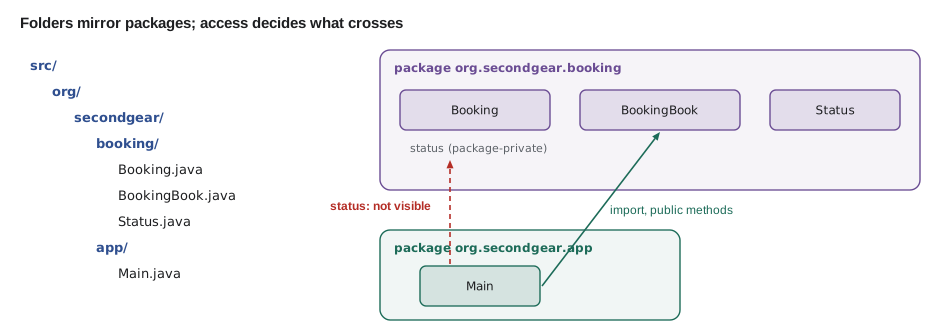
The package name must match the folder the source file is in, one folder per part of the name. Booking.java in the package org.secondgear.booking lives in src/org/secondgear/booking/Booking.java. Hamza's plan splits the booking system into two packages: org.secondgear.booking for the model classes, and org.secondgear.app for the program that uses them.
package org.secondgear.booking;

public enum Status { REQUESTED, CONFIRMED, READY }
What this code does
Status is a public enum in the package org.secondgear.booking, declared in its own file named Status.java. The package line must come first in the file. Being public, it can be used from any other package.
package org.secondgear.booking;

public class Booking {
    private final int number;
    private final String customer;
    Status status = Status.REQUESTED;

    public Booking(int number, String customer) {
        this.number = number;
        this.customer = customer;
    }

    public int number() { return number; }
    public String customer() { return customer; }
    public Status status() { return status; }

    public void confirm() {
        status = Status.CONFIRMED;
    }

    @Override
    public String toString() {
        return "#" + number + " " + customer + " " + status;
    }
}
What this code does
Booking is public, and so are its constructor and the methods other packages need. The status field has no access modifier, which makes it package-private: classes in org.secondgear.booking may change it, but no class outside may. Everything else that should be hidden is private.
package org.secondgear.booking;

public class BookingBook {
    private final Booking[] items = new Booking[50];
    private int count;

    public Booking add(String customer) {
        Booking b = new Booking(1001 + count, customer);
        items[count++] = b;
        return b;
    }

    public void markReady(int number) {
        for (int i = 0; i < count; i++) {
            if (items[i].number() == number) {
                items[i].status = Status.READY;   // package-private access
            }
        }
    }

    public int size() { return count; }
}
What this code does
BookingBook is in the same package as Booking, so markReady may set a booking's package-private status field directly. Code in other packages must go through BookingBook's public methods. The array of bookings is private, so nothing outside BookingBook can touch it.
import
A class in another package is referred to by its fully qualified name, such as org.secondgear.booking.Booking, or by its simple name after an import declaration at the top of the file. import org.secondgear.booking.Booking; makes Booking available by its simple name. A wildcard, import org.secondgear.booking.*;, imports all the package's public classes, though many teams prefer explicit imports so readers can see where each class comes from. Classes in java.lang, such as String and Math, are imported automatically. An import does not copy or load anything; it is only a shorthand for names.
package org.secondgear.app;

import org.secondgear.booking.Booking;
import org.secondgear.booking.BookingBook;

public class Main {
    public static void main(String[] args) {
        BookingBook book = new BookingBook();
        Booking a = book.add("Ana Ruiz");
        Booking b = book.add("Theo Park");
        a.confirm();
        book.markReady(1002);
        System.out.println(a);
        System.out.println(b);
        System.out.println("Bookings: " + book.size());
    }
}
What this code does
Main is in a different package, org.secondgear.app, so it imports the two booking classes it uses. It can call their public methods but cannot see anything package-private or private. The program prints the bookings through their public toString.
import java.util.Arrays;

public class Main {
    public static void main(String[] args) {
        int[] hours = {14, 9, 11};
        Arrays.sort(hours);                                  // imported by simple name
        System.out.println("Sorted: " + Arrays.toString(hours));

        java.math.BigDecimal rate = new java.math.BigDecimal("0.13");   // fully qualified, no import
        System.out.println("Rate: " + rate);

        String text = String.valueOf(Math.max(4, 7));        // java.lang: imported automatically
        System.out.println("Max: " + text);
        System.out.println("Package of String: " + String.class.getPackageName());
        System.out.println("Package of Arrays: " + Arrays.class.getPackageName());
    }
}Sorted: [9, 11, 14] Rate: 0.13 Max: 7 Package of String: java.lang Package of Arrays: java.util
What this code does
Arrays is imported, so the code can call it by its simple name, while BigDecimal is written with its fully qualified name and needs no import. String and Math come from java.lang, which every file imports automatically. getPackageName shows which package each class belongs to.
Compiling and running packages
With several packages, compile all the source files together and send the .class files to an output folder with javac's -d option, which recreates the package folders under it. To run, give java the class path, the folder where the compiled classes are, with -cp, and the fully qualified name of the class with main. The transcript below is a real build of the four files above.
$ javac -d out $(find src -name "*.java")
$ java -cp out org.secondgear.app.Main$ find src -name "*.java" src/org/secondgear/app/Main.java src/org/secondgear/booking/Booking.java src/org/secondgear/booking/BookingBook.java src/org/secondgear/booking/Status.java $ javac -d out $(find src -name "*.java") $ find out -type f out/org/secondgear/app/Main.class out/org/secondgear/booking/Booking.class out/org/secondgear/booking/BookingBook.class out/org/secondgear/booking/Status.class $ java -cp out org.secondgear.app.Main #1001 Ana Ruiz CONFIRMED #1002 Theo Park READY Bookings: 2 $ jar --create --file shopbook.jar --main-class org.secondgear.app.Main -C out . $ java -jar shopbook.jar #1001 Ana Ruiz CONFIRMED #1002 Theo Park READY Bookings: 2
What this code does
javac compiles every .java file under src and writes the class files into out, in folders matching the packages. java is told to look for classes in out and to start the class org.secondgear.app.Main. jar then packs the classes into one file that java -jar can run.
A JAR file, short for Java archive, is a zip file of compiled classes with a small description inside, the manifest, which can name the main class. It is how Java programs and libraries are distributed. In practice, build tools such as Maven and Gradle, which JAVA-120 introduces, run javac and jar for you and fetch libraries your program depends on.
The four access levels
Java has four levels of access, three written with keywords and one, package-private, written by leaving the modifier out. They apply to classes, fields, constructors and methods. A top-level class can only be public or package-private.
| Modifier | Same class | Same package | Subclass in another package | Anywhere |
|---|---|---|---|---|
| private | yes | no | no | no |
| (none): package-private | yes | yes | no | no |
| protected | yes | yes | yes, through inheritance | no |
| public | yes | yes | yes | yes |
The guideline is to give everything the least access that works. Start with private. Widen to package-private when other classes in the same package genuinely need it, to protected when a member is designed for subclasses, and to public only for what the rest of the program is meant to use. Everything public is a promise: other code will come to depend on it, and changing it later breaks that code.
$ javac -d out $(find src -name "*.java")$ javac -d out $(find src -name "*.java")
src/org/secondgear/app/Main.java:12: error: status is not public in Booking; cannot be accessed from outside package
b.status = org.secondgear.booking.Status.READY;
^
1 errorWhat this code does
This build changed one line of Main to set b.status directly instead of calling book.markReady. status is package-private in org.secondgear.booking, and Main is in org.secondgear.app, so javac refuses the access. The error names the member, the class and the reason.
Access levels inside one file
The examples below keep to one file so you can run them, but they show the same rules. All the classes in a file without a package line belong to the unnamed package, so package-private members are visible to all of them, and only private members are hidden.
public class Main {
    public static void main(String[] args) {
        Locker l = new Locker("L-3");
        l.store("Theo Park's helmet");
        System.out.println(l.label + ": " + l.contents());
        // l.secretCode would not compile: it is private to Locker
        System.out.println("Code length: " + l.codeLength());
        System.out.println(new Locker.Key(l).open());
    }
}

class Locker {
    final String label;              // package-private: visible in this package
    private final String secretCode; // private: only Locker's own code
    private String item = "(empty)";

    Locker(String label) {
        this.label = label;
        this.secretCode = "4" + label.length() + "71";
    }

    void store(String what) { item = what; }
    String contents() { return item; }
    int codeLength() { return secretCode.length(); }

    static class Key {
        private final Locker locker;
        Key(Locker locker) { this.locker = locker; }
        String open() {
            return "Opened " + locker.label + " with code " + locker.secretCode;
        }
    }
}L-3: Theo Park's helmet Code length: 4 Opened L-3 with code 4371
What this code does
label is package-private, so Main, in the same unnamed package, can read it directly, while secretCode is private and Main can use it only through codeLength. The nested Key class is inside Locker, so it may read the private secretCode. Private means private to the class and the classes nested inside it.
A nested class sees its outer class's private members, and the outer class sees the nested class's private members. That is one reason builders, as in lesson 3, are nested: they can set private fields that nothing else may touch.
protected across packages
protected allows a subclass in another package to use a member it inherits, which is exactly what template methods need. It also allows access from the same package, which surprises people coming from other languages. The example puts the classes in one file, so it cannot show the package boundary, but the comments mark what would and would not compile if RentalBooking were in a different package.
public class Main {
    public static void main(String[] args) {
        Booking r = new RentalBooking("Theo Park", 3);
        System.out.println(r.receipt());
    }
}

abstract class Booking {
    private final String customer;

    protected Booking(String customer) {
        this.customer = customer;
    }

    public final String receipt() {
        return customer + ": " + details() + ", " + priceCents() + " cents";
    }

    protected abstract String details();     // for subclasses to supply
    protected abstract long priceCents();

    protected String customer() { return customer; }
}

class RentalBooking extends Booking {
    private final int days;

    RentalBooking(String customer, int days) {
        super(customer);                     // allowed from any subclass
        this.days = days;
    }

    @Override protected String details() { return days + "-day rental for " + customer(); }
    @Override protected long priceCents() { return 1500L * days; }
}Theo Park: 3-day rental for Theo Park, 4500 cents
What this code does
receipt is public and final, so any code can ask for a receipt and no subclass can change how it is assembled. The protected abstract methods and the protected getter are the parts designed for subclasses, and a subclass in another package could still use them. The constructor is protected because only subclasses should call it.
Modules, briefly
Since Java 9, packages can themselves be grouped into modules. A module is described by a file named module-info.java at the root of its sources, which lists the packages it exports to other modules and the other modules it requires. A package that is not exported is hidden from other modules even if its classes are public, which gives large programs and libraries a stronger boundary than public alone. Java's own library is split into modules such as java.base, which every program uses.
module org.secondgear.shopbook {
    requires java.base;              // implied; shown for illustration
    exports org.secondgear.booking;  // other modules may use these classes
    // org.secondgear.app is not exported: it stays internal
}
What this code does
A module declaration names the module, the modules it needs and the packages it makes available. Here only the booking package is exported, so another module could use Booking but not reach the app package. Small programs like Hamza's do not need a module file, and this course does not use one.
Most applications you will build in this program, including Spring Boot services in Year 2, run fine without module files. It is enough to know what they are and to recognize module-info.java when you meet it in a library.
Organizing the booking system
Packages are a design tool as much as an organizing one. Group classes that change together and use each other heavily, and keep the dependencies between packages few and in one direction. Hamza's planned layout for the capstone keeps the model, the rules and the console screen apart.
| Package | Classes | Depends on |
|---|---|---|
| org.secondgear.booking | Booking, RepairBooking, RentalBooking, Status, Slot, BookingException | nothing else in the program |
| org.secondgear.money | Money, Rates | nothing |
| org.secondgear.service | BookingService, which checks capacity and rules | booking, money |
| org.secondgear.app | Main, the console menu | service, booking |
Dependencies flow one way, from the app toward the model. The booking classes never import the console code, so the same model could later sit behind a web service in JAVA-260 without change.
Try it yourself
Least access
The Wallet class exposes its balance as a package-private field that main changes directly, which lets the balance go negative. Make the field private, add long balance() and a method boolean spend(long cents) that refuses (returning false) when there is not enough money.
Change main to use the methods. The program should print true, false and Balance: 700.
public class Main {
    public static void main(String[] args) {
        Wallet w = new Wallet(2000);
        w.balance -= 1300;
        System.out.println(true);
        w.balance -= 5000;
        System.out.println(false);
        System.out.println("Balance: " + w.balance);
    }
}

class Wallet {
    long balance;

    Wallet(long balance) {
        this.balance = balance;
    }
}
Try it yourself
Private access from a nested class
Complete the nested static class Counter.Report so its text() method reads the private count of the Counter it was given and returns Counted 3 bikes.
The program should print Counted 3 bikes.
public class Main {
    public static void main(String[] args) {
        Counter c = new Counter();
        c.add(); c.add(); c.add();
        System.out.println(new Counter.Report(c).text());
    }
}

class Counter {
    private int count;

    void add() { count++; }

    static class Report {
        private final Counter counter;
        Report(Counter counter) { this.counter = counter; }
        String text() {
            return "Counted ? bikes";
        }
    }
}
Common mistakes
MistakePutting a class in a package whose name does not match its folder.
InsteadPlace the file in folders matching the package, such as src/org/secondgear/booking.
MistakeMaking every class and method public by habit.
InsteadStart private and widen access only as far as the design needs.
MistakeExpecting import to load or copy a class.
Insteadimport only lets you use the simple name; compiling and the class path find the class.
MistakeRunning java with the file path, such as java out/org/secondgear/app/Main.class.
InsteadGive the class path with -cp out and the fully qualified class name.
MistakeLetting the model package import the console package.
InsteadKeep dependencies one way, from the app toward the model.
Summary and key terms
- Real projects put each top-level class in its own file and group related classes in packages, declared on the first line with package and named with the organization's reversed domain.
- A package's folders must match its name.
- Classes from other packages are used by their fully qualified names or imported; java.lang is imported automatically. javac -d out compiles into package folders, java -cp out runs a class by its fully qualified name, and a JAR file packs compiled classes, with a manifest that can name the main class.
- The four access levels are private, package-private (no modifier), protected and public; give each member the least access that works.
- Nested classes share private access with their outer class.
- Modules, described in module-info.java, export chosen packages and require other modules.
- Packages should depend on each other in one direction, from the app toward the model.
- Package
- A named group of related classes, declared with package and stored in matching folders.
- Fully qualified name
- A class name including its package, such as org.secondgear.booking.Booking.
- import
- A declaration that lets a class from another package be used by its simple name.
- Package-private
- The access level with no modifier, allowing use only within the same package.
- protected
- Access for the same package and for subclasses in other packages.
- public
- Access from anywhere.
- Class path
- The list of folders and JAR files where java and javac look for classes.
- JAR file
- A zip archive of compiled classes, with a manifest describing it.
- Unnamed package
- The package of classes in files with no package declaration.
- Module
- A named group of packages that declares what it exports and requires, in module-info.java.
- Least access
- The guideline of giving each member the narrowest access that works.
Practice problems
Work each problem on paper first, then reveal the answer to check.
Where must the file for org.secondgear.booking.Status be stored?
Show answer
In the folder src/org/secondgear/booking, named Status.java.
What does import org.secondgear.booking.Booking; do?
Show answer
Lets the file refer to the class as Booking instead of its fully qualified name.
Which access level is used when no modifier is written?
Show answer
Package-private: visible only within the same package.
How do you run a class called Main in the package org.secondgear.app compiled into out?
Show answer
java -cp out org.secondgear.app.Main
Can a nested class read its outer class's private fields?
Show answer
Yes; private access covers the class and the classes nested inside it.
Lesson quiz · 5 questions
Score 60% or more to complete this lesson.
Create a free account to save your progress, take quizzes and earn a certificate.