
FAT-210 · Lesson 10 of 12 · 19 min
Annunciators, displays and the fire department interface
When the first fire truck pulls up to Riverlight Tower, the captain doesn't go to the panel room in the basement. She walks through the main entrance to a locked cabinet beside the concierge desk, opens it with a key every Charlotte fire captain carries, and reads the annunciator. 'Floor 11, east corridor smoke, first alarm. Floor 11 waterflow. Floor 12 corridor smoke.' In fifteen seconds she knows where to send her crews. Captain Helen Strand tells Sasha this story at a pre-construction meeting for the tower's panel upgrade. 'That cabinet is my view of the building,' she says. 'If what it shows is wrong, slow or hard to read, my firefighters go to the wrong place.' This lesson covers annunciators and displays, where they go, what they must show, and how the fire department uses them.
What an annunciator does
An annunciator is a display, separate from the control unit, that shows the status of the fire alarm system where people need to see it. The control unit itself has a display, but it is often in an electrical room, a basement or a security office that isn't where firefighters arrive. The annunciator repeats the important information at the entrance, at a fire command center, at a nursing station or anywhere else the design calls for. It shows alarm, supervisory and trouble conditions, identifies the zone or device, and on many systems offers a limited set of controls such as acknowledge, silence and reset, protected by a key or passcode.
The International Fire Code and the International Building Code, adopted in North Carolina through the state codes, require zone annunciation where a fire alarm system has more than one zone, at a location approved by the fire code official, usually the main entrance. High-rise buildings need a fire command center with the annunciator, voice communication controls and other fire safety controls grouped in a room near the firefighters' entrance. NFPA 72 sets how annunciators are installed, wired and supervised.
Kinds of annunciator
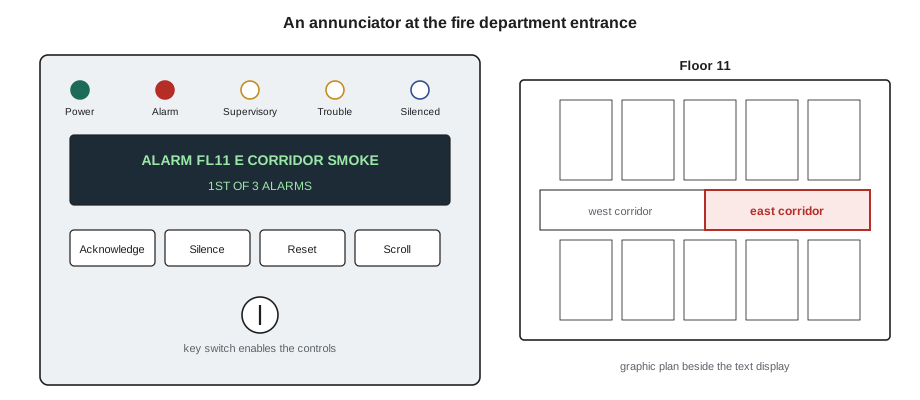
The simplest annunciator is a row of LEDs, one per zone, each with a printed label: 'Zone 4, Floor 2, north classrooms'. It is easy to read, needs no menu, and is still common in small and medium buildings. An alphanumeric annunciator has a text display that shows the same messages as the panel: the device label, the type of event and the count of events, with buttons to scroll through them. A graphic annunciator shows a floor plan of the building with an LED or a lit area for each zone, so responders can see at a glance where the alarm is and how to get there. Large buildings often use a computer graphic workstation as well, with floor plans that zoom to the device.
| Type | Shows | Best suited to |
|---|---|---|
| LED zone annunciator | One labeled light per zone | Small and medium buildings with clear zones |
| Alphanumeric annunciator | Text messages, device labels, event counts | Addressable systems of any size |
| Graphic annunciator | A floor plan with lit zones | Buildings where finding the zone is hard |
| Graphic workstation | Zoomable plans, histories, controls | Campuses, hospitals and high-rise towers |
What the display must show
Whatever its type, the display must make the system's state clear in a few seconds. A green power-on indication shows the system has power. Separate common indications show that an alarm, a supervisory signal or a trouble is present anywhere in the system. Another shows that signals have been silenced, so nobody assumes a quiet building is a safe one. For each event, the display shows what kind it is, where it is, and, on addressable systems, which device. When there are several events, it shows how many of each kind and lets the user scroll through them, with the first alarm kept easy to find. All of this must be readable in the lighting at the annunciator's location, by someone wearing gloves and a helmet.
Labels are the weak point of most annunciators. A zone LED labeled 'Zone 7' or a text message reading 'DEVICE 1-047' forces the responder to go and find out what that means. The labels on the annunciator must use the same names as the building: room numbers, wing names and floor numbers that match the signs. When a building is renovated or a tenant changes, the annunciator labels change too. Captain Strand's office checks annunciator labels on every fire inspection, and missing or wrong labels are the deficiency she writes up most.
Building the point list
Every addressable system's annunciator and fire department display is built from a point list: every device and output, with its address, label, zone and the message shown for each kind of event. The designer starts the point list during design, the installer fills in the addresses, and the programmer turns it into the panel's labels and the graphic workstation's floor plans. A point list kept as a spreadsheet or a simple text file can also be checked automatically for missing labels, duplicate addresses and devices with no zone.
# Build and check an annunciator point list (illustrative)
points = [  # (address, floor, area, device)
    ("1-101", 11, "E CORRIDOR", "SMOKE"), ("1-102", 11, "W CORRIDOR", "SMOKE"),
    ("1-103", 11, "ELEV LOBBY", "SMOKE"), ("2-111", 11, "", "WATERFLOW"),
    ("1-104", 12, "E CORRIDOR", "SMOKE"), ("1-104", 12, "W CORRIDOR", "SMOKE"),
    ("2-112", 12, "STAIR B", "PULL STATION"),
]
seen, problems = set(), []
for addr, floor, area, dev in points:
    label = f"FL{floor} {area} {dev}".replace("  ", " ")
    if not area:
        problems.append(f"{addr}: no area in label ({label})")
    if addr in seen:
        problems.append(f"{addr}: duplicate address")
    seen.add(addr)
    print(f"{addr}  zone FLOOR {floor:<3d} {label}")
print()
print("Problems found:", len(problems))
for p in problems:
print(" ", p)1-101 zone FLOOR 11 FL11 E CORRIDOR SMOKE 1-102 zone FLOOR 11 FL11 W CORRIDOR SMOKE 1-103 zone FLOOR 11 FL11 ELEV LOBBY SMOKE 2-111 zone FLOOR 11 FL11 WATERFLOW 1-104 zone FLOOR 12 FL12 E CORRIDOR SMOKE 1-104 zone FLOOR 12 FL12 W CORRIDOR SMOKE 2-112 zone FLOOR 12 FL12 STAIR B PULL STATION Problems found: 2 2-111: no area in label (FL11 WATERFLOW) 1-104: duplicate address
The check finds a waterflow switch with no area in its label, which would show only 'FL11 WATERFLOW' and not which riser or valve, and a duplicate address on floor 12, which would make two devices share one message. Both are fixed in the point list before anything is programmed.
Controls at the annunciator
Annunciators often carry some of the panel's controls, so firefighters and trained staff don't have to go to the panel room. Which controls are provided, and who can use them, is part of the design and is agreed with the fire department. Typical annunciator controls are acknowledge, signal silence and reset, behind a key switch or passcode. In buildings with staged evacuation or voice communication, the annunciator or the fire command center also has controls to sound the alarm on more floors, make announcements and talk on firefighter telephones, which FAT-310 covers. Every control at an annunciator must do exactly what the same control does at the panel.
Event history and records
Every modern panel keeps a history of events: each alarm, supervisory signal, trouble, acknowledgment, silence, reset, disable and program change, with the date and time. The history is the first thing a technician reads on a service call, because it shows what has been happening when nobody was watching. After a real fire or a false alarm, the history shows the order of events, how long people took to respond, and what the system did. The panel's clock must be set correctly, and kept correct through daylight saving changes, or the history becomes hard to match with the fire department's records.
# Summarize a panel's event history (illustrative export)
history = '''2026-03-02 07:11:40 TROUBLE  2-118 FL18 W CORRIDOR SMOKE DIRTY
2026-03-04 14:02:13 ALARM    1-101 FL11 E CORRIDOR SMOKE
2026-03-04 14:02:31 ALARM    2-111 FL11 RISER 2 WATERFLOW
2026-03-04 14:03:05 ACK      ANNUNCIATOR MAIN ENTRANCE
2026-03-04 14:19:50 SILENCE  ANNUNCIATOR MAIN ENTRANCE
2026-03-04 14:41:12 RESET    PANEL
2026-03-06 09:30:00 SUPERV   2-140 FL1 FIRE PUMP RUNNING
2026-03-06 09:42:17 SUPERV   2-140 FL1 FIRE PUMP RUNNING RESTORED'''
counts, first_alarm = {}, None
for line in history.splitlines():
    date, time, kind = line.split()[:3]
    counts[kind] = counts.get(kind, 0) + 1
    if kind == "ALARM" and first_alarm is None:
        first_alarm = line
print("Events by kind:", ", ".join(f"{k} {v}" for k, v in counts.items()))
print("First alarm:", first_alarm)
t0 = 14 * 3600 + 2 * 60 + 13
t_ack = 14 * 3600 + 3 * 60 + 5
print("Time from first alarm to acknowledge:", t_ack - t0, "s")Events by kind: TROUBLE 1, ALARM 2, ACK 1, SILENCE 1, RESET 1, SUPERV 2 First alarm: 2026-03-04 14:02:13 ALARM 1-101 FL11 E CORRIDOR SMOKE Time from first alarm to acknowledge: 52 s
The summary shows a dirty-detector trouble that needs attention, a real alarm on floor 11 that was acknowledged at the annunciator in under a minute, and a fire pump run that the pump contractor later confirmed was its weekly test. This is the kind of reading Gerry expects at the start of every visit.
Working with the fire department
The fire department is the main user of the annunciator, so its views shape the design. Before construction, the designer meets the fire marshal's office to agree the annunciator's location, its type, its controls and the key used to open its cabinet; many US departments use a standard key for annunciator cabinets, and many require a key box at the entrance for building keys. After installation, the department often joins part of the acceptance test so its officers know the system. Captain Strand's office also asks that a laminated zone map or floor plan be mounted beside every LED annunciator.
Worked problem
An annunciator that disagreed with the panel
During the Riverlight annual inspection, Sasha operates a detector on floor 14. The panel shows 'ALARM FL14 E CORRIDOR SMOKE', but the annunciator at the main entrance shows 'ALARM FL13 E CORRIDOR SMOKE'. What could cause this?
Show solution
- The panel's message is the program's label for that address, so the panel is right.
- The annunciator either has its own label table, or its graphic shows the wrong floor for that address.
- A past renovation may have updated the panel labels but not the annunciator's separate configuration.
- She compares the annunciator's point list with the panel's and finds every point from floor 13 upward shifted by one floor.
Answer: During an earlier upgrade, someone had inserted a new point for floor 12 into the panel's list but not into the annunciator's, which took its messages by position rather than by address. Sasha rebuilds the annunciator's configuration from the panel's point list and tests one device on every floor at the annunciator before signing off.
Remote displays for building staff
Not every display is for the fire department. Many buildings put a small annunciator or a display terminal where staff work, such as the concierge desk at Riverlight Tower, the security office at Tamarind House or the nursing stations at Eastview. These displays let staff see a trouble or supervisory signal as soon as it occurs, call the service company, and start the building's procedures for an alarm before the fire department arrives. They are programmed with the same labels as every other display, and their controls are limited to what the fire safety plan says staff may do, which is usually acknowledge and nothing more.
Some owners also want fire alarm events passed to a building management system, an email or a text message. These connections are useful for keeping staff informed, but they are not a replacement for the listed annunciators and the monitoring station, because they are not supervised in the same way and can fail without anyone knowing. The panel sends the information through a listed interface, and the design makes clear that these extra messages are for convenience only.
Any display that leaves the building, such as a remote view of the panel over the internet, is also covered by the security rules in lesson 8: the connection is approved by the owner, protected by passwords that are changed from the defaults, and shown on the system's documents, so nobody is surprised to learn it exists.
Common mistakes
MistakePlacing the annunciator where it suits the electrician, not the fire department.
InsteadLocate it at the entrance the fire department agrees.
MistakeLabeling zones by number only.
InsteadUse the building's own names and room numbers.
MistakeUpdating the panel's labels but not the annunciator's.
InsteadKeep every display built from the same point list.
MistakeLeaving the panel clock wrong.
InsteadSet and maintain the time so the history matches real events.
MistakeGiving annunciator controls different behavior from the panel.
InsteadEach control must do the same thing everywhere.
Summary and key terms
- Annunciators show the system's state where responders and staff need it, usually at the fire department entrance.
- The building and fire codes require zone annunciation at an approved location and a fire command center in high-rise buildings.
- LED, alphanumeric, graphic and workstation annunciators suit different buildings.
- Displays show power, common alarm, supervisory, trouble and silenced indications, with the first alarm easy to find.
- The point list is the single source for every display's labels and must be checked.
- Event history, with a correct clock, is the record of what the system did.
- Annunciator
- A display, separate from the panel, that shows the fire alarm system status.
- Fire command center
- The room or area near the firefighter entrance where fire safety controls are grouped.
- Graphic annunciator
- An annunciator that shows alarms on a floor plan.
- Point list
- The list of every address with its label, zone and messages.
- Event history
- The panel's record of every event with its date and time.
- Common indication
- A light or message that shows an event is present anywhere in the system.
Practice problems
Work each problem on paper first, then reveal the answer to check.
Where is the annunciator usually located?
Show answer
At the entrance the fire department will use, or another location it approves.
What does a signals-silenced indication warn of?
Show answer
That a quiet building may still be in alarm.
Why build every display from the same point list?
Show answer
So the panel and annunciators always agree.
Why must the panel clock be correct?
Show answer
So the event history matches the fire department's records.
Lesson quiz · 5 questions
Score 60% or more to complete this lesson.
Create a free account to save your progress, take quizzes and earn a certificate.