
DCT-230 · Lesson 3 of 12 · 21 min
ASHRAE thermal guidelines and inlet temperature
A customer in Hall A sends an angry ticket: their monitoring tool shows a server reporting 84 °F at its inlet, and their contract says the hall will be kept "within ASHRAE recommended conditions." Dmitri Volkov, the shift lead, forwards the ticket to Jamal and Roz with a note: "Is this real, and are we in breach?" To answer, Jamal has to know what the ASHRAE guidelines actually say, where the temperature that counts is measured, and how to check it. That is this lesson.
Who ASHRAE is and why it matters
ASHRAE is a professional society of heating, ventilation, air-conditioning and refrigeration engineers. Its technical committee 9.9 publishes the Thermal Guidelines for Data Processing Environments, the reference that equipment makers, designers, operators and customers use worldwide to agree on the conditions IT equipment needs. The fifth edition was published in 2021. The guidelines are not a law or a building code; they are a voluntary reference. But they are written into nearly every colocation contract, service level agreement and equipment warranty, which makes them as binding in practice as any regulation a technician works under.
The guidelines describe two kinds of range for the air entering IT equipment:
- The recommended range: the conditions in which equipment should normally run for reliability and long life. Operators aim to keep inlet air inside it nearly all the time.
- The allowable range: wider conditions in which the equipment is designed to keep working, for short periods or by deliberate choice to save energy, with some cost in reliability or fan power.
Equipment is placed in classes according to the allowable range it is designed for. Most enterprise servers and storage are class A1 or A2; some hardened equipment is A3 or A4. The fifth edition added class H1 for high-density equipment, such as some AI servers, that needs cooler air than the others.
The recommended range
For the common air-cooled classes the recommended range is the same:
- Dry-bulb temperature at the inlet: 64.4 °F to 80.6 °F.
- Moisture: a dew point from 15.8 °F up to 59 °F, and relative humidity no higher than about 70 percent where the air is clean. Where gaseous pollutants are present, the guidelines lower the humidity limit, to about 50 percent.
For class H1, the recommended upper limit is lower, 71.6 °F, reflecting the higher density of those systems. Lesson 9 returns to the liquid-cooled classes, which use different temperature limits for the water rather than the air.
The recommended range is wide on purpose. Older practice kept halls at 64 °F or colder, which wasted a great deal of energy. Raising the cold aisle toward the upper part of the range lets chillers work less and lets free cooling run for more of the year. Stonebridge runs Hall A at a supply setpoint of about 72 °F, aiming for rack inlets between 72 °F and 77 °F.
# Check rack inlet readings against the ASHRAE recommended range and the class A1 allowable range
REC = (18.0, 27.0)       # recommended dry bulb, C
A1 = (15.0, 32.0)        # class A1 allowable dry bulb, C
DP = (-9.0, 15.0)        # recommended dew point, C
def classify(t, dp):
    if REC[0] <= t <= REC[1] and DP[0] <= dp <= DP[1]:
        return "recommended"
    if A1[0] <= t <= A1[1]:
        return "allowable only - investigate"
    return "OUTSIDE A1 - urgent"
readings = {  # rack: (bottom, middle, top) inlet, C
    "A-14-07": (21.8, 22.9, 24.1),
    "A-22-03": (19.5, 23.0, 27.6),
    "A-28-02": (22.4, 26.0, 33.1),
}
hall_dp = 8.0
for rack, temps in readings.items():
    hi = max(temps)
print(f"{rack}: top reading {hi * 1.8 + 32:.1f} F -> {classify(hi, hall_dp)}")A-14-07: top reading 75.4 F -> recommended A-22-03: top reading 81.7 F -> allowable only - investigate A-28-02: top reading 91.6 F -> OUTSIDE A1 - urgent
The script uses the highest of each rack's three sensors, as the site's reporting does. The first rack is comfortably inside the recommended range. The second is just over the top of it and goes on Jamal's list to investigate. The third, at 91.6 °F, is outside even the class A1 allowable range, which on a real shift would be an urgent call to the shift lead.
The allowable ranges
The allowable range for each class is wider than the recommended range. In round numbers:
| Class | Allowable inlet dry bulb | Typical equipment |
|---|---|---|
| A1 | 59 to 89.6 °F | Enterprise servers and storage in tightly controlled halls |
| A2 | 50 to 95 °F | Most volume servers, network gear |
| A3 | 41 to 104 °F | Equipment rated for wider ranges |
| A4 | 41 to 113 °F | Hardened equipment |
| H1 | 59 to 77 °F | Some high-density equipment |
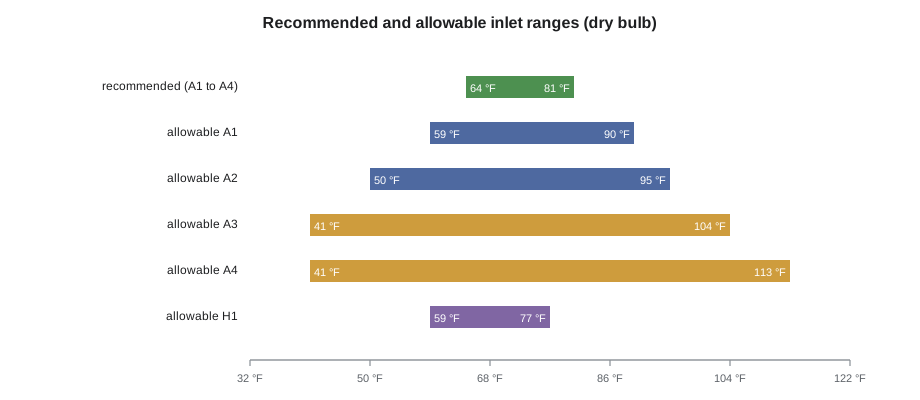
Equipment running in the allowable range is not broken and is not out of warranty. But the guidelines show that failure rates rise when equipment spends long periods near the top of the allowable range, and server fans speed up and use more power. A technician should treat any inlet above the recommended range as something to investigate and record, even if it is still allowable.
The guidelines also limit how fast the temperature changes. Rapid swings stress components and, in some equipment, tape drives. A common figure is no more than about 36 °F in an hour. A cooling unit that cycles on and off and swings an aisle by several degrees every few minutes can cause problems even if every reading is within range.
Where the temperature that counts is measured
The guidelines apply to the air entering the IT equipment, at the inlet, not the room average, the cooling unit supply or the hot aisle. This is the single most important fact in this lesson and the source of most disputes.
- Room temperature: meaningless for compliance. A room can average 75 °F while one rack ingests hot exhaust.
- Cooling unit supply air: tells how cold the air leaving the unit is, not what the servers see.
- Return air at the cooling unit: tells how warm the air coming back is. Useful for diagnosing the unit, not for compliance.
- Rack inlet: the air at the front of the rack, close to the equipment intakes. This is what the guidelines and most contracts mean.
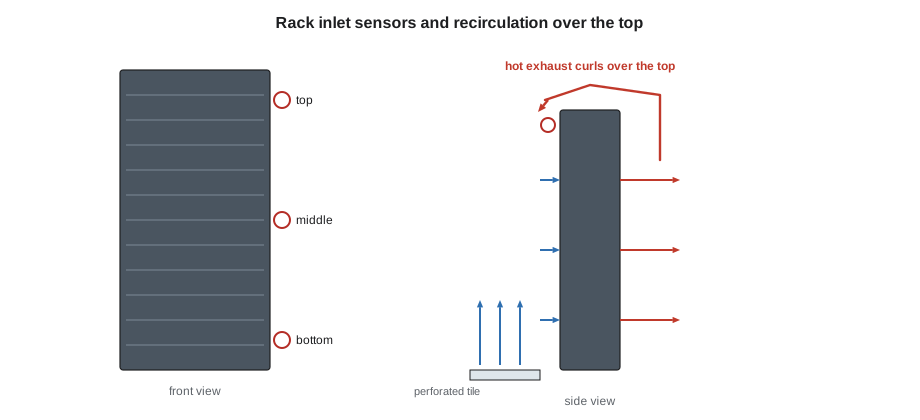
Inlet sensors are usually placed on the front door or front rails of a rack, at three heights: near the bottom, the middle and the top. Hot air recirculating over the top of a rack or around its ends usually shows first at the top sensor, so the top reading is often the highest. A rack's inlet temperature for reporting is usually taken as the highest of its sensors.
Equipment-reported temperatures
Most servers report their own inlet temperature through their management controllers, and customers often read those numbers in their own tools, as in the ticket that started this lesson. These readings are useful but must be read with care:
- The server's inlet sensor is inside the chassis, near the front, and may read a degree or two above the air at the rack door because of heat from nearby components.
- Different models measure in different places, so two servers side by side can disagree.
- The reading may be the inlet of one server in the rack, not the rack inlet the contract covers.
When a customer's server reading and the facility sensor disagree, the technician's job is to measure the air at the server's intake with a calibrated handheld instrument, record both readings and the location, and report what the air is actually doing.
Investigating an inlet complaint
Roz walks Jamal through the steps the site uses for any inlet temperature complaint:
- Identify the rack and the exact servers involved from the ticket.
- Check the facility sensors on that rack and its neighbors in the monitoring system, including the trend over the past day.
- Go to the rack. Measure the inlet air with a calibrated handheld at the front of the reported server, about 2 in from its face, and at the facility sensor positions.
- Look for causes at the rack: missing blanking panels, gaps between the rack and its neighbors, open cable cut-outs, equipment mounted backwards so it draws air from the hot aisle.
- Look for causes in the aisle: a blocked or missing perforated tile, an open containment door, boxes or carts in the aisle, a cooling unit in alarm.
- Fix what the technician may fix under the house rules, such as installing blanking panels or closing a door, and record it. Raise a ticket for the rest.
- Report back with the measurements, the cause and what was done.
Back to the customer's complaint
Jamal checks the facility sensors on the customer's cabinet: 74.8 °F bottom, 75.6 °F middle and 77.2 °F top, all within the recommended range for the past week. At the rack he measures 76.3 °F at the face of the reported server, which sits near the top. The server's own sensor reads 84 °F.
Behind the cabinet he finds the cause: a 1U switch at the top of the rack has been mounted with its intake facing the hot aisle. It draws hot exhaust and blows it out through its own front, directly into the intake of the server below it. The air at the rack door is within range, but the air reaching that one server is not. The fix is the customer's: the switch needs a reversed-airflow fan module or a different mounting. Jamal writes up his measurements and a photo for the customer, and Dmitri replies to the ticket that the facility met its commitment, explaining the cause and the fix.
Worked problem
Is this rack within the recommended range?
Cabinet A-22-03 has inlet sensors reading 67.1 °F, 73.4 °F and 81.7 °F from bottom to top, with a hall dew point of 46 °F. Is it within the recommended range?
Show solution
- Take the highest inlet reading as the rack inlet: 81.7 °F.
- Compare with the recommended upper limit of 80.6 °F: it is 1.1 °F above.
- Check moisture: a dew point of 46 °F is inside the 15.8 to 59 °F range.
- The rack is above the recommended range at the top but inside the class A1 allowable range.
Answer: The top of the rack is just outside the recommended range, so it needs investigating, most likely for hot air recirculating over the top. It is not a failure, and it is within the allowable range.
Reporting inlet conditions to customers
Most colocation contracts promise that inlet conditions will stay within the ASHRAE recommended range for a stated share of the time, often 99 percent or more of the hours in a month, measured by the facility's own sensors. Stonebridge's monthly customer report shows, for each cabinet or cage, the highest inlet reading of the month, the hours above the recommended range and the hours above the allowable range. Hours above the recommended range are explained in the report, usually with the cause found and the fix made.
The report is only as good as the sensors behind it. A sensor reading high because it is badly placed makes the facility look worse than it is and sends technicians chasing problems that do not exist. A sensor reading low because it sits in a draft of cold air from a tile hides real problems. During the monthly round, technicians check that every inlet sensor is still at its marked position on the rack door, has not been moved by a customer's engineer, and is not touching metal or blocked by cables.
When a customer's engineers move sensors or add their own, the readings must be kept apart. Stonebridge reports only its own sensors under the contract, but it records the customer's readings in tickets when they are raised, as in this lesson's opening complaint.
When the allowable range is used on purpose
Some operators deliberately let inlets rise into the allowable range for short periods to save energy, for example on the hottest afternoons of the year, rather than run extra chillers. That is a decision for the site's management and its customers, written into the operating procedures and the contracts. A technician never raises setpoints on their own initiative, even to save energy. If a setpoint looks wrong, the right step is to report it and ask.
Practice problems
Work each problem on paper first, then reveal the answer to check.
A customer reports that a server in their cabinet shows a high inlet. What is the first check in the monitoring system?
Show answer
The facility inlet sensors on that cabinet and its neighbors, and their trend.
Common mistakes
MistakeQuoting the room average or cooling unit supply temperature as compliance.
InsteadThe guidelines apply to the air at the IT equipment inlet.
MistakeTreating any reading in the allowable range as fine.
InsteadReadings above the recommended range need investigating and recording.
MistakeTrusting a server's internal inlet sensor as the rack inlet.
InsteadMeasure the air at the intake with a calibrated instrument and compare.
MistakeKeeping the cold aisle as cold as possible to be safe.
InsteadRunning colder than needed wastes energy; aim for the setpoint inside the recommended range.
MistakeIgnoring fast temperature swings because each reading is in range.
InsteadThe guidelines also limit the rate of change; cycling units should be reported.
Summary and key terms
- ASHRAE TC 9.9's thermal guidelines, fifth edition 2021, are the reference for IT equipment inlet conditions.
- The recommended range for air-cooled classes is 64.4 to 80.6 °F with a dew point of 15.8 to 59 °F.
- Allowable ranges are wider and depend on the equipment class; H1 equipment needs cooler air.
- Compliance is measured at the equipment inlet, usually as the highest of a rack's front sensors.
- Equipment-reported temperatures help but must be checked against a calibrated measurement.
- Inlet complaints usually have local causes: blanking, gaps, reversed equipment, tiles or doors.
- Recommended range
- The inlet conditions in which equipment should normally run for reliability and efficiency.
- Allowable range
- The wider inlet conditions an equipment class is designed to tolerate.
- Equipment class
- A1 to A4 or H1; sets the allowable range a device is designed for.
- Rack inlet temperature
- The air temperature at the front of a rack where equipment draws it in.
- Rate of change
- How fast inlet temperature changes; the guidelines limit it as well as the level.
- TC 9.9
- The ASHRAE technical committee that writes the data center thermal guidelines.
Practice problems
Work each problem on paper first, then reveal the answer to check.
Where is the temperature measured that the ASHRAE guidelines refer to?
Show answer
At the air inlet of the IT equipment, at the front of the rack.
A rack's sensors read 72, 75 and 79 °F. Is it within the recommended range?
Show answer
Yes; the highest reading is below 80.6 °F.
Why might a server's own inlet sensor read higher than the rack door sensor?
Show answer
It sits inside the chassis near warm components, or the server is receiving recirculated air locally.
Why do operators run cold aisles warmer than they used to?
Show answer
Warmer supply air within the recommended range saves chiller energy and extends free cooling.
Lesson quiz · 5 questions
Score 60% or more to complete this lesson.
Create a free account to save your progress, take quizzes and earn a certificate.