
CMPUT-274 · Lesson 3 of 12 · 32 min
Functional programming II: recursion, immutability, laziness and pattern matching
Lesson 2 showed how pure and higher-order functions replace many loops. This lesson completes the functional toolkit. Without mutable loop counters, repetition is expressed by recursion. Without in-place updates, data is immutable, and new versions share structure with old ones. Laziness delays computation until a value is needed, which allows infinite sequences and avoids wasted work. Algebraic data types and pattern matching describe data as a fixed set of shapes and process each shape in its own case. Python supports all four ideas to some degree, and the comparison with Java and Rust shows how languages differ in how much they help.
Recursion instead of loops
A recursive function solves a problem by calling itself on smaller instances. You studied the proof side in CMPUT-272, where structural induction shows that a recursive definition is correct, and the cost side in CMPUT-204, where recurrences give running times. In functional programming, recursion is also the main control structure: where imperative code writes a loop that updates a variable, functional code writes a function whose result is defined in terms of the result on a smaller input.
def length(xs):                 # structural recursion on a list
    return 0 if not xs else 1 + length(xs[1:])

def total(tree):                # recursion on a nested structure
    """tree is a number or a list of trees"""
    if isinstance(tree, (int, float)):
        return tree
    return sum(total(t) for t in tree)

def flatten(tree):
    if not isinstance(tree, list):
        return [tree]
    return [x for t in tree for x in flatten(t)]

nested = [1, [2, 3, [4]], [[5], 6]]
print(length([7, 8, 9]), total(nested), flatten(nested))3 21 [1, 2, 3, 4, 5, 6]
Each function has a base case for the smallest input and a recursive case that reduces the problem. The shape of the code mirrors the shape of the data: a list is empty or an element followed by a list, and a tree is a leaf or a list of trees. This correspondence between data definition and function definition is called structural recursion, and it is the most reliable way to write correct recursive functions.
Tail calls and the recursion limit
A call is a tail call when it is the last thing a function does, so its result is returned unchanged. Languages such as Scheme, Haskell and many ML dialects guarantee tail-call optimization: a tail call reuses the current stack frame, so a tail-recursive function runs in constant stack space, just like a loop. Python deliberately does not perform this optimization; its creator argued that full stack traces are more valuable for debugging. Every Python call uses a new frame, and the interpreter stops deep recursion with a `RecursionError` once the limit, 1,000 frames by default, is reached.
import sys

def count_down(n):          # tail-recursive in form
    if n == 0:
        return "done"
    return count_down(n - 1)

def count_down_loop(n):     # the loop a tail-call optimizer would produce
    while n != 0:
        n -= 1
    return "done"

print("limit:", sys.getrecursionlimit())
print(count_down(900))
try:
    count_down(5000)
except RecursionError as err:
    print("RecursionError:", err)
print(count_down_loop(5000))limit: 1000 done RecursionError: maximum recursion depth exceeded done
The practical rule in Python is to use recursion for structures whose depth is small, such as trees, parsers and divide-and-conquer algorithms, where depth grows like \(\log n\), and to use loops or iterators for long linear sequences. Raising the limit with `sys.setrecursionlimit` only postpones the problem and can crash the interpreter if the C stack overflows. In a language with guaranteed tail calls, the recursive and loop versions above are equally efficient.
Worked problem
Turning recursion into a tail-recursive form
The definition sum_to(n) = n + sum_to(n − 1), with sum_to(0) = 0, is not tail-recursive. Rewrite it with an accumulator and explain why the new version is tail-recursive.
Show solution
- In n + sum_to(n − 1), the addition happens after the recursive call returns, so the call is not the last action.
- Add an accumulator parameter: sum_acc(n, acc) returns acc when n = 0, otherwise sum_acc(n − 1, acc + n).
- Now the recursive call is the final action and its result is returned directly.
- Start with sum_acc(n, 0). For n = 4 the calls are (4,0), (3,4), (2,7), (1,9), (0,10), returning 10.
Answer: sum_acc(n, acc) is tail-recursive because nothing remains to be done after the call. A tail-call-optimizing language runs it in constant stack space; Python still uses n frames.
Immutability and persistent data
In functional programming, values do not change. Instead of updating a list in place, you build a new list. That sounds expensive, but immutable structures can share most of their contents. A persistent data structure keeps old versions available after an update, and a well-designed one copies only the parts that changed. A singly linked list is the simplest example: adding to the front creates one new node that points to the old list, and both versions remain valid.
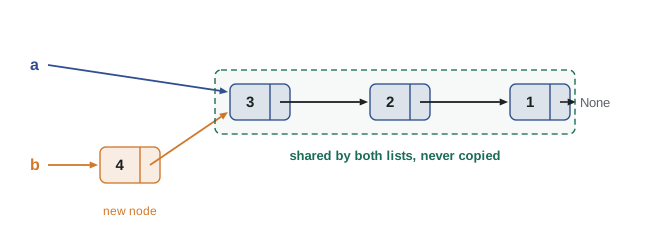
from typing import NamedTuple, Optional

class Node(NamedTuple):              # an immutable list cell
    head: int
    tail: Optional["Node"]

def cons(x, xs): return Node(x, xs)

def to_list(xs):
    out = []
    while xs is not None:
        out.append(xs.head); xs = xs.tail
    return out

a = cons(3, cons(2, cons(1, None)))
b = cons(4, a)                       # new version shares all of a
print(to_list(a), to_list(b), "shared:", b.tail is a)

t = (1, 2, 3)
try:
    t[0] = 99
except TypeError as err:
    print("TypeError:", err)
fs = frozenset({"red", "green"}) | {"blue"}   # set operations return new frozensets
print(sorted(fs))[3, 2, 1] [4, 3, 2, 1] shared: True TypeError: 'tuple' object does not support item assignment ['blue', 'green', 'red']
Python offers immutable built-ins, tuples, strings, frozensets and frozen dataclasses, but its lists and dictionaries are mutable. Copying a large list for every change costs \(\Theta(n)\) time, so efficient persistent vectors and maps use trees with high branching factors, giving updates in \(O(\log n)\) with very small constants. Clojure, Scala and Haskell build these in; in Python, third-party libraries provide them. The benefit of immutability is that a value you hold can never change under you, which removes a whole class of bugs and makes values safe to share between threads, as lesson 9 explains.
| Python type | Mutable? | Functional alternative |
|---|---|---|
| list | Yes | tuple, or build a new list instead of appending |
| dict | Yes | {**d, key: value} to make an updated copy; types.MappingProxyType for a read-only view |
| set | Yes | frozenset |
| class instance | Usually | dataclass(frozen=True) or NamedTuple |
| str, int, float, tuple | No | Already immutable |
Laziness and generators
Strict, or eager, evaluation computes a value as soon as the expression is reached. Lazy evaluation delays it until the value is needed. Haskell is lazy by default; Python is eager but provides laziness through iterators and generators. A generator function uses `yield` to produce values one at a time, pausing between them. Generator expressions, `map`, `filter`, `zip` and the `itertools` module all produce lazy iterators, so you can describe large or even infinite sequences and compute only the part you use.
from itertools import count, islice, takewhile

def primes():
    """Infinite generator of primes by trial division against earlier primes."""
    found = []
    for n in count(2):
        if all(n % p for p in takewhile(lambda p: p * p <= n, found)):
            found.append(n)
            yield n

print("first 10 primes:", list(islice(primes(), 10)))

squares = (n * n for n in count(1))              # infinite, but nothing computed yet
big = next(s for s in squares if s > 2000)
print("first square over 2000:", big)

calls = 0
def costly(x):
    global calls; calls += 1
    return x * 10
lazy = map(costly, range(1_000_000))
print(next(lazy), next(lazy), "calls made:", calls)first 10 primes: [2, 3, 5, 7, 11, 13, 17, 19, 23, 29] first square over 2000: 2025 0 10 calls made: 2
The last part shows the payoff: `map` over a million elements did only two calls because only two values were requested. Laziness turns a pipeline of transformations into a stream that flows one element at a time, using constant memory regardless of input size. It also has costs. Errors appear only when the value is finally demanded, which can be far from where the expression was written, and a lazy iterator can be consumed only once. Side effects inside lazy pipelines are especially confusing, because they happen at unpredictable times or not at all.
Worked problem
Reading a large file lazily
A log file has 50 million lines. You want the first 5 lines that contain ERROR. Compare `[l for l in open(f) if "ERROR" in l][:5]` with a lazy version.
Show solution
- The list comprehension reads every line and stores all matching lines before slicing, so it touches all 50 million lines and may use a lot of memory.
- A lazy version is `islice((l for l in open(f) if "ERROR" in l), 5)`.
- The generator reads lines only as islice asks for them, and islice stops after the fifth match.
- If the five errors are in the first thousand lines, only about a thousand lines are read.
Answer: The lazy pipeline reads only as far as needed and keeps at most one line in memory at a time, while the eager version reads and filters the whole file first.
Algebraic data types and pattern matching
An algebraic data type defines a value as one of a fixed set of variants, each carrying its own fields. A shape might be a circle with a radius, a rectangle with a width and height, or a triangle with three side lengths. Functions on such data examine which variant they have and handle each case. Pattern matching makes this concise: a match statement checks the shape of a value and binds its fields to names in one step. ML and Haskell introduced the idea; Rust has `enum` and `match`; Java added sealed interfaces, records and pattern matching for switch in Java 21; Python added the `match` statement in version 3.10.
from dataclasses import dataclass
import math

@dataclass(frozen=True)
class Circle:   r: float
@dataclass(frozen=True)
class Rect:     w: float; h: float
@dataclass(frozen=True)
class Tri:      a: float; b: float; c: float

def area(s):
    match s:
        case Circle(r):
            return math.pi * r * r
        case Rect(w, h) if w == h:
            return w * w                      # a guard picks out squares
        case Rect(w, h):
            return w * h
        case Tri(a, b, c):
            p = (a + b + c) / 2               # Heron's formula
            return math.sqrt(p * (p - a) * (p - b) * (p - c))
        case _:
            raise ValueError(f"unknown shape {s!r}")

for s in [Circle(1), Rect(2, 2), Rect(2, 5), Tri(3, 4, 5)]:
print(f"{s!r:<26} area = {area(s):.3f}")Circle(r=1) area = 3.142 Rect(w=2, h=2) area = 4.000 Rect(w=2, h=5) area = 10.000 Tri(a=3, b=4, c=5) area = 6.000
Python's `match` works on dataclasses because they define `__match_args__`, the order of fields for positional patterns. Patterns can also match literals, sequences such as `[first, *rest]`, and dictionaries such as `{'type': 'click', 'x': x}`, which makes `match` useful for processing JSON-like messages. Python does not check that every variant is handled; if you forget `Tri`, the program fails only when a triangle arrives. Rust checks exhaustiveness at compile time, as the next example shows.
enum Shape {
    Circle { r: f64 },
    Rect { w: f64, h: f64 },
    Tri { a: f64, b: f64, c: f64 },
}

fn area(s: &Shape) -> f64 {
    match s {
        Shape::Circle { r } => std::f64::consts::PI * r * r,
        Shape::Rect { w, h } => w * h,
        Shape::Tri { a, b, c } => {
            let p = (a + b + c) / 2.0;
            (p * (p - a) * (p - b) * (p - c)).sqrt()
        }
    }
}

fn main() {
    let shapes = vec![
        Shape::Circle { r: 1.0 },
        Shape::Rect { w: 2.0, h: 5.0 },
        Shape::Tri { a: 3.0, b: 4.0, c: 5.0 },
    ];
    let total: f64 = shapes.iter().map(area).sum();
    for s in &shapes {
        println!("area = {:.3}", area(s));
    }
    println!("total = {:.3}", total);
}area = 3.142 area = 10.000 area = 6.000 total = 19.142
If you delete the `Tri` arm from the Rust `match`, the compiler refuses to build the program and reports that the pattern for triangles is not covered. Exhaustiveness checking turns a run-time surprise into a compile-time error. This is one of the clearest examples of a type system preventing a bug, and lesson 7 builds on it.
Worked problem
Matching nested messages
Write match cases that handle these event dictionaries: {"type": "click", "x": 10, "y": 20}, {"type": "key", "key": "q"} and anything else. A click should return its position, a key "q" should return "quit", other keys return "key", and anything else returns "ignored".
Show solution
- case {"type": "click", "x": x, "y": y}: return (x, y). Mapping patterns match on the listed keys and ignore extra keys.
- case {"type": "key", "key": "q"}: return "quit". A literal value in the pattern must match exactly.
- case {"type": "key"}: return "key". Cases are tried in order, so the specific "q" case must come first.
- case _: return "ignored". The wildcard catches every remaining value.
Answer: Order matters: specific patterns before general ones, and a final wildcard. The click event returns (10, 20) and the q key returns "quit".
Common mistakes
MistakeWriting recursive functions in Python for long linear sequences.
InsteadPython has no tail-call optimization and a default limit of about 1,000 frames; use loops or iterators for long sequences and recursion for shallow structures such as trees.
MistakeAssuming immutable updates must copy the whole structure.
InsteadPersistent data structures share unchanged parts; a prepend to a linked list creates one node, and tree-based vectors copy O(log n) nodes.
MistakeIterating over a generator twice and expecting the same values again.
InsteadIterators are consumed as you use them; recreate the generator or store the values in a list if you need them twice.
MistakePutting side effects inside lazy pipelines.
InsteadEffects inside map or a generator run only when values are demanded, possibly never; keep lazy pipelines pure.
MistakeOrdering match cases from general to specific.
InsteadCases are tried top to bottom; a general pattern placed first will capture values meant for later, more specific cases.
Summary and key terms
- Recursion replaces loops in functional code, and structural recursion follows the shape of the data.
- Tail calls can run in constant stack space in languages that optimize them; Python does not, so deep recursion raises RecursionError.
- Immutable values never change; persistent data structures keep old versions and share unchanged parts.
- Python offers tuples, strings, frozensets and frozen dataclasses as immutable types.
- Lazy evaluation computes values only when needed, enabling infinite sequences and constant-memory pipelines.
- Algebraic data types describe values as a fixed set of variants, and pattern matching processes each variant.
- Rust and Java check that pattern matches are exhaustive; Python's match does not.
- structural recursion
- Recursion whose cases follow the definition of the data type, with a base case for the simplest form.
- tail call
- A call that is the last action of a function, whose result is returned directly.
- tail-call optimization
- Reusing the current stack frame for a tail call so that tail recursion uses constant stack space.
- immutable value
- A value that cannot be changed after it is created.
- persistent data structure
- A data structure that preserves previous versions when updated, usually by sharing unchanged parts.
- structural sharing
- Reusing parts of an old data structure in a new version instead of copying them.
- lazy evaluation
- Delaying the computation of an expression until its value is needed.
- generator
- A Python function that uses yield to produce a lazy sequence of values one at a time.
- algebraic data type
- A type defined as a fixed set of variants, each with its own fields.
- pattern matching
- Checking a value against patterns describing its shape and binding its parts to names.
Practice problems
Work each problem on paper first, then reveal the answer to check.
Write a recursive function that reverses a list without using loops or reversed.
Show answer
`def rev(xs): return [] if not xs else rev(xs[1:]) + [xs[0]]`.
Why is `def fact(n): return 1 if n == 0 else n * fact(n - 1)` not tail-recursive?
Show answer
The multiplication by n happens after the recursive call returns, so the call is not the last action.
Write a tail-recursive factorial with an accumulator.
Show answer
`def fact(n, acc=1): return acc if n == 0 else fact(n - 1, acc * n)`.
After `a = (1, 2)` and `b = a + (3,)`, is a changed?
Show answer
No; tuples are immutable, so a is still (1, 2) and b is a new tuple (1, 2, 3).
How many new nodes does prepending one element to an immutable linked list of length n create?
Show answer
One; the new node points to the existing list, which is shared.
Write a generator `evens()` that yields 0, 2, 4, … forever, and take the first five.
Show answer
`def evens(): n = 0` then `while True: yield n; n += 2`; `list(islice(evens(), 5))` gives [0, 2, 4, 6, 8].
What does `g = (x * x for x in range(3)); list(g); list(g)` produce?
Show answer
[0, 1, 4] and then [], because the generator is exhausted after the first use.
Write a match case that destructures a list into its first element and the rest.
Show answer
`case [first, *rest]:`.
What happens in Python if a match statement has no case for a value that arrives?
Show answer
No case runs and execution continues after the match; there is no compile-time check, so a missing case is a silent logic error unless a wildcard raises.
Give one advantage and one disadvantage of lazy evaluation.
Show answer
Advantage: avoids computing unused values and supports infinite sequences. Disadvantage: errors and effects occur late and unpredictably, and iterators can be consumed only once.
Lesson quiz · 5 questions
Score 60% or more to complete this lesson.
Create a free account to save your progress, take quizzes and earn a certificate.