
CMPUT-274 · Lesson 11 of 12 · 30 min
Asynchronous, event-driven and other paradigms
The paradigms so far organize programs around steps, functions, objects or concurrent workers. This lesson covers four more ways of thinking that are widely used today. Event-driven programming structures a program as handlers that run when something happens. Asynchronous programming, with Python's `async` and `await`, lets one thread juggle thousands of waiting tasks. Logic programming describes what is true and lets a search engine find answers. Dataflow and reactive programming describe values that update automatically when their inputs change. Each is a different answer to the question of what drives a computation forward: the program counter, an event, a query or a change in data.
Event-driven programming
In an event-driven program, the main loop belongs to a framework, not to you. The framework waits for events, such as a mouse click, a key press, an arriving network packet or a timer expiring, and calls the handler you registered for each one. Your code is a set of callbacks. Graphical user interfaces, web servers, games and embedded controllers all work this way. The observer pattern from lesson 6 is the building block: event sources are subjects, and handlers are observers.
import heapq

class EventLoop:
    """A tiny event loop: handlers are registered per event type; events are processed in time order."""
    def __init__(self):
        self.handlers, self.queue, self.now, self.seq = {}, [], 0.0, 0
    def on(self, kind, handler):
        self.handlers.setdefault(kind, []).append(handler)
    def emit(self, kind, at=None, **data):
        self.seq += 1
        heapq.heappush(self.queue, (self.now if at is None else at, self.seq, kind, data))
    def run(self):
        while self.queue:
            self.now, _, kind, data = heapq.heappop(self.queue)
            for h in self.handlers.get(kind, []):
                h(self, **data)

loop = EventLoop()
loop.on("click", lambda lp, x, y: print(f"t={lp.now:.1f} click at ({x}, {y})"))
loop.on("click", lambda lp, x, y: x > 100 and lp.emit("open_menu", at=lp.now + 0.2))
loop.on("open_menu", lambda lp: print(f"t={lp.now:.1f} menu opened"))
loop.on("tick", lambda lp, n: print(f"t={lp.now:.1f} tick {n}"))

loop.emit("tick", at=1.0, n=1)
loop.emit("click", at=0.5, x=40, y=10)
loop.emit("click", at=1.5, x=150, y=20)
loop.emit("tick", at=2.0, n=2)
loop.run()t=0.5 click at (40, 10) t=1.0 tick 1 t=1.5 click at (150, 20) t=1.7 menu opened t=2.0 tick 2
Two features of event-driven code deserve attention. Handlers must return quickly, because while one runs, no other event is processed; a slow handler freezes a user interface. And control flow is inverted: you do not call the framework, it calls you, sometimes called the Hollywood principle, don't call us, we'll call you. The second click handler shows a consequence: a handler can schedule further events, so the program's behavior emerges from chains of events rather than from a single readable sequence. Long chains of callbacks nested inside callbacks, known as callback hell, motivated the asynchronous syntax in the next section.
Asynchronous programming with async and await
Asynchronous programming lets one thread run many tasks that spend most of their time waiting, typically for network or disk I/O. In Python, a function defined with `async def` is a coroutine. Inside it, `await` marks a point where the coroutine may pause while it waits for something, letting the event loop run other coroutines in the meantime. When the awaited operation completes, the coroutine resumes where it left off. The code reads like ordinary sequential code, but the waits overlap.
import asyncio, time

async def fetch(name, delay):
    print(f"start {name}")
    await asyncio.sleep(delay)          # stands in for a network request; the loop runs others meanwhile
    print(f"done  {name}")
    return f"{name}:{int(delay * 1000)}ms"

async def main():
    t0 = time.perf_counter()
    results = await asyncio.gather(     # run three coroutines concurrently
        fetch("weather", 0.30), fetch("news", 0.10), fetch("stocks", 0.20))
    elapsed = time.perf_counter() - t0
    print(results)
    print("total waiting 0.60 s; elapsed under 0.45 s:", elapsed < 0.45)

asyncio.run(main())start weather start news start stocks done news done stocks done weather ['weather:300ms', 'news:100ms', 'stocks:200ms'] total waiting 0.60 s; elapsed under 0.45 s: True
All three coroutines start immediately, and each finishes in order of its delay, so the whole run takes about as long as the slowest request rather than the sum of all three. `asyncio.gather` returns the results in the order the coroutines were passed, regardless of finishing order. Everything ran on one thread, so there was no parallelism and no possibility of the read–add–write races from lesson 9 in between `await` points: a coroutine is only ever interrupted where it says `await`.
That last property is both the strength and the weakness of asynchronous code. It is a form of cooperative multitasking: tasks yield control voluntarily at `await`. Shared state is safe between awaits, which simplifies reasoning. But a coroutine that computes for a long time without awaiting, or that calls a blocking function such as `time.sleep` or a synchronous database driver, blocks the entire event loop and every other task. CPU-heavy work must be moved to a thread or process pool, for example with `asyncio.to_thread` or `loop.run_in_executor`.
| Model | Who decides when to switch | Parallel? | Best for |
|---|---|---|---|
| Threads (pre-emptive) | The operating system, at any instruction | Yes, except Python code under the GIL | Blocking libraries, mixed workloads |
| Processes | The operating system | Yes | CPU-bound work, isolation |
| async / await (cooperative) | The task itself, at each await | No, one thread | Many concurrent I/O-bound tasks, such as servers and crawlers |
| Event callbacks | The framework, between handlers | No | User interfaces, simple servers |
Worked problem
Spotting a blocking call
An async web server handles each request with `async def handle(req): data = requests.get(url).text; return data`. Under load, all requests become slow. Why, and how do you fix it?
Show solution
- requests.get is a synchronous function: it blocks the thread until the response arrives.
- The event loop runs on that same thread, so while one handler waits, no other coroutine can run.
- Requests are therefore handled one at a time, and latency adds up under load.
- Fix: use an asynchronous HTTP client and write data = await client.get(url), or move the blocking call off the loop with await asyncio.to_thread(requests.get, url).
Answer: A blocking call inside a coroutine stalls the whole event loop. Use async libraries throughout, or delegate blocking work to a thread or process pool.
Logic programming
Logic programming describes a problem as facts and rules and asks questions about them. You do not say how to find an answer; the system searches for values that make the query true. Prolog, created in 1972 by Alain Colmerauer and Philippe Roussel, is the classic language. A Prolog program might state the facts parent(ana, ben) and parent(ben, cy), and the rule that X is a grandparent of Z if X is a parent of some Y and Y is a parent of Z. The query grandparent(ana, Who) then returns Who = cy. The same rule answers grandparent(Who, cy) as well: relations can be queried in any direction, which functions cannot do.
Two mechanisms do the work. Unification matches a query against facts and rule heads, binding variables so that both sides become equal. Backtracking explores alternatives: when one choice leads to a dead end, the system undoes its bindings and tries the next possibility, a depth-first search through the space of proofs. The program below implements both in a few dozen lines of Python, enough to answer queries about a small family tree.
def is_var(t): return isinstance(t, str) and t[0].isupper()   # variables start with a capital

def walk(t, s):
    while is_var(t) and t in s:
        t = s[t]
    return t

def unify(a, b, s):
    a, b = walk(a, s), walk(b, s)
    if a == b: return s
    if is_var(a): return {**s, a: b}
    if is_var(b): return {**s, b: a}
    if isinstance(a, tuple) and isinstance(b, tuple) and len(a) == len(b):
        for x, y in zip(a, b):
            s = unify(x, y, s)
            if s is None: return None
        return s
    return None

FACTS = [("parent", "ana", "ben"), ("parent", "ana", "dee"),
         ("parent", "ben", "cy"), ("parent", "dee", "eli"), ("parent", "dee", "fay")]
RULES = [(("grandparent", "X", "Z"), [("parent", "X", "Y"), ("parent", "Y", "Z")]),
         (("sibling", "A", "B"), [("parent", "P", "A"), ("parent", "P", "B"), ("neq", "A", "B")])]

counter = [0]
def rename(term):                                   # fresh variables for each rule use
    if is_var(term): return f"{term}_{counter[0]}"
    if isinstance(term, tuple): return tuple(rename(t) for t in term)
    return term

def solve(goals, s):
    if not goals:
        yield s; return
    goal, rest = goals[0], goals[1:]
    if goal[0] == "neq":
        if walk(goal[1], s) != walk(goal[2], s):
            yield from solve(rest, s)
        return
    for fact in FACTS:                              # try every fact: backtracking
        s2 = unify(goal, fact, s)
        if s2 is not None:
            yield from solve(rest, s2)
    for head, body in RULES:                        # try every rule
        counter[0] += 1
        head, body = rename(head), [rename(g) for g in body]
        s2 = unify(goal, head, s)
        if s2 is not None:
            yield from solve(body + rest, s2)

def ask(query, var):
    return sorted({walk(var, s) for s in solve([query], {})})

print("grandchildren of ana:", ask(("grandparent", "ana", "Who"), "Who"))
print("grandparent of fay: ", ask(("grandparent", "Who", "fay"), "Who"))
print("siblings of eli: ", ask(("sibling", "eli", "S"), "S"))grandchildren of ana: ['cy', 'eli', 'fay'] grandparent of fay: ['ana'] siblings of eli: ['fay']
The same two rules answered three different kinds of question: who are ana's grandchildren, who is fay's grandparent, and who are eli's siblings. The engine is a generator, so it produces answers lazily, one per successful proof, exactly as lesson 3's generators produced values on demand. Logic programming lives on in database query languages such as Datalog, in type checkers, which solve constraints about types, in build systems and package managers, which resolve dependency constraints, and in constraint solvers used for scheduling and planning.
Worked problem
Reading a rule both ways
With the rule ancestor(X, Z) if parent(X, Z), and ancestor(X, Z) if parent(X, Y) and ancestor(Y, Z), what does the query ancestor(Who, eli) return for the family facts above?
Show solution
- First rule: parent(Who, eli) matches parent(dee, eli), giving Who = dee.
- Second rule: parent(Who, Y) and ancestor(Y, eli). Trying Y = dee requires parent(Who, dee), which gives Who = ana.
- Other choices of Y, such as ben or cy, lead to no proof of ancestor(Y, eli), so the search backtracks.
- The answers are dee and ana.
Answer: Who = dee and Who = ana. The recursive rule mirrors the recursive definitions of lesson 3, and backtracking searches all ways of satisfying it.
Dataflow and reactive programming
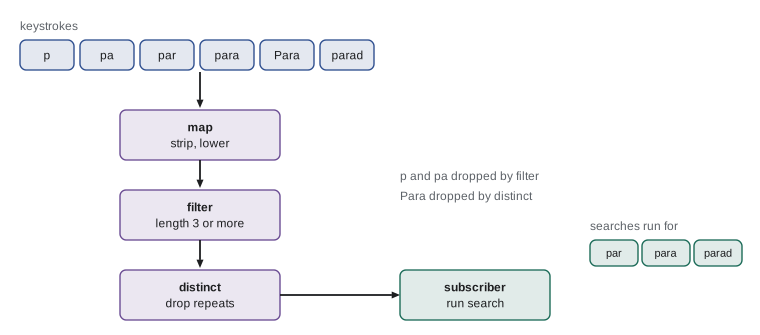
In the dataflow paradigm, a program is a graph of values connected by dependencies, and a value is recomputed whenever one of its inputs changes. Spreadsheets, from lesson 1, are the most familiar example. Reactive programming applies the same idea to streams of events over time: a stream of mouse positions, of stock prices or of search keystrokes can be filtered, mapped, combined and throttled with operators much like map and filter, and subscribers receive the results as they happen. Libraries such as RxJS and Reactor, and user-interface frameworks such as React and SwiftUI, apply these ideas, and the signals used in many recent JavaScript frameworks are fine-grained reactive values.
class Stream:
    """A tiny push-based reactive stream."""
    def __init__(self):
        self.subs = []
    def subscribe(self, fn):
        self.subs.append(fn); return self
    def push(self, value):
        for fn in self.subs: fn(value)
    def map(self, f):
        out = Stream(); self.subscribe(lambda v: out.push(f(v))); return out
    def filter(self, p):
        out = Stream(); self.subscribe(lambda v: p(v) and out.push(v)); return out
    def distinct(self):
        out = Stream(); last = [object()]
        def on(v):
            if v != last[0]:
                last[0] = v; out.push(v)
        self.subscribe(on); return out

keys = Stream()
queries = (keys.map(str.strip).map(str.lower)
               .filter(lambda q: len(q) >= 3)
               .distinct())
queries.subscribe(lambda q: print("search for:", repr(q)))

for typed in ["p", "pa", "par", "para", "Para ", "parad", "parad"]:
keys.push(typed) # each keystroke is an eventsearch for: 'par' search for: 'para' search for: 'parad'
The pipeline reads as a declarative description of when to search: normalize the text, ignore queries under three characters, and skip repeats. Seven keystrokes produce three searches. A full reactive library would also offer time-based operators, such as debounce, which waits until the user pauses typing, and operators that combine several streams. Reactive code unites three earlier ideas: the observer pattern supplies the push mechanism, functional operators supply the transformations, and the event loop supplies the timing.
Common mistakes
MistakeDoing slow work inside an event handler or coroutine without yielding.
InsteadLong computations block the event loop; keep handlers short and move heavy work to threads or processes.
MistakeCalling blocking functions such as time.sleep or synchronous HTTP clients inside async code.
InsteadUse the asynchronous equivalents, such as asyncio.sleep and async clients, or delegate with asyncio.to_thread.
MistakeThinking async code runs in parallel.
InsteadA single event loop runs one coroutine at a time; async gives concurrency for waiting, not parallel computation.
MistakeTreating a logic program as a sequence of steps.
InsteadRules state relations; the engine searches, and the same rule can answer queries in several directions.
MistakeLeaving reactive subscriptions active forever.
InsteadUnsubscribe when a consumer is finished, or subscriptions leak memory and keep doing work.
Summary and key terms
- Event-driven programs register handlers that a framework calls when events occur; control flow is inverted.
- Coroutines with async and await let one thread overlap many waits; tasks switch only at await points.
- Blocking calls and long computations inside coroutines stall the whole event loop.
- Logic programming states facts and rules; unification and backtracking search for answers.
- Logic relations can be queried in multiple directions, unlike functions.
- Dataflow programs recompute values when their inputs change, as spreadsheets do.
- Reactive programming transforms streams of events with operators and pushes results to subscribers.
- event-driven programming
- A paradigm in which program flow is determined by events dispatched to registered handlers.
- event loop
- A loop that waits for events or ready tasks and dispatches them, one at a time.
- inversion of control
- A design in which a framework calls application code rather than the other way round.
- coroutine
- A function that can pause at await points and later resume, defined in Python with async def.
- cooperative multitasking
- Multitasking in which tasks yield control voluntarily rather than being pre-empted.
- unification
- Finding variable bindings that make two terms identical.
- backtracking
- Undoing choices and trying alternatives when a search path fails.
- dataflow programming
- A paradigm in which computation is driven by changes to values in a dependency graph.
- reactive programming
- Programming with streams of values over time that are transformed by operators and observed by subscribers.
- debounce
- A reactive operator that emits a value only after a quiet period with no new events.
Practice problems
Work each problem on paper first, then reveal the answer to check.
Why must event handlers in a user interface return quickly?
Show answer
The event loop processes one handler at a time; while a handler runs, no other events, including repaint and input, are handled.
What does await do in a coroutine?
Show answer
It pauses the coroutine until the awaited operation completes, letting the event loop run other tasks meanwhile.
Three coroutines wait 1, 2 and 3 seconds with asyncio.sleep and are run with gather. About how long does the program take?
Show answer
About 3 seconds, the longest wait, because the waits overlap.
Why can shared variables be updated safely between await points in asyncio?
Show answer
Only one coroutine runs at a time and it cannot be interrupted except at await, so no other task can interleave.
Give a CPU-bound task that should not run directly inside a coroutine, and say what to do instead.
Show answer
For example image compression; run it with asyncio.to_thread or in a process pool via run_in_executor.
Write a Prolog-style rule for uncle in words, using parent and sibling.
Show answer
X is an uncle of Z if X is a sibling of Y and Y is a parent of Z (ignoring gender).
Explain backtracking in one sentence.
Show answer
When a choice leads to failure, the search undoes it and tries the next alternative.
In the logic engine, why are rule variables renamed on each use?
Show answer
So that variables from different uses of the same rule do not accidentally share bindings.
In the reactive search example, why did "Para " not trigger a second search for "para"?
Show answer
After strip and lower it equals the previous value "para", and distinct drops repeated values.
Name a real system that uses dataflow ideas.
Show answer
Spreadsheets, build systems such as make, React-style user interfaces, or stream-processing systems.
Lesson quiz · 5 questions
Score 60% or more to complete this lesson.
Create a free account to save your progress, take quizzes and earn a certificate.