
CMP-325 · Lesson 5 of 12 · 33 min
SQL III: subqueries, views, window functions and recursive queries
The query block of lesson 4 answers many questions, but some need more. 'Which students scored above their section's average?' compares each row with a value computed from other rows. 'Which students have taken every first-year computing course?' is a 'for all' question. 'What are all the prerequisites, direct and indirect, of Algorithms II?' follows a chain of unknown length. This lesson covers the SQL features for such questions: subqueries in their several forms, common table expressions, views, window functions and recursive queries. These are where SQL becomes a genuinely expressive language, and they are used constantly in reporting and analytics.
Subqueries
A subquery is a query nested inside another. A scalar subquery returns a single value and can be used wherever a value can, for example to compare each instructor's salary with the overall average. A subquery after IN returns a column of values to test membership. A subquery in FROM, called a derived table, produces a temporary relation that the outer query treats like a table; it must be given an alias. EXISTS (subquery) is true when the subquery returns at least one row.
-- Scalar subquery: instructors earning more than the average salary
SELECT name, salary
FROM instructor
WHERE salary > (SELECT AVG(salary) FROM instructor)
ORDER BY salary DESC;

-- IN subquery: students enrolled in any section taught by Lindqvist
SELECT DISTINCT s.name
FROM student s JOIN enrollment e ON e.student_id = s.student_id
WHERE e.sec_id IN (SELECT sec_id FROM section
                   WHERE instr_id = (SELECT instr_id FROM instructor WHERE name = 'Lindqvist'))
ORDER BY s.name;

-- Derived table: departments whose average student credits exceed 40
SELECT dept_id, avg_credits
FROM (SELECT dept_id, AVG(credits) AS avg_credits
      FROM student WHERE dept_id IS NOT NULL GROUP BY dept_id) AS t
WHERE avg_credits > 40;name salary --------- ------ Okafor 128000 Haddad 118000 Lindqvist 112000 name ----- Ava Ben Grace dept_id avg_credits ------- ----------- BIO 40.5 CS 46.5 MATH 55.5 PHYS 45
The scalar subquery computes the average once (AVG ignores Morrison's NULL salary), and the outer query compares each instructor with it. If a scalar subquery returns more than one row, the standard says it is an error; SQLite quietly uses the first row, another leniency that can hide bugs. The derived table example could be written with HAVING instead; many queries can be written several ways, and the clearest is usually best, since the optimizer often turns them into the same plan.
Correlated subqueries
A correlated subquery refers to a column of the outer query, so conceptually it is re-evaluated for each outer row. It answers 'compare each row with something about its own group' questions directly. Optimizers usually transform correlated subqueries into joins, so they are not necessarily slow, but it helps to read them as 'for each row of the outer query, compute the inner one'.
-- Students who scored above the average of their own section
SELECT s.name, e.sec_id, e.grade
FROM enrollment e JOIN student s ON s.student_id = e.student_id
WHERE e.grade > (SELECT AVG(e2.grade) FROM enrollment e2
                 WHERE e2.sec_id = e.sec_id)          -- correlated: refers to outer e
ORDER BY e.sec_id, e.grade DESC;

-- EXISTS: courses that have at least one prerequisite
SELECT course_id FROM course c
WHERE EXISTS (SELECT 1 FROM prereq p WHERE p.course_id = c.course_id);

-- NOT EXISTS: instructors with no section assigned (safe with NULLs, unlike NOT IN)
SELECT name FROM instructor i
WHERE NOT EXISTS (SELECT 1 FROM section s WHERE s.instr_id = i.instr_id);name sec_id grade ----- ------ ----- Grace 1 93 Ava 1 88 Grace 3 91 Chloe 4 91 Grace 4 89 Chloe 6 95 Grace 6 86 Elena 8 81 course_id --------- CMPUT-201 CMPUT-204 CMPUT-272 CMPUT-291 CMPUT-304 name -------- Morrison
NOT EXISTS is the safe way to express 'has no matching row'. The alternative WHERE instr_id NOT IN (SELECT instr_id FROM section) returns no rows at all here, because section 10 has a NULL instr_id, and as lesson 4 explained a NULL in a NOT IN list makes every comparison unknown. A left join with a test for NULL on the right side, LEFT JOIN section s ON ... WHERE s.sec_id IS NULL, is a third correct way to write an anti-join.
For-all questions: relational division
Questions with 'every' or 'all' correspond to relational division. SQL has no division operator, but the question can be rephrased with a double negative: a student has taken every required course if there is no required course that the student has not taken. That becomes two nested NOT EXISTS subqueries. The rephrasing is exactly the logical equivalence from CMPUT-272, \(\forall x\, P(x) \equiv \neg \exists x\, \neg P(x)\).
-- Students who have taken EVERY 100- and 200-level CMPUT course that has a Fall 2025 section
WITH required AS (
    SELECT DISTINCT course_id FROM section
    WHERE course_id LIKE 'CMPUT-1%' OR course_id LIKE 'CMPUT-2%'
      AND term = 'Fall' AND year = 2025
)
SELECT s.name
FROM student s
WHERE NOT EXISTS (                       -- there is no required course...
    SELECT 1 FROM required r
    WHERE NOT EXISTS (                   -- ...that this student has not taken
        SELECT 1 FROM enrollment e JOIN section sec ON sec.sec_id = e.sec_id
        WHERE e.student_id = s.student_id AND sec.course_id = r.course_id))
ORDER BY s.name;name ----- Ava Grace
The query above contains a deliberate bug of a common kind. AND binds more tightly than OR, so the condition in the required list means 'CMPUT-1 courses in any term, or CMPUT-2 courses in Fall 2025', which happens to give the intended set here only by luck. Always parenthesize mixed AND and OR: (course_id LIKE 'CMPUT-1%' OR course_id LIKE 'CMPUT-2%') AND term = 'Fall' AND year = 2025. With the correct version, the required set is CMPUT-174, CMPUT-204 and CMPUT-272, and the result is again Ava and Grace, the two students with all three.
Worked problem
Division by counting
An alternative way to write the same for-all query is to count. Describe it and state the condition under which it is correct.
Show solution
- For each student, count the distinct required courses they have taken: join enrollment to section, keep rows whose course is in the required set, group by student and COUNT(DISTINCT course_id).
- Keep the groups whose count equals the number of required courses: HAVING COUNT(DISTINCT sec.course_id) = (SELECT COUNT(*) FROM required).
- It is correct only if the counted courses are restricted to the required set (otherwise extra courses inflate the count) and duplicates are removed with DISTINCT (otherwise retaking a course counts twice).
Answer: Group, count distinct required courses taken and compare with the total. Counting is often easier to read than double NOT EXISTS, provided the two conditions are respected.
Common table expressions and views
A common table expression, written WITH name AS (query), gives a name to a subquery for the duration of one statement. CTEs make long queries readable by breaking them into named steps, like local variables in a program, and a CTE can be referred to several times. The division example used one to name the required courses.
A view is a named query stored in the database: CREATE VIEW name AS query. A view behaves like a table in later queries, but its rows are computed from the underlying tables each time it is used, so it is always up to date. Views serve three purposes. They simplify: a complex join can be written once and reused. They secure: a view can expose some columns and rows while privileges hide the base table, so the registrar's office sees student contact details without grades. And they provide logical data independence, the idea from lesson 1: if a table is split or restructured, a view with the old name and shape keeps old queries working.
CREATE VIEW transcript AS
SELECT s.student_id, s.name, c.course_id, c.title, sec.term, sec.year, e.grade
FROM enrollment e
JOIN student s   ON s.student_id = e.student_id
JOIN section sec ON sec.sec_id   = e.sec_id
JOIN course c    ON c.course_id  = sec.course_id;

SELECT course_id, term, year, grade FROM transcript WHERE name = 'Grace' ORDER BY year, term;

SELECT name, ROUND(AVG(grade), 1) AS gpa_pct, COUNT(grade) AS completed
FROM transcript GROUP BY student_id HAVING COUNT(grade) >= 2 ORDER BY gpa_pct DESC;course_id term year grade --------- ------ ---- ----- CMPUT-174 Fall 2025 93 CMPUT-272 Fall 2025 89 CMPUT-204 Fall 2025 91 MATH-125 Fall 2025 86 CMPUT-291 Winter 2026 NULL name gpa_pct completed ----- ------- --------- Chloe 93 2 Grace 89.8 4 Ava 83.7 3 Isla 71 2 Ben 68.5 2
Some views can be updated: an UPDATE on a simple view over one table, without aggregation or DISTINCT, can be translated into an update of the base table, and the standard and PostgreSQL allow it, with WITH CHECK OPTION to prevent updates that would make a row fall out of the view. Updates through views with joins or aggregates are ambiguous in general. SQLite views are read-only unless INSTEAD OF triggers are defined. A materialized view, offered by PostgreSQL and Oracle among others, stores the result physically and refreshes it on demand, trading freshness for speed, which is common for dashboards and reports.
CASE expressions
CASE is SQL's conditional expression, usable anywhere a value is allowed. Its searched form is CASE WHEN condition THEN value ... ELSE value END. It is the standard way to turn numbers into categories, to pivot rows into columns by aggregating CASE expressions, and to avoid division by zero.
SELECT s.name, e.grade,
       CASE WHEN e.grade IS NULL THEN 'in progress'
            WHEN e.grade >= 85  THEN 'A'
            WHEN e.grade >= 70  THEN 'B'
            WHEN e.grade >= 60  THEN 'C'
            ELSE 'F' END AS letter
FROM enrollment e JOIN student s ON s.student_id = e.student_id
WHERE e.sec_id = 4 OR e.sec_id = 5
ORDER BY e.sec_id, s.name;

-- Pivot: one row per section, counting letter grades in columns
SELECT sec_id,
       SUM(CASE WHEN grade >= 85 THEN 1 ELSE 0 END) AS a,
       SUM(CASE WHEN grade BETWEEN 70 AND 84 THEN 1 ELSE 0 END) AS b,
       SUM(CASE WHEN grade < 70 THEN 1 ELSE 0 END) AS below_b
FROM enrollment WHERE grade IS NOT NULL GROUP BY sec_id ORDER BY sec_id;name grade letter ----- ----- ----------- Ava 79 B Ben 65 C Chloe 91 A Grace 89 A Isla 74 B Ava NULL in progress Grace NULL in progress sec_id a b below_b ------ - - ------- 1 2 1 1 3 1 1 0 4 2 2 1 6 2 1 1 8 0 1 1
Window functions
A window function computes a value for each row from a set of related rows, its window, without collapsing the rows into groups. Where GROUP BY gives one row per group, a window function keeps every row and adds a column such as the row's rank within its section, the section average beside each grade, or a running total. The syntax is function() OVER (PARTITION BY columns ORDER BY columns). PARTITION BY divides the rows into windows, like GROUP BY but without merging them; ORDER BY within OVER orders rows inside each window for ranking and running calculations. SQLite has supported window functions since 3.25 (2018), MySQL since 8.0 and MariaDB since 10.2.
SELECT e.sec_id, s.name, e.grade,
       ROUND(AVG(e.grade) OVER (PARTITION BY e.sec_id), 1)              AS sec_avg,
       e.grade - ROUND(AVG(e.grade) OVER (PARTITION BY e.sec_id), 1)    AS diff,
       RANK()       OVER (PARTITION BY e.sec_id ORDER BY e.grade DESC)  AS rnk,
       ROW_NUMBER() OVER (ORDER BY e.grade DESC)                        AS overall
FROM enrollment e JOIN student s ON s.student_id = e.student_id
WHERE e.grade IS NOT NULL AND e.sec_id IN (1, 4)
ORDER BY e.sec_id, rnk;sec_id name grade sec_avg diff rnk overall ------ ----- ----- ------- ----- --- ------- 1 Grace 93 77.8 15.2 1 1 1 Ava 88 77.8 10.2 2 4 1 Ben 72 77.8 -5.8 3 7 1 Dev 58 77.8 -19.8 4 9 4 Chloe 91 79.6 11.4 1 2 4 Grace 89 79.6 9.4 2 3 4 Ava 79 79.6 -0.6 3 5 4 Isla 74 79.6 -5.6 4 6 4 Ben 65 79.6 -14.6 5 8
| Function | Returns | Notes |
|---|---|---|
| ROW_NUMBER() | 1, 2, 3, ... in window order | Ties get different numbers, arbitrarily |
| RANK() | Rank with gaps after ties: 1, 2, 2, 4 | Competition ranking |
| DENSE_RANK() | Rank without gaps: 1, 2, 2, 3 | |
| SUM / AVG / COUNT ... OVER | Aggregate over the window or a running frame | With ORDER BY, the default frame is a running total |
| LAG(x) / LEAD(x) | Value of x in the previous or next row | Useful for differences between consecutive rows |
| NTILE(n) | Bucket number 1 to n | Quartiles, deciles |
Worked problem
Top student per section
Find the highest-scoring student in each section with grades, keeping ties. Why can this not be done with a plain GROUP BY returning the name?
Show solution
- GROUP BY sec_id with MAX(grade) gives the top grade but not whose it is; selecting name beside it is the ill-formed query lesson 4 warned about.
- Compute a rank per section in a CTE: RANK() OVER (PARTITION BY sec_id ORDER BY grade DESC) AS r.
- Keep the rows where r = 1. RANK gives every tied student rank 1, so ties are kept; ROW_NUMBER would keep only one arbitrarily.
WITH ranked AS (
  SELECT e.sec_id, s.name, e.grade,
         RANK() OVER (PARTITION BY e.sec_id ORDER BY e.grade DESC) AS r
  FROM enrollment e JOIN student s ON s.student_id = e.student_id
  WHERE e.grade IS NOT NULL)
SELECT sec_id, name, grade FROM ranked WHERE r = 1 ORDER BY sec_id;
Answer: Rank within each section with a window function and keep rank 1. Window functions cannot appear in WHERE directly, because they are computed after WHERE, hence the CTE.
Recursive queries
Some questions follow chains of unknown length: all prerequisites of a course, direct and indirect; everyone in an instructor's mentoring line; all parts inside an assembly. Relational algebra cannot express such transitive closure with a fixed expression. SQL:1999 added recursive common table expressions, now supported by SQLite, PostgreSQL, MySQL 8, MariaDB and the others. A recursive CTE has a base query, UNION or UNION ALL, and a recursive query that refers to the CTE itself. The DBMS runs the base query, then repeatedly runs the recursive part on the rows found in the previous round until no new rows appear.
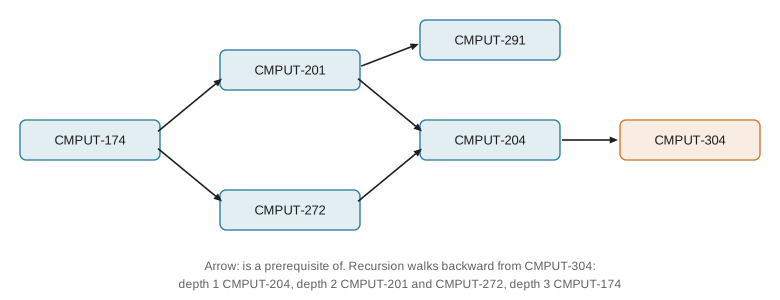
-- All prerequisites of CMPUT-304, with the depth at which each is reached
WITH RECURSIVE needs(course_id, depth) AS (
    SELECT prereq_id, 1 FROM prereq WHERE course_id = 'CMPUT-304'      -- base case
    UNION
    SELECT p.prereq_id, n.depth + 1                                     -- recursive step
    FROM prereq p JOIN needs n ON p.course_id = n.course_id
)
SELECT course_id, MIN(depth) AS depth FROM needs GROUP BY course_id ORDER BY depth, course_id;

-- Mentoring chain: everyone below Okafor, with their path
WITH RECURSIVE tree(instr_id, name, path) AS (
    SELECT instr_id, name, name FROM instructor WHERE name = 'Okafor'
    UNION ALL
    SELECT i.instr_id, i.name, t.path || ' > ' || i.name
    FROM instructor i JOIN tree t ON i.mentor_id = t.instr_id
)
SELECT path FROM tree ORDER BY path;course_id depth --------- ----- CMPUT-204 1 CMPUT-201 2 CMPUT-272 2 CMPUT-174 3 path ------------------ Okafor Okafor > Lindqvist Okafor > Tremblay
Recursion uses the same prerequisite structure as this site's own catalog, where CMPUT-304 depends on CMPUT-204, which depends on CMPUT-201 and CMPUT-272, which both depend on CMPUT-174. Using UNION rather than UNION ALL in the first query removes duplicate rows, which also guarantees termination on graphs with cycles. With UNION ALL and a cycle, a recursive CTE runs forever or until a system limit stops it; on data that might contain cycles, track the path and stop when a node repeats, or rely on UNION's duplicate removal.
Common mistakes
MistakeUsing NOT IN with a subquery that can return NULL.
InsteadIf any value is NULL, NOT IN returns no rows. Use NOT EXISTS or a left anti-join.
MistakeMixing AND and OR without parentheses.
InsteadAND binds more tightly than OR. Parenthesize so the condition means what you intend.
MistakePutting a window function in WHERE.
InsteadWindow functions are computed after WHERE. Compute them in a CTE or derived table and filter in the outer query.
MistakeExpecting a view to store a copy of the data.
InsteadAn ordinary view is a stored query, recomputed on use. A materialized view stores results and must be refreshed.
MistakeWriting a recursive CTE with UNION ALL over data that may contain cycles.
InsteadIt may never terminate. Use UNION, track visited nodes, or add a depth limit.
Summary and key terms
- Subqueries can return a scalar, a column for IN, a relation in FROM (a derived table), or be tested with EXISTS.
- A correlated subquery refers to the outer row and is read as being evaluated once per outer row; optimizers often convert it to a join.
- NOT EXISTS is the safe anti-join; NOT IN fails silently when the subquery returns NULL.
- For-all questions use relational division, written with double NOT EXISTS or by counting distinct matches.
- CTEs name subqueries within a statement; views store named queries for simplicity, security and logical data independence.
- Window functions such as RANK and AVG OVER (PARTITION BY ...) add per-row values computed over related rows without collapsing them.
- Recursive CTEs compute transitive closures such as all prerequisites; UNION or cycle checks ensure termination.
- Subquery
- A query nested inside another query.
- Correlated subquery
- A subquery that refers to columns of the outer query.
- Derived table
- A subquery in the FROM clause, treated as a temporary relation.
- EXISTS
- A predicate that is true when its subquery returns at least one row.
- Anti-join
- A query keeping rows of one table that have no match in another.
- Common table expression
- A named subquery introduced with WITH for the duration of one statement.
- View
- A named, stored query that behaves like a table.
- Materialized view
- A view whose result is stored and refreshed, rather than recomputed each time.
- Window function
- A function computing a value for each row over a window of related rows, using OVER.
- Recursive CTE
- A common table expression that refers to itself, used for transitive closure.
Practice problems
Work each problem on paper first, then reveal the answer to check.
Write a query for courses with more credits than the average course.
Show answer
SELECT course_id FROM course WHERE credits > (SELECT AVG(credits) FROM course);
Rewrite "students not enrolled in any section" with NOT EXISTS.
Show answer
SELECT name FROM student s WHERE NOT EXISTS (SELECT 1 FROM enrollment e WHERE e.student_id = s.student_id);
Why does a correlated subquery appear to run once per outer row?
Show answer
Because it refers to a column of the current outer row, so its result can differ for each row.
State the logical equivalence behind writing division with double NOT EXISTS.
Show answer
For all x, P(x) is equivalent to: there does not exist an x such that not P(x).
Give two reasons to create a view.
Show answer
To simplify repeated complex queries, to restrict what users can see, or to preserve old table shapes after a schema change.
What is the difference between RANK and DENSE_RANK for grades 90, 85, 85, 80?
Show answer
RANK gives 1, 2, 2, 4; DENSE_RANK gives 1, 2, 2, 3.
Write a window expression giving each student's credits as a percentage of their department's total.
Show answer
100.0 * credits / SUM(credits) OVER (PARTITION BY dept_id).
Why can relational algebra without recursion not find all prerequisites of a course?
Show answer
The chain length is unbounded, and each fixed expression can only follow a fixed number of joins.
What risk does UNION ALL pose in a recursive CTE?
Show answer
If the data contains a cycle, the recursion never stops producing new rows.
Write a CASE expression that labels courses with 4 or more credits as "heavy" and others as "standard".
Show answer
CASE WHEN credits >= 4 THEN 'heavy' ELSE 'standard' END.
Lesson quiz · 5 questions
Score 60% or more to complete this lesson.
Create a free account to save your progress, take quizzes and earn a certificate.