
CMP-325 · Lesson 4 of 12 · 31 min
SQL II: queries, joins and aggregation
Most work with a database is asking questions of it. This lesson covers the core of SQL querying: the SELECT-FROM-WHERE block, sorting and limiting results, conditions and the three-valued logic that NULL brings, the different kinds of join, and aggregation with GROUP BY and HAVING. All examples run against the college database defined in lesson 3. By the end you should be able to translate ordinary questions, such as 'which instructors teach more than one section, and what is their average class grade?', into correct SQL, and to predict what a query returns before you run it.
The basic query block
A query has the shape SELECT columns FROM tables WHERE condition. FROM names the tables; WHERE keeps the rows for which the condition is true; SELECT chooses the output columns, which may be expressions, and can rename them with AS. In relational algebra terms, FROM is a Cartesian product, WHERE is a selection and SELECT is a projection, except that SQL keeps duplicate rows unless you write SELECT DISTINCT. ORDER BY sorts the result, ascending by default or DESC for descending, and LIMIT keeps only the first rows. Without ORDER BY, the order of rows is undefined and may change between runs or versions, even if it looks stable.
SELECT name, credits, credits / 3 AS approx_courses
FROM student
WHERE credits >= 45
ORDER BY credits DESC;

SELECT DISTINCT dept_id FROM course ORDER BY dept_id;

SELECT course_id, title FROM course
WHERE title LIKE '%Algorithms%' OR course_id IN ('MATH-125', 'STAT-151');name credits approx_courses ----- ------- -------------- Grace 90 30 Chloe 87 29 Elena 66 22 Ava 54 18 Farid 45 15 dept_id ------- BIO CS MATH PHYS course_id title --------- -------------------------- CMPUT-204 Algorithms I CMPUT-304 Algorithms II MATH-125 Linear Algebra I STAT-151 Introduction to Statistics
Integer division explains the approx_courses column: in SQLite, PostgreSQL and SQL Server, dividing two integers truncates, so 54 / 3 is 18 and 45 / 3 is 15, while MySQL returns a decimal. Write 54 / 3.0 or CAST(credits AS REAL) to get a fractional result portably. Conditions can use comparison operators, AND, OR and NOT, BETWEEN low AND high (inclusive), IN (list), and LIKE with the wildcards % (any sequence of characters) and _ (exactly one character). Whether LIKE is case-sensitive varies by system: SQLite's is case-insensitive for ASCII letters, PostgreSQL's is case-sensitive and offers ILIKE.
How SQL evaluates a query
The clauses of a query are written in one order and evaluated, logically, in another. Understanding the logical order explains many puzzling errors, such as why a column alias defined in SELECT cannot be used in WHERE in standard SQL.
| Logical step | Clause | What it does |
|---|---|---|
| 1 | FROM and JOIN | Builds the combined rows from the tables |
| 2 | WHERE | Keeps rows whose condition is true |
| 3 | GROUP BY | Forms groups of rows with equal grouping values |
| 4 | HAVING | Keeps groups whose condition is true |
| 5 | SELECT | Computes output columns and aliases; applies DISTINCT |
| 6 | ORDER BY | Sorts the result (may use aliases) |
| 7 | LIMIT / OFFSET | Keeps a slice of the sorted rows |
The DBMS may physically compute things in a different order, using indexes and pushing work around as lesson 9 shows, but the answer must be as if it followed these steps. Because WHERE runs before SELECT, a condition on an alias defined in SELECT is not allowed in standard SQL (SQLite and MySQL accept it as an extension); repeat the expression or use a subquery. Because WHERE runs before GROUP BY, conditions on aggregates such as COUNT(*) must go in HAVING, not WHERE.
NULL and three-valued logic
A comparison involving NULL is neither true nor false; its result is unknown. So credits > 50 is unknown when credits is NULL, and so is NULL = NULL. SQL therefore uses three-valued logic with true, false and unknown. WHERE keeps only rows whose condition is true, so rows where it is unknown are dropped, just like false ones. To test for NULL, use IS NULL and IS NOT NULL, never = NULL, which is always unknown.
| p | q | p AND q | p OR q | NOT p |
|---|---|---|---|---|
| true | unknown | unknown | true | false |
| false | unknown | false | unknown | true |
| unknown | unknown | unknown | unknown | unknown |
-- Which students have no department?
SELECT name FROM student WHERE dept_id = NULL;      -- always unknown: returns nothing
SELECT name FROM student WHERE dept_id IS NULL;     -- correct

-- NOT IN with a NULL in the list returns nothing at all
SELECT name FROM instructor WHERE dept_id NOT IN ('CS', NULL);

-- COALESCE substitutes a value for NULL in output
SELECT name, COALESCE(dept_id, '(none)') AS dept FROM student WHERE student_id IN (101, 108);name ---- (no rows) name ---- Hiro name ---- (no rows) name dept ---- ------ Ava CS Hiro (none)
The NOT IN result surprises almost everyone. The condition dept_id NOT IN ('CS', NULL) means dept_id <> 'CS' AND dept_id <> NULL. The second part is unknown for every row, so the whole condition is at best unknown, and no row is ever kept. The same trap appears when NOT IN is used with a subquery that can return a NULL; lesson 5 shows the safer NOT EXISTS. Aggregate functions also treat NULL specially: COUNT(column), SUM, AVG, MIN and MAX ignore NULLs, while COUNT(*) counts rows. An average of grades therefore averages only the grades that exist, which is usually, but not always, what you want.
Joins
Joins combine rows from several tables. The modern syntax writes the join in FROM with JOIN ... ON condition. An inner join keeps pairs of rows that satisfy the condition. The older style lists tables separated by commas and puts the join condition in WHERE; it means the same for inner joins but makes it easy to forget a condition, which silently produces a Cartesian product. USING (column) is shorthand for equality on same-named columns and outputs the column once; NATURAL JOIN joins on all same-named columns, which is fragile, because adding a column to one table can silently change the join.
-- Inner join: each student with the name of their department
SELECT s.name AS student, d.name AS department
FROM student AS s
JOIN department AS d ON s.dept_id = d.dept_id
ORDER BY d.name, s.name;

-- Left outer join: every department, with its number of students (0 if none)
SELECT d.name, COUNT(s.student_id) AS students
FROM department AS d
LEFT JOIN student AS s ON s.dept_id = d.dept_id
GROUP BY d.dept_id
ORDER BY students DESC, d.name;student department ------- ----------------- Elena Biology Jonah Biology Ava Computing Science Ben Computing Science Dev Computing Science Grace Computing Science Chloe Mathematics Isla Mathematics Farid Physics name students ----------------- -------- Computing Science 4 Biology 2 Mathematics 2 Physics 1 History 0
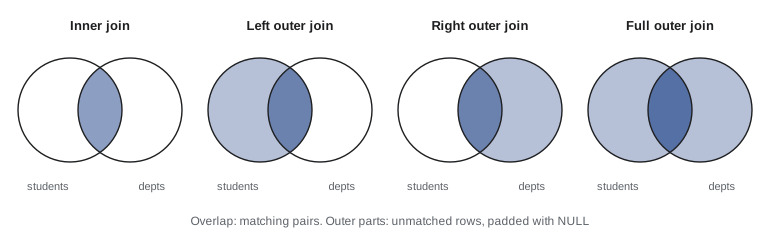
The table aliases s and d shorten the query and are required when the same table appears twice. A left outer join keeps every row of the left table; where no right row matches, the right columns are NULL. A right outer join does the reverse, and a full outer join keeps unmatched rows from both sides. SQLite supports RIGHT and FULL joins since version 3.39; MySQL and MariaDB still do not support FULL OUTER JOIN, which can be written as a union of a left and a right join. A useful habit is to count with COUNT(column from the right table) after a left join, so that unmatched rows count as zero rather than one.
-- Self-join: each instructor with their mentor's name
SELECT i.name AS instructor, m.name AS mentor
FROM instructor AS i
LEFT JOIN instructor AS m ON i.mentor_id = m.instr_id
ORDER BY i.instr_id;

-- Three-table join: who teaches which course, and when
SELECT c.course_id, sec.term, sec.year, i.name AS instructor
FROM section AS sec
JOIN course AS c ON c.course_id = sec.course_id
LEFT JOIN instructor AS i ON i.instr_id = sec.instr_id
WHERE c.dept_id = 'CS'
ORDER BY sec.year, sec.term, c.course_id;instructor mentor ---------- -------- Okafor NULL Lindqvist Okafor Tremblay Okafor Nakamura NULL Ferreira Nakamura Chen NULL Haddad NULL Morrison NULL course_id term year instructor --------- ------ ---- ---------- CMPUT-174 Fall 2025 Tremblay CMPUT-204 Fall 2025 Okafor CMPUT-272 Fall 2025 Nakamura CMPUT-174 Winter 2026 NULL CMPUT-201 Winter 2026 Lindqvist CMPUT-291 Winter 2026 Lindqvist
Worked problem
Where to put a condition in an outer join
You want every department with the number of its students who have at least 50 credits, including departments where that number is zero. A colleague writes LEFT JOIN student s ON s.dept_id = d.dept_id WHERE s.credits >= 50. What goes wrong, and how do you fix it?
Show solution
- WHERE runs after the join. For departments with no qualifying students, the left join produces rows whose s.credits is NULL.
- NULL >= 50 is unknown, so WHERE removes those rows, and the departments disappear: the outer join has effectively become an inner join.
- Move the condition into the join: LEFT JOIN student s ON s.dept_id = d.dept_id AND s.credits >= 50. Now unmatched departments survive with NULLs.
- Count COUNT(s.student_id) so that departments with no match show 0.
Answer: Conditions on the optional (right) side of a left join belong in ON, not WHERE; otherwise the unmatched rows are filtered out.
Aggregation and grouping
Aggregate functions compute one value from many rows: COUNT, SUM, AVG, MIN and MAX, plus system-specific ones such as SQLite's group_concat or PostgreSQL's string_agg. Without GROUP BY, an aggregate summarizes the whole result. With GROUP BY, rows are partitioned into groups that share the grouping values, and each group produces one output row. HAVING then filters groups, as WHERE filters rows.
-- Per section: enrolled students, graded students and average grade
SELECT e.sec_id, sec.course_id,
       COUNT(*)             AS enrolled,
       COUNT(e.grade)       AS graded,
       ROUND(AVG(e.grade), 1) AS avg_grade
FROM enrollment AS e
JOIN section AS sec ON sec.sec_id = e.sec_id
GROUP BY e.sec_id, sec.course_id
HAVING COUNT(e.grade) >= 2
ORDER BY avg_grade DESC;

-- Instructors teaching more than one section
SELECT i.name, COUNT(*) AS sections
FROM instructor AS i JOIN section AS sec ON sec.instr_id = i.instr_id
GROUP BY i.instr_id
HAVING COUNT(*) > 1;sec_id course_id enrolled graded avg_grade ------ --------- -------- ------ --------- 3 CMPUT-204 2 2 87.5 6 MATH-125 4 4 81.5 4 CMPUT-272 5 5 79.6 1 CMPUT-174 4 4 77.8 8 BIOL-107 2 2 71.5 name sections --------- -------- Lindqvist 2 Ferreira 2
COUNT(*) counts rows and COUNT(e.grade) counts non-NULL grades, which is why enrolled and graded differ for sections with students still in progress. The rule for grouped queries is that every column in SELECT must be either a grouping column or inside an aggregate. A query such as SELECT dept_id, name, COUNT(*) FROM student GROUP BY dept_id is ill-formed, because a department has many student names and SQL does not know which one to show. The standard rejects it, and so do PostgreSQL and MySQL in their default modes, but SQLite accepts it and returns a name from an arbitrary row of the group, a convenience that hides bugs.
Worked problem
Translating a question into a grouped query
For each department that has at least one graded enrollment, find the department name and the highest grade any of its students has earned, listing highest first.
Show solution
- Rows needed: enrollments with grades, their students, and the students' departments. Join enrollment to student to department.
- Keep only graded enrollments with WHERE e.grade IS NOT NULL (this filters rows, so it belongs in WHERE).
- Group by department and compute MAX(e.grade).
SELECT d.name, MAX(e.grade) AS best FROM enrollment e JOIN student s ON s.student_id = e.student_id JOIN department d ON d.dept_id = s.dept_id WHERE e.grade IS NOT NULL GROUP BY d.dept_id ORDER BY best DESC;- Departments without graded enrollments are excluded automatically by the inner joins and the WHERE condition, as the question asks.
Answer: With the college data: Mathematics 95, Computing Science 93, Biology 81, Physics 77.
Set operations
UNION, INTERSECT and EXCEPT combine the results of two queries with compatible columns. UNION and the others remove duplicates, as in relational algebra; UNION ALL keeps them and is faster because it does not have to check. They are useful when the two parts come from different tables or need different conditions.
-- People in Computing Science, whether students or instructors
SELECT name, 'student' AS role FROM student WHERE dept_id = 'CS'
UNION
SELECT name, 'instructor' FROM instructor WHERE dept_id = 'CS'
ORDER BY role, name;

-- Courses that have a section but are nobody's prerequisite
SELECT course_id FROM section
EXCEPT
SELECT prereq_id FROM prereq;name role --------- ---------- Lindqvist instructor Okafor instructor Tremblay instructor Ava student Ben student Dev student Grace student course_id --------- BIOL-107 CMPUT-291 MATH-125 PHYS-130 STAT-151
Note that ORDER BY applies to the whole combined result and is written once at the end. MySQL added INTERSECT and EXCEPT only in version 8.0.31; older code emulates them with joins and subqueries. Set operations compare whole rows, and for this purpose two NULLs are treated as equal, an exception to the usual rule that NULL equals nothing.
Common mistakes
MistakeWriting WHERE column = NULL.
InsteadComparisons with NULL are unknown, so no rows match. Use IS NULL or IS NOT NULL.
MistakePutting a condition on an aggregate in WHERE, such as WHERE COUNT(*) > 1.
InsteadWHERE runs before grouping; conditions on groups go in HAVING.
MistakeSelecting a column that is neither grouped nor aggregated.
InsteadEach output row of a grouped query represents a group, so other columns are ambiguous. SQLite allows it but returns an arbitrary value.
MistakeFiltering the right-hand table of a LEFT JOIN in WHERE.
InsteadThat removes the NULL-extended rows and turns the outer join into an inner join. Put the condition in ON.
MistakeRelying on the order rows happen to come back in.
InsteadWithout ORDER BY the order is undefined and can change. Always sort when order matters.
Summary and key terms
- A query block is SELECT ... FROM ... WHERE ..., with optional GROUP BY, HAVING, ORDER BY and LIMIT; SQL keeps duplicates unless DISTINCT is used.
- Logically FROM runs first, then WHERE, GROUP BY, HAVING, SELECT, ORDER BY and LIMIT, which explains where aliases and aggregate conditions may appear.
- Comparisons with NULL are unknown; WHERE keeps only true rows; test with IS NULL; NOT IN with a NULL returns nothing.
- Inner joins keep matching pairs; left, right and full outer joins also keep unmatched rows, filling the other side with NULLs.
- Conditions on the optional side of an outer join belong in ON; table aliases allow self-joins.
- Aggregates (COUNT, SUM, AVG, MIN, MAX) ignore NULLs except COUNT(*); every non-aggregated SELECT column must be in GROUP BY; HAVING filters groups.
- UNION, INTERSECT and EXCEPT combine compatible query results and remove duplicates unless ALL is given.
- SELECT
- The SQL statement and clause that retrieves data and chooses output columns.
- WHERE
- The clause that keeps rows for which a condition is true.
- Three-valued logic
- The logic of true, false and unknown that SQL uses because of NULL.
- Inner join
- A join that keeps only pairs of rows satisfying the join condition.
- Outer join
- A join that also keeps unmatched rows from one or both tables, padding with NULLs.
- Self-join
- A join of a table with itself, using different aliases.
- Aggregate function
- A function such as COUNT or AVG that computes one value from many rows.
- GROUP BY
- The clause that partitions rows into groups with equal values in the listed columns.
- HAVING
- The clause that keeps groups satisfying a condition, usually on aggregates.
- COALESCE
- A function returning its first non-NULL argument.
Practice problems
Work each problem on paper first, then reveal the answer to check.
Write a query listing course titles in alphabetical order.
Show answer
SELECT title FROM course ORDER BY title;
Why does SELECT name FROM student WHERE dept_id <> 'CS' not return Hiro, whose dept_id is NULL?
Show answer
NULL <> 'CS' is unknown, and WHERE keeps only true rows. Add OR dept_id IS NULL to include him.
What is the difference between COUNT(*) and COUNT(grade)?
Show answer
COUNT(*) counts rows; COUNT(grade) counts rows where grade is not NULL.
Write a query giving each department's total instructor salary.
Show answer
SELECT dept_id, SUM(salary) FROM instructor GROUP BY dept_id;
Change your previous query to show only departments whose total exceeds 200,000.
Show answer
Add HAVING SUM(salary) > 200000.
Write a query listing every course with the number of sections offered, including courses with none.
Show answer
SELECT c.course_id, COUNT(s.sec_id) FROM course c LEFT JOIN section s ON s.course_id = c.course_id GROUP BY c.course_id;
What does a comma-separated FROM student, department with no WHERE condition produce?
Show answer
The Cartesian product: every student paired with every department.
Why might NOT IN (subquery) return no rows unexpectedly?
Show answer
If the subquery returns any NULL, every NOT IN comparison is unknown.
Write a query listing each instructor and the number of mentees they have.
Show answer
SELECT m.name, COUNT(i.instr_id) FROM instructor m LEFT JOIN instructor i ON i.mentor_id = m.instr_id GROUP BY m.instr_id;
What is the difference between UNION and UNION ALL?
Show answer
UNION removes duplicate rows; UNION ALL keeps them and is cheaper.
Lesson quiz · 5 questions
Score 60% or more to complete this lesson.
Create a free account to save your progress, take quizzes and earn a certificate.