
CISSP-113 · Lesson 6 of 12 · 27 min
Wireless, cellular and satellite networks
Wireless networks remove the cable and, with it, the most basic physical control: anyone within radio range can receive the signal and try to join. Wi-Fi is now the default way most users connect at work, phones depend on cellular networks, billions of IoT devices use short-range radios, and low Earth orbit satellite services have made satellite broadband an everyday option for remote sites. This lesson covers the security of each: Wi-Fi standards and encryption, enterprise authentication, wireless attacks and controls, Bluetooth and other personal area networks, cellular networks through 5G, and satellite links.
Wi-Fi standards
Wi-Fi is the trade name for wireless LAN products certified by the Wi-Fi Alliance against the IEEE 802.11 family of standards. Successive generations have increased speed and efficiency. The Wi-Fi Alliance now uses generation numbers: Wi-Fi 4 is 802.11n, Wi-Fi 5 is 802.11ac, Wi-Fi 6 is 802.11ax, Wi-Fi 6E extends 802.11ax into the 6 GHz band, and Wi-Fi 7 is 802.11be, certified from January 2024. Wi-Fi 6E and Wi-Fi 7 devices operating in 6 GHz must use WPA3, which has helped move the industry away from older security modes. Wireless networks use the 2.4 GHz band, which travels further and penetrates walls better but is crowded, the 5 GHz band, and the 6 GHz band, which offers wide clean channels but shorter range.
Networks are identified by a service set identifier, SSID, broadcast in beacon frames. Hiding the SSID provides no real security, because the name appears in other frames that any sniffer can capture, and it can make clients probe for the network wherever they go. MAC address filtering is similarly weak, because MAC addresses are visible in the air and trivially spoofed. Neither is a substitute for strong authentication and encryption.
| Generation | IEEE standard | Bands | Security note |
|---|---|---|---|
| Wi-Fi 4 | 802.11n | 2.4 and 5 GHz | Often still running WPA2; legacy devices may force weaker modes |
| Wi-Fi 5 | 802.11ac | 5 GHz | WPA2 common; WPA3 possible with updates |
| Wi-Fi 6 | 802.11ax | 2.4 and 5 GHz | WPA3 required for Wi-Fi 6 certification |
| Wi-Fi 6E | 802.11ax | Adds 6 GHz | WPA3 and protected management frames mandatory in 6 GHz |
| Wi-Fi 7 | 802.11be | 2.4, 5 and 6 GHz | WPA3 mandatory; multi-link operation needs consistent security across links |
Wi-Fi security protocols
Wired Equivalent Privacy, WEP, the original 802.11 security, used the RC4 cipher with short initialization vectors and a flawed design; it can be cracked in minutes and must never be used. Wi-Fi Protected Access, WPA, was an interim fix using TKIP, now deprecated. WPA2, mandatory for certified devices from 2006, uses AES in CCMP mode and remains very common. Its personal mode, WPA2-PSK, derives keys from a shared passphrase; an attacker who captures the four-way handshake, or a single PMKID frame from some access points, can try to guess the passphrase offline, so short or common passphrases fall quickly. The 2017 KRACK research showed key reinstallation flaws in the handshake that vendors patched, a reminder that client devices need updates too.
WPA3, introduced in 2018, replaces the pre-shared key exchange with Simultaneous Authentication of Equals, SAE, a password-authenticated key exchange based on the Dragonfly handshake. SAE resists offline dictionary attacks, because each guess requires an online interaction with the network, and provides forward secrecy, so capturing traffic today and learning the password later does not decrypt it. WPA3-Enterprise offers an optional 192-bit security mode aligned with high-assurance government suites. WPA3 requires protected management frames, which stop attackers forging the deauthentication frames once used to kick users off networks. Early implementations had flaws, published as Dragonblood in 2019, which led to fixes; transition modes that allow both WPA2 and WPA3 clients on one network can let attackers force a downgrade, so they should be retired once clients support WPA3. Wi-Fi Enhanced Open, based on opportunistic wireless encryption, encrypts traffic on open networks such as cafes without a password, protecting against passive eavesdropping, though it does not authenticate the network.
Worked problem
Why passphrase length matters for WPA2-Personal
An attacker captures a WPA2-PSK handshake and can test 1,000,000 guesses per second on a graphics processor. Compare an 8-character lowercase passphrase with a passphrase of four random words chosen from a list of 7,776.
Show solution
- 8 lowercase letters: 26^8 ≈ 2.09 × 10^11 combinations.
- At 10^6 per second, exhausting them takes about 2.09 × 10^5 seconds, about 2.4 days.
- Four random words from 7,776: 7,776^4 ≈ 3.66 × 10^15 combinations.
- At 10^6 per second that is about 3.66 × 10^9 seconds, about 116 years.
Answer: The eight-letter passphrase falls in days; four random words resist for over a century at this rate. Better still, WPA3-SAE removes the offline attack entirely, and enterprises should use 802.1X instead of a shared key.
Enterprise Wi-Fi with 802.1X
Organizations should not protect corporate Wi-Fi with a shared passphrase: everyone knows it, it rarely changes, departing staff keep it and a single leak exposes the whole network. Enterprise mode uses 802.1X with the Extensible Authentication Protocol, EAP, and a RADIUS server, giving each user or device its own credentials and session keys. Common EAP methods differ greatly in strength. EAP-TLS uses certificates on both the client and the server, giving mutual authentication without passwords; it is the strongest common method and resists phishing, but needs a public key infrastructure and device management to issue certificates. PEAP and EAP-TTLS build a TLS tunnel authenticated by the server's certificate and then send a password-based inner method, such as MSCHAPv2, inside it. They are easier to deploy but depend on clients properly validating the server certificate; if clients accept any certificate, an attacker running an evil twin access point can capture credentials. EAP-FAST, from Cisco, uses protected access credentials. LEAP, an old Cisco method, is broken and must not be used.
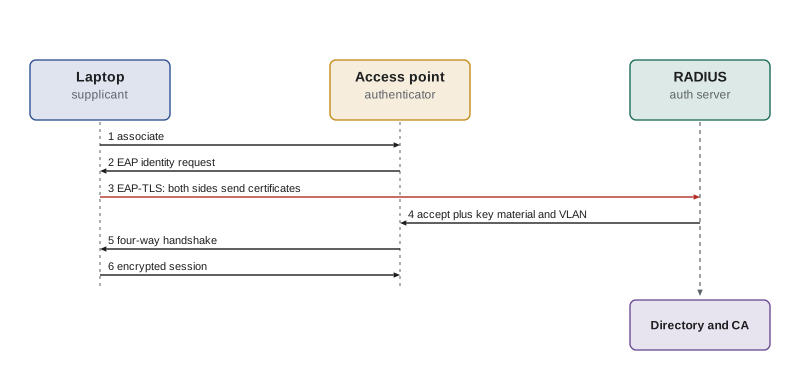
Whatever EAP method is used, configure clients to validate the server certificate and the expected server name, ideally pushed by device management so users cannot click through warnings. RADIUS can also return attributes that place each user or device into the right VLAN or apply access policies, which links wireless access to segmentation. Guest access should use a separate SSID and network that reaches only the internet, with client isolation so that guests cannot attack each other, a captive portal for terms of use, rate limits and short session times.
Wireless attacks and controls
Rogue access points are unauthorized access points connected to the wired network, often installed by employees for convenience; they create an unmanaged entry point. Evil twins are attacker-controlled access points broadcasting a trusted SSID to lure clients and capture traffic or credentials. Deauthentication attacks forge management frames to disconnect clients, either to disrupt service or to capture handshakes as clients reconnect; protected management frames counter them. Jamming floods radio channels with noise and cannot be prevented by cryptography; it can only be detected, located and dealt with physically or through regulators, and deliberate jamming is illegal in Canada and the United States. War driving is searching for wireless networks from a moving vehicle. Wi-Fi Protected Setup, WPS, a push-button or PIN pairing feature, has a PIN design flaw that allows brute force and should be disabled.
Controls include a wireless intrusion prevention system, WIPS, that monitors the airspace with sensors, detects rogue and evil twin access points and unusual frames and can contain them; regular wireless surveys; 802.1X with certificate validation; WPA3 with protected management frames; disabling WPS; careful antenna placement and power settings so that coverage does not extend far beyond the building; and physical security for access points. Site surveys, using predictive modeling during design and measurement after installation, ensure good coverage and reveal where signals leak outdoors.
| Attack | What it does | Main controls |
|---|---|---|
| Rogue access point | Unmanaged bridge into the wired network | WIPS detection, 802.1X on wired ports, policy |
| Evil twin | Fake access point steals credentials or traffic | EAP-TLS or strict server certificate validation, WIPS |
| Deauthentication | Disconnects clients, aids handshake capture | Protected management frames (802.11w), WPA3 |
| Offline passphrase cracking | Guesses PSK from captured handshake | WPA3-SAE, long random passphrases, enterprise mode |
| WPS PIN brute force | Recovers network key through flawed PIN | Disable WPS |
| Jamming | Denies service by radio noise | Detection, location, wired fallback, report to regulator |
Bluetooth, NFC and IoT radios
Bluetooth connects personal devices over short distances in the 2.4 GHz band. Classic Bluetooth and Bluetooth Low Energy have different pairing methods; modern secure connections use elliptic curve Diffie-Hellman key exchange, but legacy pairing and the "just works" method offer weaker protection against on-path attacks. Historical attacks include bluejacking, sending unsolicited messages; bluesnarfing, stealing data; and bluebugging, taking control of a device. More recent research, such as BlueBorne in 2017 and the KNOB attack in 2019, found implementation and protocol flaws that allowed remote compromise or forced weak keys. Controls: keep devices updated, turn Bluetooth off or make devices non-discoverable when not needed, prefer secure pairing methods and restrict Bluetooth on sensitive systems by policy.
Near-field communication, NFC, works at a few centimeters and underpins contactless payments, transit cards and access badges. Its short range limits but does not eliminate risks such as relay attacks, where attackers extend the range of a card to make a payment or open a door. Radio frequency identification, RFID, tags in badges and inventory can sometimes be read or cloned from a distance with specialized equipment; older 125 kHz proximity badges are especially easy to clone, so organizations should move to modern encrypted smart card credentials. IoT devices use protocols such as Zigbee, Z-Wave, Thread, LoRaWAN and Bluetooth Low Energy, many with optional or weakly implemented security. The newer Matter standard, which runs over Thread and Wi-Fi, aims to improve interoperability and security for smart home devices. Lesson 8 returns to IoT.
Cellular networks
Cellular networks connect phones, tablets, laptops and an increasing number of IoT devices. Second-generation GSM authenticated only the phone, not the network, and used encryption that has been broken, which made fake base stations, known as IMSI catchers or cell-site simulators, effective at intercepting calls and tracking subscribers. Third- and fourth-generation networks, UMTS and LTE, added mutual authentication and stronger encryption, but devices can still be forced down to 2G where it remains available, and signaling protocols between carriers, SS7 for older networks and Diameter for 4G, have been abused to locate subscribers and intercept text messages. This is one reason security agencies advise against using SMS for multifactor authentication where better options exist.
Fifth-generation, 5G, networks add further protections. The subscription permanent identifier is concealed using public key encryption, so IMSI catchers can no longer capture it in clear text; the core network uses a service-based architecture with stronger authentication between functions; and network slicing lets operators create logically separate networks with different properties for different customers. Private 5G networks, built by enterprises on licensed, shared or, in some countries, dedicated spectrum, are being used in factories, ports and mines. New risks come with new architecture: a much larger software attack surface, dependence on cloud-native functions, and supply chain concerns that have led both Canada and the United States to restrict certain vendors from their 5G networks.
In the United States, the Secure and Trusted Communications Networks Act of 2019 led the Federal Communications Commission to designate certain suppliers, including Huawei and ZTE, as national security threats and to fund the removal of their equipment from US networks. The FCC also regulates radio spectrum and, in recent years, has proposed and adopted rules on cybersecurity labeling for consumer IoT devices through the US Cyber Trust Mark program.
Satellite networks
Satellite links serve remote sites, ships, aircraft and backup connectivity. Geostationary satellites orbit at about 35,786 km, so a signal must travel up and down twice for a round trip, giving roughly 500 to 700 ms of latency, which hurts interactive applications and TCP throughput. Low Earth orbit constellations, such as those operated by SpaceX and others, orbit at roughly 500 to 1,200 km and deliver round-trip times of a few tens of milliseconds, comparable to terrestrial broadband. Security concerns include interception of unencrypted downlinks, which researchers have repeatedly demonstrated on older services; jamming and spoofing; dependence on ground stations and the operator's network; and attacks on user terminals, highlighted when a cyberattack disabled tens of thousands of satellite modems in Europe at the start of the 2022 invasion of Ukraine. Treat satellite links as untrusted transport: encrypt traffic end to end with a VPN, manage terminals like any other network device and plan for jamming in contested areas.
# Round-trip propagation delay for satellite links (signal travels at about 300,000 km/s)
c = 300_000  # km/s
for name, alt_km in [('Geostationary', 35_786), ('Medium Earth orbit', 8_000), ('Low Earth orbit', 550)]:
    # user -> satellite -> ground station, and back again: four passes of the altitude (best case overhead)
    rtt_ms = 4 * alt_km / c * 1000
print(f"{name:20s} altitude {alt_km:>6,} km minimum round trip {rtt_ms:6.1f} ms")Geostationary altitude 35,786 km minimum round trip 477.1 ms Medium Earth orbit altitude 8,000 km minimum round trip 106.7 ms Low Earth orbit altitude 550 km minimum round trip 7.3 ms
Thinking like a manager
When a question offers SSID hiding or MAC filtering as the answer to a wireless risk, it is almost certainly a distractor. When it describes credentials stolen by a fake access point, the fix is mutual authentication with certificate validation, ideally EAP-TLS. When it asks how to protect a small office with a shared password, WPA3-Personal with a long random passphrase is the right answer; for an enterprise, it is 802.1X. When it involves cellular or satellite links, treat them as untrusted transport and protect data with encryption at higher layers, and remember supply chain and regulatory considerations for national infrastructure.
Common mistakes
MistakeHiding the SSID and filtering MAC addresses as the main wireless controls.
InsteadUse WPA3 or 802.1X; SSIDs and MAC addresses are visible and spoofable.
MistakeUsing PEAP without enforcing server certificate validation.
InsteadPush profiles that validate the RADIUS certificate and server name, or use EAP-TLS.
MistakeProtecting corporate Wi-Fi with one shared passphrase.
InsteadUse 802.1X so each user or device has its own credentials and keys.
MistakeLeaving WPA2/WPA3 transition mode on indefinitely.
InsteadMove to WPA3-only once clients support it, to prevent downgrade attacks.
MistakeTrusting satellite or cellular links as private.
InsteadEncrypt traffic end to end and manage terminals as network devices.
Summary and key terms
- Wi-Fi generations run from Wi-Fi 4 (802.11n) to Wi-Fi 7 (802.11be); 6 GHz operation requires WPA3.
- WEP and TKIP are broken; WPA2 uses AES-CCMP; WPA3 uses SAE, giving resistance to offline guessing and forward secrecy.
- Enterprise Wi-Fi uses 802.1X with EAP; EAP-TLS with mutual certificates is the strongest common method.
- Rogue and evil twin access points, deauthentication and jamming are key wireless threats; WIPS and PMF help.
- Bluetooth, NFC, RFID and IoT radios need updates, secure pairing and modern credentials.
- 5G conceals subscriber identifiers and adds slicing, but enlarges the software and supply chain attack surface.
- Satellite links add latency (GEO) or new dependencies (LEO) and should be treated as untrusted transport.
- SSID
- The name of a wireless network, broadcast in beacon frames.
- WPA2
- Wi-Fi security using AES-CCMP, with personal (PSK) and enterprise modes.
- WPA3
- Wi-Fi security using SAE for personal mode and requiring protected management frames.
- SAE
- Simultaneous Authentication of Equals, a password-authenticated key exchange resistant to offline guessing.
- EAP-TLS
- An EAP method using certificates on both client and server.
- Evil twin
- A rogue access point imitating a legitimate network.
- Protected management frames
- Cryptographic protection of Wi-Fi management frames (802.11w).
- WIPS
- A wireless intrusion prevention system monitoring the radio environment.
- IMSI catcher
- A fake cellular base station used to intercept or track phones.
- Network slicing
- Creating logically separate virtual networks on shared 5G infrastructure.
Practice problems
Work each problem on paper first, then reveal the answer to check.
Which IEEE standard is Wi-Fi 6?
Show answer
802.11ax.
Why is SSID hiding not a real control?
Show answer
The SSID appears in other frames that sniffers can capture.
What cipher mode does WPA2 use?
Show answer
AES in CCMP mode.
What advantage does SAE give over WPA2-PSK?
Show answer
Resistance to offline dictionary attacks, plus forward secrecy.
Which EAP method uses certificates on both sides?
Show answer
EAP-TLS.
What does a PEAP deployment depend on to resist evil twins?
Show answer
Clients validating the server certificate and name.
What feature should be disabled because of a PIN design flaw?
Show answer
Wi-Fi Protected Setup (WPS).
Why are 125 kHz proximity badges a risk?
Show answer
They can be read and cloned easily.
How does 5G protect the subscriber identifier?
Show answer
It conceals it with public key encryption.
Roughly what round-trip latency does geostationary satellite add?
Show answer
About 500 to 700 ms.
Lesson quiz · 5 questions
Score 60% or more to complete this lesson.
Create a free account to save your progress, take quizzes and earn a certificate.