
CISSP-111 · Lesson 8 of 12 · 27 min
Data remanence and media sanitization
When data is deleted, it rarely disappears. Deleting a file usually removes only the pointer to it; formatting a disk usually rebuilds the file system without touching the data; and solid-state drives keep copies of old data in areas the operating system cannot see. The residual data left behind is called data remanence, and it is the reason the 2024 outline names remanence and destruction explicitly in the data life cycle. This lesson explains why data remains, the standard categories of sanitization (clear, purge and destroy), how methods differ by media type, how to verify and document sanitization, and how to handle cloud and outsourced storage where you never touch the media.
Why data remains
On a traditional magnetic hard disk, a file system records which blocks belong to which file. Deleting a file marks its blocks as free but leaves the magnetic patterns intact until they are overwritten. Recovery tools can read those blocks and reassemble files. A quick format behaves similarly, and even a full format may not overwrite every area.
Solid-state drives (SSDs) and other flash media are more complicated. Flash cells wear out, so the drive's controller spreads writes across cells (wear leveling) and keeps spare capacity (over-provisioning) that the operating system cannot address. When data is overwritten, the controller usually writes the new data to a fresh cell and marks the old one for later erasure, so the old data may persist in cells the host cannot reach. Bad-block remapping on both hard disks and SSDs can also leave old data in retired areas. This is why simply overwriting an SSD from the operating system is not a reliable purge.
Remanence affects more than computer disks. Printers, copiers and scanners often contain hard disks or flash storage that keep images of every document processed. Phones, tablets, network equipment, smart televisions, vehicles, medical devices and industrial controllers all store data, configuration and credentials. Backup tapes, optical discs, memory cards and USB drives travel and get lost. Paper, microfilm and whiteboards are media too. A disposal program that covers only laptops and servers will miss many of these.
Clear, purge and destroy
In the United States, NIST Special Publication 800-88, Guidelines for Media Sanitization, is the reference most organizations use. Revision 2, published in September 2025, replaced Revision 1 from 2014. It shifts the focus to establishing an enterprise media sanitization program, removes the old device-by-device appendices in favor of pointing to current technique standards such as IEEE 2883, extends scope from electronic media to information storage media generally, and distinguishes verification that a sanitization operation completed from validation that the data was effectively removed. Federal agencies follow it, and many state laws, contracts and standards such as PCI DSS refer to it.
Both national guides, and most industry practice, use three levels of sanitization. Clear applies logical techniques to user-addressable storage, such as overwriting with new values or using the device's standard reset, to protect against simple, non-invasive recovery with ordinary tools. Purge applies physical or logical techniques that make recovery infeasible even with state-of-the-art laboratory techniques; examples include a drive's built-in sanitize commands, cryptographic erase and, for some magnetic media, degaussing. Destroy renders the media unusable and recovery infeasible by physical means such as disintegration, pulverizing, melting or incineration, so the media cannot be reused.
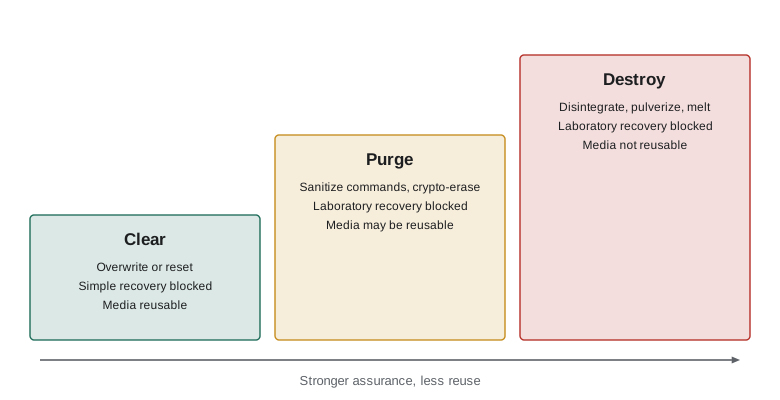
Choosing the level depends mainly on two questions: how sensitive is the data, and will the media leave the organization's control? Media staying inside the organization and being reused for data of the same or higher classification may only need clearing. Media leaving the organization, through resale, donation, recycling or return to a leasing company, normally needs purging. Media that held highly sensitive data, or that cannot be purged reliably because it is damaged or does not support sanitize commands, should be destroyed. Lower categories of data may tolerate less rigorous methods, but the decision should be documented in policy rather than left to the technician.
| Media | Clear | Purge | Destroy |
|---|---|---|---|
| Magnetic hard disk | Overwrite all user-addressable sectors | ATA or SCSI sanitize, cryptographic erase, or degauss (destroys the drive mechanism) | Shred, disintegrate, pulverize or incinerate |
| SSD and flash | Factory reset or overwrite; not reliable for hidden areas | Built-in sanitize (block erase) or cryptographic erase | Disintegrate to small particle size or incinerate |
| Mobile phone | Factory reset | Factory reset with full-device encryption enabled (crypto-erase) | Shred or disintegrate |
| Magnetic tape | Overwrite | Degauss with an approved degausser | Incinerate or shred |
| Optical disc | Not applicable | Not applicable | Shred, disintegrate or incinerate |
| Paper | Not applicable | Not applicable | Cross-cut shred, pulp or incinerate |
Methods in more detail
Overwriting replaces data with patterns such as zeros, ones or random values. On modern magnetic hard disks, a single complete overwrite pass is generally considered sufficient for clearing; the old advice to make many passes comes from much older drive technologies, and NIST's 2025 revision removed multiple-pass requirements for clearing some media. Overwriting cannot reach remapped bad sectors or the hidden areas of SSDs, so it is a clear method, not a purge, for flash media.
Degaussing exposes magnetic media to a strong magnetic field that scrambles the recorded data. It works on tapes and traditional hard disks, but it usually destroys modern hard disks entirely by wiping the servo tracks the drive needs to operate, and it has no effect on SSDs, flash or optical media, which are not magnetic. NIST's 2025 revision notes that degaussing does not on its own count as a destroy technique. Degaussers must be rated for the coercivity of the media, which has increased over time, so an old degausser may fail on newer tapes.
Cryptographic erase (crypto-erase) relies on encryption. If the media has been encrypted from the start with a strong key, such as on a self-encrypting drive or a phone with full-device encryption, then securely destroying the key makes the data unreadable, almost instantly, without touching every block. Crypto-erase is attractive for SSDs and for cloud storage, but it is only as good as the encryption implementation, the assurance that no copy of the key survives, and the assumption that the cipher will remain strong for as long as the data stays sensitive. NIST's revision cautions about relying on it for very long-lived sensitive data and points to validated cryptographic modules under FIPS 140-3.
Physical destruction methods include shredding, disintegrating (cutting media into very small particles), pulverizing, melting and incineration. For SSDs and flash chips, particle size matters because a single surviving chip fragment can hold a lot of data; destruction vendors specify particle sizes accordingly. Destruction is final, which makes it reliable but wasteful; NIST's revision encourages purge where possible so media can be reused or recycled, and discourages relying on coarse shredding for anything above the lowest categories.
Verification, validation and documentation
Sanitization should be checked. Verification confirms that the operation ran to completion as intended, for example that the sanitize command finished without errors on every drive. Validation, which NIST's 2025 revision distinguishes explicitly, confirms that the target data is actually no longer recoverable, for example by sampling drives with forensic tools after a process change. Checking is particularly important for new device types, new tools and outsourced vendors.
Each sanitized item should get a record, often a certificate of sanitization, showing the manufacturer, model and serial number, the media type, the classification of data it held, the method and tool used, the date, the person who performed it and the verification result. Disposal vendors should provide certificates for every device, and contracts should allow audits of their processes. These records matter when a regulator or customer asks how you know data on retired equipment was destroyed, and they close the loop in the asset inventory.
Worked problem
Choosing methods for a refresh
A company retires 300 laptops with self-encrypting SSDs, 40 servers with magnetic hard disks that held confidential customer data, 25 multifunction printers with internal storage and 600 backup tapes that held restricted data. The laptops will be sold through a reseller; the server disks will go to recycling; the printers return to a leasing company; the tapes are at end of life. Choose a method for each.
Show solution
- Laptops leave control and hold sensitive data: purge with the drive's sanitize command or crypto-erase, verify, and record serial numbers on certificates.
- Server hard disks leave control with confidential data: purge with sanitize commands or crypto-erase, or destroy if any drive fails verification.
- Printers return to the lessor: use the manufacturer's storage sanitization feature or remove and purge or destroy the drives, as the lease allows; get a certificate.
- Tapes held restricted data and are at end of life: destroy them through a certified vendor, with witnessed destruction or video evidence and certificates; degauss first if policy requires.
Answer: Purge laptops and server disks with verification, sanitize or remove printer storage, and destroy the restricted tapes. Every item needs a recorded method and certificate.
Worked problem
Overwrite time versus crypto-erase
A 4 TB hard disk can be overwritten at about 150 MB/s. How long would one full pass take, and why might crypto-erase be preferred for a self-encrypting drive?
Show solution
- Capacity: 4 TB ≈ 4,000,000 MB.
- Time: 4,000,000 ÷ 150 ≈ 26,667 seconds ≈ 7.4 hours.
- Crypto-erase on a self-encrypting drive destroys the media encryption key in seconds, making all data unreadable at once, provided the drive implements encryption correctly.
Answer: About 7.4 hours per pass, against seconds for crypto-erase. Crypto-erase scales better, but its assurance depends on a trustworthy encryption implementation.
Cloud and outsourced storage
In cloud services you never touch the physical media, and your data is spread across shared disks. You cannot sanitize the provider's drives yourself, so assurance comes from three sources. First, contracts and certifications: providers describe their media sanitization processes in their security documentation and independent audit reports such as SOC 2 and ISO 27001 certificates, and should commit to sanitizing or destroying media at end of life. Second, crypto-shredding: if your data is encrypted with keys you control, deleting the keys renders the remaining copies unreadable, including in backups and replicas you cannot reach. Third, data deletion processes: confirm how long deleted data persists in backups and logs, and make sure the contract covers return and deletion at the end of the service. This is one reason customer-managed keys are popular for sensitive cloud data.
Outsourced disposal vendors, often called IT asset disposition (ITAD) providers, should be selected with the same care as any processor. Look for documented processes aligned with NIST or Cyber Center guidance, background-checked staff, secure transport with chain of custody, the ability to provide per-device certificates, and recognized certifications such as NAID AAA for destruction services or R2 and e-Stewards for responsible recycling.
Thinking like a manager
Exam questions on remanence often hinge on media type and destination. If the media is an SSD, overwriting from the operating system is not enough; choose sanitize commands, crypto-erase or destruction. If media is leaving the organization, purge at least. If the data is highly sensitive or the media cannot be purged reliably, destroy. If the data is in the cloud, rely on contracts, audit reports and crypto-shredding with customer-controlled keys. And whatever the method, document it, because sanitization that cannot be proven is, from an auditor's point of view, sanitization that did not happen.
Common mistakes
MistakeTreating file deletion or formatting as sanitization.
InsteadDeletion and formatting usually leave data recoverable; use clear, purge or destroy.
MistakeOverwriting SSDs from the operating system and calling them purged.
InsteadUse built-in sanitize commands, crypto-erase or destruction for flash media.
MistakeDegaussing SSDs or optical discs.
InsteadDegaussing works only on magnetic media and usually ruins modern hard disks.
MistakeForgetting printers, phones and network devices.
InsteadInclude every device that stores data in the disposal program.
MistakeAccepting a vendor's word without per-device certificates.
InsteadRequire certificates, chain of custody and audit rights.
Summary and key terms
- Data remanence is residual data left after deletion, formatting or overwriting.
- Wear leveling, over-provisioning and bad-block remapping leave data in areas the host cannot reach.
- Clear protects against simple recovery, purge against laboratory recovery, and destroy makes media unusable.
- Choose the level by data sensitivity and whether media leaves your control.
- Degaussing works only on magnetic media; crypto-erase depends on sound encryption and key destruction.
- Verify and validate sanitization and record each item on a certificate.
- In the cloud, rely on contracts, audit reports and crypto-shredding with customer-controlled keys.
- Data remanence
- Residual data that remains on media after attempts to remove it.
- Clear
- Logical sanitization protecting against simple, tool-based recovery.
- Purge
- Sanitization that makes recovery infeasible even with laboratory techniques.
- Destroy
- Physical sanitization that makes media unusable and recovery infeasible.
- Degaussing
- Erasing magnetic media with a strong magnetic field.
- Cryptographic erase
- Sanitizing encrypted media by securely destroying the encryption key.
- Wear leveling
- Spreading writes across flash cells, leaving old data in unreachable cells.
- Over-provisioning
- Spare flash capacity not addressable by the host.
- Certificate of sanitization
- A record of the method, media and verification for each sanitized item.
- ITAD provider
- An IT asset disposition vendor that sanitizes, recycles or resells retired equipment.
Practice problems
Work each problem on paper first, then reveal the answer to check.
Why does deleting a file not remove its data?
Show answer
Deletion usually removes only the pointer; the data blocks remain until overwritten.
Why is overwriting unreliable for SSDs?
Show answer
Wear leveling and over-provisioning keep old data in cells the host cannot reach.
Name the three sanitization levels.
Show answer
Clear, purge and destroy.
Which sanitization level suits media leaving the organization?
Show answer
At least purge.
On which media does degaussing work?
Show answer
Magnetic media such as tapes and traditional hard disks.
What makes cryptographic erase effective?
Show answer
Strong encryption from the start and secure destruction of every copy of the key.
What is the difference between verification and validation in NIST's 2025 revision?
Show answer
Verification confirms the operation completed; validation confirms the data is no longer recoverable.
What should a certificate of sanitization record?
Show answer
Device identifiers, media type, data classification, method, tool, date, operator and verification result.
How can a cloud customer render data unreadable in copies it cannot reach?
Show answer
Crypto-shredding by deleting customer-controlled keys.
Name a device type often forgotten in disposal programs.
Show answer
Multifunction printers and copiers, phones or network equipment.
Lesson quiz · 5 questions
Score 60% or more to complete this lesson.
Create a free account to save your progress, take quizzes and earn a certificate.