
CISSP-111 · Lesson 4 of 12 · 27 min
Handling requirements: marking, storage, transmission and media
Classification tells people how sensitive something is; handling requirements tell them what to do about it. Sub-domain 2.2 of the 2024 outline asks you to establish information and asset handling requirements: the rules for marking, storing, sending, sharing, printing, transporting and eventually disposing of information and media at each classification level. Handling rules are where asset security meets everyday work. They must be strict enough to protect sensitive information and simple enough that busy people follow them. This lesson builds a handling matrix, covers storage and transmission rules, physical handling of media and documents, clean desk and clear screen, and how to handle information when it leaves the organization.
The handling matrix
Most organizations express handling requirements as a matrix: classification levels across the top, handling activities down the side, and a short rule in each cell. The matrix turns the classification scheme into practical instructions. It should be published with the classification policy, written in plain language, and backed by technical controls wherever possible so that the easy way is also the compliant way. A one-page summary with examples is far more effective than a long standard that nobody reads.
| Activity | Internal | Confidential | Restricted |
|---|---|---|---|
| Marking | Optional; label applied by default | Label and visible marking required | Label, marking and handling caveats on every page |
| Storage | Approved company systems | Approved systems with access by need to know | Approved systems with named access, encryption and logging |
| Email inside the company | Allowed | Allowed to authorized recipients | Encrypted, named recipients only |
| Email outside the company | Allowed for business purposes | Encrypted; external sharing approved by owner | Prohibited unless owner approves a secure channel |
| Removable media | Company-issued media | Encrypted company media only | Prohibited without owner and security approval |
| Printing | Allowed | Secure print release; collect immediately | Only on approved printers; numbered copies |
| Personal devices | Allowed through managed apps | Managed apps only, no local download | Prohibited |
| Disposal | Recycling or standard shredding | Cross-cut shredding; sanitize media | Witnessed destruction with certificate |
Look at how controls tighten as the level rises, and how some activities move from allowed to prohibited. Observe also that the matrix covers the whole life cycle, from marking through disposal. A common weakness is a matrix that covers storage and email in detail but says nothing about printing, collaboration tools, screenshots, voice and video calls, or what to do when a document must be shared with a regulator or a court.
Storage requirements
Storage rules start with approved locations. Sensitive information should live only in systems the organization manages and has assessed: corporate file shares, document management systems, approved cloud services and line-of-business applications. Personal email accounts, consumer file-sharing services, unmanaged laptops and personal phones are the usual places sensitive data escapes. Within approved systems, access should follow need to know and least privilege, with groups mapped to roles rather than permissions granted to individuals ad hoc. Higher levels add encryption at rest, stronger authentication, detailed logging and periodic access recertification.
Storage rules must also cover copies. Exports, extracts, test data and backups often carry the same information as production systems with weaker controls. A developer copying production customer data into a test environment, or an analyst exporting a report to a spreadsheet on their desktop, creates a copy that inherits the original classification but rarely its protections. Good practice is to use masked or synthetic data for testing, covered in lesson 7, and to keep extracts inside controlled environments.
Transmission requirements
Information in transit is exposed to interception and misdirection. Handling rules should require encryption in transit for confidential and restricted information across untrusted networks, which today means any network outside a tightly controlled segment. Transport Layer Security (TLS) version 1.2 or 1.3 protects web traffic and most application connections; email may need TLS between servers plus message-level encryption such as S/MIME or a secure portal for the most sensitive content. File transfers should use secure protocols such as SFTP or managed file transfer rather than plain FTP or email attachments.
Misdirection, sending the right information to the wrong person, is one of the most common causes of reportable breaches. Autocomplete in email clients, reply-all on large threads and look-alike addresses all contribute. Controls include warnings when sending to external recipients, delay-send features, data loss prevention rules that prompt or block when sensitive content is detected, and secure portals that require the recipient to authenticate. For the most sensitive transfers, a two-person check before sending, or a separate channel for passwords and keys, adds assurance.
Physical handling of documents and media
Paper and removable media still matter. Sensitive printed documents should be printed using secure print release, where the job waits until the user authenticates at the printer, and collected immediately. They should be stored in locked cabinets when not in use, carried in closed folders or envelopes, and never left in meeting rooms. Restricted documents may be numbered and logged so that every copy can be accounted for.
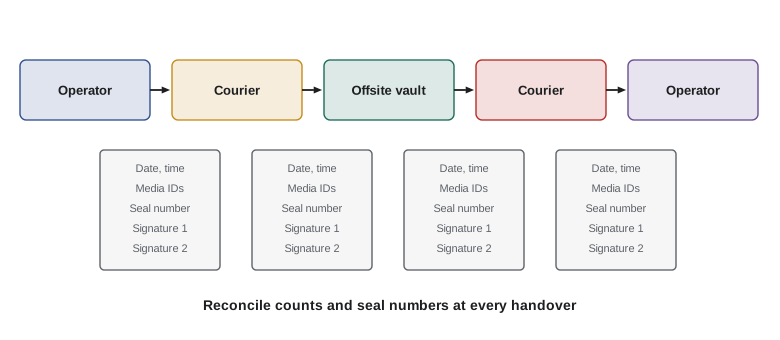
Removable media such as USB drives, external disks, optical discs and backup tapes should be company-issued, encrypted and tracked. Many organizations block unapproved USB storage entirely through endpoint controls, allowing only encrypted, registered devices. Backup tapes and drives sent offsite need tamper-evident packaging, bonded couriers or trusted staff, chain-of-custody records showing every handover, and reconciliation when they arrive and return. Media should be stored in environments that protect against heat, humidity and magnetic fields, especially tapes intended to last years.
Worked problem
Sizing an offsite tape rotation
A company keeps daily backup tapes for 2 weeks, weekly tapes for 3 months and monthly tapes for 12 months, all offsite. Each backup set uses 3 tapes. How many tapes are offsite at any time once the rotation is full, assuming 5 working days a week, about 13 weeks in 3 months, and that monthly sets replace the weekly set in their week?
Show solution
- Daily sets: 2 weeks × 5 days = 10 sets, minus the 2 days replaced by weekly sets, giving about 8 sets.
- Weekly sets: 13 weeks, minus the 3 weeks replaced by monthly sets in that period, giving about 10 sets.
- Monthly sets: 12 sets.
- Total sets: 8 + 10 + 12 = 30 sets; tapes: 30 × 3 = 90 tapes.
Answer: About 90 tapes are offsite at once. Each needs tracking, chain of custody and, at end of life, secure destruction; the count shows why tape management needs a system rather than memory.
Clean desk, clear screen and the open office
A clean desk policy requires sensitive documents and media to be locked away when a desk is unattended, especially overnight. A clear screen policy requires screens to lock automatically after a short idle period and staff to lock them manually when they step away. Both policies address the casual exposure that happens in shared offices, hot-desking areas and home offices: a visitor reading a document on a desk, a cleaner photographing a whiteboard, a family member glancing at a screen. Privacy screens help in public places such as trains and airports, and whiteboards should be wiped after meetings.
Remote and hybrid work changes the picture. Home offices are rarely as controlled as company premises, so handling rules should address printing at home (often prohibited for confidential and above), shredding, video calls where screens may be shared accidentally, smart speakers that may record conversations, and family members using company devices. The simplest effective control is to keep sensitive information in company systems accessed through managed devices or virtual desktops, so that little sensitive data lands on the home device at all.
Sharing outside the organization
Information often has to leave the organization: to customers, suppliers, auditors, regulators, lawyers and courts. Handling rules should state who can approve external sharing at each level, what agreement must be in place, such as a non-disclosure agreement or a data processing agreement, and what channel must be used. The receiving party should be told how to handle the information, ideally through markings they recognize and contract terms that map your levels to theirs. For personal information, privacy law may restrict sharing or require notice to individuals; lesson 10 covers this.
Information-sharing communities, such as industry information sharing and analysis centers, use agreed markings such as the Traffic Light Protocol introduced in lesson 2. Legal and regulatory disclosures have their own rules: a subpoena or production order should go to legal counsel before any data is released, and data shared under legal privilege must be marked and handled to preserve that privilege.
Handling during travel and at borders
Travel creates particular risks. Devices can be lost, stolen or inspected. Some organizations issue clean loaner laptops and phones for high-risk destinations, with only the data needed for the trip, and wipe them on return. Staff should know that border agencies in many countries, including Canada and the United States, can inspect electronic devices at the border, so carrying large volumes of sensitive or privileged data across borders should be avoided where cloud access is a practical alternative. Full-disk encryption protects lost devices but does not prevent lawful inspection.
Worked problem
A handling decision
A project manager needs to send a confidential draft contract to an external law firm today. The firm has signed a non-disclosure agreement, and the handling matrix says confidential information may go outside only encrypted and with owner approval. The owner is traveling but reachable by phone. What should the manager do?
Show solution
- Confirm the classification: confidential, per the document label.
- Get owner approval: call the owner and record the approval in the ticket or email trail.
- Choose an approved encrypted channel: the company's secure file-sharing portal with recipient authentication, not a personal email account.
- Verify the recipient address and send; log the transfer.
Answer: Obtain and record the owner's approval, then send through the approved encrypted portal to verified recipients. Urgency does not justify bypassing the handling rules.
Making handling rules stick
Handling rules fail when they are hard to follow. The most effective programs embed the rules in tools: sensitivity labels that automatically apply encryption and restrict forwarding, data loss prevention that warns before a confidential attachment goes to an external address, endpoint controls that block unapproved USB storage, secure printing by default, and managed file sharing that is easier to use than the consumer alternatives. Training then focuses on judgment rather than memorizing rules, with short scenarios that match people's actual work. Measurement closes the loop: track policy exceptions, data loss prevention alerts, lost devices and misdirected emails, and use the trends to adjust both rules and tools.
Thinking like a manager
Exam questions on handling usually test whether you apply rules consistently and choose controls that fit the classification. Urgency, seniority and convenience are not reasons to bypass handling rules; the right answer usually involves getting the owner's approval and using an approved secure channel. When a scenario describes repeated handling failures, look for answers that improve the process and tools, such as labels and data loss prevention, rather than only disciplining individuals. And remember that handling covers the whole life cycle, including copies, printouts, backups and disposal.
Common mistakes
MistakeWriting handling rules only for storage and email.
InsteadCover printing, collaboration tools, media, travel, external sharing and disposal.
MistakeLetting urgency justify sending confidential data through personal accounts.
InsteadGet owner approval and use an approved encrypted channel.
MistakeUsing production data freely in test environments.
InsteadUse masked or synthetic data, or apply production-level controls.
MistakeSending backup tapes offsite without chain-of-custody records.
InsteadRecord every handover with media identifiers, seals and signatures, and reconcile counts.
MistakeRelying on training alone to enforce handling.
InsteadEmbed rules in tools such as labels, data loss prevention and endpoint controls.
Summary and key terms
- Handling requirements translate classification into practical rules for each activity across the life cycle.
- A short, plain-language handling matrix backed by technical controls works better than a long standard.
- Store sensitive information only in approved, managed systems, and control copies, extracts and test data.
- Encrypt sensitive information in transit and use controls against misdirection.
- Track removable media and backup tapes with encryption, chain of custody and reconciliation.
- Clean desk, clear screen and remote-work rules address casual exposure.
- External sharing needs approval, agreements, secure channels and markings the recipient understands.
- Handling requirements
- Rules for marking, storing, transmitting, sharing and disposing of information at each level.
- Handling matrix
- A table of classification levels against handling activities with a rule in each cell.
- Secure print release
- Holding print jobs until the user authenticates at the printer.
- Chain of custody
- A record of every person who handled an item, when and why.
- Clean desk policy
- Requiring sensitive material to be secured when a workspace is unattended.
- Clear screen policy
- Requiring screens to lock when unattended.
- Misdirection
- Sending information to the wrong recipient.
- Managed file transfer
- A controlled, logged system for transferring files securely.
- Tamper-evident packaging
- Packaging that shows visible signs if opened.
- Loaner device
- A clean device issued for high-risk travel and wiped on return.
Practice problems
Work each problem on paper first, then reveal the answer to check.
What two axes make up a handling matrix?
Show answer
Classification levels and handling activities.
Why are test environments a common handling weakness?
Show answer
Copies of production data land there with weaker controls.
Name two controls against email misdirection.
Show answer
External recipient warnings, delay send, data loss prevention prompts or secure portals.
What should a chain-of-custody record include?
Show answer
Media identifiers, seal numbers, date, time and signatures at each handover.
What does secure print release prevent?
Show answer
Sensitive printouts sitting unattended at the printer.
What is the simplest control for sensitive data in home offices?
Show answer
Keep it in company systems accessed through managed devices or virtual desktops.
Who should see a subpoena before any data is released?
Show answer
Legal counsel.
Does full-disk encryption prevent lawful border inspection?
Show answer
No; it protects lost devices but not against lawful demands.
Why embed handling rules in tools?
Show answer
So the easy way is also the compliant way, reducing reliance on memory.
What metrics help improve handling rules?
Show answer
Exceptions, data loss prevention alerts, lost devices and misdirected emails.
Lesson quiz · 5 questions
Score 60% or more to complete this lesson.
Create a free account to save your progress, take quizzes and earn a certificate.