
CINE-410 · Lesson 4 of 12 · 30 min
Data, workflow and post-production for large format
Large-format and very high-resolution capture creates very large amounts of data. A camera recording 6.5K or 17K raw images can fill drives faster than a crew can copy them, overwhelm a laptop-based dailies system and push storage and render times in post far beyond a standard budget. On film, the equivalent pressure falls on magazines, the laboratory and scanning. This lesson shows how to estimate data rates and storage, plan a robust on-set data workflow, choose proxies and dailies strategies, and work with post-production so the large-format image survives intact to the final master.
Where the data comes from
The amount of data a camera records depends on four things: the number of photosites recorded, the bit depth, the frame rate and the compression ratio. Raw formats store the sensor data before debayering, so a useful first estimate treats each photosite as one sample.
Here W and H are the recorded width and height in photosites, b is the bit depth and C is the compression ratio (1 for uncompressed). Manufacturers publish exact data rates for each mode, which include headers and metadata and may differ from the estimate. Always use the manufacturer's figures for the final plan.
Worked problem
Estimating a 6.5K raw data rate
A 65 mm camera records 6560 × 3100 photosites at 12 bits per sample, uncompressed raw, at 24 fps. Estimate the data rate and the storage needed per hour of recording.
Show solution
- Bytes per frame: 6560 × 3100 × 12 ÷ 8 = 30,504,000 bytes ≈ 30.5 MB.
- Data rate: 30.5 MB × 24 ≈ 732 MB/s.
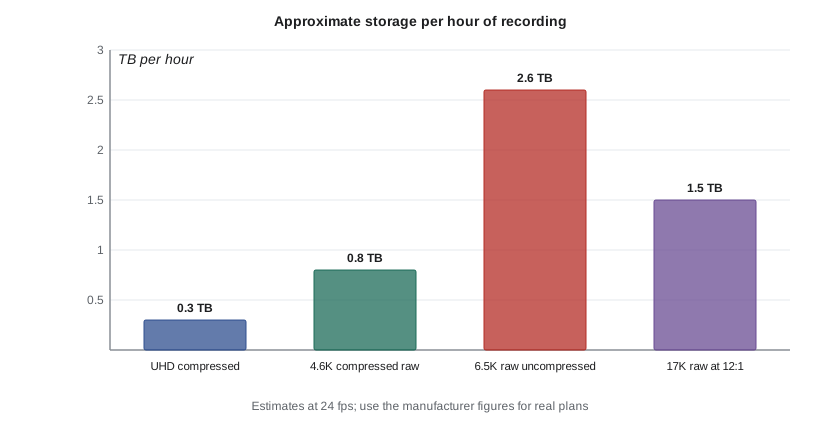
- Per hour: 732 MB/s × 3,600 s ≈ 2,635,000 MB ≈ 2.6 TB.
Answer: About 730 MB/s, or roughly 2.6 TB per hour of recording, before any compression. A manufacturer's compressed raw option could reduce this significantly, at the cost of some processing.
Worked problem
A 17K camera with compressed raw
A 17K 65 mm camera records about 17,520 × 8,040 photosites at 12 bits. If the production chooses a compressed raw setting with a ratio of 12:1, estimate the data rate at 24 fps.
Show solution
- Uncompressed bytes per frame: 17,520 × 8,040 × 12 ÷ 8 ≈ 211 MB.
- With 12:1 compression: 211 ÷ 12 ≈ 17.6 MB per frame.
- Data rate: 17.6 × 24 ≈ 422 MB/s, or about 1.5 TB per hour.
Answer: About 420 MB/s, roughly 1.5 TB per hour. Compression makes very high resolutions practical, but the choice of ratio should be tested for the scene content, since fine detail and noise compress less well.
Shooting ratio and daily storage
Recording hours are not the same as screen time. Coverage, takes and rehearsals mean a production records many times the length of the finished film. Course CINE-320 introduced the shooting ratio; large-format work uses the same idea to size storage.
Worked problem
Sizing storage for a shoot day
A large-format day is expected to record 2.5 hours of material at about 2.6 TB per hour. The production keeps three copies on set (two on separate shuttle drives and one on a RAID), as required by its insurer. How much new storage is needed for the day, and how long does one copy take at a sustained transfer speed of 1.2 GB/s?
Show solution
- One copy: 2.5 × 2.6 = 6.5 TB.
- Three copies: 3 × 6.5 = 19.5 TB of new storage for the day.
- Transfer time for one copy: 6.5 TB = 6,500 GB; 6,500 ÷ 1.2 ≈ 5,417 s ≈ 1.5 hours.
- If copies run in parallel from the camera media, total time stays about 1.5 hours; if they run one after another, it triples to about 4.5 hours.
Answer: About 19.5 TB of storage per day and at least 1.5 hours of transfer per copy. The data team must start copying during the day, use parallel copies and plan enough camera media to keep shooting while offloads run.
The on-set data workflow
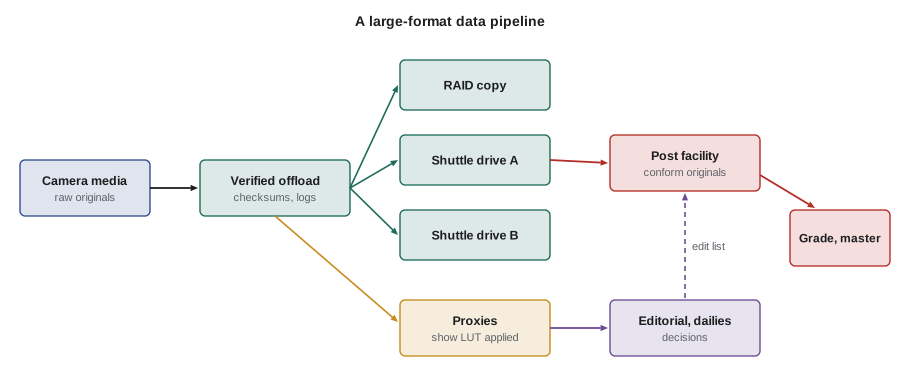
A large-format data workflow follows the same principles as any professional workflow, but every step is bigger and slower.
- Capture: camera media sized so each card or magazine holds enough material for a sensible part of the day, with spares so the camera never waits for an offload.
- Offload with verification: copy software that writes checksums (such as xxHash or MD5) and verifies every copy against the source.
- Redundancy: at least two verified copies on separate media before camera media is cleared; many insurers and studios require three.
- Logging: clip names, scene and take, lens, stop, frame rate, filters and notes linked to the files, ideally captured automatically from the camera metadata.
- Transcoding: proxies or dailies in lighter codecs for review and editing, with the show LUT applied.
- Shipping: shuttle drives to post on a schedule, tracked and logged, with copies kept on set until post confirms receipt and verification.
- Clearing media: only after the agreed number of verified copies exists and post has confirmed, following a written procedure that everyone understands.
Proxies, dailies and review
Editors and producers cannot work with 17K raw files on ordinary computers. The usual solution is to edit with proxies and return to the camera originals only for finishing.
- Proxy codecs: compressed intermediate codecs at HD or UHD resolution with the show LUT, small enough to stream or edit on laptops.
- Dailies: graded or LUT-applied versions for the director, producers and studio, often streamed securely.
- Large-format review: some productions review key shots at full resolution on a calibrated large screen or in a theater, because problems in focus or detail that look fine on a laptop can be obvious on a premium screen.
- Metadata integrity: proxies must carry the same clip names and timecode as the originals so the conform works later.
A simple rule protects everyone: proxies are for decisions, originals are for the final image.
Film workflows for 65 mm and 15/70
On film, the workflow runs through the camera loader, the laboratory and the scanner.
- Loading and logging: magazines loaded in a darkroom or changing bag, labeled with roll numbers, and camera reports completed for every roll.
- Processing: negative developed at a laboratory equipped for 65 mm, which may be in another city or country, so shipping time and risk must be planned.
- Scanning: negative scanned at high resolution, often 8K or higher for 15/70, to create digital files for editing and finishing.
- Dailies: usually digital, made from scans or telecine; some productions also make film prints for critical review.
- Archiving: the original negative is a long-term archival asset and must be stored correctly.
Film productions also need clear "hold" and "release" procedures for exposed negative, the same way digital productions treat camera media.
Post-production for large format
Large format affects the whole post pipeline.
- Storage: online and nearline storage for many terabytes, with backups and possibly cloud archiving.
- Conform and grading: high-resolution timelines need powerful workstations; many facilities grade at a working resolution and render the final master at full resolution.
- Visual effects: plates at very high resolution increase render times and costs, so VFX budgets should be based on the actual delivery resolution.
- Mastering: separate masters may be needed for IMAX, standard cinema, HDR streaming and SDR television, each with its own aspect ratio and color volume.
- Archiving: camera originals, project files and masters stored for the long term, often on LTO tape or in cloud archives.
Worked problem
How much does extra resolution cost in visual effects rendering?
A visual effects vendor estimates that a shot takes 6 hours of render time per frame at 4K (4096 × 2160). Render time scales roughly with the number of pixels. Estimate the render time per frame at 6.5K (6560 × 3100).
Show solution
- Pixels at 4K: 4096 × 2160 ≈ 8.85 million.
- Pixels at 6.5K: 6560 × 3100 ≈ 20.3 million.
- Ratio: 20.3 ÷ 8.85 ≈ 2.3.
- Estimated render time: 6 × 2.3 ≈ 13.8 hours per frame.
Answer: Roughly 14 hours per frame, about 2.3 times the 4K figure. Many productions finish VFX at a lower working resolution and upscale carefully, or agree a delivery resolution early to control this cost.
Security and continuity of the data team
High-value footage needs physical and digital security, especially on large studio productions.
- Encryption of shuttle drives and secure transfer for cloud uploads.
- Access control on set and at the data station.
- Clear chain-of-custody logs for every drive.
- Backup power for the data station, so offloads are not interrupted.
- A trained backup data wrangler, so a single illness does not stop the pipeline.
Planning with post from day one
The DP, DIT, post supervisor and colorist should agree on the large-format workflow in prep, ideally after a test shoot that runs footage all the way through the pipeline to a projected result.
- Confirm the recording format, resolution, frame rate and compression for each scene.
- Confirm how many copies, on which media, and when media can be cleared.
- Confirm proxy specifications and the dailies schedule.
- Confirm the color pipeline: show LUT, color management, HDR and SDR targets.
- Confirm storage, VFX resolution and mastering requirements, including IMAX or PLF deliverables.
Lessons from data failures
Most lost footage is lost through simple process errors, not exotic technical failures. Common causes include formatting a card that had not been fully copied, copying to a drive that later failed with no second copy, mislabeling shuttle drives so the wrong drive was wiped, and running out of camera media so that someone clears a card "just this once" to keep shooting. Large-format productions face the same risks with higher stakes, because each card holds more expensive material. Clear labels, written procedures, enough media and a data team with the authority to say "not yet" prevent almost all of these losses.
Common mistakes
MistakeEstimating storage from screen time instead of recorded time
InsteadBase storage on expected recording hours per day, including takes and coverage, and use the manufacturer's data rates
MistakeClearing camera media after one copy
InsteadClear media only after the agreed number of verified copies exists and post has confirmed receipt
MistakeEditing directly from camera originals on laptops
InsteadEdit with proxies that carry matching clip names and timecode, and conform to originals for finishing
MistakeIgnoring transfer time when planning camera media
InsteadCalculate offload time and carry enough media so the camera never waits for copies
MistakeBudgeting visual effects at 4K for a 6.5K delivery
InsteadAgree the delivery resolution early and budget render time and storage for it
Summary and key terms
- Data per frame depends on recorded photosites, bit depth and compression; data rate multiplies by frame rate.
- Uncompressed 6.5K raw at 24 fps is roughly 730 MB/s, about 2.6 TB per hour; compressed raw reduces this substantially.
- Storage per day equals recording hours times data per hour times the number of copies required.
- Large-format workflows need verified offloads, redundancy, logging, proxies, tracked shipping and written clearing rules.
- Film workflows run through loaders, laboratories and scanners, with careful handling of irreplaceable negative.
- Higher resolution raises post costs for storage, grading, visual effects rendering and mastering.
- A test shoot through the whole pipeline lets the DP, DIT and post team confirm the workflow before production.
- Raw
- Image data recorded close to the sensor's original values, before debayering and most processing
- Bit depth
- The number of bits used to record each sample, which sets how many levels can be stored
- Compression ratio
- How much smaller compressed data is than uncompressed data
- Checksum
- A calculated value used to verify that a copy matches the source exactly
- Shuttle drive
- A portable drive used to move copies of footage from set to post
- Proxy
- A lightweight copy of footage used for editing and review
- Conform
- Rebuilding the edited sequence using the original camera files for finishing
- Debayering
- Converting raw sensor data from a color filter array into full RGB images
- LTO
- Linear Tape-Open, a magnetic tape format widely used for long-term archiving
- Chain of custody
- A record of who handled each drive or roll, when and where
Practice problems
Work each problem on paper first, then reveal the answer to check.
Estimate bytes per frame for 4096 × 2160 photosites at 12 bits, uncompressed.
Show answer
4096 × 2160 × 12 ÷ 8 ≈ 13.3 MB
At 13.3 MB per frame and 24 fps, what is the data rate?
Show answer
About 319 MB/s
A day records 3 hours at 1.5 TB per hour with three copies. How much storage is needed?
Show answer
3 × 1.5 × 3 = 13.5 TB
How long does copying 4 TB take at 1 GB/s?
Show answer
4,000 s, about 67 minutes
Why should proxies carry the same clip names and timecode as the originals?
Show answer
So the edit can be conformed to the camera originals later
Name two things recorded in a camera report or clip log.
Show answer
Any two of roll or clip name, scene and take, lens, stop, frame rate, filters and notes
If render time scales with pixel count, how much longer does an 8K frame (8192 × 4320) take than a 4K frame (4096 × 2160)?
Show answer
Four times as long, because it has four times the pixels
Why might a production review key large-format shots on a big screen?
Show answer
Focus or detail problems invisible on a laptop can be obvious on a premium screen
What is the purpose of a written media-clearing procedure?
Show answer
To make sure camera media is only reused after the required verified copies exist and post has confirmed them
Why does a film workflow need shipping plans?
Show answer
The 65 mm laboratory may be far away, so negative must travel safely and on time
Lesson quiz · 5 questions
Score 60% or more to complete this lesson.
Create a free account to save your progress, take quizzes and earn a certificate.