
CINE-302 · Lesson 3 of 12 · 25 min
Previs, techvis, stuntvis and postvis
Complex sequences are expensive to shoot and even more expensive to get wrong. Visualization tools let filmmakers design, test and communicate shots before committing crews, sets and budgets. Previsualization (previs) turns a sequence into a rough animated film; technical visualization (techvis) converts it into precise measurements for camera, cranes and sets; stuntvis plans action with real performers; virtual scouting lets the team explore digital locations; and postvis replaces green screens with rough composites in the edit. CINE-301 introduced previs as one planning tool among shot lists, storyboards and floor plans; this lesson goes deeper into the visualization pipeline as it serves visual effects, and the cinematographer's role in each stage.
Why visualize
Visualization answers questions that are hard to resolve on paper. Does the action read clearly? How long is the sequence? Which shots need visual effects, and of what kind? What lenses, camera heights and moves will tell the story? How large must the green screen or LED volume be? Where will the crane go, and how fast must it move? Can the stunt be performed safely? Visualization makes these questions concrete and visible to everyone: the director, producers, studio, cinematographer, production designer, stunt coordinator, VFX supervisor and vendors. It reduces surprises on set, focuses the budget on what will appear on screen, and gives the editor and composer something to work with before final effects exist. It can also become a trap: sequences that are previsualized in exhaustive detail may feel mechanical when shot, and directors and cinematographers sometimes deliberately leave room for discovery on the day.
Pitchvis and previs
Pitchvis is a short visualization made to sell an idea, often to a studio or investor, showing the tone and spectacle of a project. Previs proper is made once a project is moving forward. Previs artists, working in real-time engines such as Unreal Engine or in animation software, build simple versions of sets, characters, vehicles and props, then animate the action and place virtual cameras with lenses, heights and movement that match real equipment. The result is edited like a film, with temporary sound and music, and revised repeatedly with the director. Previs can be rough and stylized; its purpose is clarity, not beauty. Good previs uses realistic camera behavior: correct focal lengths and sensor sizes, achievable speeds, and plausible camera positions, so that the shots can actually be photographed.
The cinematographer's role in previs
A cinematographer should be involved in previs as early as possible, because shots designed without photographic knowledge can be impossible or unattractive to film. Contributions include:
- Setting the virtual camera to the production format and sensor size, so that focal lengths and depth of field match reality.
- Choosing lenses and camera heights that suit the visual language of the film (CINE-301).
- Checking that moves are achievable with real equipment at real speeds.
- Considering light: where the sun or key light will be, and whether the previs implies a time of day.
- Identifying which shots can be done practically and which need visual effects.
- Flagging shots that would be expensive to light, such as wide shots of night exteriors that would need extensive rigging.
Some cinematographers work directly in virtual cameras during previs sessions, operating a tracked physical device or handheld controller in a motion capture volume, so that camera moves have human feel.
Techvis
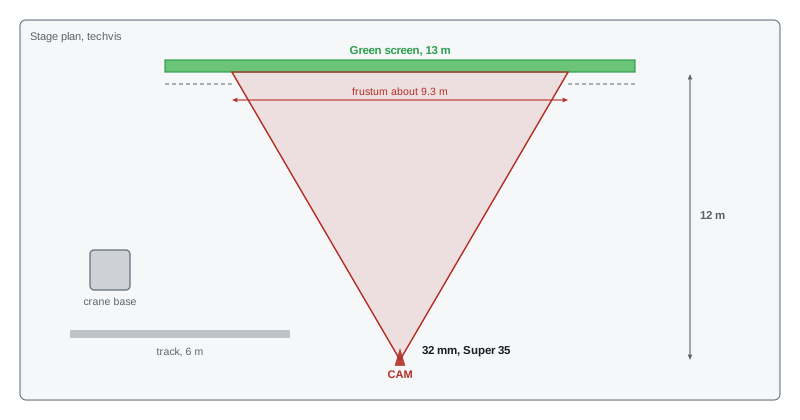
Techvis translates previs into technical information for production. For each shot, techvis reports the lens focal length, camera position and height, distances to subjects, crane or dolly positions and arm lengths, camera speeds, field-of-view coverage on set pieces, and how much of the set or screen is visible. Techvis diagrams show plans and elevations with the camera's frustum, the pyramid of space the lens sees, drawn over the set or stage. They answer questions such as: How high and wide must the blue screen be to cover this angle? Does a 50-foot Technocrane reach this position? How fast must the car travel for this shot to last four seconds? Techvis helps the grip, art, construction and VFX departments plan precisely.
Here \(W\) is the width covered at distance \(d\), \(\theta_h\) the horizontal field of view, \(w_s\) the sensor width and \(f\) the focal length.
Worked problem
How big must the screen be?
Previs shows an actor in a medium shot against a sky, filmed with a 32 mm lens on a Super 35 camera (active sensor width about 24.9 mm). The green screen will be 12 m behind the camera. How wide must the screen be to fill the frame, with 20 % extra on each side for movement?
Show solution
- Coverage width: \(W = d \cdot w_s / f = 12 \times 24.9 / 32 \approx 9.3\) m.
- Add 20 % on each side: 9.3 × 1.4 ≈ 13.1 m.
- The screen should be about 13 m wide, or the camera height and framing adjusted to need less.
Answer: About 13 m wide; techvis makes this visible before the stage is booked and the screen is rigged.
Stuntvis
Stuntvis, or action design previs, is made by stunt coordinators and second unit directors, often by filming real stunt performers rehearsing fights, falls and vehicle action with small cameras, then editing the footage into a sequence. Stuntvis captures the physical reality of what performers can do safely, and reveals timing, camera positions and coverage that will sell the action. It is often combined with digital previs for elements that cannot be rehearsed, such as large explosions or creatures. Cinematographers watch stuntvis closely, because the camera positions used in rehearsal often influence the final shots, and safe distances and protective measures for cameras and crew must be planned.
Virtual scouting
Virtual scouting lets the director, cinematographer and production designer explore a digital version of a set or location in a real-time engine, often with virtual reality headsets or tablets used as virtual cameras. The team can walk through a set before it is built, test camera positions and lenses, move walls, adjust the sun, and agree on what must be built physically and what can be extended digitally. Virtual scouting is central to LED volume work, where the digital environment shown on the wall must be finished before the shoot (Lessons 10 and 11), but it is also used for traditional sets and locations scanned with LiDAR or photogrammetry (Lesson 7). Cinematographers can use virtual scouts to plan lighting, identify where large sources or rigging must go, and estimate the time of day and weather that the environment implies.
Postvis
Postvis happens after the shoot. Artists create quick composites by replacing green screens with rough backgrounds and adding simple CG characters or effects to the photographed plates, so that the editor and director can judge timing, performance and story while final VFX are being made. Postvis is essential for test screenings, for keeping the edit moving and for communicating with VFX vendors about what the director wants. For cinematographers, postvis is a chance to see how plates combine with backgrounds and to raise concerns about lighting continuity early, while there is still time to adjust the final work.
Real-time engines and virtual production
Real-time game engines, especially Unreal Engine, have become central to visualization. They render high-quality images instantly, allowing directors and cinematographers to adjust lighting, lenses and camera moves interactively. The same digital assets built for previs can be refined for virtual scouting, LED volume content and sometimes final VFX, creating a continuous pipeline from planning to final pixels. This continuity has blurred the line between visualization and production, giving rise to the broad term virtual production, which covers previs, virtual scouting, performance capture, simulcam (in which a live composite of the plate and CG is shown on set) and in-camera VFX. Cinematographers increasingly need some fluency with these tools, at least enough to communicate with virtual production teams in their language.
| Stage | Made by | Main purpose |
|---|---|---|
| Pitchvis | Previs studio | Sell an idea or tone |
| Previs | Previs team with director | Design and time a sequence |
| Techvis | Previs and technical teams | Measurements for cameras, cranes, sets and screens |
| Stuntvis | Stunt team | Plan safe, effective action |
| Virtual scouting | Virtual art department | Explore and adjust digital sets and locations |
| Simulcam | Virtual production team | Live composite on set for framing |
| Postvis | Postvis artists | Temporary composites for the edit |
Using previs well
Previs is a tool, not a contract. The best results come when the team treats it as a starting point, preserving the intent of each shot while adapting to the realities of the set, actors and light. Practical habits include keeping previs camera data in real units, labeling shots with the same IDs as the VFX breakdown, noting assumptions such as lens and height on each shot, updating previs when key decisions change, and comparing previs to dailies to see where the photography improved on the plan or departed from it in ways that affect VFX. When shooting departs significantly from previs, the VFX supervisor should be told, because bids and assets may be based on the previs.
Lens choices in previs
Previs is only useful to the cinematographer if the virtual lenses and sensor match the real ones. Most previs software lets the artist enter the sensor dimensions and focal length, and the result should be checked against a known reference, for example by framing a virtual object of known size at a known distance and confirming the image height matches the field-of-view equation. Mismatched sensor settings are one of the most common errors in previs: a sequence designed on a default full-frame sensor will look tighter when shot on Super 35 with the same focal lengths, and every camera position may have to change on the day. Cinematographers should supply the previs team with the camera and lens package early, including anamorphic squeeze factors where relevant, and ask for lens and distance data to be printed on each frame of the previs so that it can be used as a shooting plan.
Techvis deliverables
Typical techvis deliverables include overhead plans showing camera positions, travel distances and speeds; camera height and tilt for each setup; crane or dolly track lengths; the size of green screen or LED wall needed to fill the frame; the position of the sun at the planned shooting time; and the frame rate and shutter for high-speed or motion control shots. For a car chase, techvis might give the camera car speed, the distance to the picture car and the focal length needed to hold a two-shot through the windshield. For a stunt fall, it might give the height, the rig position and the number of frames the fall takes at 24 or 48 fps. These numbers turn creative ideas into equipment orders and safety plans.
How much previs is enough?
Previs costs money and time, so productions decide which sequences benefit most. Sequences with heavy VFX, stunts, complex camera moves or expensive locations usually earn their previs cost many times over by preventing mistakes on the day. Dialogue scenes, simple inserts and scenes with flexible blocking rarely need it. A common compromise is rough previs for the whole effects load to support bidding and scheduling, with detailed previs and techvis reserved for the most complex shots. The cinematographer's role is to make sure previs remains achievable: a virtual camera can fly anywhere at any speed, but a real crane, drone or camera car cannot.
Postvis is also a practical tool for the cinematographer. Watching rough composites cut into the edit shows whether the photographed plates support the intended effect, whether framing leaves room for the digital elements, and whether pickups are needed while the crew and locations are still available.
A short previs pass for a single complex shot can take a day or two, while a full sequence may take weeks, so request it early.
Common mistakes
MistakePrevis cameras with unrealistic lenses or speeds.
InsteadUse real sensor sizes, focal lengths and achievable moves.
MistakeJoining previs after shots are locked.
InsteadInvolve the cinematographer early.
MistakeTreating previs as a rigid contract.
InsteadKeep intent and adapt to the set.
MistakeIgnoring techvis screen and set sizes.
InsteadUse frustum calculations to plan coverage.
MistakeDeparting from previs without telling VFX.
InsteadReport changes that affect bids and assets.
Summary and key terms
- Visualization reduces surprises and focuses budgets.
- Previs designs and times sequences with realistic virtual cameras.
- Cinematographers should shape previs lenses, heights, moves and light.
- Techvis gives measurements for cameras, cranes, screens and sets.
- Stuntvis plans action with real performers; virtual scouting explores digital sets.
- Postvis provides temporary composites for the edit.
- Real-time engines link visualization to virtual production and final images.
- Previs
- Rough animated visualization of a sequence.
- Pitchvis
- Visualization made to sell an idea.
- Techvis
- Technical measurements derived from previs.
- Stuntvis
- Action previs made with stunt performers.
- Virtual scouting
- Exploring digital sets in a real-time engine.
- Postvis
- Temporary composites made after the shoot.
- Frustum
- The pyramid of space seen by a lens.
- Simulcam
- Live composite of plate and CG on set.
- Real-time engine
- Software that renders interactive images instantly.
- Virtual production
- Umbrella term for real-time tools in filmmaking.
Practice problems
Work each problem on paper first, then reveal the answer to check.
Name three questions previs answers.
Show answer
Clarity, length, VFX needs, lenses, screen size, crane position, safety.
Why must previs use real sensor sizes?
Show answer
So focal lengths and depth of field match reality.
What does techvis report?
Show answer
Lens, position, height, distances, speeds, coverage.
Width covered by a 50 mm lens on a 24.9 mm sensor at 10 m?
Show answer
About 5 m.
Who makes stuntvis?
Show answer
Stunt coordinators and second unit teams.
Name two uses of virtual scouting.
Show answer
Test camera positions, adjust sets, plan lighting, decide what to build.
What is postvis for?
Show answer
Temporary composites for editing and screenings.
What is simulcam?
Show answer
A live composite of plate and CG on set.
Name a risk of over-detailed previs.
Show answer
Mechanical, lifeless photography.
Why tell VFX about departures from previs?
Show answer
Bids and assets may be based on it.
Lesson quiz · 5 questions
Score 60% or more to complete this lesson.
Create a free account to save your progress, take quizzes and earn a certificate.