
CINE-202 · Lesson 11 of 12 · 25 min
HDR and SDR mastering and delivery
High dynamic range has transformed how audiences see images at home. HDR televisions, monitors, tablets and phones can display highlights several times brighter than standard displays, with deeper blacks and wider color, bringing the image closer to the range the camera captured. Streaming services and many broadcasters now deliver HDR versions of films and series, alongside SDR versions for older displays. For cinematographers, HDR changes how scenes are lit and exposed, how highlights and practical lights are handled, and how the image is monitored on set. This lesson covers what HDR is, the PQ and HLG transfer functions, nits and mastering levels, HDR formats including HDR10, HDR10+ and Dolby Vision, mastering displays, creating SDR versions with trims, delivery specifications, and how HDR affects choices on set.
What HDR means
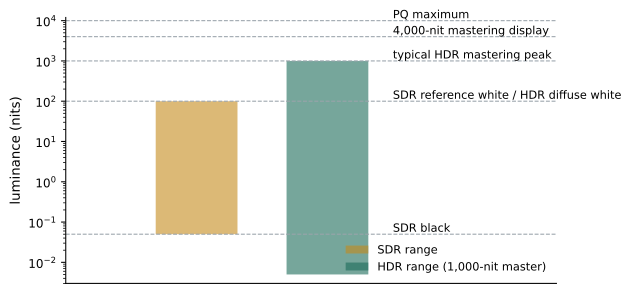
In SDR, reference white is about 100 nits, and the display's full range typically spans from very dark black to that white, with highlights compressed beneath it. In HDR, diffuse white, such as a white shirt or paper, is usually placed at about 100 to 200 nits, similar to SDR, while specular highlights, light sources, reflections and bright skies can reach far higher, up to 1,000 nits or more on mastering displays and many consumer screens. Black levels can be much deeper, especially on OLED displays. The result is not simply a brighter picture: most of the image sits at similar levels to SDR, but highlights have more room, contrast is greater, and colors in bright areas are more saturated because HDR is combined with a wider gamut, usually P3 within a Rec.2020 container. HDR images can feel more realistic, with sparkling highlights, luminous skies and convincing light sources, but can also be harsh or uncomfortable if highlights are pushed too far.
PQ and HLG
HDR uses new transfer functions, standardized in ITU-R BT.2100:
- PQ (Perceptual Quantizer, SMPTE ST 2084), developed by Dolby, encodes absolute luminance: each code value corresponds to a specific number of nits, up to 10,000. The curve is based on human contrast sensitivity, allocating code values efficiently across the range, so that 10-bit or 12-bit PQ shows no visible banding. Because it is absolute, PQ content is mastered to a specific peak, such as 1,000 nits, and displays with less capability must tone map it down, using metadata to do so gracefully. PQ is used for HDR10, HDR10+ and Dolby Vision, and is the standard for streaming and cinema HDR.
- HLG (Hybrid Log-Gamma), developed by the BBC and NHK, encodes relative luminance: the lower part of the curve resembles a conventional gamma curve, and the upper part is logarithmic. HLG signals look reasonable on SDR displays without metadata, and HDR displays render them relative to their own peak brightness. This backward compatibility makes HLG suitable for live broadcast, where a single signal must serve both HDR and SDR viewers.
| Feature | PQ | HLG |
|---|---|---|
| Encoding | Absolute luminance (nits) | Relative to display peak |
| Maximum | 10,000 nits | Display-dependent |
| Metadata | Static or dynamic metadata used | No metadata required |
| SDR compatibility | Needs a separate SDR version or tone mapping | Watchable on SDR displays |
| Typical use | Streaming, cinema HDR, packaged media | Live broadcast, sport |
HDR formats
HDR content is delivered in several formats built on PQ or HLG:
- HDR10: PQ, 10-bit, Rec.2020 container, with static metadata describing the mastering display (SMPTE ST 2086) and the content's maximum and average light levels (MaxCLL and MaxFALL). It is an open, baseline format supported by virtually all HDR displays.
- HDR10+: adds dynamic metadata, describing scene-by-scene or frame-by-frame brightness, so that displays can tone map more accurately; it is royalty-free and promoted by Samsung and partners.
- Dolby Vision: a proprietary format from Dolby using PQ with 12-bit capability and dynamic metadata created during grading, including trim information for different display capabilities. It is widely required by streaming services for premium HDR content and is supported by many televisions and phones. The colorist generates Dolby Vision metadata with an analysis pass and adjusts trims for target displays.
- HLG: used for broadcast, sometimes with compatibility for SDR viewers.
Streaming services often require Dolby Vision masters, from which HDR10 and SDR versions can be derived, while broadcasters may require HLG or HDR10.
Mastering displays and environments
HDR grading requires professional mastering displays capable of the target peak brightness and gamut with accurate tracking of the PQ curve, such as reference monitors from Sony, Flanders Scientific, Canon and others capable of 1,000 nits or more, and in some cases displays reaching 2,000 to 4,000 nits. Streaming service specifications typically require mastering on a display capable of at least 1,000 nits with P3 gamut coverage, at D65, in a controlled environment. Grading suites must have controlled, dim ambient light and neutral surroundings. Consumer televisions, which apply their own tone mapping and picture modes, are useful for checking how content will appear at home, but not for mastering.
Creating SDR versions
Most HDR productions also deliver SDR versions for older televisions, broadcast and many online platforms. There are two main approaches. In an HDR-first workflow, the colorist grades the HDR master first and derives the SDR version through a tone-mapping output transform or Dolby Vision analysis, then makes trim adjustments to brightness, contrast and saturation for SDR. In an SDR-first workflow, the SDR grade is made first and the HDR version is extended from it, which can be faster for productions where SDR is the main deliverable but may limit the HDR's potential. Scene-referred pipelines (Lessons 9 and 10) make both approaches easier, since the same working-space grade can feed different output transforms. Comparing HDR and SDR versions side by side on calibrated monitors ensures that the creative intent survives in both.
Worked problem
Planning HDR and SDR deliverables
A streaming series must deliver a Dolby Vision HDR master and an SDR Rec.709 version. The colorist works in a scene-referred space. What steps should the grading pipeline include?
Show solution
- Grade the HDR master on a 1,000-nit P3-D65 PQ reference display.
- Run a Dolby Vision analysis to generate dynamic metadata for each shot.
- Review the derived 100-nit SDR version on a calibrated Rec.709 monitor, adjusting Dolby Vision trims for brightness, contrast and saturation where needed.
- Export the HDR master in the required format (for example, an IMF package or ProRes 4444 XQ with Dolby Vision metadata) and the SDR version, then quality-check both against the service's specifications.
Answer: Grade HDR at 1,000 nits, analyze for Dolby Vision, trim and approve the SDR version, then export both and check against specifications.
Delivery specifications
Each distributor publishes technical specifications for deliverables. They cover resolution, frame rate, codec and wrapper, such as IMF (Interoperable Master Format) packages or ProRes files; color space and transfer function; mastering display characteristics; HDR metadata; audio formats; captions; and quality control requirements, such as limits on noise, artifacts and light levels. Some services require cameras that meet minimum standards for original capture, and approve specific camera models and recording formats for their productions, with limits on the proportion of footage from non-approved cameras. Productions should obtain the specifications early and plan the pipeline backwards from them, testing deliverables before final mastering.
HDR on set
HDR affects choices during production. Highlights that would be compressed into near-white in SDR become visible and bright in HDR: practical lamps, windows, specular reflections, fire and car headlights may need to be controlled more carefully, since an unshaded bulb may become uncomfortably bright or reveal its filament. Detail in skies and windows becomes more visible, so exteriors seen through windows may need more attention. Noise and lighting imperfections in highlights and saturated colors can be more noticeable. Conversely, HDR rewards careful lighting with beautiful highlights, sparkle and depth. Cinematographers increasingly monitor HDR on set, with a calibrated HDR monitor at the DIT station or in video village, alongside the SDR view, to judge both. Exposure decisions should preserve highlight detail in the log or raw recording, since HDR shows more of it; strong highlight clipping that might be tolerable in SDR can look harsh in HDR.
Creative choices in HDR
HDR is a creative tool, not an obligation to make everything bright. Many filmmakers use HDR subtly, keeping most of the image at SDR-like levels and allowing only key highlights to rise, preserving a cinematic feel. Others use it boldly for spectacle in action, nature and animation. Viewer comfort matters: large areas of very bright HDR content, such as bright skies filling the frame or sudden cuts from dark to very bright scenes, can be tiring or startling, so colorists manage average light levels and transitions. Consistency between HDR and SDR versions, so that both tell the same story with the same mood, is a key goal. Discussing HDR intentions with the director, colorist and distributor in pre-production helps the cinematographer light for both.
Tone mapping on consumer displays
Consumer HDR televisions and phones vary widely in peak brightness, from a few hundred nits to over 2,000, and in black level and color gamut. When content mastered at 1,000 nits plays on a display that can reach only 600 nits, the display must tone map: compress the highlights to fit its capability while preserving as much of the creative intent as possible. HDR10 televisions use static metadata to guide this compression for the whole program, which can produce inconsistent results between bright and dark scenes; Dolby Vision and HDR10+ use dynamic metadata to tone map each scene or shot individually, generally producing more faithful results. Televisions also apply their own picture modes, motion processing and brightness adjustments, which can alter the image substantially; filmmaker modes, supported by many manufacturers, disable most of this processing to show content closer to the master.
Light levels and viewer comfort
Delivery specifications and good practice often set limits on HDR light levels. MaxCLL describes the brightest pixel in the program and MaxFALL the highest frame-average light level, and some services recommend keeping MaxFALL below a few hundred nits for comfortable viewing. Sudden changes from dark to very bright scenes can be uncomfortable in a darkened room, and large bright areas such as skies or white walls at high nit levels can be fatiguing. Colorists manage these levels, often keeping diffuse whites and skies lower than the display could show, and reserving the highest values for small specular highlights.
HDR in cinemas
Theatrical HDR is offered through systems such as Dolby Cinema, which uses laser projection with high contrast and peak brightness of about 108 nits (31.5 foot-lamberts), and through some premium large formats and LED cinema screens that reach higher brightness. Although these peaks are much lower than home HDR displays, the very dark blacks in a darkened theater give a large contrast range. Theatrical HDR masters are separate deliverables from home HDR masters, graded on appropriate projection systems or calibrated displays emulating them, with their own trims.
Archiving HDR and SDR masters
Productions usually archive both HDR and SDR masters, along with the scene-referred graded master and color metadata. Keeping the scene-referred version allows new display versions to be created as technology changes, while the display-referred masters preserve the approved looks for current formats. Clear documentation of mastering displays, peak luminance, metadata and trims accompanies each archived version.
Monitoring HDR on set in practice
A practical on-set HDR setup usually places a calibrated HDR reference monitor at the DIT station, receiving a PQ or HLG feed with the show look, alongside an SDR monitor showing the Rec.709 version. The cinematographer checks critical setups in both, paying particular attention to bright windows, practicals, skies and specular highlights. Video village often receives SDR only, since HDR monitors are expensive and viewing conditions on set are rarely controlled. Communicating clearly which version each monitor shows avoids confusion between departments.
Common mistakes
MistakeMaking HDR versions uniformly brighter.
InsteadKeep diffuse white similar and use the extra range for highlights.
MistakeMastering HDR on consumer televisions.
InsteadUse calibrated reference HDR displays.
MistakeIgnoring practicals and windows on set.
InsteadControl highlights that HDR will reveal.
MistakeDelivering without checking specifications.
InsteadPlan from distributor specifications.
MistakeNeglecting the SDR version.
InsteadReview and trim SDR on a calibrated monitor.
Summary and key terms
- HDR adds highlight range, deeper blacks and wider color.
- Diffuse white stays near 100–200 nits; highlights can reach 1,000 nits or more.
- PQ encodes absolute luminance; HLG is relative and broadcast-friendly.
- HDR10, HDR10+ and Dolby Vision use PQ with static or dynamic metadata.
- Mastering needs calibrated displays and controlled environments.
- SDR versions are derived with trims or graded separately.
- HDR affects lighting, highlights and monitoring on set.
- HDR
- High dynamic range imaging and display.
- Nit
- Candela per square meter.
- PQ
- Perceptual Quantizer absolute HDR transfer function.
- HLG
- Hybrid Log-Gamma relative HDR transfer function.
- BT.2100
- ITU recommendation defining PQ and HLG.
- HDR10
- PQ format with static metadata.
- Dolby Vision
- Proprietary HDR format with dynamic metadata.
- MaxCLL
- Maximum content light level metadata.
- Trim pass
- Adjustments for a target display version.
- IMF
- Interoperable Master Format for deliverables.
Practice problems
Work each problem on paper first, then reveal the answer to check.
Where is diffuse white typically placed in HDR?
Show answer
About 100–200 nits.
Maximum luminance in PQ?
Show answer
10,000 nits.
Who developed HLG?
Show answer
The BBC and NHK.
Why suit HLG to live broadcast?
Show answer
It is backward compatible with SDR without metadata.
What metadata does HDR10 use?
Show answer
Static metadata: ST 2086, MaxCLL and MaxFALL.
What does dynamic metadata allow?
Show answer
Scene-by-scene tone mapping.
Typical minimum mastering display peak for streaming HDR?
Show answer
1,000 nits.
What is an HDR-first workflow?
Show answer
Grade HDR first, derive SDR with trims.
Name two on-set concerns for HDR.
Show answer
Bright practicals, windows, specular highlights, noise.
What is IMF?
Show answer
A standard package format for master deliverables.
Lesson quiz · 5 questions
Score 60% or more to complete this lesson.
Create a free account to save your progress, take quizzes and earn a certificate.