
CINE-101 · Lesson 5 of 12 · 25 min
Coverage and continuity
Most scenes are recorded not as one continuous shot but as a series of shots from different positions, which the editor assembles into a sequence that feels continuous. For that illusion to work, the shots must be planned so that they cover all the action, and they must match: people must be in the same places, looking in consistent directions, holding the same props, doing the same things at the same moments. This lesson explains how scenes are covered, the rules of screen direction that keep the viewer oriented (above all the 180-degree rule), how to keep continuity across shots, and how to plan the order of setups so that coverage is efficient on set.
The master shot method
The classic way to cover a scene is the master shot method. First, a master shot records the whole scene from beginning to end in a wide or medium-wide framing that shows everyone and the geography of the space. Then the same action is repeated for closer shots: two-shots, over-the-shoulders, singles of each character, and inserts of important objects. The editor can then cut freely between angles at any moment, because every part of the scene exists in several sizes. A typical coverage list for a two-person dialogue scene is:
- Master (wide two-shot) of the whole scene.
- Over-the-shoulder (or medium single) on character A, and its reverse on character B.
- Close-up on A and close-up on B.
- Inserts: hands, props, a document being read.
- Cutaways: other things in the location, such as a clock, a window or a passer-by, which help bridge edits and compress time.
Not every scene needs full coverage. Experienced directors shoot only the angles the scene needs, sometimes playing a whole scene in a single, carefully staged moving shot (a oner). But for beginners, generous coverage is the safest way to give the editor options.
The 180-degree rule
In any scene, an imaginary line, the axis of action, runs between the two main characters (or along the direction of movement). The 180-degree rule says that all shots of the scene should be taken from the same side of that line. If the camera stays on one side, character A always looks right and character B always looks left, and the viewer understands that they are facing each other. If the camera crosses the line between shots, A suddenly also looks left, and the viewer is momentarily confused about who is where.
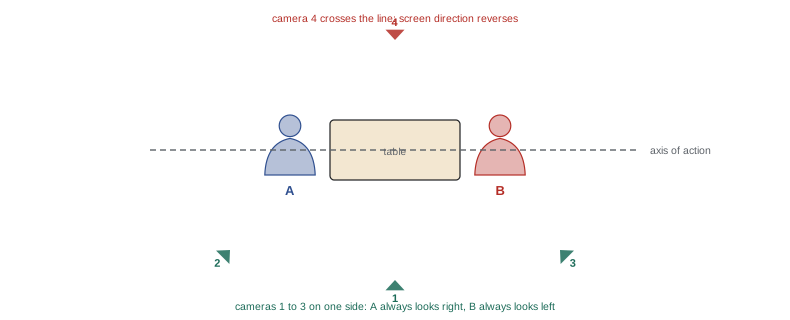
The line can be crossed deliberately and without confusion in several ways: by moving the camera across the line during a shot, so the viewer sees the change; by having a character move across the line; by cutting to a neutral shot taken directly on the line or to a cutaway; or by establishing a new axis when characters reposition. Crossing the line abruptly can also be a deliberate choice to signal disorientation or a shift in power, but it should be a choice, not an accident.
Screen direction for movement
The same principle applies to movement. If a character walks from left to right in one shot, they should continue left to right in the next, or they appear to have turned around. A journey that consistently runs left to right across shots feels like progress in one direction; a return journey runs right to left. Chase scenes rely on consistent direction for the pursuer and the pursued. When a change of direction is needed, show it: the character turns on screen, or the camera moves to a new position in view of the audience.
Eyelines
When two characters are shown in separate shots, their eyelines must match for the viewer to believe they are looking at each other. If A looks slightly camera right and up (because B is standing), then in the reverse shot B should look camera left and down. Eyeline height matters as much as direction: a seated character looking at a standing one looks up, and the reverse looks down. Use marks or a stand-in at the right height for the actor to look at when the other actor is not present, and keep the camera at a consistent height relative to each character's eyes.
The 30-degree rule
When cutting between two shots of the same subject, the camera position should change by at least about 30 degrees, or the shot size should change substantially. Otherwise, the cut looks like a small jump (a jump cut) rather than a new view. This is why coverage combines different angles and sizes: a medium shot and a close-up from slightly different angles cut smoothly, while two medium shots from almost the same position do not.
Continuity
Continuity is the consistency of everything the viewer can see and hear across shots that are meant to be continuous in time. Because shots are filmed minutes or hours apart, many things can change: a glass that was half full is now full, a cigarette is longer than it was, a scarf has moved, the light has changed, an actor raises a cup with the other hand. Viewers may not notice small errors consciously, but they sense that something is wrong. Continuity is protected by:
- Performance: actors repeat actions the same way, at the same points in the dialogue, in every take and angle.
- Props, costume, hair and makeup: departments photograph and record each look and reset props between takes.
- The script supervisor: notes which lines and actions occur in each take, eyelines, screen directions, prop handling and timing, and flags inconsistencies before they become problems.
- Light and time of day: shooting all angles of a scene under consistent light, which is difficult outdoors as the sun moves.
In practice, the editor will choose performance over continuity when they conflict: a powerful take with a glass in the wrong hand usually wins. But the fewer such compromises the better.
Cutting on action
Cuts are least noticeable when they happen during movement, because the eye follows the motion and does not register the change. A character reaching for a door handle in a wide shot can be cut to a close-up of the hand completing the movement; a person sitting down in a medium shot can be cut to a closer shot as they settle. To make this possible, actors overlap the action: in each angle they repeat the whole movement, not just the part expected to be used, so the editor can choose the cut point. Camera operators should start recording before the action begins and keep rolling until well after it ends.
Worked problem
Covering a short dialogue scene
Two friends, Maya and Leo, sit across a café table for a one-page scene: they greet each other, Leo slides an envelope across, Maya opens it and reacts. Plan the coverage and the order of setups.
Show solution
- Establish the axis of action between Maya and Leo and keep all cameras on one side of it.
- Setup 1: master, a wide two-shot of the whole scene from the side, including the envelope moment.
- Setup 2: over-the-shoulder on Maya (past Leo), the whole scene. Setup 3: close-up of Maya for the reaction, from the same side.
- Turn around. Setup 4: over-the-shoulder on Leo (past Maya). Setup 5: close-up of Leo.
- Setup 6: inserts of the envelope sliding and the contents, and cutaways of the café.
Answer: Six setups cover the scene. Shooting all of Maya's angles before turning around to Leo's side minimizes relighting, because the lights are rearranged only once. Each angle repeats the whole scene, so the editor can cut on action, such as the envelope sliding, at any moment.
Planning setups efficiently
Each new camera position, a setup, takes time to light, rehearse and shoot, often 30 minutes or more on a professional set. Productions therefore order setups to minimize changes: they shoot all angles in one direction before turning around, group shots that share a lens or lighting arrangement, and shoot the widest shots first, when the whole set must be dressed and lit, before moving in for closer shots that need only part of it. A shot list (Lesson 9) records the setups and their order, and the assistant director uses it to estimate how many scenes can be shot in a day.
Coverage for documentary and events
In documentary and event work, the action cannot be repeated, so coverage is gathered differently. A single operator varies shot sizes during the action, changing size between sentences or moments rather than during them; a second camera holds a wide shot while the first moves in for details; and the operator collects cutaways and reactions before and after the main action. Interviews are covered with two cameras at different sizes, or by changing size between questions. The principles are the same: give the editor different sizes, keep screen direction consistent, and record enough before and after each moment to cut.
Continuity in practice
On a small production without a script supervisor, someone must still watch continuity. A few practical habits help: photograph the set, props and actors' costumes at the start of each scene and whenever something changes; note which hand an actor uses for important actions and where they are in the dialogue when they do it; keep drinks at consistent levels by refilling between takes; and keep an eye on clocks, candles and anything else that changes with time. Watching the previous take's ending before starting a new angle reminds everyone of positions and actions. Most of all, ask actors to keep their actions simple and repeatable: a performance that changes greatly from take to take is hard to cut, however good each take may be on its own.
Continuity also applies to sound. If one angle is recorded with a noisy air conditioner running and another without, the background changes at every cut. Keeping background sound consistent across angles, recording room tone for each setup, and noting problems on the sound report help the editor smooth the scene.
Before leaving a location, run through the coverage checklist with the director: is every line and action covered in at least two sizes, are there reactions for every important moment, are the inserts and cutaways recorded, and has room tone been captured? A few minutes of checking can save a return trip to the location.
Common mistakes
MistakeCrossing the axis of action without a transition.
InsteadKeep cameras on one side, or show the move across the line.
MistakeRecording only the part of the action you expect to use.
InsteadOverlap the whole action in every angle.
MistakeCutting between nearly identical angles.
InsteadChange angle by at least 30° or change shot size substantially.
MistakeMismatched eyelines in singles.
InsteadMatch direction and height of eyelines, using marks or a stand-in.
MistakeShooting setups in script order regardless of lighting.
InsteadShoot one direction completely before turning around.
Summary and key terms
- Coverage records a scene from several angles and sizes so it can be edited.
- The master shot method films a wide master, then closer angles, inserts and cutaways.
- The 180-degree rule keeps cameras on one side of the axis of action for consistent direction.
- Screen direction of movement and eyelines must stay consistent between shots.
- The 30-degree rule avoids jump cuts.
- Continuity covers performance, props, costume and light; the script supervisor tracks it.
- Cut on action, overlap action, and order setups to minimize relighting.
- Master shot
- A wide shot covering the whole scene.
- Setup
- A camera position with its lighting, for one or more shots.
- Cutaway
- A shot of something other than the main action, used to bridge edits.
- Axis of action
- The imaginary line between characters or along movement.
- 180-degree rule
- Keeping the camera on one side of the axis of action.
- Screen direction
- The direction of movement or gaze on screen.
- Eyeline match
- Consistent gaze directions that make characters appear to look at each other.
- 30-degree rule
- Changing angle by at least about 30° between shots of the same subject.
- Continuity
- Consistency of visible and audible details across shots.
- Overlapping action
- Repeating a whole action in each angle to allow cutting.
Practice problems
Work each problem on paper first, then reveal the answer to check.
What does a master shot record?
Show answer
The whole scene in a wide framing.
List five shots in typical two-person dialogue coverage.
Show answer
Master, OTS on A, OTS on B, close-ups of A and B, inserts and cutaways.
What happens if the camera crosses the axis of action between shots?
Show answer
Characters appear to swap screen direction, confusing the viewer.
Name two ways to cross the line acceptably.
Show answer
Move the camera across during a shot, have a character cross, cut via a neutral shot or cutaway, or re-establish the axis.
A character exits frame right. Where should they enter the next shot to keep direction?
Show answer
Frame left, still moving left to right.
What is the 30-degree rule?
Show answer
Change the camera angle by at least about 30° (or the size substantially) between shots of the same subject.
Who tracks continuity on a professional set?
Show answer
The script supervisor.
Why cut on action?
Show answer
Movement hides the cut because the eye follows the motion.
Why shoot all of one side before turning around?
Show answer
To minimize relighting and setup changes.
How does a documentary operator provide coverage of unrepeatable action?
Show answer
By changing shot size between moments, using a second camera, and collecting cutaways and reactions.
Lesson quiz · 5 questions
Score 60% or more to complete this lesson.
Create a free account to save your progress, take quizzes and earn a certificate.