
TRD-106 · Lesson 6 of 12 · 19 min
Daily logs, time sheets and job records
Construction runs on paperwork that nobody enjoys and everybody needs. Time sheets decide what people are paid and what the customer is billed. Daily logs record what happened on site each day. Photos, delivery tickets, inspection forms, requests for information and change orders show what was asked for, what was done and who agreed to what. When a project goes smoothly, these records sit in a binder or a cloud folder and nobody looks at them. When something goes wrong (a delay, a dispute over extra work, an injury, a leak two years later), they are often the only reliable account of what happened.
Apprentices do not write most of these records, but they feed into all of them. Maya's time entries, her notes to Luis, her photos and her reports to Dave become part of the project's record. This lesson explains what the main records are, why they matter and how to contribute to them accurately.
Time sheets
A time sheet records the hours each worker spends on the job, and often which task or cost code the hours belong to. On Kingsway Tower, Northbridge workers enter their hours in a phone app at the end of each day, choosing the area and task from a list (for example, level 6 domestic water rough-in). Dave reviews and approves the entries each week. The office uses them to pay the crew, to bill the general contractor for time-and-material work and to track whether the job is on budget.
Accurate time entries matter for three reasons. They decide what you are paid, including overtime. They tell the company how long tasks really take, which shapes future estimates and the schedule. And they are a legal record: falsifying a time sheet, whether by adding hours you did not work or by letting someone else enter time for you, is dishonest and can lead to dismissal. Entering time to the wrong task, even by accident, can make a job look over budget when it is not, or hide a problem until it is too late to fix.
Tips for accurate time sheets: enter your time every day, not at the end of the week from memory; record start and finish times and unpaid breaks; choose the task or cost code that matches what you actually did, and ask your foreman if you are unsure; record time spent on extra work or on another trade's problem separately, because it may be billable; and note travel, training, and time lost to delays the way your employer asks.
Overtime rules depend on the law and on any collective agreement. Under Ontario's Employment Standards Act, the general rule is overtime pay after 44 hours in a work week, but many construction workers are covered by collective agreements that set daily and weekly overtime at lower thresholds and different rates. Your employer and your agreement tell you which rules apply to you.
The program below totals a week of time entries, subtracts unpaid breaks, and splits the hours into regular and overtime using a weekly threshold. The threshold is a setting at the top, so the same check works under different rules.
# weekly time sheet: paid hours and overtime (weekly threshold only; check your own rules)
from datetime import datetime
entries = [  # day, start, finish, unpaid break in minutes
    ("Mon", "06:55", "15:30", 30), ("Tue", "06:55", "15:30", 30), ("Wed", "06:55", "17:30", 30),
    ("Thu", "06:55", "17:30", 30), ("Fri", "06:55", "15:30", 30), ("Sat", "07:00", "12:00", 0),
]
WEEKLY_THRESHOLD = 44     # Ontario ESA general rule; a collective agreement may differ
def hours(a, b, brk):
    t = datetime.strptime(b, "%H:%M") - datetime.strptime(a, "%H:%M")
    return t.seconds / 3600 - brk / 60
total = 0
for day, a, b, brk in entries:
    h = hours(a, b, brk); total += h
    print(f"{day}: {h:5.2f} h")
reg = min(total, WEEKLY_THRESHOLD); ot = max(0, total - WEEKLY_THRESHOLD)
print(f"total {total:.2f} h: regular {reg:.2f} h, overtime {ot:.2f} h")Mon: 8.08 h Tue: 8.08 h Wed: 10.08 h Thu: 10.08 h Fri: 8.08 h Sat: 5.00 h total 49.42 h: regular 44.00 h, overtime 5.42 h
The daily log
A daily log, also called a daily report or site diary, is the foreman's record of each day on site. General contractors keep one for the whole project, and most trade contractors keep their own. On Kingsway Tower, Dave fills in Northbridge's daily log in the same app as the time sheets, usually during the last half hour of the day. It takes him about ten minutes, and he treats it as one of the most important things he does.
A good daily log records: the date and weather; the crew on site and their hours; the work done, by area; material received; equipment used; visitors and inspections; instructions received, especially verbal ones, and who gave them; delays and their causes, such as waiting for another trade, an area not ready or missing information; safety events, including near misses, incidents and toolbox talks; and anything unusual. It is written in plain, factual language, the same day.
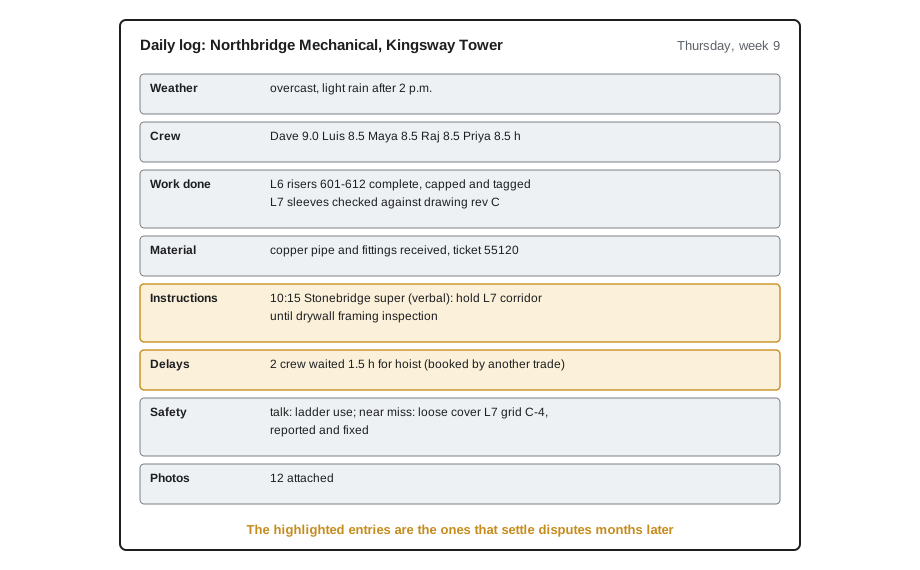
Daily logs earn their keep in disputes. Suppose that in the spring, Stonebridge claims Northbridge was late finishing the level 7 corridor. Dave's log shows that on a Thursday in week 9, Stonebridge's superintendent told him verbally to hold the corridor until the drywall framing inspection, and that the inspection did not happen until the following Tuesday. Without the log, it would be one person's memory against another's. With it, Northbridge can show exactly why the work was held.
How apprentices feed the record
Maya contributes to the daily log every day without writing it. When she tells Luis I waited forty minutes for the hoist because the drywallers had it booked, that delay ends up in Dave's log. When she photographs a sleeve in the wrong place, that photo ends up attached to a request for information. When she reports a near miss, it becomes part of the safety record. The more specific her reports are, the more useful the record becomes.
Useful reports to your journeyperson or foreman include: delays and what caused them, with times; instructions you received from anyone outside your crew; problems you found, such as conflicts with other trades, missing or damaged material, or work that does not match the drawings; near misses and hazards; and what you completed. Give the who, what, where and when: At 10:15, the Stonebridge super told me and Luis to stop work in the level 7 corridor until the framing inspection. Luis has the details.
Photos as records
A photo is the fastest, most convincing record on a site. Many companies now expect workers to photograph their work before it is covered, any problems found, the condition of areas before they start work, and deliveries that arrive damaged. Good record photos have a few things in common:
- Show context and detail: one wide photo that shows where it is, then a close-up that shows the problem.
- Include a reference: a grid line marker, room number, tape measure or tag in the frame so the location and size are clear.
- Keep the date and time: most phones and site apps stamp them automatically; do not edit or crop them out.
- Name or caption them: Level 6, grid C-4, 100 mm sleeve, before pour is far more useful than IMG_4471.
- Upload or send them the same day to the place your company uses, not just your personal camera roll.
Photos before cover-up are especially valuable. Once drywall goes up or concrete is poured, nobody can see what is inside without destroying it. A photo of a properly installed, tested and labelled pipe in an open wall can settle questions years later.
Requests for information and change orders
Two formal records connect the site to the design and the contract. A request for information, or RFI, is a written question from a contractor to the designers, usually through the general contractor, asking how to resolve something unclear or conflicting in the drawings and specifications. A change order is a written agreement to change the work, the price or the schedule. Apprentices do not write either, but they often spot the problems that start them.
On Kingsway Tower, Maya noticed that a drain line on the level 9 drawing ran straight through a structural beam. She told Luis, who told Dave, who photographed it and sent an RFI to Stonebridge asking the mechanical engineer how to reroute it. The engineer issued a sketch with a new route that cost an extra day of work and some fittings. Because the change came through the RFI, Northbridge was able to price it and get a change order approved before doing the work. If the crew had just rerouted the pipe on their own, the company might never have been paid for it, and the new route might not have met the engineer's requirements.
The rule for apprentices is simple: if the work does not match the drawings, or the drawings conflict with what is built, stop and tell your journeyperson or foreman. Do not solve it yourself, even if the fix seems obvious. Many disputes about extra work begin with a crew that made a reasonable field change without telling anyone.
| Record | Who writes it | What it is for | How an apprentice contributes |
|---|---|---|---|
| Time sheet | Each worker; approved by foreman | Pay, billing and job costing | Accurate daily entries to the right task |
| Daily log | Foreman | Day-by-day account of work, delays, instructions and safety | Specific reports of delays, instructions and problems |
| Photos | Anyone | Proof of conditions and work before cover-up | Clear, labelled photos sent the same day |
| RFI | Foreman or project manager | Questions to the designers about the drawings | Spotting conflicts and reporting them |
| Change order | Project manager and general contractor | Agreed changes to work, price or schedule | Not doing changed work until told it is approved |
| Delivery ticket | Supplier; signed on receipt | Proof of what arrived and its condition | Counting and checking before signing |
| Inspection and test records | Foreman or inspector | Proof of tests and approvals | Helping with tests and recording results |
Delivery tickets
When material arrives, someone signs a delivery ticket (a packing slip or bill of lading) to say it was received. Apprentices are often sent to receive deliveries. Before signing, count the items and check them against the ticket, look for visible damage and note it on the ticket, and check that the material is what was ordered (size, type, quantity). Write short, clear notes such as 2 of 20 lengths bent or 1 box of fittings missing before signing, and take a photo. Once a ticket is signed clean, it is hard to claim later that something was missing or damaged.
Keeping records honest
Records are only valuable if they are true. Do not backdate entries, change records after the fact without showing what was changed, sign for things you did not check, or leave out events because they are embarrassing. If you made a mistake in a record, correct it openly: draw a single line through it on paper, or use the app's edit history, and write the correction. A record that has been quietly altered is worse than no record, because once one entry is shown to be false, people stop trusting the rest.
Common mistakes
MistakeEntering a week's time on Friday from memory.
InsteadEnter your time daily, to the task you actually worked on.
MistakeTelling nobody about a delay because it was not your fault.
InsteadReport delays with times and causes so they go into the daily log.
MistakeFixing a drawing conflict in the field without telling anyone.
InsteadStop and tell your foreman; the fix may need an RFI and a change order.
MistakeSigning a delivery ticket without counting.
InsteadCount, check and note damage before signing.
MistakeTaking photos that only show a close-up with no location.
InsteadTake a wide shot for context and a close-up with a reference.
MistakeQuietly changing a record after the fact.
InsteadCorrect it openly so the change is visible.
Summary and key terms
- Time sheets drive pay, billing and job costing; enter them daily and accurately.
- Overtime rules come from employment law and any collective agreement.
- The daily log records work, crew, material, instructions, delays and safety events, and often settles disputes later.
- Apprentices feed the record through specific reports, photos and accurate time entries.
- RFIs and change orders connect the site to the design and contract; do not make field changes without telling your foreman.
- Check deliveries before signing, and keep every record honest.
- Time sheet
- A record of hours worked, often by task or cost code.
- Cost code
- A label that assigns hours or costs to a specific part of the job.
- Daily log
- The foreman's daily record of work, crew, material, instructions, delays and safety events; also called a site diary.
- RFI
- Request for information: a written question to the designers about the drawings or specifications.
- Change order
- A written agreement changing the work, price or schedule of a contract.
- Delivery ticket
- The document signed when material is received; also called a packing slip.
- Time and material
- Work billed by the hours and material actually used rather than a fixed price.
Practice problems
Work each problem on paper first, then reveal the answer to check.
Give three reasons accurate time sheets matter.
Show answer
They set pay and overtime, show how long tasks take for estimates, and are a legal record.
List five things a daily log should record.
Show answer
Any five of: date and weather, crew and hours, work done, material, equipment, visitors and inspections, instructions, delays, safety events.
Why are photos before cover-up so valuable?
Show answer
Once walls are closed or concrete is poured, the work cannot be seen without destroying it.
What should you do if the drawing shows a pipe running through a beam?
Show answer
Stop and tell your journeyperson or foreman so an RFI can be sent.
What should you check before signing a delivery ticket?
Show answer
Count the items, check them against the ticket, look for damage and note any problems.
How should you correct a mistake in a written record?
Show answer
Openly, with a single line through the error or the app's edit history, and the correction written in.
Lesson quiz · 5 questions
Score 60% or more to complete this lesson.
Create a free account to save your progress, take quizzes and earn a certificate.