
SLS-212 · Lesson 5 of 12 · 18 min
Virtual presentations and demos
▶ Video coming soon A video version of this lesson is on the way.
Priya Nandakumar, the office manager at the law firm Westgate & Rowe, worked two days a week from home and the other three from an office building whose lease ended on March 31, 2027. The firm's two senior partners were often in court. When Maya Chen proposed a demonstration of RoomFlow and a look at furniture options for the firm's new office, Priya asked whether it could be done online. On Tuesday, November 3, 2026, at 8:30 in the morning, Maya ran a forty-minute video meeting with Priya, one of the partners and the firm's part-time IT consultant, each joining from a different place. It was Maya's first solo virtual demonstration, and Farida Haddad had spent the previous Friday's lab session on nothing else.
A virtual presentation is a sales presentation delivered over a video meeting platform rather than in person. Since 2020, virtual meetings have become a normal part of business-to-business selling. Gartner's widely cited research on B2B buying, updated in 2025, found that buyers spend only a small part of their buying time with sales representatives at all, and that many prefer a buying experience with little or no seller contact. When buyers do meet sellers, the meeting is often online. Virtual presentations save travel time and make it easier to bring busy people together, but they make it harder to hold attention, read the room and build rapport.
What changes online
The principles of earlier lessons still apply online: start from discovery, tailor to the audience, demonstrate scenarios rather than features. What changes is the medium, and the medium affects attention, interaction and trust.
| In person | Online | What to do about it |
|---|---|---|
| Attention is held by physical presence | Attention competes with email, phones and other windows | Shorter segments, more interaction, a visible agenda |
| The seller reads faces and body language easily | Cameras may be off; faces are small | Ask more check questions; use names; invite reactions |
| Rapport builds in small talk before and after | Meetings start and end abruptly | Plan two minutes of genuine conversation at the start |
| Handouts and a shared screen in one room | Each person sees their own screen at their own size | Large text, simple slides, zoom in on details |
| Technical problems are rare | Audio, video and sharing problems are common | Test in advance; have a backup plan |
| Side conversations are visible | Side conversations happen in private chat | Ask directly whether anyone has questions or concerns |
Jeremy Bailenson, director of Stanford's Virtual Human Interaction Lab, published an analysis in 2021 of why long video meetings are tiring, which he called Zoom fatigue. His four proposed causes were the intense close-up eye contact, seeing oneself constantly on screen, reduced mobility, and the extra effort needed to send and read non-verbal signals. Later survey studies supported a link between video meeting load and fatigue. For sellers, the practical lessons are to keep virtual meetings shorter than their in-person equivalents, to let participants turn off self-view, and to build in breaks or changes of activity every ten minutes or so.
Preparing a virtual presentation
Farida's preparation list for virtual meetings added a technical layer to the planning described in lessons 1 and 4.
| Area | What to check |
|---|---|
| Platform | Which platform the customer uses and allows; whether guests can share screens; whether recording is allowed |
| Invitation | A clear agenda, purpose and list of attendees; the link and a dial-in number; the time in each participant's time zone |
| Your setup | Camera at eye level, light in front of you, quiet room, wired connection or strong Wi-Fi, notifications off |
| Your screen | Only the windows you will share open; browser tabs closed; demo data loaded; zoom level tested |
| Backups | A second device logged in, slides sent as a file, a phone number for the customer |
| Roles | Who presents, who watches the chat and participants, who handles technical questions |
Recording needs particular care. Many platforms make it easy to record a meeting, and a recording can be useful for people who could not attend. But recording without consent can breach privacy law and the customer's own policies, and it can damage trust. In Canada, PIPEDA requires knowledge and consent for collecting personal information in the course of commercial activity, and recording a video call collects personal information. Ridgeline's practice was to ask at the start of the meeting, record only if everyone agreed, and say how the recording would be used and when it would be deleted. SLS-120 and SLS-140 discuss call recording in more detail.
Structure and pacing online
Online attention spans are short, so virtual presentations work best when they are broken into short segments, each ending with an interaction. Farida's rule of thumb was that the audience should be asked to do something, even something small, at least every seven to ten minutes: answer a question, react to an option, try a task, or put a number in the chat.
Worked problem
Building interaction into a 40-minute virtual demonstration
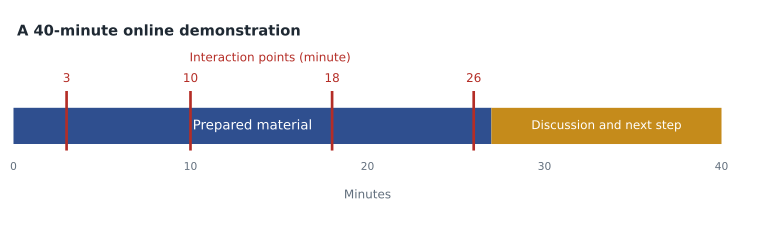
Maya's Westgate & Rowe meeting runs 40 minutes. She wants the prepared material to end by minute 27, leaving time for discussion, and she wants an interaction at least every 8 minutes during the prepared material. What is the smallest number of planned interactions she needs, and where might they go?
Show solution
- Prepared material runs from minute 0 to minute 27, which is 27 minutes.
- With an interaction at least every 8 minutes, the gaps can be no longer than 8 minutes: 27 ÷ 8 = 3.4, so she needs at least 4 gaps, which means at least 3 interactions inside the material plus one at the end.
- Possible plan: minute 3, Priya confirms the bridge statement; minute 10, the partner chooses which of two room layouts to see; minute 18, the IT consultant asks about calendar integration while Maya shows it; minute 26, Priya books a room herself through a link Maya shares.
- From minute 27 to 40: questions, the furniture options and the next step.
Answer: At least four planned interactions, roughly at minutes 3, 10, 18 and 26, keep every stretch of prepared material under 8 minutes.
The opening matters even more online, because people join late, connections drop and attention is fragile. A good virtual opening has three parts: a brief, genuine personal connection while people join; a clear statement of purpose and agenda, shown on screen; and the bridge statement. Maya began by asking the partner how the trial had gone, since Priya had mentioned he was in court the day before, and waited until all three had joined before starting the agenda.
Demonstrating online
Online demonstrations follow the same tell, show, check rhythm as in-person demonstrations (lesson 4), but they need extra care to be visible and followable.
| Habit | Why it matters online |
|---|---|
| Share one window, not the whole screen | Avoids showing email, notifications or other customers' information |
| Zoom in on the important part of the screen | Participants may be viewing on a laptop or a phone |
| Move the pointer slowly and pause on results | Video compression blurs fast movement |
| Narrate each click | Participants cannot see where you are looking |
| Hand over control or send a link for key tasks | Doing a task themselves keeps participants engaged |
| Stop sharing during discussion | Seeing faces again makes conversation easier |
Sharing a single window rather than the whole screen is a privacy habit as much as a presentation one. A salesperson who shares a whole screen risks showing a pop-up message from another customer, a CRM record or a pricing spreadsheet. Several stories in sales circles involve a seller accidentally showing a competitor's quote or a colleague's frank comment about the customer. Ridgeline's rule was simple: share the window, never the screen, and turn notifications off.
For the Westgate & Rowe demonstration, Maya prepared a RoomFlow demonstration site using the floor plan of the firm's proposed new office, which Priya had sent her, with four rooms labelled by their planned names. She shared only the browser window, zoomed to show the booking calendar clearly, and at minute 26 sent Priya a link so that she could book the "Client Room" herself from her own laptop. The partner watched Priya do it and said, "That's simpler than what we have now."
Reading a virtual room
Without body language, sellers need other ways to sense how the meeting is going. Useful signals include who speaks and who stays silent, questions in the chat, whether cameras are on or turn off partway through, and how quickly people respond to check questions. A participant who goes quiet and turns off their camera halfway through may be distracted, may have a poor connection, or may have lost interest. The only way to know is to ask, by name, a question about their part of the problem.
Maya noticed that the IT consultant said nothing for the first fifteen minutes. At the next interaction point, she asked him directly whether RoomFlow's calendar connection would work with the firm's email system, which he managed. That question turned him from an observer into a participant, and his three questions over the next five minutes were all ones she could answer. Silent technical people are often the ones who will later advise the decision maker, so drawing them in matters.
Hybrid meetings
Some meetings are hybrid: several people in one room and others joining online. Hybrid meetings are harder to run than either in-person or fully virtual ones, because the people in the room tend to dominate and the remote participants become an audience. Good practice includes asking a person in the room to watch for remote participants who want to speak, using a good room microphone, repeating questions asked in the room before answering, and directing questions to remote participants by name. If the seller is presenting from the customer's room, sharing slides through the video platform as well as on the room screen keeps remote participants from looking at a blurry camera view of the projector.
Following up after a virtual meeting
Virtual meetings end abruptly, and people move straight to their next call. The follow-up therefore matters more than after an in-person meeting. A good follow-up, sent the same day, summarizes what was shown and agreed, answers open questions, attaches or links materials, and confirms the next step. If the meeting was recorded with consent, the follow-up can say where the recording is and when it will be deleted.
Maya's follow-up to Westgate & Rowe that afternoon confirmed that RoomFlow could manage the four planned rooms, answered the IT consultant's question about guest booking with a short help article, attached two furniture layouts, and proposed a meeting on site at the new office once the firm had the keys. The negotiation that followed, practised in SLS-213's role-play lab, would set the price at 14,356 dollars for furniture and 109 dollars a month for RoomFlow on four rooms, subject to the firm signing by December 18.
Time zones are an easy detail to get wrong in virtual meetings, and Ridgeline sold into neighbouring regions as well as its own. Regina stays on Central Standard Time all year, while neighbouring provinces change their clocks in spring and fall, so the time difference with a customer in Alberta or Manitoba can change during the year. Ridgeline's sellers sent invitations from their calendars, which show each participant the time in their own zone, and stated the time zone in writing in the body of the invitation as well.
Common mistakes
MistakeRunning a virtual meeting the same length as an in-person one, with no breaks.
InsteadKeep it shorter and build in an interaction at least every seven to ten minutes.
MistakeSharing the whole screen.
InsteadShare only the window you need and turn notifications off.
MistakeRecording without asking.
InsteadAsk everyone at the start, explain how the recording will be used, and record only if all agree.
MistakeIgnoring silent participants.
InsteadAsk them a direct question about their part of the problem, by name.
MistakeLetting the people in the room dominate a hybrid meeting.
InsteadRepeat in-room questions, invite remote participants by name and share content through the platform.
Summary and key terms
- Virtual presentations are now a normal part of B2B selling; they save time but make attention, interaction and rapport harder.
- Zoom fatigue, described by Bailenson in 2021, suggests keeping virtual meetings shorter and letting people turn off self-view.
- Prepare the platform, invitation, your setup, your screen, backups and roles.
- Ask for consent before recording.
- Break the presentation into short segments with an interaction at least every seven to ten minutes.
- When demonstrating, share one window, zoom in, move slowly, narrate and hand over control for key tasks.
- Read the virtual room by watching who speaks and asking silent participants direct questions.
- In hybrid meetings, take extra care to include remote participants.
- Follow up the same day with a summary, answers and the next step.
- Virtual presentation
- A sales presentation delivered over a video meeting platform.
- Hybrid meeting
- A meeting with some participants in a room and others joining online.
- Zoom fatigue
- Tiredness from long video meetings, attributed by Bailenson to close-up eye contact, self-view, reduced mobility and extra effort reading signals.
- Interaction point
- A planned moment when participants are asked to answer, choose, react or try something.
- Window sharing
- Sharing a single application window rather than the whole screen.
- Same-day follow-up
- A summary sent after a meeting confirming what was shown, agreed and still open.
Practice problems
Work each problem on paper first, then reveal the answer to check.
A 30-minute virtual presentation should end its prepared material at minute 20 with an interaction at least every 6 minutes. What is the minimum number of interactions inside the material?
Show answer
20 ÷ 6 = 3.3, so at least 4 gaps are needed, which means at least 3 interactions inside the material.
Why is sharing a single window safer than sharing the whole screen?
Show answer
It avoids showing notifications, other customers' records or internal pricing by accident.
A remote participant has been silent for fifteen minutes. What should you do?
Show answer
At the next interaction point, ask them by name a question about their part of the problem.
Lesson quiz · 5 questions
Score 60% or more to complete this lesson.
Create a free account to save your progress, take quizzes and earn a certificate.