
PYTH-270 · Lesson 11 of 12 · 24 min
Documenting design decisions
▶ Video coming soon A video version of this lesson is on the way.
Six months after the first design review, a new developer joined Ridgeline and asked Jordan why orders were stored through a repository instead of the web framework's built-in database layer, and why the payment code went through an adapter when there was, at that point, only one provider in use. Jordan remembered the reasons, roughly. Lena had moved on to another client. If Jordan had also left, the reasons would have been lost, and the newcomer might have undone a careful decision because it looked like needless complexity.
Code shows what a program does. It rarely shows why it is built that way, what alternatives were considered, or which constraints shaped the choice. This lesson covers the kinds of documentation that preserve design knowledge, from docstrings and type hints to architecture decision records and diagrams, how to make examples executable so they stay correct, and how to keep documentation alive instead of letting it rot in a forgotten folder.
Document the why
Good code needs fewer comments, because clear names and small functions already explain what the code does. What the code cannot say is why. A comment such as # add 1 to i is noise; a comment such as # the accountant requires rounding each line, not the total; see ADR 0004 is valuable, because it records a reason nobody could reconstruct from the code. Comments that explain intent, constraints, trade-offs and surprising decisions earn their place; comments that restate the code should be deleted, because they drift out of date as the code changes.
Design knowledge lives at several levels, and each needs a different kind of record. Inside a function, a short comment explains a surprising line. At the level of a function or class, a docstring explains its contract. At the level of a module or package, a module docstring or README explains its purpose and how to use it. At the level of the whole system, decision records and diagrams explain the structure and the reasons behind it.
Docstrings and type hints
A docstring is the string literal at the start of a module, class or function, available at run time as __doc__ and shown by help() and editors. PEP 257 sets the basic conventions: a one-line summary in the imperative mood, a blank line, then details. Common formats such as Google style and NumPy style add sections for arguments, return values and exceptions. Whatever the format, a good docstring tells a caller everything needed to use the function without reading its body: what it does, what each parameter means including units, what it returns and what it raises.
Type hints complement docstrings. They document the types precisely in a form that tools can check, so the docstring does not need to repeat them and can focus on meaning. Together they form the function's contract.
from datetime import date, timedelta

def sell_by(roasted: date, window_days: int = 30) -> date:
    """Return the last day a bag may be sold.

    Ridgeline sells coffee for 30 days after roasting by default; Rosa may
    shorten the window for light roasts.

    Args:
        roasted: The date the coffee was roasted.
        window_days: How many days the bag may be sold after roasting.

    Returns:
        The final sale date, inclusive.

    Raises:
        ValueError: If window_days is not positive.
    """
    if window_days <= 0:
        raise ValueError("window_days must be positive")
    return roasted + timedelta(days=window_days)

print(sell_by(date(2026, 11, 2)))
print(sell_by.__doc__.splitlines()[0])2026-12-02 Return the last day a bag may be sold.
Executable examples with doctest
Examples are the most useful part of documentation and the part most likely to go stale. The doctest module, in the standard library, finds text in docstrings that looks like an interactive Python session, runs it, and checks that the output matches. A docstring example then serves as both documentation and a test: if someone changes the function so the example no longer holds, the test fails. PYTH-230 introduced doctest as a testing tool; here the point is documentation that cannot lie.
Doctests work best for short, deterministic examples that show typical use and one or two edge cases. Complex setups, random output and long tests belong in a proper test suite. You run doctests with python -m doctest module.py, or by asking pytest to collect them, and you can run them for a single function from code, as the next example does.
import doctest

def bags_from_roast(green_kg, loss=0.15, bag_g=340):
    """Return how many full bags a batch of green coffee will fill.

    Roasting loses about 15 out of every 100 grams of weight.

    >>> bags_from_roast(12)
    30
    >>> bags_from_roast(1)
    2
    >>> bags_from_roast(0)
    0
    """
    roasted_g = green_kg * 1000 * (1 - loss)
    return int(roasted_g // bag_g)

finder = doctest.DocTestFinder()
runner = doctest.DocTestRunner()
for test in finder.find(bags_from_roast, globs={"bags_from_roast": bags_from_roast}):
    runner.run(test)
print(runner.summarize(verbose=False))TestResults(failed=0, attempted=3)
Try it yourself
Documented and tested
Write loyalty_tier(points) that returns "Bean" for 0 to 99 points, "Roast" for 100 to 299 and "Reserve" for 300 or more. Give it a docstring with a one-line summary and at least three doctest examples (lines starting with >>> followed by the expected output), covering each tier.
The tests run your doctests, so the examples must be correct, and they check the function itself on boundary values.
def loyalty_tier(points):
    """Tier."""
    if points >= 300:
        return "Reserve"
    return "Bean"
Look at the globs argument in the listing. It tells doctest which names the examples can use. When doctest is run on a whole module it uses that module's names automatically, but when you run it on a single function from inside a script or a notebook, passing the names explicitly avoids a confusing NameError.
READMEs and module documentation
One level up from functions, every package and every significant module deserves a short explanation of its purpose. A module docstring at the top of the file says what the module is for and what it exports. A README at the top of the repository is the front door for every new developer and every user of a library: what the project does, how to install it, a minimal working example, how to run the tests and where to find more. The best READMEs can be skimmed in two minutes and get a newcomer from nothing to a running example.
Ridgeline's README was a single line, Ridgeline tools, until the new developer arrived. Jordan rewrote it with four short sections: what the package does and which applications use it, setting up a development environment, running the tests and doctests, and a map of the packages with one sentence each and a link to the ADR folder. He keeps it current by checking it whenever a pull request adds a package or changes a command.
Architecture decision records
An architecture decision record, or ADR, is a short document that captures one significant design decision: what was decided, why, and what follows from it. Michael Nygard proposed the format in 2011, and it has become standard practice because it is cheap to write and extraordinarily valuable later. Each ADR is a small text file, usually Markdown, numbered in sequence and stored in the repository next to the code, often in docs/adr/, so it is versioned and reviewed like code.
Nygard's format has five parts. A title names the decision. A status says whether it is proposed, accepted, deprecated or superseded by a later ADR. The context describes the forces at play: the problem, the constraints, the options considered. The decision states what the team will do, in active voice. The consequences list what becomes easier and what becomes harder as a result, including the costs, because every real decision has some. ADRs are never edited to change a decision; a new ADR supersedes the old one, which keeps the history of reasoning intact.
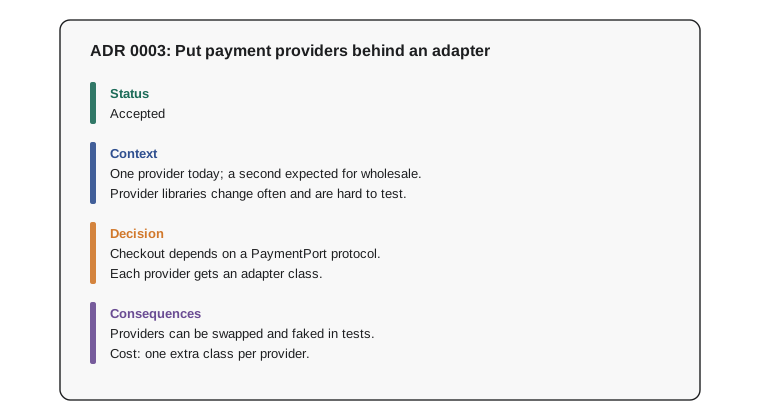
Ridgeline's first ADRs were written retroactively, in an afternoon, while Jordan still remembered the reasons: 0001 records the decision to keep a modular monolith rather than split services, 0002 the repository pattern, 0003 the payment adapter, 0004 the accountant's rounding rule. When the new developer asked about payments, Jordan pointed to ADR 0003, and the question was answered in two minutes.
Try it yourself
Render an ADR
Write render_adr(number, title, status, context, decision, consequences) that returns an ADR as Markdown text. consequences is a list of strings. The first line is # ADR NNNN: Title, with the number padded to four digits.
Then come four sections, each a ## heading followed by its text on the next line: Status, Context, Decision and Consequences, where consequences are listed one per line as - item. Separate the heading line and each section with a blank line, and end the text with a single newline.
def render_adr(number, title, status, context, decision, consequences):
    return f"ADR {number}: {title}\n{status}\n{context}\n{decision}"
Diagrams that stay useful
A diagram can show in seconds what pages of text cannot: which parts exist and how they connect. The trouble is that diagrams drawn once in a drawing tool quickly fall out of date, and an outdated diagram is worse than none because people trust it. Two practices help. First, draw at the right level of detail. Simon Brown's C4 model suggests four zoom levels: a context diagram showing the system and the people and systems around it; a container diagram showing the deployable parts, such as the web shop, the database and the background worker; a component diagram showing the major parts inside one container; and, only rarely, code-level diagrams such as UML class diagrams, which tools can generate.
Second, keep diagrams as code. Text-based formats such as Mermaid and PlantUML describe a diagram in a few lines of text that live in the repository, are reviewed in pull requests and render automatically in many documentation tools and code hosting sites. A sequence diagram of the checkout flow written in Mermaid is easy to update in the same commit that changes the flow.
sequenceDiagram
    participant Shop as Web shop
    participant Svc as OrderService
    participant Repo as OrderRepository
    participant Pay as PaymentPort
    Shop->>Svc: place_order(customer, lines)
    Svc->>Repo: add(order)
    Svc->>Pay: charge(total)
    Pay-->>Svc: receipt
    Svc-->>Shop: order confirmation
Design reviews and keeping documents alive
For larger decisions, many teams write a short design document, sometimes called an RFC (request for comments), before building: the problem, the proposed approach, the alternatives and the open questions, circulated for feedback. Writing it forces clear thinking, and reviewing it on paper is far cheaper than discovering a flaw after the code is written. The accepted outcome is then summarised in an ADR.
Documentation stays alive when it lives close to the code and changes with it. Put ADRs, diagrams-as-code and the README in the repository; make updating them part of the definition of done for a change; review them in the same pull request as the code; and run doctests in continuous integration. Delete documents that no longer describe reality, or mark them clearly as historical. A small amount of current, trusted documentation is worth far more than a large amount of stale material that nobody believes.
Worked problem
Writing Ridgeline's fifth ADR
The team has decided to store subscription events, such as created, paused and renewed, in an append-only table rather than updating a status column, so Anita can reconstruct revenue history. Jordan drafts the ADR.
Show solution
- Title: ADR 0005: Record subscription changes as an event log.
- Status: Proposed, changed to Accepted after the team review on Friday.
- Context: Anita needs revenue for any past date; a status column loses history; volumes are small (a few thousand events a month); the team knows SQL well.
- Decision: each change to a subscription appends a row (id, subscription, event, when, data); the current state is computed from the events and cached.
- Consequences: full history and easy auditing; current state needs a query or cache; the reporting code must be rewritten; deleting customer data needs a documented process.
Answer: A one-page ADR with title, status, context, decision and honest consequences, stored as docs/adr/0005-subscription-event-log.md.
Common mistakes
MistakeWriting comments that restate what the code does.
InsteadComment the why: intent, constraints and surprising decisions.
MistakeLeaving docstrings without parameters, units, return values or exceptions.
InsteadDocument the full contract so callers need not read the body.
MistakeWriting examples in documentation that are never run.
InsteadMake them doctests and run them in continuous integration.
MistakeKeeping decisions only in people's heads or chat history.
InsteadRecord significant decisions as ADRs in the repository.
MistakeEditing an old ADR when a decision changes.
InsteadWrite a new ADR that supersedes it, keeping the history of reasoning.
MistakeDrawing detailed diagrams once and never updating them.
InsteadDraw at the right C4 level and keep diagrams as code next to the source.
Summary and key terms
- Code shows what a program does; documentation must preserve why it is built that way.
- Comment intent and constraints, not mechanics; delete comments that restate the code.
- Docstrings state a function's contract; type hints state its types precisely.
- doctest turns docstring examples into tests so documentation cannot go stale.
- Architecture decision records capture each significant decision with status, context, decision and consequences.
- The C4 model gives useful zoom levels for diagrams; diagrams as code stay current.
- Keep documentation in the repository, update it with the code, and review it in pull requests.
- docstring
- A string literal at the start of a module, class or function that documents it.
- PEP 257
- The Python convention for writing docstrings.
- contract
- What a function promises: its inputs, outputs, effects and errors.
- doctest
- A standard-library module that runs examples written in docstrings and checks their output.
- architecture decision record
- A short document recording one significant design decision and its reasons.
- superseded
- The status of an ADR replaced by a later decision.
- C4 model
- Context, container, component and code: four levels of architecture diagram.
- diagrams as code
- Diagrams described in text formats such as Mermaid and stored with the source.
- sequence diagram
- A diagram showing the messages exchanged between parts over time.
- RFC
- A request for comments: a design proposal circulated for review before building.
Practice problems
Work each problem on paper first, then reveal the answer to check.
Which of these comments is worth keeping: # loop over the lines, or # Northwind rejects amounts with more than 2 decimals?
Show answer
The second: it records a constraint the code cannot explain.
What should a function's docstring tell a caller?
Show answer
What it does, what each parameter means including units, what it returns and what it raises.
How does a doctest keep documentation honest?
Show answer
The example is run as a test, so a change that breaks it is caught.
Name the five parts of a Nygard ADR.
Show answer
Title, status, context, decision and consequences.
A decision recorded in ADR 0002 is reversed. What do you do with ADR 0002?
Show answer
Mark it superseded and write a new ADR that records the new decision and links to the old one.
Why keep diagrams as code?
Show answer
They live with the source, are reviewed in pull requests and can be updated in the same commit as the change.
Lesson quiz · 5 questions
Score 60% or more to complete this lesson.
Create a free account to save your progress, take quizzes and earn a certificate.