
PYTH-102 · Lesson 4 of 12 · 24 min
Classes and objects
▶ Video coming soon A video version of this lesson is on the way.
In the PYTH-101 capstone, each Ridgeline coffee was a dictionary: {"name": "Sunrise Blend", "price": 18.50, "stock": 42}. The functions that worked with coffees, such as sell, restock and is_low, lived elsewhere and took the dictionary as an argument. That works, but nothing ties the data and the operations together. A typo such as coffee["stok"] goes unnoticed until it raises a KeyError deep inside a report, any function can set the stock to a negative number, and a reader has to search the whole program to learn what a coffee can do.
Classes solve these problems. A class describes a kind of object: what data each object holds and what operations it supports. Each object made from the class, called an instance, carries its own data, and the operations, called methods, travel with it. This lesson shows how to define classes, write an __init__ method, use self, distinguish instance attributes from class attributes, protect an object's data with properties, and save typing with dataclasses. It is the foundation of object-oriented programming, the style used by most large Python programs and libraries.
Defining a class
A class definition starts with the keyword class, the class name and a colon. Class names use CapitalizedWords, such as Coffee or RoastBatch, which distinguishes them from functions and variables. Inside the class, functions defined with def become methods. The special method __init__ runs automatically each time a new object is created, and its job is to set up the object's starting data.
class Coffee:
    """A coffee Ridgeline sells by the bag."""

    def __init__(self, sku, name, price, stock=0):
        self.sku = sku
        self.name = name
        self.price = price
        self.stock = stock

    def value(self):
        """Return the value of the bags in stock."""
        return self.stock * self.price

sunrise = Coffee("RC-101", "Sunrise Blend", 18.50, 42)
guji = Coffee("RC-102", "Ethiopia Guji", 22.00, 15)
print(sunrise.name, sunrise.stock, sunrise.value())
print(guji.name, guji.stock, guji.value())
print(type(sunrise).__name__, isinstance(guji, Coffee))Sunrise Blend 42 777.0 Ethiopia Guji 15 330.0 Coffee True
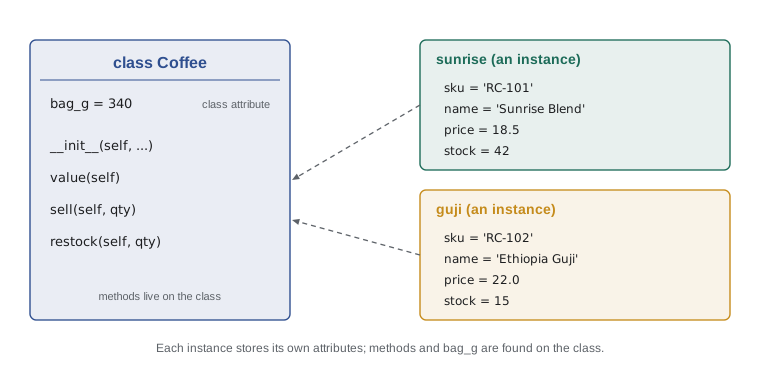
Calling the class like a function, Coffee("RC-101", "Sunrise Blend", 18.50, 42), creates a new object and then calls __init__ with the new object as the first argument and your arguments after it. Inside __init__, assignments such as self.price = price create attributes, values stored on that particular object. sunrise and guji are separate instances of the same class: they share the methods but each has its own sku, name, price and stock.
self
Every method receives the object it was called on as its first parameter. By universal convention that parameter is named self. When you write sunrise.value(), Python looks up value on the Coffee class and calls it as Coffee.value(sunrise), so inside the method self refers to sunrise. That is how one method can work on any number of objects: self is whichever object the method was called on.
class Coffee:
    def __init__(self, sku, name, price, stock=0):
        self.sku, self.name, self.price, self.stock = sku, name, price, stock

    def value(self):
        return self.stock * self.price

sunrise = Coffee("RC-101", "Sunrise Blend", 18.50, 42)
print(sunrise.value())          # the usual way
print(Coffee.value(sunrise)) # what Python does behind the scenes777.0 777.0
Forgetting self is the most common error when writing classes. If a method is defined as def value(): without self, calling sunrise.value() raises a TypeError saying value takes 0 positional arguments but 1 was given: the one argument is the object itself. Inside a method, forgetting self. in front of an attribute name, writing stock instead of self.stock, makes Python look for an ordinary variable called stock, which usually raises a NameError.
Methods that change the object
Methods can read an object's attributes and also change them. The sell and restock rules that were separate functions in PYTH-101 belong naturally on the Coffee class, where they can check their inputs and keep the stock valid. Code that uses the class no longer touches the stock attribute directly; it asks the object to sell or restock, and the object enforces its own rules.
class Coffee:
    def __init__(self, sku, name, price, stock=0):
        self.sku, self.name, self.price, self.stock = sku, name, price, stock

    def sell(self, qty):
        """Remove qty bags from stock and return the sale amount."""
        if qty <= 0:
            raise ValueError("quantity must be positive")
        if qty > self.stock:
            raise ValueError(f"only {self.stock} bags of {self.name} left")
        self.stock -= qty
        return qty * self.price

    def restock(self, qty):
        if qty <= 0:
            raise ValueError("quantity must be positive")
        self.stock += qty

dark = Coffee("RC-104", "Sumatra Dark", 20.25, 9)
print(dark.sell(2), dark.stock)
dark.restock(30)
print(dark.stock)
try:
    dark.sell(100)
except ValueError as err:
print("ValueError:", err)40.5 7 37 ValueError: only 37 bags of Sumatra Dark left
This is encapsulation: an object keeps its data together with the code that is allowed to change it, and the rest of the program uses the object through its methods. If the rule for selling changes, for example to reserve two bags for online orders, the change is made in one method and every part of the program follows it.
Instance attributes and class attributes
Attributes set on self belong to one instance. Attributes assigned directly in the class body, outside any method, belong to the class itself and are shared by every instance. Class attributes suit values that are the same for every object, such as Ridgeline's standard bag size or the reorder point, and constants that methods need.
class Coffee:
    bag_g = 340                 # class attribute, shared by every coffee
    reorder_point = 10

    def __init__(self, name, stock):
        self.name = name        # instance attributes, one set per coffee
        self.stock = stock

    def is_low(self):
        return self.stock < self.reorder_point

    def kg_in_stock(self):
        return self.stock * self.bag_g / 1000

a = Coffee("Sunrise Blend", 42)
b = Coffee("Sumatra Dark", 9)
print(a.bag_g, b.bag_g, Coffee.bag_g)
print(a.is_low(), b.is_low(), a.kg_in_stock())
b.reorder_point = 5             # creates an instance attribute on b only
print(b.is_low(), a.reorder_point, Coffee.reorder_point)340 340 340 False True 14.28 False 10 10
When Python looks up self.reorder_point, it checks the instance first and then the class. Assigning b.reorder_point = 5 created a new attribute on b that hides the class value for b alone; a and the class are unaffected. This lookup order is useful for per-object overrides but surprising if you meant to change the shared value, which needs Coffee.reorder_point = 5. Never use a mutable class attribute, such as a list, for data that should belong to each instance: like a mutable default argument, it would be shared by all of them.
Try it yourself
A RoastBatch class
Kai's roast log needs a class. Write RoastBatch with an __init__(self, batch_id, sku, green_kg, roasted_kg) that stores the four values as attributes.
Add a method loss() that returns the weight lost in roasting as a fraction of the green weight, rounded to 3 decimals, and a method bags(bag_g=340) that returns the number of full bags the roasted weight fills. A batch of 12.0 kg green and 10.2 kg roasted has a loss of 0.15 and fills 30 bags.
class RoastBatch:
    def __init__(batch_id, sku, green_kg, roasted_kg):
        pass

b = RoastBatch('B-0412', 'RC-101', 12.0, 10.2)
print(b.loss(), b.bags())
Properties
Sometimes a value should look like a plain attribute but needs code behind it. A coffee's value is always stock times price, so storing it would risk it becoming out of date. And setting the price should reject negative numbers. The @property decorator turns a method into a read-only attribute that is computed each time it is accessed, and a matching setter method can check values before they are stored.
class Coffee:
    def __init__(self, name, price, stock):
        self.name = name
        self.price = price          # goes through the setter below
        self.stock = stock

    @property
    def value(self):
        return round(self.stock * self.price, 2)

    @property
    def price(self):
        return self._price

    @price.setter
    def price(self, amount):
        if amount < 0:
            raise ValueError("price cannot be negative")
        self._price = round(amount, 2)

c = Coffee("Colombia Huila", 19.75, 27)
print(c.value)                  # no parentheses: it reads like an attribute
c.price = 20.499
print(c.price, c.value)
try:
    c.price = -1
except ValueError as err:
print("ValueError:", err)533.25 20.5 553.5 ValueError: price cannot be negative
The real data is stored in self._price. A single leading underscore is Python's convention for an internal attribute: it tells other programmers not to use it directly, though Python does not enforce this. Python relies on such conventions rather than strict access control, a philosophy often summed up as "we are all consenting adults". Properties are the reason Python programmers can start with simple public attributes and add checks later without changing any of the code that uses the class.
Dataclasses
Many classes exist mainly to hold data, and their __init__ methods are nothing but a list of self.x = x lines. The dataclasses module writes that code for you. Decorate a class with @dataclass and list its fields with type annotations, and Python generates __init__, a readable representation for printing, and equality comparison. Type annotations are covered properly in lesson 11; for now, read sku: str as "sku holds a string".
from dataclasses import dataclass, field

@dataclass
class Sale:
    sku: str
    qty: int
    price: float
    note: str = ""
    tags: list = field(default_factory=list)

    def amount(self):
        return round(self.qty * self.price, 2)

s1 = Sale("RC-101", 2, 18.50)
s2 = Sale("RC-101", 2, 18.50)
s3 = Sale("RC-106", 1, 21.50, note="gift", tags=["online"])
print(s1)
print(s3.amount(), s3.tags)
print(s1 == s2, s1 is s2)Sale(sku='RC-101', qty=2, price=18.5, note='', tags=[]) 21.5 ['online'] True False
The printout shows the class name and every field, which makes debugging much easier than the default <__main__.Sale object at 0x...>. Two Sale objects with the same fields compare equal with ==, although they are still separate objects, as is shows. Default values work as in functions, and field(default_factory=list) gives each instance its own new list, avoiding the shared mutable default problem. Dataclasses can still have ordinary methods, like amount here.
Worked problem
Designing an Inventory class
Theo wants one object that holds all the coffees, finds one by its SKU, sells from it and lists the low-stock coffees. Design an Inventory class that uses Coffee objects.
Show solution
- Data: a dictionary self.coffees mapping SKU to Coffee, starting empty in __init__.
- add(coffee) stores the coffee under coffee.sku and refuses a duplicate SKU with ValueError.
- get(sku) returns the coffee or raises KeyError with a clear message.
- sell(sku, qty) delegates to get(sku).sell(qty), so the selling rules stay on Coffee.
- low_stock() returns the coffees whose is_low() is true, sorted by SKU.
- total_value() adds up the value of every coffee.
Answer: Inventory manages the collection and delegates per-coffee rules to Coffee, so each class has one job.
class Coffee:
    reorder_point = 10
    def __init__(self, sku, name, price, stock=0):
        self.sku, self.name, self.price, self.stock = sku, name, price, stock
    def is_low(self):
        return self.stock < self.reorder_point
    def sell(self, qty):
        if not 0 < qty <= self.stock:
            raise ValueError(f"cannot sell {qty} of {self.sku}")
        self.stock -= qty
        return qty * self.price

class Inventory:
    def __init__(self):
        self.coffees = {}
    def add(self, coffee):
        if coffee.sku in self.coffees:
            raise ValueError(f"duplicate SKU {coffee.sku}")
        self.coffees[coffee.sku] = coffee
    def get(self, sku):
        if sku not in self.coffees:
            raise KeyError(f"no coffee with SKU {sku}")
        return self.coffees[sku]
    def sell(self, sku, qty):
        return self.get(sku).sell(qty)
    def low_stock(self):
        return [c for sku, c in sorted(self.coffees.items()) if c.is_low()]
    def total_value(self):
        return round(sum(c.stock * c.price for c in self.coffees.values()), 2)

inv = Inventory()
for row in [("RC-101", "Sunrise Blend", 18.50, 42), ("RC-104", "Sumatra Dark", 20.25, 9),
            ("RC-105", "Decaf Swiss Water", 19.00, 12)]:
    inv.add(Coffee(*row))
print(inv.sell("RC-105", 3))
print([c.name for c in inv.low_stock()])
print(inv.total_value())57.0 ['Sumatra Dark', 'Decaf Swiss Water'] 1130.25
Try it yourself
A loyalty card class
Write a class LoyaltyCard with __init__(self, owner) that stores the owner and starts points at 0.
Add add_purchase(amount), which adds one point per whole dollar, and a read-only property tier that returns "Bean" below 100 points, "Roast" from 100 to 299 and "Reserve" from 300.
class LoyaltyCard:
    def __init__(self, owner):
        self.owner = owner

    def tier(self):
        return 'Bean'

card = LoyaltyCard('Sam')
card.add_purchase(120.40)
print(card.points, card.tier)
Common mistakes
MistakeLeaving self out of a method definition.
InsteadEvery method takes self as its first parameter: def value(self).
MistakeWriting stock instead of self.stock inside a method.
InsteadReach the object's attributes through self.
MistakeCalling the class name instead of creating an instance, as in Coffee.value().
InsteadCreate an object first, sunrise = Coffee(...), then call sunrise.value().
MistakeUsing a list as a class attribute for data each object should own.
InsteadCreate the list in __init__ as self.items = [], or use field(default_factory=list).
MistakeChanging an object's data from outside instead of through its methods.
InsteadGive the class methods that enforce the rules, and call them.
MistakeStoring a value that can be computed, such as value, so it goes out of date.
InsteadCompute it in a property from the attributes it depends on.
Summary and key terms
- A class describes a kind of object; calling the class creates an instance and runs __init__ to set it up.
- Methods are functions defined in a class; their first parameter, self, is the object the method was called on.
- Instance attributes are set on self and belong to one object; class attributes are shared by all instances.
- Python looks up an attribute on the instance first, then on the class.
- Encapsulation keeps data and the code that changes it together, so objects can enforce their own rules.
- @property makes a method read like an attribute, and a setter can validate assigned values.
- @dataclass generates __init__, a readable representation and equality for data-holding classes.
- class
- A definition of a kind of object, its data and its methods.
- instance
- One object created from a class.
- attribute
- A named value stored on an object or a class.
- method
- A function defined in a class and called on its instances.
- self
- The conventional name of a method's first parameter, the object it was called on.
- __init__
- The special method that initializes a new instance.
- class attribute
- An attribute defined in the class body and shared by all instances.
- encapsulation
- Bundling data with the methods that manage it.
- property
- A method exposed as an attribute, computed or validated when accessed.
- dataclass
- A class whose __init__ and other methods are generated from its fields.
Practice problems
Work each problem on paper first, then reveal the answer to check.
What does Python do when you write sunrise.value()?
Show answer
It finds value on the Coffee class and calls it with sunrise as self.
A class sets bag_g = 340 in its body. After c.bag_g = 1000, what are c.bag_g and Coffee.bag_g?
Show answer
1000 and 340: the assignment created an instance attribute on c.
Write a class Tea with __init__ storing name and price, and a method with_tax(rate) returning the price with tax.
Show answer
class Tea: def __init__(self, name, price): self.name, self.price = name, price; def with_tax(self, rate): return self.price * (1 + rate)
Why is a value property better than a value attribute updated by hand?
Show answer
It is always computed from the current stock and price, so it cannot go out of date.
What three methods does @dataclass generate for you?
Show answer
__init__, __repr__ and __eq__.
What does a leading underscore, as in self._price, signal?
Show answer
An internal attribute that other code should not use directly.
Lesson quiz · 5 questions
Score 60% or more to complete this lesson.
Create a free account to save your progress, take quizzes and earn a certificate.