
PMP-160 · Lesson 9 of 12 · 27 min
Timing, breaks and test-day logistics
Four hours is a long time to concentrate. Candidates who know the material well still lose marks by rushing at the end, spending ten minutes on one stubborn question, arriving flustered, or being caught out by the rules of online proctoring. This lesson covers the practical side of the exam: how to pace yourself, how to use the two breaks, how to choose between a test centre and an online exam, and what to expect on the day.
Details of check-in and security are set by PMI and its testing partner, Pearson VUE, and they change from time to time. Read the current exam handbook and your appointment confirmation before the day. The principles below stay the same.
How much time each question gets
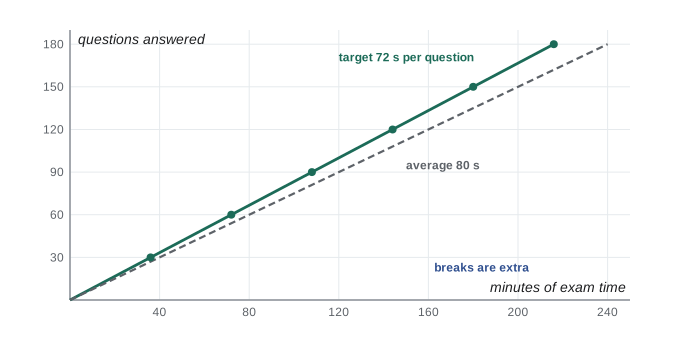
The exam gives 240 minutes for 180 questions, an average of 80 seconds per question. The two 10-minute breaks are separate and do not count against your 240 minutes. Most questions take less than a minute to answer once you are practised; case sets and calculations take longer. The aim is a steady pace that leaves a few minutes in each section to review questions you flagged.
# Pacing plan for 180 questions in 240 minutes (breaks are separate and not counted).
total_q, total_min = 180, 240
avg = total_min * 60 / total_q
print(f"average available: {avg:.0f} seconds per question")
target = 72                                   # seconds; leaves time to review flagged items
reserve = total_min - total_q * target / 60
print(f"at {target} s per question you finish with {reserve:.0f} minutes to review")
print()
print(f"{'After question':>15}{'Target elapsed':>16}{'Latest elapsed':>16}")
for q in range(30, total_q + 1, 30):
    tgt = q * target / 60
    latest = q * avg / 60
print(f"{q:>15}{tgt:>13.0f} min{latest:>13.0f} min")average available: 80 seconds per question
at 72 s per question you finish with 24 minutes to review
After question Target elapsed Latest elapsed
30 36 min 40 min
60 72 min 80 min
90 108 min 120 min
120 144 min 160 min
150 180 min 200 min
180 216 min 240 minThe plan above targets 72 seconds per question, which would leave about 24 minutes in total for review. It also gives two checkpoints for every 30 questions: the target time, and the latest time at which you are still on the overall average. If you pass a checkpoint later than the latest time, speed up slightly on the next block, mainly by not lingering over questions you cannot resolve.
Handling hard questions
Every candidate meets questions that seem to have two right answers, or none. The worst response is to spend several minutes going round in circles. A better routine is:
- Read the stem again, slowly, and identify the signal word and the situation.
- Eliminate what you can, using the distractor types from lesson 2.
- If two options remain, apply the decision ladder from lesson 3: which comes first, which is within the project manager's role, which protects value?
- Choose the better option, flag the question and move on. You can return to it before the section ends.
When you return to a flagged question, change your answer only if you find a clear reason, such as a fact you missed. Research on test taking suggests that well-founded changes more often help than hurt, but changes driven only by doubt are less reliable. A sound rule is to change an answer when you can explain why the new one is better.
The breaks and the sections
The 2026 exam has two optional 10-minute breaks. On the current exam, the first break comes after the case-study section and the second about midway through the remaining questions. Once you start a break, you cannot return to the questions before it. That makes each section a separate unit: finish every question and review your flagged items before you click through to the break.
Take both breaks. Ten minutes away from the screen to stretch, drink water and eat a small snack restores concentration for the next section. Candidates who skip breaks to save time usually lose more through fatigue than they gain. If you finish a section early, the unused time does not carry over to the next one, so use it to review that section's flagged questions.
| Before the break | During the break | After the break |
|---|---|---|
| Answer every question in the section | Leave the room or stand away from the desk as allowed | Settle in and reread the first question carefully |
| Review flagged questions | Drink water and eat a light snack | Return to your pace plan |
| Confirm nothing is blank | Do not use your phone or study materials | Treat the section as a fresh start |
Test centre or online?
You can take the exam at a Pearson VUE test centre or online with remote proctoring. Each has advantages, and the question formats differ slightly, as lesson 1 explained.
| Factor | Test centre | Online proctored |
|---|---|---|
| Environment | Controlled room, provided equipment | Your own private room and computer |
| Technical risk | Low; staff handle problems | Higher; you must meet system and internet requirements |
| Travel | Required; plan time and parking | None |
| Question formats | All, including matching, hotspot and pull-down | Case sets, graphics, single and multiple response |
| Breaks | Leave the room under staff supervision | Leave the camera view only as permitted during scheduled breaks |
| Scratch work | Provided whiteboard or erasable sheets | On-screen whiteboard; physical notes usually not allowed |
| Interruptions | Rare | Any person entering the room or noise can end the session |
Online exams suit candidates with a quiet, private room, reliable internet and a computer that passes the system check. Test centres suit candidates who want fewer technical worries or have no suitable space at home. If you choose online, run the official system test on the same computer and network you will use, well before the day, and again shortly before the exam.
In Canada, test centres are mostly in larger cities. Candidates in smaller communities often choose the online exam to avoid a long drive, especially in winter. If you book a test centre, allow for weather and road conditions on the day.
Online proctoring rules in practice
Online exams are monitored through your webcam and microphone. The exact rules are in your confirmation and the testing partner's guidance; typical requirements include:
- A private, quiet room with a closed door, where no one will enter during the exam.
- A clear desk and surrounding area, with no notes, books, phones or second monitors within reach.
- A room scan with your webcam and photographs at check-in, which can begin some minutes before the appointment time.
- Government-issued identification matching the name on your PMI application exactly.
- Staying in camera view throughout, except during the scheduled breaks, and not reading questions aloud.
- Using the on-screen whiteboard for working, rather than paper.
Breaking a rule, even innocently, such as someone walking into the room or looking away from the screen repeatedly, can lead the proctor to end the exam. Prepare the room the day before, tell everyone in the household, and silence or remove devices that might ring.
Test-centre logistics
For a test centre, arrive early; centres typically ask candidates to arrive about 30 minutes before the appointment. Bring the required identification, which must match your application. You will store personal items in a locker, be photographed and possibly scanned, and receive a whiteboard or erasable sheets. If anything about the environment distracts you, such as noise or a faulty keyboard, tell the staff immediately rather than struggling through.
The day itself
Worked problem
Priya plans her exam day
Priya has booked an online exam starting at 9:00 on a Saturday. She lives with her partner and two children. How should she plan the day?
Show solution
- The evening before, she runs the system check again, clears her desk, removes notes from the room and sets out her identification.
- She arranges for her partner to take the children out from 8:15 until about 1:45, covering check-in, the exam and both breaks, so the house is quiet.
- She eats a normal breakfast, avoids too much caffeine, and starts check-in at the earliest allowed time so that any technical problem can be solved before 9:00.
- She uses her pacing plan, takes both breaks, eats a small snack and drinks water during them, and reviews each section's flagged questions before moving on.
Answer: Prepare the room and technology the night before, protect the time from interruptions, start check-in early and follow the pacing plan with both breaks.
After the exam you will usually see a provisional pass or fail result on screen, followed later by the official result and score report in your PMI account. If you pass, PMI records your certification and the three-year certification cycle begins, with 60 professional development units needed to renew. If you do not pass, the score report shows which domains to work on, and you can retake within your eligibility period.
Concentration over four hours
Four hours of careful reading is tiring for anyone. Attention tends to dip in predictable places: after the first hour, just after a break, and in the last forty minutes. Plan for those dips rather than being surprised by them. At each checkpoint, take one slow breath and relax your shoulders before reading the next question. After each break, read the first question of the new section twice as carefully as usual, because the mind takes a minute to settle back in. In the final stretch, keep using your reading routine even if you feel rushed; misreading late in the exam is a common cause of lost marks.
Your physical setup matters too. At a test centre, adjust the chair and screen at the start rather than putting up with discomfort for four hours. At home, choose a chair you can sit in comfortably, check the lighting so the screen is easy to read, and keep the room at a comfortable temperature. Small discomforts become large distractions by the third hour.
Food and drink are simple but often neglected. A normal meal a couple of hours before the exam, rather than a large one just before, keeps energy steady. During breaks, a small snack with some protein and slow carbohydrates, such as nuts or a granola bar, works better than sugar alone. Check what you are allowed to bring into the break area or keep near your desk before the day.
Worked problem
Recovering from a slow start
At question 30, a candidate sees that 48 minutes have passed instead of the target 36, after several difficult case questions. What should the candidate do?
Show solution
- Stay calm: the candidate is 12 minutes behind the target and 8 minutes behind the average pace, which is recoverable.
- Over the next 60 questions, aim for about 65 to 70 seconds each by answering straightforward questions promptly and flagging hard ones rather than wrestling with them.
- Do not skip reading parts of the stem to save time; that trades a small time gain for more errors.
- Check again at question 60. By then the candidate should be close to the average pace and can return to the normal target.
Answer: Speed up modestly on straightforward questions and flag hard ones, then recheck at the next checkpoint.
Common mistakes
MistakeSpending several minutes on one hard question.
InsteadEliminate, choose, flag and move on.
MistakeSkipping the breaks to save time.
InsteadBreaks do not use exam time; take both to stay sharp.
MistakeLeaving flagged questions for the end of the exam.
InsteadReview them before each break, because you cannot go back.
MistakeTesting your computer only on the exam morning.
InsteadRun the system check well ahead and again shortly before.
MistakeUsing an identification document with a different name.
InsteadThe name must match your PMI application exactly.
Summary and key terms
- You have 240 minutes for 180 questions, an average of 80 seconds each; breaks are extra.
- Aim for a steady pace of about 70 to 75 seconds, with checkpoints every 30 questions.
- For hard questions: reread, eliminate, apply the decision ladder, choose, flag and move on.
- Each break closes the section before it, so review flagged questions first.
- Test centres reduce technical risk and offer all formats; online exams avoid travel but demand a private room and a working setup.
- Prepare identification, room and technology the day before, and protect the exam time from interruptions.
- Pacing plan
- A schedule of target times for points in the exam, used to keep a steady speed.
- Checkpoint
- A point in the exam at which you compare elapsed time with your plan.
- Flag
- A marker on a question you want to review before leaving the section.
- Section
- A block of questions that closes when you start a break.
- Online proctoring
- Remote supervision of an exam through webcam, microphone and screen monitoring.
- System check
- The testing partner's test of your computer, camera and connection.
- Score report
- The official report showing pass or fail and performance by domain.
- Professional development unit (PDU)
- A unit of continuing education; 60 are needed every three years to maintain the PMP.
Practice problems
Work each problem on paper first, then reveal the answer to check.
What is the average time available per question?
Show answer
80 seconds.
Do the breaks count against the 240 minutes?
Show answer
No.
When should you review flagged questions?
Show answer
Before each break, because you cannot return to a closed section.
Where does the first break come on the 2026 exam?
Show answer
After the case-study section.
What should you do when stuck between two options?
Show answer
Apply the decision ladder, choose, flag and move on.
When should you change an answer?
Show answer
When you can explain why the new answer is better.
Name two requirements of online proctoring.
Show answer
For example, a private room, a clear desk, a room scan, matching identification or staying in camera view.
Which formats are offered only at test centres?
Show answer
Matching, enhanced matching, hotspot and pull-down list.
How early should you arrive at a test centre?
Show answer
About 30 minutes before the appointment.
How many PDUs are needed to renew the PMP?
Show answer
60 every three years.
Lesson quiz · 5 questions
Score 60% or more to complete this lesson.
Create a free account to save your progress, take quizzes and earn a certificate.