
PHOT-310 · Lesson 10 of 12 · 27 min
Retouching, compositing, CGI and AI imagery
Very few commercial product images are delivered exactly as they came out of the camera. Dust is removed, labels are straightened, reflections are refined, several exposures are blended, backgrounds are cleaned or replaced, and increasingly, parts of the image or the whole image are rendered from 3D models or generated with artificial intelligence. These techniques are powerful and legitimate tools, but they also carry responsibilities. A product image is a representation to consumers about what they are buying; when post-production changes the product's appearance, features or performance, it can mislead them and break the law. This lesson covers product retouching levels and techniques, multi-exposure compositing, computer-generated imagery, generative AI tools, the copyright and disclosure questions they raise, and the legal and ethical line between enhancing an image and deceiving a customer.
Levels of product retouching
Retouching effort varies enormously, and agreeing the level in advance avoids disputes over cost and expectations. Studios and retouching houses commonly define levels such as:
- Basic: crop, straighten, exposure and colour correction, dust and lint removal, background cleaned to the required value. Typical for high-volume e-commerce.
- Standard: basic plus clipping or background removal, consistent shadows, removal of minor scratches, creases and labels, alignment to templates and colour matching across variants.
- Advanced: standard plus reshaping and symmetry, label replacement with clean artwork, reflection control, combining multiple exposures, removing supports and seams.
- Hero or high-end: complete reconstruction of the product's surfaces for advertising and packaging, with perfect gradients, highlights and edges, composites of many frames, colour-critical matching and many review rounds.
| Level | Typical use | Indicative time per image |
|---|---|---|
| Basic | High-volume e-commerce | 2 to 5 minutes |
| Standard | Retail e-commerce with clipping | 5 to 15 minutes |
| Advanced | Brand websites, catalogues | 30 minutes to 2 hours |
| Hero | Advertising, packaging | 4 hours to several days |
Worked problem
Budgeting retouching time
A job includes 120 e-commerce images at standard level, 20 advanced images for a brand site and 3 hero images for packaging. Estimated times are 10 minutes, 1 hour and 8 hours respectively. At a retouching rate of $85 per hour, what should be budgeted?
Show solution
- Standard: 120 × 10 min = 1,200 min = 20 h.
- Advanced: 20 × 1 h = 20 h.
- Hero: 3 × 8 h = 24 h.
- Total: 64 h × $85 = $5,440.
Answer: About 64 hours or $5,440, before revision rounds. State in the estimate how many rounds of revisions are included and the rate for additional work.
Product retouching techniques
Product retouching focuses on cleanliness, accuracy and form. Common tasks include:
- Dust, lint, scratch and fingerprint removal: the most frequent task, which is why careful handling on set saves so much money.
- Clipping and masking: separating the product from the background with paths or masks for placement on white or on new backgrounds, with clean, accurate edges.
- Shadows and reflections: creating consistent drop shadows, natural contact shadows or mirror reflections so that products sit convincingly on the surface.
- Straightening and symmetry: correcting perspective, aligning verticals and making symmetrical products, such as bottles and boxes, exactly symmetrical.
- Label and graphics clean-up: replacing a wrinkled or misprinted label on a pre-production sample with clean artwork supplied by the client, aligned and wrapped to the product's shape.
- Colour matching: adjusting the product colour to match the physical product or a supplied reference, using measurements from colour targets and spectrophotometer readings where needed.
- Gradient and surface refinement: smoothing gradients and highlights on glossy surfaces so that they look clean and continuous.
Retouchers work non-destructively with layers, masks and adjustment layers, so that changes can be revised. Master files are kept at full resolution with layers, and derivative files are exported for each use.
Multi-exposure compositing
Many advertising product images are composites of several frames shot with the camera locked in position, each frame lit for a different part of the product. A perfume bottle might be shot in five frames: one for the glass edges in dark-field, one for the liquid backlit, one for the label, one for the metal cap, and one for the background gradient. The retoucher combines the best parts of each frame with masks. This technique, sometimes called light painting or frame compositing, lets the photographer light each element ideally without compromise.
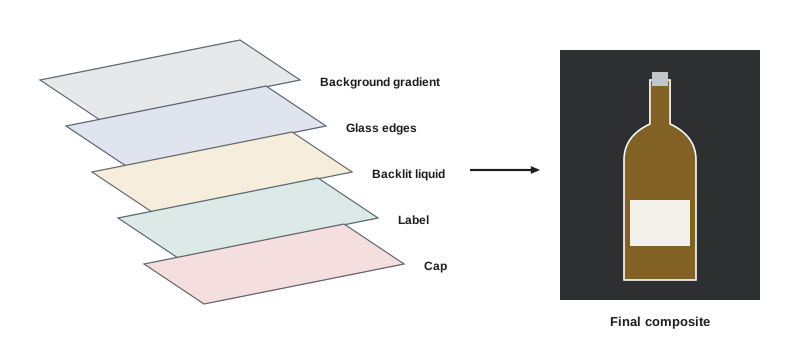
Composites require planning on set. The camera, product and focus must not move between frames; lights that are not needed in a frame are switched off or flagged; and the photographer shoots a clean plate of the empty set for retouching. Supports such as acrylic rods, fishing line and clamps can be used freely when the photographer knows they will be masked out using a frame in which they are absent or hidden.
Composites can also combine product photographs with separately shot backgrounds, props, splashes and environments. When combining photographs from different shoots, matching perspective (camera height, angle and focal length), light direction, colour, contrast, grain and depth of field is essential for a believable result.
Computer-generated imagery
Computer-generated imagery (CGI) creates product images from 3D models rather than photographs. Many furniture, appliance, electronics, automotive and packaging images are now fully or partly rendered. The 3D model may come from the manufacturer's computer-aided design (CAD) files, or a 3D artist may build it from measurements and photographs. Materials are defined using physically based rendering (PBR) properties such as colour, roughness, metalness and transparency, then lit in a virtual studio and rendered by software such as Blender, KeyShot, 3ds Max with V-Ray or Corona, or Cinema 4D with Redshift.
CGI has clear advantages: products can be shown before they are manufactured, every colour variant can be rendered from one model, impossible camera angles and exploded views are easy, and there is no limit on sets and environments. Disadvantages include the cost of building accurate models and materials, difficulty rendering some natural materials convincingly, and a look that can feel artificial without skilled artists. Hybrid workflows are common: a product photographed for accurate materials, combined with rendered environments, or a rendered product placed in a photographed room.
Worked problem
When is CGI cheaper than photography?
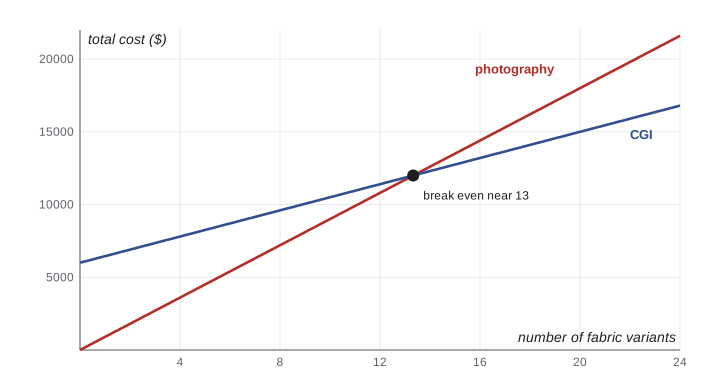
A furniture company needs images of a sofa in 12 fabric colours, each in 3 angles. Photography costs $2,400 per day to shoot about 12 images, plus $300 for each fabric sample sofa built. A CGI studio charges $6,000 to build the model and materials, then $150 per rendered image. Which is cheaper for 12 colours? At how many colours do they break even?
Show solution
- Images: 12 colours × 3 angles = 36.
- Photography: 36 / 12 = 3 days × $2,400 = $7,200, plus 12 × $300 = $3,600; total $10,800, or $900 per variant.
- CGI: $6,000 + 36 × $150 = $6,000 + $5,400 = $11,400; per extra colour $450.
- Break even: 900x = 6,000 + 450x, so x ≈ 13.3 colours.
Answer: For 12 colours, photography is slightly cheaper ($10,800 versus $11,400), but CGI becomes cheaper from about 14 colours, and the CGI model can be reused for new colours, angles and seasons.
Generative AI in product imagery
Generative AI tools create or modify images from text prompts, reference images or masks. In product photography they are used to extend backgrounds, remove objects, generate props and environments, create background variations for e-commerce, produce concept images for briefs and mood boards, and in some cases generate entire scenes, models or products. Generative fill tools in editing software, dedicated product photography platforms and general image generators are all widely available.
The opportunities are real: faster pre-production visualization, cheap background variations, rescue of imperfect frames and new creative possibilities. So are the risks:
- Accuracy: generated images can change the product's shape, proportions, labels, textures or colours in subtle ways. A generated image of a product may not show the real product at all.
- Rights: training data, output ownership and similarity to existing works are legally unsettled in many places. Some tools offer indemnities for commercial use; others do not.
- Copyright protection: purely AI-generated material may not be protected by copyright, which matters to clients who want exclusive images.
- Trust: undisclosed synthetic imagery can damage brand trust when discovered, and platforms increasingly label AI-generated content.
- Talent and likeness: generating images that resemble real people raises right of publicity and consent issues, and union agreements increasingly address digital replicas.
In Canada, whether AI-generated works can be protected by copyright, and who would own them, is unsettled. The Copyright Act does not define authorship for AI-generated content, a registration listing an AI system as co-author has been challenged in the Federal Court, and the federal government has consulted on copyright and generative AI without, so far, changing the law. Photographers should state in contracts which parts of an image are AI-generated and avoid promising exclusive copyright in generated material.
Content provenance standards are developing in response. The Coalition for Content Provenance and Authenticity (C2PA) standard, implemented as Content Credentials, attaches signed metadata to images recording how they were captured and edited, including the use of generative AI. Some cameras, editing programs and platforms support it, and some clients request it.
Enhancement versus deception
The central legal and ethical question is whether the final image gives consumers a false impression about the product. Cleaning dust, removing a pre-production flaw that will not exist on the shipped product, correcting colour to match the real product, and creating attractive backgrounds are generally acceptable. Changing what the product is or does is not.
In Canada, the Competition Act prohibits making representations to the public that are false or misleading in a material respect, considering their general impression as well as their literal meaning. Deceptive marketing can be pursued as a civil matter, with administrative monetary penalties that since 2022 can reach three times the benefit obtained or, if that cannot be determined, up to 3 percent of annual worldwide gross revenues, and knowingly or recklessly misleading representations can be criminal offences. Since June 2025, private parties can also seek leave from the Competition Tribunal to bring deceptive marketing cases. The Canadian Code of Advertising Standards, administered by Ad Standards, also requires that advertising not distort the true meaning of claims or illustrations.
Practical examples help draw the line. Retouching a smartphone image so that its screen shows a crisp interface is common and accepted when the interface is what the phone displays. Making the phone thinner, changing its camera layout or exaggerating its screen brightness would misrepresent the product. In cosmetics advertising, self-regulatory bodies have challenged mascara advertisements in which models wore false lashes or lashes were enhanced in post-production, because the images exaggerated the product's effect, and small-print disclaimers did not cure the misleading overall impression. In food advertising, as lesson 6 explained, the advertised product must be genuine and representative.
A useful test for any change is to ask: would a customer who saw this image and then received the product feel misled about its appearance, size, colour, features or performance? If the answer is yes, the change should not be made, or the image must be presented as an illustration, with the difference made clear in a way that changes the overall impression, not just in fine print.
Working with outside retouchers
Many photographers send advanced and hero retouching to specialist retouchers or retouching houses. A clear retouching brief prevents wasted rounds: supply the selected frames and any extra frames for compositing, the client's layout and brand guidelines, the reference product or colour measurements, the intended uses and sizes, and marked-up notes showing exactly what should change and what must not. Agree the file format, colour space, layer structure and naming for returned files, as well as the schedule and the number of revision rounds included. Check returned images at full size against the physical product and the brief before sending them to the client, because the photographer remains responsible to the client for the accuracy of the final images, whoever performed the retouching.
Common mistakes
MistakeLeaving the retouching level undefined in the estimate.
InsteadDefine levels, times and revision rounds before the job.
MistakeMoving the camera between frames intended for a composite.
InsteadLock camera, product and focus, and shoot a clean plate.
MistakeUsing generative AI to create product details without checking accuracy.
InsteadVerify that every product feature matches the real product.
MistakePromising clients exclusive copyright in AI-generated material.
InsteadDisclose AI use and state ownership terms clearly.
MistakeRetouching a product to perform or look better than it does.
InsteadEnhance presentation, never misrepresent the product.
Summary and key terms
- Retouching levels range from basic e-commerce clean-up to hero reconstruction.
- Product retouching covers dust, clipping, shadows, symmetry, labels, colour and gradients.
- Multi-exposure composites light each part of a product ideally from a locked camera.
- CGI renders products from 3D models and can be cheaper for many variants.
- Generative AI offers speed but risks inaccuracy, unclear rights and limited copyright protection.
- Content Credentials record capture and editing history, including AI use.
- Advertising law prohibits images that give a false or misleading impression of the product.
- Retouching level
- An agreed standard of post-production effort.
- Clipping
- Separating a product from its background.
- Composite
- An image combined from several frames or sources.
- Clean plate
- A frame of the set without the product or supports.
- CGI
- Computer-generated imagery rendered from 3D models.
- PBR
- Physically based rendering using real material properties.
- Generative AI
- Software that creates images from prompts or references.
- C2PA
- Standard for signed content provenance metadata.
- General impression
- The overall message conveyed by an advertisement.
- Mock-up
- A substitute or simulated demonstration in advertising.
Practice problems
Work each problem on paper first, then reveal the answer to check.
What is the most common product retouching task?
Show answer
Dust, lint and scratch removal.
Retouching cost for 30 hours at $90?
Show answer
$2,700.
Why shoot a clean plate?
Show answer
To remove supports and the product in compositing.
Name two advantages of CGI.
Show answer
Pre-production products and many variants from one model.
Break even when photography is $800 per colour and CGI is $5,000 + $300 per colour?
Show answer
10 colours.
Name two risks of generative AI for products.
Show answer
Inaccurate product details and unclear rights.
Does US copyright protect purely AI-generated images?
Show answer
No, human authorship is required.
What is C2PA?
Show answer
A standard for signed provenance metadata.
Is removing dust from a product image deceptive?
Show answer
Generally no.
Is making a phone look thinner acceptable?
Show answer
No, it misrepresents the product.
Lesson quiz · 5 questions
Score 60% or more to complete this lesson.
Create a free account to save your progress, take quizzes and earn a certificate.