
MSBA-261 · Lesson 10 of 12 · 21 min
Row-level security
▶ Video coming soon A video version of this lesson is on the way.
Dr. Philippa Ondaatje-Ruiz, Lumenvale's privacy officer, had one condition before the Enrolment and Revenue model could be shared beyond the institutional research office. "Campus coordinators see their own campus. Deans see their own school. Nobody sees individual students unless their job needs it," she said. "And I want to be able to test it myself." That condition is a job for row-level security, a feature the PL-300 study guide places in the domain on managing and securing Power BI. It is defined in the semantic model, so it belongs in a modeling course too. This lesson covers static and dynamic row-level security, how it interacts with workspace roles, how to test it, and object-level security for hiding whole tables and columns.
What row-level security does
Row-level security (RLS) restricts which rows of data a user can see. It is defined as roles in the semantic model. Each role has one or more table filter expressions, DAX expressions that return true for the rows members of the role may see. When a member of a role queries the model, through any report, dashboard, Excel connection or Copilot, the engine applies the role's filters before anything else. The filters then travel along relationships like any other filter, so a filter on the Campus dimension also restricts Registration and Outlet Sales.
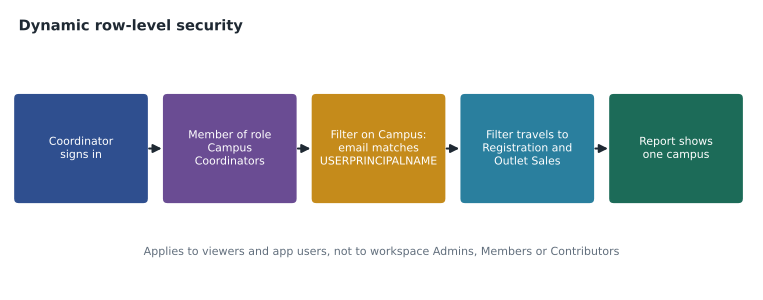
RLS filters rows, not visuals. A report built with RLS in mind can be shared with everyone: the same page shows Downtown figures to the Downtown coordinator and Ridgeview figures to the Ridgeview coordinator, and the college totals each of them sees are totals of their own campus only.
Static roles
The simplest roles are static: a filter with a fixed value. Kwabena first built three roles, Downtown, Lakeshore and Ridgeview, each with a filter on the Campus table.
// Role: Lakeshore   Table: Campus
[CampusCode] = "LKS"
Static roles are easy to understand and test, and they are a fine choice when there are few, stable groups. Their weakness shows as the organization grows: one role per campus is manageable, but one role per school, per program or per department quickly becomes dozens of roles to maintain, each needing its members assigned.
Dynamic roles
Dynamic RLS uses a single role whose filter depends on who is signed in. The DAX function USERPRINCIPALNAME returns the signed-in user's sign-in name, usually their email address, such as kwabena.asante-lowe@lumenvale.example. The model includes a security table that maps users to what they may see, and the role filter compares it with the signed-in user.
| UserEmail | CampusCode | School |
|---|---|---|
| dtn.coordinator@lumenvale.example | DTN | (all) |
| lks.coordinator@lumenvale.example | LKS | (all) |
| dean.health@lumenvale.example | (all) | Health Sciences |
| dean.business@lumenvale.example | (all) | Business |
Kwabena designed two roles, one for campus coordinators and one for deans, each with a dynamic filter.
// Role: Campus Coordinators   Table: Campus
[CampusCode]
    IN CALCULATETABLE (
        VALUES ( 'Security Access'[CampusCode] ),
        'Security Access'[UserEmail] = USERPRINCIPALNAME ()
    )

// Role: Deans   Table: Program
[School]
    IN CALCULATETABLE (
        VALUES ( 'Security Access'[School] ),
        'Security Access'[UserEmail] = USERPRINCIPALNAME ()
    )
The bracketed "(all)" entries were handled by putting deans and coordinators in different roles: the Deans role filters only Program, so a dean sees every campus, and the Campus Coordinators role filters only Campus, so a coordinator sees every school. A user who belongs to several roles sees the union of what each role allows, which is worth remembering: membership in a broad role overrides the restrictions of a narrow one.
The Security Access table itself was hidden from report authors and related to nothing, so that it did not filter facts accidentally. An alternative design relates the security table to the dimension and uses relationship filtering with a bidirectional filter set to apply security filters in both directions; that design suits large mappings but is harder to reason about. Kwabena chose the lookup pattern above because it was explicit.
Signe pointed out one more benefit of the dynamic design: the registrar's office could maintain the Security Access table in a SharePoint list or Dataverse table, so a new coordinator gained access the next time the model refreshed, without anyone editing the model.
Who RLS applies to
RLS applies only to users with Viewer permissions on the content: people who see the report through a workspace Viewer role, an app, or direct sharing with read access. Users with the Admin, Member or Contributor workspace roles can edit the model, so RLS does not restrict them. This surprises many teams. If the Lakeshore coordinator is made a Contributor so she can build her own reports in the workspace, she will see every campus.
Rupert's solution was the one Microsoft recommends: keep the semantic model in a workspace where only the institutional research team has edit roles, publish reports to readers through the Student Success org app and the enrolment app, and give report authors Build permission on the model so they can create their own reports in other workspaces. Build permission lets them connect to the model, and RLS still applies to them as readers.
Assigning members
Roles are created in Power BI Desktop, or with web modeling in the service, but members are assigned in the Power BI service, on the semantic model's Security settings. Members can be individual users or, better, Microsoft Entra security groups, so that membership is managed in one place. Kwabena asked Rupert's team to create two groups, PBI-Enrolment-Coordinators and PBI-Enrolment-Deans, and assigned each to its role. Dynamic filters then decided which rows each member saw.
A model with RLS roles but no members assigned to a role means readers outside every role see nothing: a viewer who is not a member of any role gets an error or empty visuals. That is a safe default, but it confuses people at launch. Kwabena added a short page to the app explaining how to request access.
Testing roles
Philippa had insisted on testing, and Power BI makes it straightforward. In Desktop, View as on the Modeling ribbon lets you choose roles and enter another user's email, so that USERPRINCIPALNAME returns that email, and see the report exactly as that user would. In the service, the semantic model's Security page has a Test as role option that does the same against the published model.
Kwabena wrote a test plan with five people: a coordinator for each of two campuses, two deans and a user in no role. For each he checked the overview page totals against figures he calculated independently, checked that the student detail page showed nothing for deans, and checked a matrix visual for the user in no role. He ran the plan in Desktop before publishing and again in the service afterwards, with Philippa watching the second run.
Object-level security
RLS hides rows. Sometimes whole tables or columns should be hidden from some users, such as the Student table with names and birth dates. Object-level security (OLS) restricts access to tables and columns for a role, so that members cannot see them or query them at all; visuals that use them show an error for those users. OLS is defined on roles like RLS, using TMDL view in Desktop or an external tool such as Tabular Editor.
Philippa's rule that "nobody sees individual students unless their job needs it" became an OLS setting: the Deans and Campus Coordinators roles had no access to the Student table, while a separate Advising role, for staff whose work required student detail, did. Reports for deans were designed without student-level visuals, so they never displayed an error.
Security and performance
Role filters run for every query, so they should be simple. Filtering a small dimension, such as Campus or Program, is cheap, and the filter then travels to the fact tables along relationships. Filtering a large fact table directly, or writing role filters with complex iterators, makes every visual slower for every reader. Kwabena kept every role filter on a dimension and tested report speed while viewing as a role, because a page that is fast for the model owner can be slow for a role member.
Worked problem
Diagnosing a security surprise
After launch, the Lakeshore coordinator reports that she can see Downtown and Ridgeview figures. Her email is correctly listed for LKS in the Security Access table. What should Kwabena check?
Show solution
- Check her workspace role: if she is an Admin, Member or Contributor of the model's workspace, RLS does not apply to her.
- Check her role memberships: if she is also in the Deans group, the union of both roles lets her see all campuses for her school.
- Use Test as role in the service with her email to reproduce what she sees.
- He finds she was added as a Contributor so she could edit a report. Remove the role, give her Build permission, and let her author in a separate workspace.
Answer: Check workspace roles first, because RLS does not restrict editors, then role memberships, then test as her in the service.
Securing several fact tables
Because role filters travel along relationships, one filter on Campus secured every fact table related to Campus: Registration, Outlet Sales and Bookstore Stock. Program Budget related only to Program and Date, so the Campus Coordinators role did not restrict it at all, and a coordinator could see every program's budget. Kwabena discussed this with Philippa. Budgets were not sensitive, so they agreed to leave it, and he documented the decision. In a model where every fact table had to be restricted, he would have checked that each one had a path from a secured dimension, or added a filter for the unsecured table to the role.
This is a good test for any RLS design: list every table in the model and ask whether each role restricts it, through a relationship or its own filter. Tables that are reached by no role filter are visible in full to every role member.
Worked problem
Checking what a role restricts
The Deans role filters Program[School]. Which tables in the enrolment model does it restrict: Registration, Outlet Sales, Program Budget and Bookstore Stock?
Show solution
- Registration relates to Program, so the School filter reaches it: restricted.
- Program Budget relates to Program: restricted.
- Outlet Sales and Bookstore Stock relate to Campus, Outlet and Product Category, not Program: not restricted.
- Decide with the privacy officer whether deans may see all outlet data; if not, add a role filter on Outlet or Campus for deans.
Answer: Registration and Program Budget are restricted; Outlet Sales and Bookstore Stock are not, because no path connects Program to them.
RLS with Copilot and other connections
Row-level security applies to every way of querying the model, not only reports. A coordinator who analyzes the model in Excel sees only her campus. A reader who asks Copilot a question about enrolment gets an answer computed with the same security filters, because Copilot queries the model as that user. That consistency is one reason Philippa preferred security in the model rather than in separate filtered copies of the data for each campus.
Static or dynamic: a decision summary
For small, stable groups, such as three campuses, static roles are clear and easy to audit. For many users or groups that change often, dynamic roles with a maintained mapping table scale far better. Some organizations combine them: a dynamic role for most readers and a static All Data role for a small audit group. Whatever the design, the mapping table and the role membership should be owned by someone outside the modeling team, such as the registrar's office, so that access decisions are made by the people accountable for them.
Documenting the security design
Philippa asked for one more thing before sign-off: a written description of the security design that someone outside the analytics team could understand. Kwabena wrote a single page listing each role, its filter in plain words, the security group assigned to it, who owned the group's membership, which tables each role restricted and which it did not, and how to test it. The page was stored with the model in the repository and linked from the app's help page. When the college's internal auditors reviewed data access the following spring, the page answered their questions without a meeting.
Common mistakes
MistakeGiving report readers the Contributor or Member role so they can explore the model.
InsteadKeep readers as viewers or app users, and grant Build permission for authoring; RLS does not apply to editors.
MistakeCreating one static role per department as the organization grows.
InsteadUse dynamic RLS with USERPRINCIPALNAME and a maintained security table.
MistakeAssigning individual users to roles.
InsteadAssign Microsoft Entra security groups so membership is managed in one place.
MistakePublishing without testing roles.
InsteadTest with View as in Desktop and Test as role in the service, against independently calculated figures.
Summary and key terms
- Row-level security restricts rows through roles with DAX table filter expressions defined in the semantic model.
- Role filters travel along relationships, so filtering a dimension restricts related fact tables.
- Static roles use fixed values; dynamic roles use USERPRINCIPALNAME and a security mapping table.
- A user in several roles sees the union of what the roles allow.
- RLS applies to viewers and app users, not to workspace Admins, Members or Contributors.
- Members, ideally security groups, are assigned in the Power BI service; test with View as and Test as role.
- Object-level security hides whole tables or columns from roles.
- Row-level security (RLS)
- Model roles whose DAX filters restrict which rows members can see.
- Role
- A named set of security filters in a semantic model, with members assigned in the service.
- Static RLS
- Role filters with fixed values, such as one campus code.
- Dynamic RLS
- Role filters that depend on the signed-in user, usually through USERPRINCIPALNAME.
- USERPRINCIPALNAME
- A DAX function that returns the signed-in user's sign-in name.
- Object-level security (OLS)
- Security that hides tables or columns from members of a role.
- Build permission
- Permission to create content from a semantic model without editing it.
Practice problems
Work each problem on paper first, then reveal the answer to check.
Why did Kwabena put the role filter on Campus rather than on Registration?
Show answer
Filtering a small dimension is cheaper, and the filter reaches Registration and Outlet Sales through relationships.
Where are role members assigned?
Show answer
In the Power BI service, on the semantic model's security settings.
Which workspace roles are not restricted by RLS?
Show answer
Admin, Member and Contributor.
Lesson quiz · 5 questions
Score 60% or more to complete this lesson.
Create a free account to save your progress, take quizzes and earn a certificate.