
MSBA-110 · Lesson 9 of 12 · 20 min
Choosing the right AI tool for a task
▶ Video coming soon A video version of this lesson is on the way.
Hamish started the ninth session with a stack of 15 real requests that pilot users had sent him in October. "Can Copilot do my month-end commission reconciliation?" "Which tool should I use to compare two insurers' cyber wordings?" "Can I get an agent that answers the questions clients ask on our website?" Some had obvious answers. Some needed a conversation. One, the reconciliation, was better done without generative AI at all. Choosing well, he said, was the skill that separated people who saved time from people who wasted it arguing with a chatbot.
This lesson gives a practical way to match tasks to tools. It draws together the earlier lessons: what generative AI is good at, what grounding the task needs, which Copilot experience can reach that data, and how much risk the output carries. AB-731 asks leaders to select a generative AI solution to meet a business need and to identify when to use Researcher or Analyst; AB-730 expects everyday users to make the same choices for their own work.
Start with the task, not the tool
Describe the task in one sentence before choosing anything: what goes in, what must come out, who will use the result and what happens if it is wrong. "I need a two-page plain-language summary of the differences between two cyber policy wordings for a client meeting on Thursday; if it is wrong, I give bad advice" is a task. "Use AI on cyber" is not.
Then ask four questions. Is this a language task? Drafting, summarizing, explaining, comparing and extracting suit generative AI; exact calculations, rule-following and transactions usually suit other tools. What information does it need? Public knowledge, a file you have, your work across Microsoft 365, or structured data in a system. How much does accuracy matter? Internal brainstorming tolerates error; client advice does not. Will this happen once or often? A one-off task suits a chat; a task repeated by many people may justify an agent or an automation.
The options
Quillfield's pilot users had a range of options, from no AI at all to building a custom agent.
| Option | Best for | Not ideal for |
|---|---|---|
| No generative AI: a formula, report, template or rule-based automation | Exact calculations, fixed rules, repeatable transactions | Drafting or summarizing varied text |
| Copilot Chat | General questions, public information, working with a file you upload | Questions that need your mailbox, meetings or shared files |
| Microsoft 365 Copilot in an app | Drafting or revising the document, email, deck or workbook in front of you | Deep research across many sources |
| Microsoft 365 Copilot Chat with work grounding | Questions across your emails, meetings, chats and files | Exact figures without checking |
| Researcher | Multi-step research across work and web with a cited report | Quick one-line answers |
| Analyst | Exploring data files, calculating and charting with explained steps | Narrative writing |
| An existing agent | A repeated task someone has already set up and tested | Tasks outside the agent's scope |
| Building a new agent | A repeated task for many people with stable knowledge or actions | One-off tasks |
A decision path
Hamish drew the choice as a short decision path. It does not cover every case, but it settles most of them in a few seconds.
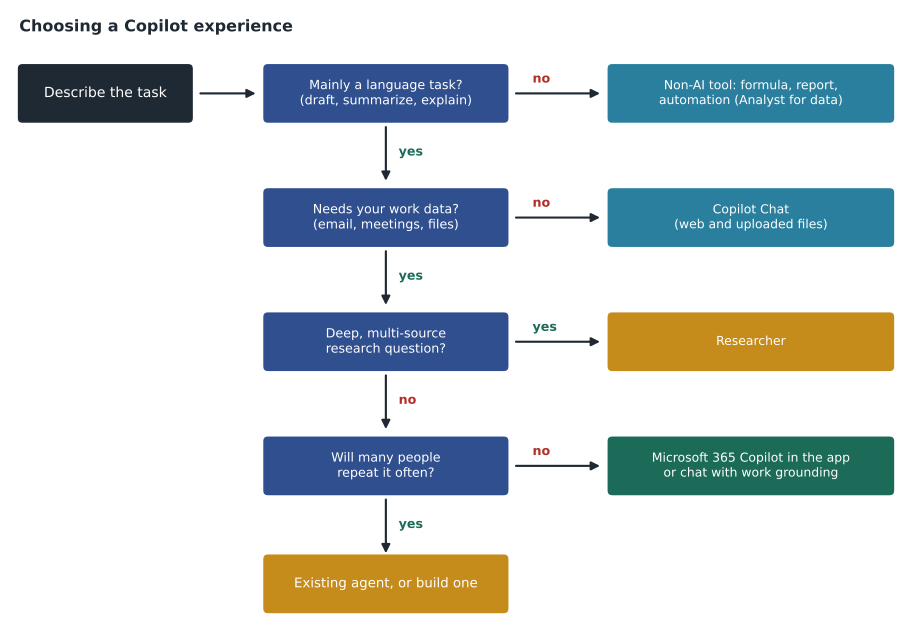
Look at where the path starts. Generative AI is not the first answer to every problem. Quillfield's commission reconciliation compared two systems line by line using fixed rules; an Excel workbook with lookups and checks did it more reliably than any chatbot could. Generative AI might help write the explanation of the variances afterwards, but not the reconciliation itself.
Researcher or Analyst?
People often confused the two built-in agents, so Hamish compared them directly. Researcher answers questions that need many sources read and weighed: it plans an approach, searches your work content and the web, and writes a structured, cited report. A good Researcher task at Quillfield was "What have our food manufacturing clients asked about product contamination cover in the last six months, and how do the three insurers we place most with compare on that cover?" Analyst answers questions about data: it reads spreadsheets or data files, reasons step by step, runs calculations and produces tables and charts with an explanation of what it did. A good Analyst task was "From this export of 2026 renewals, show retention by line of business and branch, and highlight anything unusual."
| Researcher | Analyst | |
|---|---|---|
| Main input | Many documents, messages and web sources | Spreadsheets and data files |
| Main output | A structured written report with citations | Calculations, tables and charts with explanations |
| Time taken | Several minutes | Seconds to minutes |
| Typical question | What do we know about this topic across our work and the web? | What does this data show? |
| Key check | Open the citations for important claims | Check the calculation steps and a sample of results |
Accuracy and risk shape the choice
The same task can call for different tools depending on what is at stake. Drafting an internal recap of a team meeting is low risk, so a quick Copilot summary with a skim is fine. Drafting the coverage comparison a client will rely on is high risk, so the broker might use Researcher to gather the material, then write or carefully revise the comparison and check each point against the wordings. For some tasks the risk is high enough that the organization decides AI should not be used at all, or only with specific review, as the AI council does for decisions about individual clients.
Worked problem
When does an agent pay off?
Quillfield's service team answers about 120 internal questions a week about procedures, each taking a coordinator about 6 minutes to look up. An agent could answer most of them in 1 minute of the asker's time. Building and testing the agent takes Yusra about 30 hours, plus about 2 hours a month of upkeep. Assuming the agent handles 80 of the 120 questions, how many hours a month does it save, and how long until the build time is repaid?
Show solution
- Time saved per question: 6 - 1 = 5 minutes.
- Questions handled a month: 80 x 4.33 weeks, about 346.
- Hours saved a month: 346 x 5 / 60, about 29 hours.
- Net of upkeep: 29 - 2 = 27 hours a month.
- Payback: 30 / 27, a little over 1 month.
Answer: About 27 hours a month net, so the build effort is repaid in just over a month. A task done once a quarter would never justify an agent.
Where you work matters
Use Copilot where the work already is. If you are writing a proposal in Word, Copilot in Word sees the document and can draft, rewrite or summarize in place. If you are in a long email thread, Copilot in Outlook can summarize it and draft a reply. If you need to pull together material from many places, Copilot Chat with work grounding is the better starting point. Moving content between tools by copying and pasting wastes time and can drop context. The AB-730 skill areas reflect this: managing prompts and conversations, and drafting and analyzing business content in the apps.
Sorting Hamish's 15 requests
By the end of the session the group had sorted all 15 requests. Four were best done in a single app with Copilot: drafting proposals, summarizing threads and revising letters. Three suited Copilot Chat with work grounding, such as "what did I agree with the insurer about the Hendry renewal?" Two were Researcher tasks and two were Analyst tasks. Two pointed to agents: the procedures agent already built and a certificate-request agent worth building. One, the website agent for clients, was referred to the AI council because it would talk directly to the public. And the commission reconciliation went back to Excel.
Combining tools in one piece of work
Real tasks often use more than one tool. Preparing for a renewal meeting with a large client might start with Copilot Chat with work grounding to gather what has been discussed this year, move to Analyst to look at claims and premium history from an export, use Researcher to check what the market is doing for that client's industry, and finish in Word or PowerPoint, where Copilot helps draft the meeting materials from the gathered notes. At each step the user decides what to keep, checks what matters and carries the result forward.
Worked problem
Planning a combined workflow
Dolores plans a renewal meeting for a large food manufacturer. She estimates: gathering past discussions by hand, 50 minutes; analyzing three years of claims in a spreadsheet, 60 minutes; reading market updates, 45 minutes; drafting a ten-slide deck, 90 minutes. With Copilot tools she expects to cut each step to about 40 percent of its time, but adds 30 minutes of checking overall. How much time does she expect to save?
Show solution
- Time by hand: 50 + 60 + 45 + 90 = 245 minutes.
- With tools before checking: 245 x 0.4 = 98 minutes.
- Add checking: 98 + 30 = 128 minutes.
- Saving: 245 - 128 = 117 minutes.
Answer: About two hours saved on one meeting, with checking built into the plan rather than added as an afterthought.
The checking time is planned from the start. Users who leave verification to the end, when they are tired and the meeting is close, are the ones most likely to let an error through. Building a short check into each step keeps the whole workflow reliable.
When the answer is "not yet"
Some tasks are good candidates for AI in principle but not yet in practice. The data may not be ready: client notes scattered across personal folders cannot ground a reliable answer until they are moved. The process may not be stable: a procedure that changes every month is a poor foundation for an agent. Or the risk may not yet be understood: a new type of client-facing agent needs a pilot with close monitoring before it handles real conversations. Saying "not yet" is part of choosing well.
At Quillfield, the client-facing website agent fell into this category. The AI council agreed the idea had merit but asked for three things first: a clear list of questions the agent would and would not answer, a tested escalation path to a person, and a statement on the website that visitors were talking to an AI agent. The project went onto the plan for the spring.
| Reason to wait | What to do first |
|---|---|
| Data is scattered or outdated | Move and clean the content; set ownership |
| The process keeps changing | Stabilize and document the process |
| The risk is not understood | Run a small pilot with close monitoring |
| People are not trained | Train users and set clear review rules |
Good prompts make every tool better
Choosing the right tool and writing a good prompt work together. The best tool with a vague prompt gives a vague answer; a clear prompt in a less suitable tool often still gives something useful. A good prompt states the goal, gives the context and points to the sources, and sets expectations for the format and length of the answer. "Summarize this" is weak. "Summarize this underwriter thread for a client meeting tomorrow: list the insurer's open questions, the deadline and anything we have promised, in five bullets, citing the emails" is strong.
These four parts, goal, context, source and expectations, are the structure MSBA-111 uses throughout, and they appear in the AB-730 skills for managing prompts and conversations. For this course, the point is that a well-written prompt is part of choosing well: it tells the tool exactly which job you have chosen it for.
Hamish kept the sorted list of 15 requests and added to it every week. Within a month it held more than 60 examples, each tagged with the tool that worked best and the check that went with it, and it became the most visited page on Quillfield's AI intranet site. Concrete examples from colleagues, he found, taught tool choice better than any general rule.
Common mistakes
MistakeReaching for generative AI for exact calculations and fixed rules.
InsteadUse formulas, reports or rule-based automation; use AI to explain results.
MistakeAsking Copilot Chat about your mailbox without work grounding.
InsteadUse Microsoft 365 Copilot with work grounding or the app where the content is.
MistakeBuilding an agent for a one-off task.
InsteadAgents pay off for tasks many people repeat.
MistakeChoosing a tool without considering what happens if the output is wrong.
InsteadMatch the tool and the review to the risk.
Summary and key terms
- Describe the task first: inputs, outputs, users and the cost of being wrong.
- Ask whether it is a language task, what information it needs, how much accuracy matters and how often it repeats.
- Options range from no AI, through Copilot Chat and Copilot in apps, to Researcher, Analyst and agents.
- Researcher writes cited reports from many sources; Analyst works with data and explains its calculations.
- Higher-risk outputs need more careful tools and review, and some uses go to the AI council.
- Researcher
- A Microsoft 365 Copilot agent that plans and carries out multi-step research and writes a cited report.
- Analyst
- A Microsoft 365 Copilot agent that reasons over data files, runs calculations and explains its steps.
- Rule-based automation
- A process that follows fixed rules, such as a scheduled workflow or formula, without generative AI.
- Payback period
- The time it takes for savings to repay the effort or cost of a solution.
Practice problems
Work each problem on paper first, then reveal the answer to check.
Why was the commission reconciliation not a generative AI task?
Show answer
It needed exact line-by-line matching under fixed rules, which formulas do more reliably.
Give one task for Researcher and one for Analyst.
Show answer
Researcher: comparing what clients have asked and what insurers offer on a cover. Analyst: retention by line and branch from a renewals export.
What four questions help choose a tool?
Show answer
Is it a language task, what information does it need, how much does accuracy matter, and how often will it repeat?
Lesson quiz · 5 questions
Score 60% or more to complete this lesson.
Create a free account to save your progress, take quizzes and earn a certificate.