
LVT-230 · Lesson 9 of 12 · 20 min
Video recording, storage and bandwidth
A camera's job is only half done when its image is good. The other half is keeping that image, at the right quality, for as long as the owner needs it, and being able to find the right minutes quickly when something happens. Riverside school's 140 cameras produce a constant stream of data, all day and all night, into recorders that must hold a month of it. If the recorders fill early, the oldest days are overwritten and the evidence for an incident three weeks ago is gone; if the network is overloaded, recordings have gaps. This lesson covers video compression, frame rate and bitrate, recording modes, how to calculate bandwidth and storage, how recorders protect video with RAID, the video management system, and exporting and retaining video according to the owner's policy.
Compression and codecs
Uncompressed video from a 4 MP camera at 15 frames per second would be more than a gigabit per second, far too much to send or store. Cameras compress video with a codec before sending it. The common codecs are H.264 and the newer H.265, which gives similar quality at roughly half the bitrate, though it needs more processing to decode and not every viewer supports it. Both send occasional complete frames, called key frames or I-frames, and in between send only the changes from frame to frame. Many cameras add their own smart compression, which lowers the bitrate further in parts of the image that are not changing.
Because compression sends changes, the bitrate depends on the scene. A camera looking at an empty corridor at night sends little data; the same camera looking at a busy cafeteria at lunch, or at trees moving in the wind, sends much more. Low light also raises the bitrate, because image noise looks like change to the codec. That is why storage estimates use average bitrates measured on similar cameras, with a margin, rather than the smallest number on a data sheet.
Frame rate, resolution and quality
Three settings decide most of a camera's bitrate: resolution, frame rate and compression quality. Resolution comes from the design, as lesson 8 described. Frame rate is how many images per second are recorded. Television-style motion needs 25 or 30 frames per second, but for most security recording 10 to 15 frames per second shows movement clearly and halves or thirds the storage; cashier counters, gaming and fast traffic may need more. The quality or compression level trades bitrate against detail; too much compression makes faces smear into blocks, which defeats the purpose of a recognition camera.
Most cameras produce two or more streams at once: a high-resolution main stream for recording and a lower-resolution substream for live viewing on multi-camera screens and phones, so viewers do not load the network with full-resolution video they cannot see in a small tile. The video management system picks the stream to suit the screen. Setting these streams consistently, from the design, is part of every camera's setup.
Recording modes
Recorders can record continuously, only when motion or an event is detected, or both: continuous at a lower frame rate with full frame rate during events. Event-only recording saves storage, but if the motion detection misses something, the video is not there, and video from just before the event, which shows how it started, is kept only if pre-event buffering is set. Owners with evidence needs, such as schools and hospitals, usually record continuously. Juniper Point records continuously at 10 frames per second with full rate on motion in the garage, and on motion only in the amenity rooms, which the board decided after its privacy review.
| Mode | Storage use | Risk | Typical use |
|---|---|---|---|
| Continuous | Highest | None from missed events | Schools, hospitals, entrances |
| Motion or event only | Lowest | Missed or partial events | Quiet rooms, low-risk areas |
| Continuous low rate plus events at full rate | Middle | Low | Parkades, warehouses |
| Scheduled | Depends | Gaps outside the schedule | Areas used only at certain hours |
Bandwidth
Each camera sends its streams over the network continuously. The total bandwidth into a recorder is the sum of the cameras' recording streams, plus any live viewing and any copies to a second recorder or the cloud. LVT-220 showed how to check uplinks; video is usually the largest load on a building network, and the designer places recorders and uplinks so the video does not have to cross busy links. At Riverside each floor's cameras feed a recorder in that floor's telecommunications room, so video stays on the floor's switches and only viewing crosses the backbone.
# Bandwidth and storage for one recorder's cameras
groups = [  # description, cameras, average Mb/s per camera (main stream, measured on similar sites)
    ("corridor, 4 MP H.265 15 fps", 18, 2.0),
    ("classroom entrance, 4 MP H.265 15 fps", 12, 2.5),
    ("exterior, 8 MP H.265 15 fps", 6, 5.0),
    ("cafeteria, 8 MP H.265 15 fps", 4, 6.0),
]
days = 30
margin = 1.25          # 25 % for busy days, night noise and growth
total_mbps = sum(n * r for _, n, r in groups)
tb = total_mbps * margin / 8 * 86400 * days / 1e6     # Mb/s -> MB/s -> MB per day -> TB
for name, n, r in groups:
    print(f"{n:3d} x {name:38s} {n * r:6.1f} Mb/s")
print(f"total recording stream: {total_mbps:.1f} Mb/s, with margin {total_mbps * margin:.1f} Mb/s")
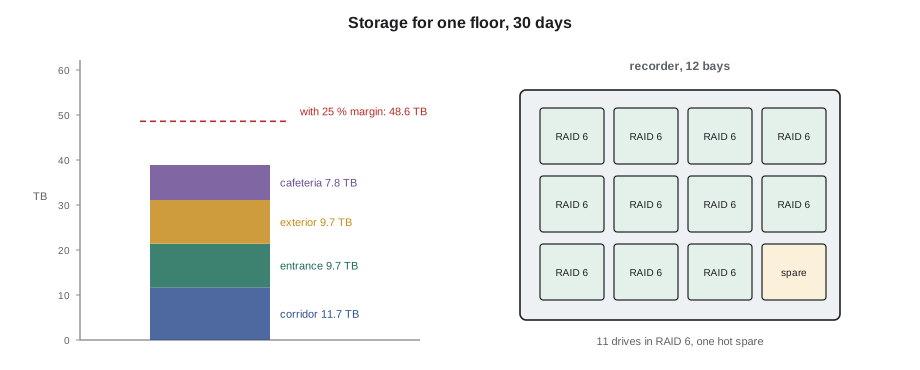
print(f"storage for {days} days: {tb:.1f} TB")18 x corridor, 4 MP H.265 15 fps 36.0 Mb/s 12 x classroom entrance, 4 MP H.265 15 fps 30.0 Mb/s 6 x exterior, 8 MP H.265 15 fps 30.0 Mb/s 4 x cafeteria, 8 MP H.265 15 fps 24.0 Mb/s total recording stream: 120.0 Mb/s, with margin 150.0 Mb/s storage for 30 days: 48.6 TB
This is the second floor of Riverside's three, with 40 cameras, and it needs about 50 TB for 30 days. The whole school's 140 cameras, with more exterior cameras on the ground floor, come to roughly 200 TB, the figure the board was given in LVT-220. The calculation is simple, but each number in it is a decision: dropping the frame rate from 15 to 10 or keeping 21 days instead of 30 changes the answer by a third, and the owner, not the installer, makes those decisions.
Storage and RAID
Recorders store video on hard drives designed for surveillance, which are made for continuous writing. A single drive can fail at any time, and in a recorder with many drives working around the clock, failures are routine over a few years. To keep a failed drive from destroying recordings, recorders combine drives in a RAID array that stores extra data so the array keeps working when a drive fails. RAID 5 can survive one drive failure, using one drive's capacity for that protection; RAID 6 can survive two, using two drives' capacity. With many large drives, rebuilding the array after a failure takes days, and a second failure during that time would destroy a RAID 5 array, so RAID 6 is common for video. A hot spare drive, already installed, lets the rebuild start automatically.
# Usable capacity of a recorder's drive array
def usable(drives, size_tb, level, spares=0):
    active = drives - spares
    if level == 5: return (active - 1) * size_tb
    if level == 6: return (active - 2) * size_tb
    if level == 10: return active // 2 * size_tb
    return active * size_tb                       # no protection
need = 50                  # TB from the recording calculation
for drives, size, level, spares in [(8, 8, 5, 0), (8, 8, 6, 0), (10, 8, 6, 1), (12, 8, 6, 1)]:
    cap = usable(drives, size, level, spares) * 0.93      # formatted capacity is a little less
    ok = "enough" if cap >= need else "short"
print(f"{drives:2d} x {size} TB, RAID {level}, {spares} spare: {cap:5.1f} TB usable -> {ok} for {need} TB")8 x 8 TB, RAID 5, 0 spare: 52.1 TB usable -> enough for 50 TB 8 x 8 TB, RAID 6, 0 spare: 44.6 TB usable -> short for 50 TB 10 x 8 TB, RAID 6, 1 spare: 52.1 TB usable -> enough for 50 TB 12 x 8 TB, RAID 6, 1 spare: 67.0 TB usable -> enough for 50 TB
The floor recorder needs at least ten 8 TB drives in RAID 6 with a hot spare. Recorders with fewer bays force a choice between larger drives, which take longer to rebuild, and a shorter retention period. Sanjay chose 12-bay recorders for Riverside so each floor has room for growth.
The video management system
The video management system, VMS, is the software that ties cameras, recorders and viewers together. It keeps the list of cameras and their settings, schedules recording, lets users watch live and search recordings, links video to events from the access and intrusion systems, and controls who may see what. The owner decides user roles: the Juniper Point concierge can watch the lobby and garage live but not play back recordings, the property manager can play back and export, and only the board's named administrator can delete or change settings. Every view, playback and export is logged, which is how the owner shows it followed its privacy policy.
The installer adds the cameras to the VMS, sets recording and streams from the design, sets up the camera groups and views the owner asked for, links events such as door forced alarms to the right cameras, sets the recorder and camera time from the network time server, and makes sure the system's own health monitoring is turned on, so that a camera that stops sending video or a drive that fails raises an alert rather than going unnoticed for weeks.
Retention, export and evidence
Retention is how long video is kept before it is overwritten. It is set by the owner's policy, guided by privacy law, which says not to keep personal information longer than needed, and by practical needs, such as how long incidents usually take to be reported. Common retention periods are 14 to 30 days, with longer periods for specific cameras where the owner has a reason. The recorder overwrites the oldest video automatically when it reaches the retention period or fills, so the calculation in this lesson decides whether the owner's policy can actually be met. Commissioning checks this: after the recorder has run for a few days, the installer checks the actual storage used per day against the estimate.
When an incident happens, the owner's authorized staff export the relevant clips. A good export includes the video in a format that can be played without special software or with a player included, the camera name and time, and a digital signature or hash that shows the file has not been altered since export, so it can be used as evidence. The installer trains the owner's staff to export and shows them where the exports go, but does not export video for anyone on the installer's own initiative.
# Compare measured storage use per day with the estimate after the first week
estimate_tb_per_day = 50.0 / 30          # from the design for one floor
measured = [1.48, 1.52, 1.61, 1.39, 1.22, 1.18, 1.55]   # TB written each day, Monday to Sunday
avg = sum(measured) / len(measured)
peak = max(measured)
capacity = 52.1                          # usable TB on the floor recorder
print(f"estimate {estimate_tb_per_day:.2f} TB/day, measured average {avg:.2f}, peak {peak:.2f}")
print(f"days the recorder can hold at the average rate: {capacity / avg:.0f}")
print(f"days at the peak rate: {capacity / peak:.0f}")
print("retention target of 30 days met" if capacity / peak >= 30 else "retention target at risk")estimate 1.67 TB/day, measured average 1.42, peak 1.61 days the recorder can hold at the average rate: 37 days at the peak rate: 32 retention target of 30 days met
The measured rate is a little under the estimate, which is normal when the margin is included, and the recorder will hold more than 30 days even at the busiest day's rate. If the measured rate had been higher, the fix would be adjusting streams, adding drives or asking the owner to accept a shorter retention, not leaving the recorder to fall short silently.
Worked problem
Recordings that end after 18 days
Three weeks after the Hartwell warehouse cameras go live, the operations manager tries to find video from 20 days ago and discovers the recorder holds only 18 days, although the design promised 30. What should Maya look at?
Show solution
- The recorder is overwriting at 18 days, so it is writing more data per day than the design assumed.
- She checks each camera's actual bitrate in the VMS: the eight heated dock cameras are running at 12 Mb/s each instead of the design's 4.
- Their settings show 30 frames per second and the highest quality, the factory defaults, because they were added after the other cameras and missed the settings template.
- She sets them to the design's 15 frames per second and standard quality, checks image quality at the dock doors, and rechecks the storage rate after a week.
Answer: With the dock cameras corrected, storage use falls to the design rate and the recorder holds 31 days. Maya adds a check of every camera's stream settings to the commissioning checklist.
Common mistakes
MistakeEstimating storage from the lowest bitrate on a data sheet.
InsteadUse measured averages for similar scenes with a margin.
MistakeLeaving cameras at factory frame rate and quality.
InsteadSet every stream from the design and check it in the VMS.
MistakeUsing RAID 5 on a large video array without thinking about rebuilds.
InsteadConsider RAID 6 and a hot spare for large arrays.
MistakeRecording only on motion where evidence matters.
InsteadRecord continuously where the owner needs evidence.
MistakeAssuming retention is met because the estimate says so.
InsteadMeasure storage use after the first week and compare.
Summary and key terms
- Cameras compress video with codecs such as H.264 and H.265, sending changes between key frames.
- Bitrate depends on resolution, frame rate, quality and the scene; busy and dark scenes cost more.
- Main streams are recorded; substreams are used for viewing on small screens.
- Bandwidth is the sum of the streams; storage is bitrate times time, with a margin.
- RAID 5 survives one drive failure and RAID 6 two; hot spares start rebuilds automatically.
- The VMS controls recording, viewing, user roles, event links and health alerts.
- Retention follows the owner's policy and is verified by measuring storage use.
- Codec
- The method a camera uses to compress video, such as H.264 or H.265.
- Bitrate
- The amount of data a stream sends per second.
- Key frame
- A complete frame sent periodically in compressed video.
- Substream
- A lower-resolution stream used for live viewing.
- RAID 6
- A drive array that keeps working after two drive failures.
- VMS
- Video management system: the software that runs cameras, recording and viewing.
- Retention
- How long recordings are kept before being overwritten.
Practice problems
Work each problem on paper first, then reveal the answer to check.
Roughly how much bitrate does H.265 save over H.264 at similar quality?
Show answer
About half.
Why do night scenes often have higher bitrates?
Show answer
Image noise in low light looks like change to the codec.
A floor needs 50 TB. Is eight 8 TB drives in RAID 6 enough?
Show answer
No; about 45 TB usable after formatting.
Who decides how long video is kept?
Show answer
The owner, under its privacy policy.
Lesson quiz · 5 questions
Score 60% or more to complete this lesson.
Create a free account to save your progress, take quizzes and earn a certificate.