
LVT-230 · Lesson 6 of 12 · 20 min
Readers, credentials and controllers
The reader is the part of the access control system that everyone touches. Residents at Juniper Point will tap their fobs on it several times a day, delivery drivers will press its intercom button, and the board will judge the whole system by whether it reads quickly and reliably. Behind that simple experience are choices about credential technology, reader interfaces, mounting and the controller settings that decide what a read does. This lesson covers credential types and their security, reader types and mounting, the reader-to-controller connection, card formats and enrolment, and the controller settings the installer programs at each door.
Credentials
A credential is whatever a person presents to prove who they are. Most systems use something the person has: a card, a fob or a phone. Some add something the person knows, a PIN, or something the person is, a fingerprint or face. Using two of these together, such as a card and a PIN, is two-factor access, which the specification may require at high-security doors such as the St. Brendan's pharmacy.
Cards and fobs come in several technologies, and the difference matters. Older 125 kHz proximity cards transmit a fixed number whenever they are near a reader. They have no encryption, and the number can be read and copied with tools that are easy to obtain, so a proximity card proves only that someone has a copy of that number. They are still common in older buildings, including the old Juniper Point garage system. Newer 13.56 MHz smart cards, such as the secure versions of the common contactless card families, carry a chip that holds keys and uses cryptographic authentication between the card and the reader, so the card cannot simply be copied. Mobile credentials store a credential in a phone app or a phone wallet and use Bluetooth or the phone's near-field communication, protected by the phone's own security.
Because the security of the whole system can be no better than the credential, owners are moving from proximity to secure smart cards and mobile credentials. Juniper Point's board decided to replace all the old proximity fobs at the changeover; Riverside's school board issues secure smart cards to staff and students. The installer's part is to install readers that support the chosen technology, configure them for it, and turn off reading of older insecure formats once the changeover is complete, so the system does not quietly keep accepting them.
| Credential | Frequency or link | Security | Notes |
|---|---|---|---|
| Proximity card or fob | 125 kHz | Low: fixed number, no encryption | Easy to copy; being phased out |
| Secure smart card or fob | 13.56 MHz | High: mutual authentication, encrypted | Needs readers and keys set up for it |
| Mobile credential | Bluetooth or NFC | High: protected by the phone | Users need a supported phone |
| PIN | Keypad | Depends on use | Often a second factor |
| Biometric | Reader sensor | High, with privacy issues | Owner must justify and protect the data |
Biometric readers deserve a note. A fingerprint or face is personal information of a sensitive kind, and privacy guidance generally says it should be used only where a less intrusive option will not do, with the person's knowledge, and with the biometric data protected. The decision belongs to the owner and its privacy officer, not the installer.
Readers
Readers range from small mullion readers that fit on a narrow door frame to wall-mount readers with keypads, displays and intercom buttons. Multi-technology readers read several credential types, which helps during a changeover. A reader has a read range, usually a few centimetres for smart cards; longer-range readers are used at vehicle gates, where a driver holds a tag or card near the windshield. Readers have a tamper switch that reports removal from the wall, and outdoor readers are rated for weather and vandal resistance.
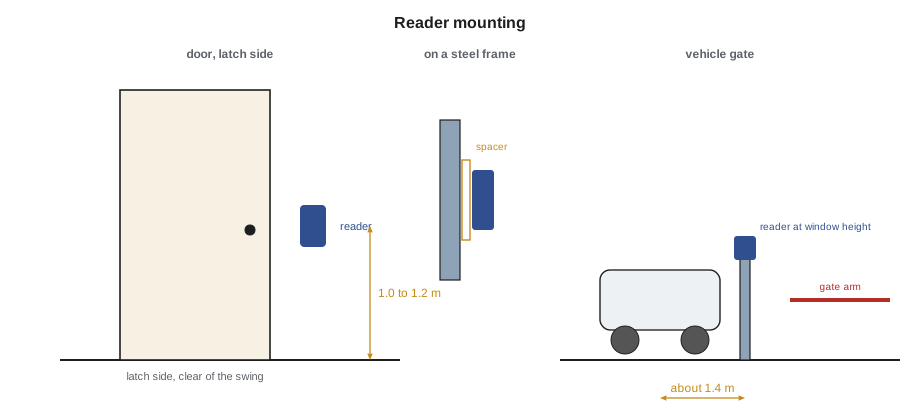
Mounting is set by accessibility rules and by the specification. Readers on accessible routes go at a height a person in a wheelchair can reach, commonly with the operable part between about 900 and 1,200 mm above the floor, beside the door on the latch side and clear of the door swing, as the accessibility standard the building follows requires. Readers at vehicle gates go where a driver can reach from the window without leaving the car, typically on a pedestal about 1.4 m from the lane centre. Mount readers on a solid backbox or a mullion plate, never on a door, and keep metal from shielding the antenna; a reader mounted directly on a steel frame may read poorly unless it is designed for metal mounting or fitted with a spacer.
Reader interfaces: Wiegand and OSDP
Lesson 5 introduced the two reader interfaces. With Wiegand, the reader sends the credential's data to the controller as pulses on two wires, data 0 and data 1, plus power, ground and wires for the reader's LED and beeper. The controller cannot talk back to the reader except through those LED and beeper wires, cannot tell whether the reader has been replaced or disconnected until someone tries a card, and the data on the wires is not protected. With OSDP, the reader and controller exchange messages over a two-wire RS-485 pair plus power. The controller polls the reader several times a second, so a cut cable or a removed reader is reported at once, and with secure channel turned on, the messages are encrypted. OSDP also lets the controller set the reader's LEDs and display and update its firmware.
The Security Industry Association published OSDP version 2.2 in 2020 and maintenance updates since, the most recent being 2.2.2 in 2024, and the protocol was adopted as IEC 60839-11-5. When the specification calls for OSDP secure channel, the installer must confirm, not assume, that the controller and readers are actually communicating in secure mode, because many readers fall back to unencrypted operation if the keys are not set up. The controller's status page shows the mode for each reader.
# Reader cable check: Wiegand distance limit and voltage at the reader
readers = [  # door, interface, run length in m, reader current in amps
    ("P1 garage door", "OSDP", 32, 0.12), ("P1 stair door", "OSDP", 41, 0.12),
    ("Vehicle gate in", "OSDP", 118, 0.25), ("Old mail room", "Wiegand", 160, 0.10),
]
WIEGAND_MAX = 150          # m, typical limit for Wiegand with the right cable
OHMS = 0.0530                 # ohms per m of one conductor, 22 AWG
supply = 12.0
for door, iface, run, amps in readers:
    drop = amps * 2 * OHMS * run
    note = ""
    if iface == "Wiegand" and run > WIEGAND_MAX:
        note = " over Wiegand limit"
print(f"{door:16s} {iface:7s} {run:4d} m {supply - drop:5.2f} V at reader{note}")P1 garage door OSDP 32 m 11.59 V at reader P1 stair door OSDP 41 m 11.48 V at reader Vehicle gate in OSDP 118 m 8.87 V at reader Old mail room Wiegand 160 m 10.30 V at reader over Wiegand limit
The old mail room reader is past the usual Wiegand limit, which is one reason it read badly, and it is being replaced with an OSDP reader on the new cable. The vehicle gate reader is far from the closet and draws more current, so its voltage falls below 9 V, under the minimum of many readers; a local power supply at the gate, with its own battery, is the fix.
Card formats and enrolment
A credential's data is arranged in a format: a fixed number of bits, with fields for a facility code, which is the same for all of a site's cards, a card number unique to each card, and parity bits that let the controller detect a misread. The most widely known format is the 26-bit format used with many proximity cards: one parity bit, an 8-bit facility code, a 16-bit card number and a final parity bit. Many other formats exist, and secure credentials often carry longer identifiers. The controller must be set to the format the site's credentials use, or it will reject every card.
Enrolment is how a credential becomes known to the system. Usually the administrator types in the card number printed on the card or reads it at an enrolment reader on the desk, and assigns it to a person. Batches of cards from the manufacturer come with a list of their numbers, which is easier and less error-prone. The installer checks the format and a few sample cards when the system is first set up.
# Check the parity of a 26-bit card read and split its fields
# (used when setting up a controller's card format; the bits come from an enrolment read)
def check_26(bits):
    assert len(bits) == 26
    even = bits[0]; data = bits[1:25]; odd = bits[25]
    ok_even = (even + sum(data[:12])) % 2 == 0      # first parity bit makes the first half even
    ok_odd = (odd + sum(data[12:])) % 2 == 1        # last parity bit makes the second half odd
    facility = int("".join(map(str, data[:8])), 2)
    card = int("".join(map(str, data[8:])), 2)
    return ok_even and ok_odd, facility, card
reads = ["11011010100000110000111000", "11011010100000110000111001"]
for r in reads:
    ok, fac, card = check_26([int(c) for c in r])
print(f"{r}: parity {'good' if ok else 'BAD'}, facility {fac}, card {card}")11011010100000110000111000: parity good, facility 181, card 1564 11011010100000110000111001: parity BAD, facility 181, card 1564
The second read has its last bit changed, so the odd parity fails and the controller would reject it as a misread. Knowing how a format is laid out helps the installer set the controller correctly and recognize when a batch of cards has been ordered with the wrong facility code, which is a common and expensive mistake. It also shows why fixed-number formats on their own provide no protection: the format is a layout, not a secret.
Controller settings at each door
Each door has settings that decide how it behaves. The unlock time, often 3 to 5 seconds, is how long the lock stays released after a valid card; doors with automatic operators or used by people with mobility devices need longer, and the controller can give extended time to specific cardholders. The held time, often 30 seconds, is how long the door can stay open before a held alarm. The request-to-exit settings decide whether a request-to-exit also unlocks the lock, which is needed with some lock types, and whether it suppresses the forced alarm. Schedules decide when the door unlocks automatically. First-person-in rules keep a door locked on its schedule until the first authorized person arrives, so a snow day does not leave the school's front door unlocked and empty.
Advanced features include anti-passback, which stops a card being passed back to let a second person in by requiring that each entry be followed by an exit; two-person rules for high-security rooms; and lockdown, which locks a set of doors at once from a button or software command, used in schools. Each of these changes what happens in a real event and is set only as the specification and the owner's procedures say.
| Setting | Typical value | What it does |
|---|---|---|
| Unlock time | 3 to 5 s | How long the lock is released after a valid read |
| Extended unlock | 10 to 30 s | Longer release for specific cardholders |
| Held time | 30 s | Time before a door held open alarms |
| Request-to-exit unlock | Yes or no | Whether an exit request releases the lock |
| Door schedule | Site hours | When the door unlocks automatically |
| First person in | On or off | Keeps the door locked until a valid read on the schedule |
Intercoms and visitor access
Visitors who have no credential need another way in. At Juniper Point, the lobby has a video intercom: a visitor finds a resident in the directory and calls them, and the resident sees the visitor on their phone and releases the door, which the access control system logs. Delivery drivers get a one-time code from the management system, and the garage gate has an intercom to the concierge desk. The intercom is part of the access control system's integration, and lesson 11 covers how the pieces are linked.
Worked problem
Readers that ignore new fobs
At Juniper Point, the new readers are installed and the first box of secure fobs arrives. Enrolled fobs work at the amenity doors, which are new readers, but not at the P1 garage door, where the reader beeps but the controller logs an unknown card format. The garage reader is the same model. What should Maya check?
Show solution
- Same reader model and same fobs, so look at the reader's configuration and the controller's format settings.
- The garage reader was installed first, before the site's credential configuration was loaded.
- Its configuration still has the factory setting that outputs a short serial number instead of the secure credential's identifier.
- She loads the site configuration onto the reader, using the manufacturer's configuration card or the controller over OSDP, and confirms secure channel is active.
Answer: The garage reader then sends the same identifier as the others, and the enrolled fobs work. Maya adds a step to the commissioning checklist to confirm every reader's configuration version.
Common mistakes
MistakeAssuming proximity cards are secure because they work.
InsteadTreat fixed-number credentials as copyable and move to secure ones.
MistakeLeaving readers set to accept old formats after a changeover.
InsteadTurn off insecure formats once the changeover is complete.
MistakeAssuming OSDP secure channel is active.
InsteadCheck each reader's mode on the controller.
MistakeMounting a reader on a steel frame without checking.
InsteadUse a metal-mount reader or spacer and test the read range.
MistakeOrdering cards without confirming the facility code and format.
InsteadCheck the format and samples before the batch is ordered.
Summary and key terms
- Credentials are cards, fobs, phones, PINs or biometrics; two together give two-factor access.
- 125 kHz proximity cards carry a fixed number and are easily copied; secure smart and mobile credentials are not.
- Readers go on the latch side within accessible reach, on a solid mount, clear of metal shielding.
- OSDP is two-way and supervised and supports encryption; Wiegand is one-way and unprotected.
- A card format lays out facility code, card number and parity; the controller must match it.
- Unlock time, held time, request-to-exit and schedules set how each door behaves.
- Proximity card
- A 125 kHz card that transmits a fixed number.
- Smart card
- A card with a chip that uses cryptographic authentication.
- Mobile credential
- A credential stored and presented by a phone.
- Facility code
- A number shared by all of a site's cards in some formats.
- Secure channel
- OSDP's encrypted mode of communication between reader and controller.
- Anti-passback
- A rule that stops a credential being used twice in a row in the same direction.
- Unlock time
- How long a lock stays released after a valid read.
Practice problems
Work each problem on paper first, then reveal the answer to check.
Why are 125 kHz proximity cards being replaced?
Show answer
They transmit a fixed number that can be copied.
What does OSDP supervision report that Wiegand cannot?
Show answer
A cut cable or removed reader, immediately.
In the 26-bit format, how many bits is the facility code?
Show answer
Eight.
What does a first-person-in rule prevent?
Show answer
A door unlocking on its schedule when no authorized person has arrived.
Lesson quiz · 5 questions
Score 60% or more to complete this lesson.
Create a free account to save your progress, take quizzes and earn a certificate.