
LVT-230 · Lesson 4 of 12 · 20 min
Alarm communication and monitoring
An alarm that only rings a bell in an empty garage at three in the morning does little good. What makes an intrusion system protect a building is the chain from the detector to a person who responds: the panel decides there is an alarm, the communicator sends a signal, a receiver at the monitoring station decodes it, an operator follows the owner's instructions, and a guard, a keyholder or the police arrive. Every link in that chain can fail, and the installer builds and tests most of them. This lesson covers how panels communicate, the paths they use, how those paths are supervised, what happens at the monitoring station, how false alarms are prevented, and how a new account is tested with the station.
What the panel sends
When something happens, the panel sends an event report to the monitoring station's receiver. The report identifies the account, which is the panel; the event, such as burglary alarm, opening, closing, trouble or restore; the partition; and the zone or user number. Panels use standard reporting formats so that receivers from one manufacturer can understand panels from another. The most widely used for many years has been Contact ID, which encodes each event as a short string of digits, and newer IP communicators use the SIA DC-09 protocol, which carries the same kind of event codes over a network, with encryption. The installer does not have to decode the formats, but must program the account number, the receiver addresses or numbers, and the event codes the station expects for each zone.
Not every event is an alarm. The panel also reports openings and closings, so the owner knows who disarmed and armed the building and when, and troubles such as AC power failure, low battery and a failed communication path. It sends a periodic test signal, often once a day, so the station knows the panel is still alive even when nothing has happened. Restores tell the station a condition has cleared. The owner's contract with the station decides which of these are handled by an operator and which are just logged.
Communication paths
For decades, alarm panels called the monitoring station over an ordinary telephone line, through a digital communicator that seized the line, dialled the receiver and sent its report as tones. That method depended on copper telephone lines, which phone companies are retiring. Most new systems now use an IP communicator over the building's network or a separate internet connection, a cellular communicator, or both. Radio networks are used in some areas. Each path has its own weaknesses: a network path fails when the building's internet or network fails, and a cellular path fails when the signal is poor, the carrier retires the network generation the communicator uses, or the antenna is damaged.
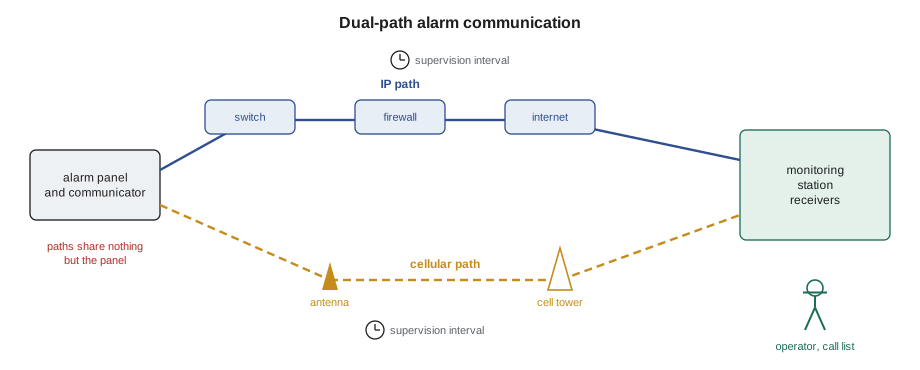
That is why higher-security systems use two different paths. A dual-path communicator sends each event over IP and, if that fails, over cellular, and the station supervises both. A burglar who cuts the building's internet connection does not stop the cellular path, and a carrier outage does not stop the IP path. At Juniper Point the specification calls for a dual-path communicator with IP on the building's management VLAN and cellular as the second path, with the cellular antenna mounted where the signal is strong, not inside the steel cabinet in the parkade.
Supervision of the path
A path that has failed silently is worse than no path, because everyone believes the building is protected. Supervision closes that gap. The panel or communicator checks in with the receiver at a set interval, and if the receiver does not hear from it within that window, it raises a communication failure for the operator to handle. For a daily test, the interval is a day. For higher-security systems, the standards and the station's certificate require much shorter intervals, measured in minutes or seconds, so that a cut path is noticed while it still matters. The communicator also watches its own paths and reports when one fails, using the other.
Short supervision intervals use more data, and on cellular plans that costs money, so the interval is set from the specification and the certificate requirements, not as short as possible. The monitoring station tells the installer what it needs for the account, and the installer programs it and confirms with the station that the supervision signals are arriving.
# How often a path checks in, and how long a failure could go unnoticed
paths = {  # path: (check-in interval in seconds, receiver grace before failure is raised)
    "daily test only": (86400, 3600),
    "IP, supervised": (180, 120),
    "cellular, supervised": (3600, 600),
}
for name, (interval, grace) in paths.items():
    worst = interval + grace
    per_day = 86400 // interval
    hours, rest = divmod(worst, 3600)
    print(f"{name:22s} {per_day:5d} check-ins a day, failure noticed within {hours:2d} h {rest // 60:2d} min")
# a dual-path panel is lost only if both paths fail at once
p_ip, p_cell = 0.002, 0.005         # chance each path is down at a given moment
print(f"chance both paths are down together: {p_ip * p_cell:.6f} ({1 / (p_ip * p_cell):,.0f} to 1)")daily test only 1 check-ins a day, failure noticed within 25 h 0 min IP, supervised 480 check-ins a day, failure noticed within 0 h 5 min cellular, supervised 24 check-ins a day, failure noticed within 1 h 10 min chance both paths are down together: 0.000010 (100,000 to 1)
The probabilities in the code are illustrative and assume the two paths fail independently, which is the point of choosing different technologies. If both paths ran through the same building network switch, a single failure would take both down, and the calculation would be wrong. Hollis checks that the IP path and the cellular path share nothing but the panel.
Inside the monitoring station
The monitoring station, also called a central station or signal receiving centre, is a staffed facility with receivers, alarm automation software and operators working around the clock. When an alarm arrives, the software shows the operator the account, the zone, the site's instructions and the call list. Typical instructions for a burglary alarm are to call the site, then the keyholders in order, and to dispatch police or a guard if the alarm is not cancelled by someone giving the right password. In Canada, stations that provide certificated monitoring are listed under the ULC standard for signal receiving centres, CAN/ULC-S301, and certificated systems are installed, inspected and tested to CAN/ULC-S302.
A certificate is a document from the listing body, held by the alarm company, that says a particular system at a particular site was installed and is monitored and maintained to the standard at a stated grade. Insurers often require one for higher-risk premises such as pharmacies. If the job is certificated, the installation, the devices, the battery, the communication paths and the inspection schedule must all meet that standard, and the certificate goes in the handover package. The St. Brendan's pharmacy alarm is certificated; the Juniper Point locker alarm is not, but is installed to the same practices.
False alarms
False alarms are the biggest problem in the alarm industry. Most are caused by people, not equipment: a user who forgets the code, arms the system with a window open, or lets the cleaner in without a code. Others come from detectors in the wrong place, as lesson 3 showed, or from poor maintenance. Each false alarm costs the police or guard time, and many police services and cities charge fees for repeated false alarms, require alarm permits, or stop responding to systems with too many. A system with frequent false alarms also teaches everyone to ignore it, which is the most dangerous outcome of all.
Panels have features designed to reduce false alarms, and industry standards for control panels set defaults for them. A long enough exit delay lets people leave; an exit error feature catches a door left open as the system arms; an abort window delays the report briefly after an alarm so a user who disarms at once cancels it; a cancel report tells the station that a user disarmed after the alarm was sent. Cross-zoning and swinger shutdown, from lesson 2, reduce detector-related false alarms. Video verification, where the operator looks at camera images before dispatching, cuts unnecessary dispatches, and some police services give verified alarms higher priority. The installer turns these features on as the specification and the station require, and trains users, which does more than any feature.
| Cause | Example | Prevention |
|---|---|---|
| User error | Wrong code, door left open on arming | Training, exit error feature, cancel window |
| Detector placement | PIR facing a heater | Correct detector and aim, walk test |
| Poor maintenance | Low battery, spider in a detector | Scheduled inspections, cleaning |
| Environmental | Wind moving a loose door | Fix the door, adjust the contact |
| Communication | Path failure reported as trouble | Supervised dual path, clear instructions |
# Review a month of alarm events for one account
events = [  # (day, zone, result)
    (2, 10, "false"), (3, 10, "false"), (5, 1, "user error"), (6, 10, "false"),
    (9, 10, "false"), (11, 5, "user error"), (12, 10, "false"), (15, 10, "false"),
    (18, 1, "user error"), (21, 10, "false"), (24, 4, "real"), (27, 10, "false"),
]
from collections import Counter
by_zone = Counter(z for _, z, r in events if r != "real")
by_cause = Counter(r for _, _, r in events)
print("non-real alarms by zone:")
for zone, n in by_zone.most_common():
    print(f"  zone {zone:2d}: {n}")
print("by result:", dict(by_cause))
worst, n = by_zone.most_common(1)[0]
print(f"start with zone {worst}: {n} of {sum(by_zone.values())} unwanted alarms ({100 * n / sum(by_zone.values()):.0f} %)")non-real alarms by zone:
zone 10: 8
zone 1: 2
zone 5: 1
by result: {'false': 8, 'user error': 3, 'real': 1}
start with zone 10: 8 of 11 unwanted alarms (73 %)This is the log that sent Maya to zone 10 in lesson 3. One detector caused most of the unwanted alarms; the rest were user errors that training can fix. Looking at the log by zone and by cause before touching any equipment is the fastest way to a fix.
Programming and testing a new account
Before the panel is connected, Cobalt Line opens an account with the monitoring station. The station needs the site address, the owner's contacts and call list, the zone list with descriptions, the partition names, the user list with names but not codes, and the instructions for each type of event. The station issues an account number and the receiver details, and the installer programs them into the panel and communicator.
The account is then tested with the station on the phone or on a technician app. The station puts the account in test mode, so signals are received but not acted on. The installer trips each zone, presses each panic and holdup device, removes AC power, disconnects the battery, fails each communication path in turn and opens and closes each partition, and the operator confirms that each event arrives with the right account, zone and description. Every event is logged. When all are confirmed, the station takes the account out of test mode, and from then on any alarm will be acted on. The installer must never trip zones on a live account without first putting it in test, and must remember to take it out of test at the end.
Worked problem
A test that will not go through
During the Juniper Point locker panel test, every zone arrives at the station over IP. When Maya unplugs the IP communicator's network cable to test the cellular path, the station receives nothing. The communicator's LED shows a weak signal. What should she check?
Show solution
- The IP path works, so the panel and account are correct.
- The cellular path is failing, and the signal indicator points to the antenna or its location.
- She finds the antenna cable coiled inside the steel cabinet, with the antenna still attached to the communicator board.
- She mounts the remote antenna on the cabinet's top, outside the steel, on the cable supplied, and checks the signal strength reading in the communicator.
Answer: With the antenna outside the cabinet, the signal reads strong, and the station receives the cellular test events. She retests the IP path after reconnecting the cable.
Common mistakes
MistakeRelying on one communication path for a high-risk site.
InsteadUse supervised dual paths that do not share equipment.
MistakeTripping zones on a live account.
InsteadPut the account in test with the station first, and take it out after.
MistakeLeaving a cellular antenna inside a steel cabinet.
InsteadMount the antenna where the signal is strong.
MistakeTurning off false alarm features to make testing faster.
InsteadProgram them as the specification and the station require.
MistakeSending user codes to the station.
InsteadSend names and passwords for verification, never panel codes.
Summary and key terms
- The panel reports alarms, openings, closings, troubles, restores and periodic tests to the station.
- Contact ID and SIA DC-09 are common reporting formats; the installer programs the account and receiver details.
- Telephone lines are being retired; IP and cellular are the main paths, often together as dual path.
- Path supervision makes a failed path visible within the interval the standard or certificate requires.
- Certificated systems are installed, monitored and inspected to the listing body's standards.
- Most false alarms come from users; panel features, good detector placement and training prevent them.
- Every new account is tested with the station in test mode, event by event.
- Communicator
- The device that sends the panel's events to the monitoring station.
- Dual path
- Two independent communication paths, such as IP and cellular.
- Supervision interval
- The time within which a path must check in before a failure is raised.
- Monitoring station
- A staffed facility that receives alarms and responds for the owner.
- Certificate
- A listing body's document confirming a system meets a standard at a grade.
- Abort window
- A short delay before an alarm is reported, so an immediate disarm cancels it.
- Test mode
- A station setting in which signals are received but not acted on.
Practice problems
Work each problem on paper first, then reveal the answer to check.
Why does a dual-path communicator use two different technologies?
Show answer
So one failure, such as a cut internet line, does not stop both.
What must happen before an installer trips zones on a monitored account?
Show answer
The station puts the account in test mode.
What is the most common cause of false alarms?
Show answer
User error.
What does a periodic test signal tell the station?
Show answer
That the panel and its path are still working.
Lesson quiz · 5 questions
Score 60% or more to complete this lesson.
Create a free account to save your progress, take quizzes and earn a certificate.