
LVT-230 · Lesson 11 of 12 · 20 min
Integration, programming and user training
By the time the Juniper Point devices are mounted and powered, the three systems each work on their own: the intrusion panel arms and reports, the doors open for valid fobs, and the cameras record. What the board paid for, though, is a system that works together. A forced garage door should raise an alarm at the concierge desk, show the nearest camera and mark the recording. Arming the locker partition at midnight should lock the locker room doors. The lobby intercom should release the door and log who let the visitor in. And the people who run the building should be able to do all this without calling Cobalt Line. This lesson covers how the systems are linked, the cause-and-effect matrix that defines those links, the programming that carries them out, protecting the systems themselves, and how the installer trains the owner's staff.
Ways the systems connect
Security systems connect in three ways. The simplest is hard-wired: a relay output on one system wired to an input on another, such as the access controller's forced-door output wired to an intrusion zone. It is reliable, easy to understand and keeps working if the network fails, but every link needs a pair of wires and a spare input and output. The second is software integration: the video management system and the access control software talk to each other over the network through a supported interface, so an access event can call up a camera and bookmark the recording. It is flexible and needs no extra wiring, but depends on both systems' versions being compatible and on the network. The third is a unified platform, in which one manufacturer's software runs access, video and sometimes intrusion together. Juniper Point uses a mix: hard-wired links for anything that must work during a network failure, and software integration for the camera and event links.
Some links are not the security installer's to make. Fire alarm release of locks goes only through the fire alarm contractor's relay, as lessons 7 and 10 described. Elevator controls, such as restricting floors to residents, go through the elevator contractor's interface. Building automation links, such as turning on garage lights when the gate opens, go through the controls contractor. In each case the installer wires to the interface point the other trade provides, shown on the drawings, and the two trades test the link together.
The cause-and-effect matrix
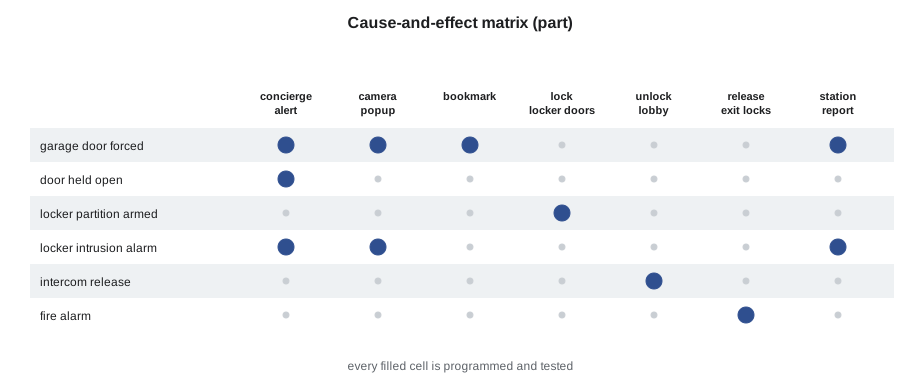
Every link between systems is written down before it is programmed, in a cause-and-effect matrix, also called a sequence of operations. Each row is a cause, an event in one system; each column is an effect, an action in this or another system; and a mark in a cell means that cause produces that effect. The matrix is drawn up by the designer with the owner, reviewed by each trade involved, and becomes the test document: commissioning tests every marked cell, and the test sheet records the result. Anything not in the matrix is not programmed, however useful it might seem on site.
| Cause | Effects |
|---|---|
| Garage door forced | Concierge alert, nearest camera shown, recording bookmarked, report to monitoring station if locker partition armed |
| Door held open over 30 s | Local sounder, concierge alert after 60 s |
| Locker partition armed | Locker room doors locked to all but security staff |
| Intrusion alarm, locker partition | Report to monitoring station, cameras in lockers to full frame rate, concierge alert |
| Lobby intercom call answered and released | Lobby door unlocked 5 s, event logged with resident unit |
| Fire alarm | Exit path locks released through fire alarm interface, garage gates open, event logged |
# Check a cause-and-effect matrix against the commissioning test results
matrix = {
    "garage door forced": ["concierge alert", "camera popup", "bookmark", "station report if armed"],
    "door held 30 s": ["local sounder", "concierge alert"],
    "locker partition armed": ["locker doors locked"],
    "locker intrusion alarm": ["station report", "cameras full rate", "concierge alert"],
    "intercom release": ["lobby unlock 5 s", "event logged"],
    "fire alarm": ["exit locks released", "gates open", "event logged"],
}
results = {  # (cause, effect): passed?
    ("garage door forced", "camera popup"): True, ("garage door forced", "bookmark"): True,
    ("garage door forced", "concierge alert"): True, ("garage door forced", "station report if armed"): False,
    ("door held 30 s", "local sounder"): True, ("door held 30 s", "concierge alert"): True,
    ("locker partition armed", "locker doors locked"): True,
    ("locker intrusion alarm", "station report"): True, ("locker intrusion alarm", "cameras full rate"): True,
    ("intercom release", "lobby unlock 5 s"): True, ("intercom release", "event logged"): True,
    ("fire alarm", "exit locks released"): True, ("fire alarm", "gates open"): True,
}
total = sum(len(v) for v in matrix.values())
passed = sum(1 for v in results.values() if v)
print(f"{total} links in the matrix, {len(results)} tested, {passed} passed")
for cause, effects in matrix.items():
    for e in effects:
        r = results.get((cause, e))
        if r is None: print(f"  not tested: {cause} -> {e}")
elif not r: print(f" FAILED: {cause} -> {e}")15 links in the matrix, 13 tested, 12 passed FAILED: garage door forced -> station report if armed not tested: locker intrusion alarm -> concierge alert not tested: fire alarm -> event logged
The check shows one failure, the forced garage door that should report to the monitoring station when the locker partition is armed, and one link not yet tested, the fire alarm event log. Both are fixed and retested before the matrix is signed. A matrix with untested cells is not a commissioned system.
Programming the access system
Programming the access control system is done mostly in its software, from documents the owner has approved. The installer creates the doors, with their names matching the drawings and the signs; sets each door's unlock time, held time, request-to-exit behaviour and schedules from the door schedule, as lesson 6 described; creates the schedules and holidays the owner gave; creates the access levels in the specification; and sets up the alarm and event handling, such as which events appear at the concierge desk and which need acknowledgment. The owner's administrator then enrols people, often from a spreadsheet imported in bulk. The installer sets up the import, checks a sample, and leaves the decisions about who gets what to the administrator.
Holidays and schedule exceptions are a common source of trouble. A school that unlocks its front doors at 7:30 every weekday must not do so on statutory holidays, professional development days or snow days. The access software has holiday schedules and first-person-in rules for exactly this, and the installer programs the year's holidays the owner provides and shows the administrator how to add more.
Programming the video system
In the video management system, the installer arranges cameras into the groups and views the owner uses: the concierge's lobby and garage wall, the property manager's full list, the security team's alarm view. Events from the access system are linked to cameras: each door is associated with the camera or cameras that see it, so that a door event in the access log can be clicked to play the video from that moment. Alarm-triggered recording changes, such as full frame rate during an intrusion alarm, are set from the matrix. User roles in the VMS follow the owner's policy on who may view live, who may play back and who may export, as lesson 9 described.
Protecting the systems themselves
Security systems are networked computers, and LVT-220's security habits apply to every one of them. Change every default password on every camera, controller, recorder and panel at installation. Use the owner's accounts and naming, not the installer's. Update firmware to the version the manufacturer recommends at commissioning, and record it. Put the security devices on their own VLANs, as the owner's network team designs. Turn off services the system does not use, such as unencrypted web access, older protocols and, for cameras, cloud connections the owner has not approved. Make sure OSDP secure channel is on and old credential formats are off. Hand every administrator credential to the owner's named contact in a sealed record, and remove the installer's temporary accounts at handover.
These steps protect the owner and the people in the building. A camera left with a default password can be viewed by anyone who finds it; an access controller with old firmware may have known weaknesses the manufacturer has fixed. The installer is the last person to touch every device before the owner takes it over, and the habits at that moment decide much of the system's security for years.
Training the owner's staff
A security system is only as good as the people who run it. Training is part of the contract, and it is planned like any other part of the job: who needs to know what, how long it takes, and what they will be able to do afterward. The concierge needs to answer alarms, call up cameras, release the lobby door for visitors and know what to do when something fails. The property manager needs to add and remove residents, change schedules, run reports and export video. The board's administrator needs everything, including user roles and backups. Residents need a one-page guide to their fob and the intercom.
# Training plan: who needs which modules, and the total time
modules = {  # module: hours
    "alarm handling and the concierge view": 1.5, "visitor and intercom procedures": 0.5,
    "cardholders, access levels and schedules": 2.0, "reports and audit logs": 1.0,
    "video playback and export": 1.0, "user roles, backups and firmware": 1.5,
    "intrusion arming, codes and troubles": 1.0, "what to do when something fails": 0.5,
}
people = {  # role: (number of people, modules)
    "concierge": (4, ["alarm handling and the concierge view", "visitor and intercom procedures",
                      "intrusion arming, codes and troubles", "what to do when something fails"]),
    "property manager": (2, ["cardholders, access levels and schedules", "reports and audit logs",
                             "video playback and export", "intrusion arming, codes and troubles",
                             "what to do when something fails"]),
    "board administrator": (1, list(modules)),
}
for role, (n, mods) in people.items():
    h = sum(modules[m] for m in mods)
    print(f"{role:20s} {n} people, {len(mods)} modules, {h:.1f} h each")
sessions = sum(sum(modules[m] for m in mods) for _, mods in people.values())
print(f"trainer time if each role is trained together: {sessions:.1f} h")concierge 4 people, 4 modules, 3.5 h each property manager 2 people, 5 modules, 5.5 h each board administrator 1 people, 8 modules, 9.0 h each trainer time if each role is trained together: 18.0 h
Training each role together keeps the trainer's time down, but concierge staff work shifts, so Hollis schedules the concierge session twice. Each session uses the real system, with the trainees doing the tasks themselves on test cardholders and test alarms, not watching a demonstration. Each person signs the training record, and the record goes into the handover package.
Good training also covers the failures. What does the concierge see when a door goes offline, a camera stops recording or the alarm panel loses its communication path? Who do they call, and what do they tell residents? A short laminated sheet at the desk with those answers, and the service number, does more for the system's reliability than any feature.
Worked problem
An integration that works only sometimes
After commissioning, the concierge reports that when a door is forced, the camera popup appears at the desk most of the time but not always. The access and video systems are linked by software integration. What should Maya check?
Show solution
- Software integration depends on both systems' connection to each other.
- She compares the access event log with the VMS integration log for the missed popups: each one happened within a few minutes after midnight.
- The VMS server restarts its integration service at midnight after a scheduled backup, and events in that window are not received.
- She asks the owner's IT team to move the backup to a time when the restart does not matter, or to set the integration to resend missed events, which the access software supports.
Answer: With the integration set to resend events after a reconnection, every forced-door test produces a popup, including one run just after midnight.
Programming the intercom
The lobby intercom is programmed like a small access system of its own. Each resident unit gets a directory entry, usually showing a name the resident chooses or only the unit number, as the board's privacy policy decides, and a call destination, which at Juniper Point is the resident's phone through the intercom's app. The release action is mapped to the lobby door's relay or, better, to the access controller as a software command, so that every release is logged against the unit that granted it. The concierge station gets a call button and a release button for each entrance it covers, which is the assignment the witness test in the capstone catches. Delivery codes come from the management system with a time limit. As with every other device, the intercom's default administrator password is changed, its firmware updated and its directory export handed to the board, not kept by the installer.
Common mistakes
MistakeProgramming links that are not in the matrix.
InsteadProgram only what the approved cause-and-effect matrix shows.
MistakeWiring security equipment into the fire alarm or elevator controls.
InsteadConnect only at the other trade's interface point, and test together.
MistakeLeaving default passwords or old firmware.
InsteadChange every password and update firmware at commissioning.
MistakeTraining by demonstration only.
InsteadHave trainees do the tasks on the real system.
MistakeForgetting holidays and exceptions.
InsteadProgram the year's holidays and show the administrator how to add more.
Summary and key terms
- Systems connect by hard-wired relays, software integration or a unified platform.
- The cause-and-effect matrix defines every link and becomes the test document.
- Fire alarm, elevator and building automation links go through the other trade's interface.
- Access programming follows the door schedule, schedules, holidays and access levels the owner approved.
- Video programming sets groups, door-to-camera links, alarm recording and user roles.
- Every device's defaults, firmware, services and credentials are secured before handover.
- Training is planned by role, done hands-on and recorded.
- Cause-and-effect matrix
- A table of events and the actions each produces across the systems.
- Software integration
- A network link between systems through a supported interface.
- Unified platform
- One software package that runs several security systems together.
- Holiday schedule
- A schedule that overrides normal door times on listed dates.
- Bookmark
- A mark in a video recording at the time of an event.
- Interface point
- The terminal or relay another trade provides for a link.
- Training record
- A signed record of who was trained on what.
Practice problems
Work each problem on paper first, then reveal the answer to check.
Why are some links hard-wired rather than integrated in software?
Show answer
So they keep working if the network fails.
What decides which links get programmed?
Show answer
The approved cause-and-effect matrix.
Name three steps that protect a camera at installation.
Show answer
Change the default password, update firmware and turn off unused services.
Why is the concierge session scheduled twice?
Show answer
Concierge staff work shifts.
Lesson quiz · 5 questions
Score 60% or more to complete this lesson.
Create a free account to save your progress, take quizzes and earn a certificate.