
JAVA-290 · Lesson 7 of 12 · 33 min
Building the API or user interface
▶ Video coming soon A video version of this lesson is on the way.
Sprint 3, from Thursday, June 29 to Wednesday, July 12, 2028, was the sprint in which the website started to look like a website. The use cases worked behind tests; now customers needed pages, the counter needed its staff pages, and the counter app's REST API needed to learn about the new fields without breaking. The sprint also contained Canada Day on Saturday, July 1, a useful accident: the public-holiday fix from version 1.4.0 meant the free-times page had to show the shop closed that day, and it was the first thing Odile checked at the review.
Noemi led this sprint. She had spent her program building interfaces, and her rule for the team was that every page should be written first as plain, correct HTML that works on its own, then styled, and only then, if ever, enhanced with a script. The pages are a user interface for customers and staff, and the REST API is an interface for another program, the counter app; this lesson covers both, because they are two adapters on the same use cases and they change together.
The pages and their routes
A server-rendered website is a set of routes: an HTTP method and a path, handled by a controller method that calls a use case and chooses a template to render. Writing the routes down first, as a table, made the design reviewable before any template existed. Two rules shaped it. Anything that changes data uses POST from a form, never GET from a link, because links get followed by browsers that prefetch them, by crawlers and by people sharing them. And nothing personal appears in a URL, because URLs end up in browser history, server logs and the chat messages people paste them into.
| Method and path | What it does | Story |
|---|---|---|
| GET / | Next free times, grouped by day, with the shop's phone number | US-01 |
| GET /book?start=2028-07-08T10:30 | The booking form for one start | US-02 |
| POST /book | Book; on success redirect to the confirmation page | US-02, US-04 |
| GET /booked/{reference} | Confirmation: day, time, what to bring, how to cancel | US-02 |
| GET /my-booking | Form asking for the reference and phone number | US-03 |
| POST /my-booking | Show the booking if both match, with a cancel button | US-03 |
| POST /my-booking/cancel | Cancel after confirmation; redirect to a cancelled page | US-03 |
| GET /staff/today and /staff/day/{date} | Bookings for a day with problems and part warnings; sign-in required | US-06 |
| POST /staff/bookings/{id}/arrived | Check a customer in; also no-show | US-06 |
The confirmation page's path contains the reference, which looks like an exception to the rule about personal data in URLs. The team discussed it and kept it: the page shows only the day, the time and the reference itself, never the name or the phone number, so knowing the URL tells you nothing you did not already have. Anything showing personal details sits behind the POST of /my-booking, which needs the phone number as well.
A page, end to end
The free-times page is the simplest: one GET, one use case, one template. Before the Spring version, Hamza wrote the whole path in plain Java with the JDK's built-in HTTP server, so the team could see every piece with nothing hidden in a framework. The server listens on port 0, which asks the operating system for any free port; a client in the same program fetches the page; and the server is stopped at the end. The slot data comes from a fixed list rather than the database.
import com.sun.net.httpserver.HttpServer;
import java.net.*;
import java.net.http.*;
import java.nio.charset.StandardCharsets;
import java.time.*;
import java.time.format.*;
import java.util.*;

public class Main {
    static final DateTimeFormatter DAY = DateTimeFormatter.ofPattern("EEEE, MMMM d", Locale.ENGLISH);
    static final DateTimeFormatter TIME = DateTimeFormatter.ofPattern("h:mm a", Locale.ENGLISH);

    static String page(Map<LocalDate, List<LocalTime>> free) {
        StringBuilder h = new StringBuilder("<!doctype html>\n<html lang=\"en\">\n<title>Book a repair - Second Gear Cycles</title>\n");
        h.append("<h1>Book a repair</h1>\n");
        for (var day : free.entrySet()) {
            h.append("<h2>").append(day.getKey().format(DAY)).append("</h2>\n");
            if (day.getValue().isEmpty()) { h.append("<p>Closed or fully booked.</p>\n"); continue; }
            h.append("<ul>\n");
            for (LocalTime t : day.getValue())
                h.append("  <li><a href=\"/book?start=").append(day.getKey()).append('T').append(t)
                 .append("\">").append(t.format(TIME)).append("</a></li>\n");
            h.append("</ul>\n");
        }
        return h.append("<p>Prefer to phone? Call the shop.</p>\n").toString();
    }

    public static void main(String[] args) throws Exception {
        Map<LocalDate, List<LocalTime>> free = new TreeMap<>();
        free.put(LocalDate.of(2028, 7, 5), List.of(LocalTime.of(9, 30), LocalTime.of(14, 0)));
        free.put(LocalDate.of(2028, 7, 6), List.of(LocalTime.of(11, 0)));
        free.put(LocalDate.of(2028, 7, 7), List.of());
        HttpServer server = HttpServer.create(new InetSocketAddress("127.0.0.1", 0), 0);
        server.createContext("/", ex -> {
            byte[] body = page(free).getBytes(StandardCharsets.UTF_8);
            ex.getResponseHeaders().set("Content-Type", "text/html; charset=utf-8");
            ex.sendResponseHeaders(200, body.length);
            try (var out = ex.getResponseBody()) { out.write(body); }
        });
        server.start();
        try {
            HttpClient client = HttpClient.newHttpClient();
            URI uri = URI.create("http://127.0.0.1:" + server.getAddress().getPort() + "/");
            HttpResponse<String> r = client.send(HttpRequest.newBuilder(uri).build(), HttpResponse.BodyHandlers.ofString());
            System.out.println(r.statusCode() + " " + r.headers().firstValue("Content-Type").orElse("?"));
            System.out.print(r.body());
        } finally {
            server.stop(0);
        }
    }
}200 text/html; charset=utf-8 <!doctype html> <html lang="en"> <title>Book a repair - Second Gear Cycles</title> <h1>Book a repair</h1> <h2>Wednesday, July 5</h2> <ul> <li><a href="/book?start=2028-07-05T09:30">9:30 AM</a></li> <li><a href="/book?start=2028-07-05T14:00">2:00 PM</a></li> </ul> <h2>Thursday, July 6</h2> <ul> <li><a href="/book?start=2028-07-06T11:00">11:00 AM</a></li> </ul> <h2>Friday, July 7</h2> <p>Closed or fully booked.</p> <p>Prefer to phone? Call the shop.</p>
What this code does
The page method builds plain HTML: a language attribute and a title for screen readers, one heading per day and an ordinary list of links, one per free start, each carrying the start in its query string. The server answers every path with that page, and the client in the same program prints the status, the content type and the body, so the output is the exact HTML a browser would receive. Because the port is chosen by the operating system and never printed, the output is identical on every run, and the finally block stops the server even if the request fails.
Two details in that output came from the accessibility checklist rather than taste. The times are links in a list, not a grid of buttons drawn with styling, so a screen reader announces how many times there are and lets the user move through them; and each day is a heading, so screen reader users, who often navigate by headings, can jump from day to day. A day with nothing free says so in words instead of showing an empty space.
The Spring version of the same page is a controller method and a template. The controller asks the SlotQuery port for the next free times and puts them in the model; Thymeleaf fills the template. The controller has no rules in it, as the previous lesson required, and it is short enough that its test, with Spring's MockMvc, checks only that the right template gets the right data.
@Controller
class FreeTimesPage {
    private final SlotQuery slots;
    private final Clock clock;

    FreeTimesPage(SlotQuery slots, Clock clock) { this.slots = slots; this.clock = clock; }

    @GetMapping("/")
    String freeTimes(Model model) {
        LocalDate today = LocalDate.now(clock);
        model.addAttribute("days", slots.nextFreeStarts(today, 14));   // a sorted map of day to free starts
        model.addAttribute("shopPhone", "905-555-0100");
        return "free-times";
    }
}
What this code does
The method returns the template's name, free-times, which Thymeleaf resolves to templates/free-times.html on the class path. The use case decides which days are open, including the public holidays added in 1.4.0, so the controller only asks for fourteen days. The clock is injected, so a test can render the page as if it were any date.
<!doctype html>
<html lang="en" xmlns:th="http://www.thymeleaf.org" th:replace="~{layout :: page(~{::title}, ~{::main})}">
<head><title>Book a repair - Second Gear Cycles</title></head>
<body>
<main id="main">
  <h1>Book a repair</h1>
  <p>Choose a start time. Each booking is for one bike.</p>
  <section th:each="day : ${days}" th:attr="aria-labelledby='d-' + ${day.key}">
    <h2 th:id="'d-' + ${day.key}" th:text="${#temporals.format(day.key, 'EEEE, MMMM d')}">Wednesday, July 5</h2>
    <p th:if="${#lists.isEmpty(day.value)}">Closed or fully booked.</p>
    <ul th:unless="${#lists.isEmpty(day.value)}" class="times">
      <li th:each="t : ${day.value}">
        <a th:href="@{/book(start=${day.key + 'T' + t})}" th:text="${#temporals.format(t, 'h:mm a')}">9:30 AM</a>
      </li>
    </ul>
  </section>
  <p>Prefer to phone? Call <a th:href="'tel:' + ${shopPhone}" th:text="${shopPhone}">905-555-0100</a>.</p>
</main>
</body>
</html>
What this code does
Every th: attribute replaces the text or attribute beside it when the page is rendered, so the file is also a valid static page with sample content that Noemi could open in a browser and check before any Java existed. th:text escapes what it inserts, which is the default that lesson 9 relies on. The layout fragment supplies the header, the skip link, the footer and the style sheet, so every page shares them.
The booking form
The booking form had six fields, and Noemi built it from the patterns her program had taught, many of them borrowed from public-sector design systems that are tested with large numbers of users. Each field has a visible label, not just placeholder text that disappears when you type. The phone field says what format is fine, any, and uses the autocomplete value tel, so a phone can fill it in, which WCAG 2.2 asks for under identifying input purpose. The problem kinds are radio buttons in a fieldset with a legend, so a screen reader announces the question with each choice. And the reminder box is unticked by default, because consent that is pre-ticked is not consent.
When something is wrong, the page shows an error summary at the top, a short list of what to fix with links to each field, and the same message next to the field itself, and it keeps everything the customer typed. Focus moves to the summary, so a screen reader reads it at once. The server does all the checking; a browser's built-in validation is a convenience, never the guard, because anyone can send a request without a browser.
The other half of a form is what happens after a successful POST. If the server simply rendered a confirmation page in reply, pressing the browser's refresh button would send the POST again, and the customer would book twice or see an error. The standard fix is Post/Redirect/Get: the server answers a successful POST with a redirect, status 303 See Other, to a GET of the confirmation page, so refreshing only reloads the confirmation. A POST with errors is answered with the form and status 200, because there is nothing to redirect to. The next example runs both cases against a small server.
import com.sun.net.httpserver.HttpServer;
import java.net.*;
import java.net.http.*;
import java.nio.charset.StandardCharsets;
import java.util.*;

public class Main {
    static Map<String, String> form(String body) {
        Map<String, String> m = new LinkedHashMap<>();
        for (String pair : body.split("&")) {
            String[] kv = pair.split("=", 2);
            m.put(URLDecoder.decode(kv[0], StandardCharsets.UTF_8), kv.length > 1 ? URLDecoder.decode(kv[1], StandardCharsets.UTF_8) : "");
        }
        return m;
    }

    static List<String> errors(Map<String, String> f) {
        List<String> e = new ArrayList<>();
        if (f.getOrDefault("name", "").isBlank()) e.add("name: Enter your name");
        if (!f.getOrDefault("phone", "").replaceAll("[\\s().+-]", "").matches("1?\\d{10}")) e.add("phone: Enter a phone number with its area code");
        if (!List.of("FLAT", "BRAKES", "GEARS", "WHEEL_TRUE", "TUNE_UP").contains(f.getOrDefault("kind", ""))) e.add("kind: Choose what needs fixing");
        return e;
    }

    public static void main(String[] args) throws Exception {
        HttpServer server = HttpServer.create(new InetSocketAddress("127.0.0.1", 0), 0);
        server.createContext("/book", ex -> {
            Map<String, String> f = form(new String(ex.getRequestBody().readAllBytes(), StandardCharsets.UTF_8));
            List<String> e = errors(f);
            byte[] body;
            if (e.isEmpty()) {
                ex.getResponseHeaders().set("Location", "/booked/K7QF-29XM");
                body = new byte[0];
                ex.sendResponseHeaders(303, -1);
            } else {
                body = ("<div role=\"alert\"><h2>There is a problem</h2><ul>" + String.join("", e.stream()
                    .map(x -> "<li><a href=\"#" + x.split(":")[0] + "\">" + x.split(": ")[1] + "</a></li>").toList())
                    + "</ul></div>\n<input id=\"name\" name=\"name\" value=\"" + f.getOrDefault("name", "") + "\">").getBytes(StandardCharsets.UTF_8);
                ex.sendResponseHeaders(200, body.length);
            }
            try (var out = ex.getResponseBody()) { out.write(body); }
        });
        server.start();
        try {
            HttpClient client = HttpClient.newHttpClient();   // does not follow redirects by default
            URI uri = URI.create("http://127.0.0.1:" + server.getAddress().getPort() + "/book");
            for (String body : List.of("name=Dana&phone=%28555%29+555-0142&kind=GEARS&start=2028-07-08T10%3A30",
                                       "name=Dana&phone=555-0142&kind=")) {
                HttpRequest req = HttpRequest.newBuilder(uri).header("Content-Type", "application/x-www-form-urlencoded")
                    .POST(HttpRequest.BodyPublishers.ofString(body)).build();
                HttpResponse<String> r = client.send(req, HttpResponse.BodyHandlers.ofString());
                System.out.println("POST " + body);
                System.out.println("  -> " + r.statusCode() + r.headers().firstValue("Location").map(l -> " Location: " + l).orElse(""));
                if (!r.body().isEmpty()) System.out.println("  " + r.body().replace("\n", "\n  "));
            }
        } finally {
            server.stop(0);
        }
    }
}POST name=Dana&phone=%28555%29+555-0142&kind=GEARS&start=2028-07-08T10%3A30 -> 303 Location: /booked/K7QF-29XM POST name=Dana&phone=555-0142&kind= -> 200 <div role="alert"><h2>There is a problem</h2><ul><li><a href="#phone">Enter a phone number with its area code</a></li><li><a href="#kind">Choose what needs fixing</a></li></ul></div> <input id="name" name="name" value="Dana">
What this code does
The form method decodes an application/x-www-form-urlencoded body, where spaces arrive as plus signs and other characters as escaped byte codes, which URLDecoder turns back into text. A valid booking gets 303 with a Location header and no body, and because Java's HttpClient does not follow redirects unless asked, the example can print the redirect itself. The invalid one gets 200 with an error summary marked role=alert, a link to each field and the name the customer typed kept in its field, though this example inserts that value without escaping, which lesson 9 shows to be a mistake.
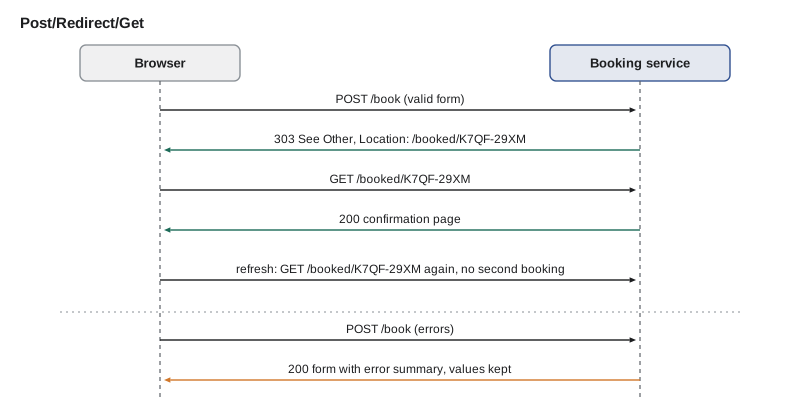
The Spring version uses Bean Validation on a form record, the same annotations the REST API used, and BindingResult to collect the errors. The redirect is a return value starting with redirect:, and Spring uses 302 by default; the team configured 303, which is the status the HTTP specification defines for this pattern. The use case's own refusals, such as a taken start or the per-phone limit, come back as a Refused result and are shown in the same error summary, as if they were errors on the form.
record BookingForm(
    @NotNull LocalDateTime start,
    @NotBlank(message = "Enter your name") @Size(max = 80) String name,
    @NotBlank(message = "Enter a phone number with its area code") String phone,
    @NotNull(message = "Choose what needs fixing") ProblemKind kind,
    @Size(max = 500, message = "Keep the note under 500 characters") String note,
    boolean remind) {}

@PostMapping("/book")
String book(@Valid @ModelAttribute("form") BookingForm form, BindingResult errors, Model model) {
    Optional<PhoneNumber> phone = PhoneNumber.parse(Objects.requireNonNullElse(form.phone(), ""));
    if (phone.isEmpty() && !errors.hasFieldErrors("phone"))
        errors.rejectValue("phone", "phone.invalid", "Enter a phone number with its area code");
    if (errors.hasErrors()) return "book";
    return switch (bookRepair.book(form.toRequest(phone.get()))) {
        case Booked b -> "redirect:/booked/" + b.booking().reference();
        case Refused r -> { errors.reject("refused", r.reason()); yield "book"; }
    };
}
What this code does
Bean Validation checks the annotations before the method body runs, and the phone number then gets the stricter check of the PhoneNumber type from lesson 5, so both kinds of error appear in the same summary. A failed validation returns the book template with the form's values still in the model, so nothing the customer typed is lost. The sealed Result from the use case maps to either a redirect or a global error, and the compiler checks that both cases are handled.
Pages for the counter
US-06 gave the counter a staff page: the day's bookings in order, each with the customer's first name, the problem kind and note, whether a part the problem usually needs is low or out, and a button to check the customer in. Tamsin had asked for the problem on this list so that the mechanics could plan from it, and Kofi for the part warning, which came from the API's existing part availability. The page had to work on the counter computer's old monitor and on the shop's tablet, and it had to be quick to read at a glance with a customer waiting.
Thierry wrote the logic that builds the list as a plain function first, so its ordering and warnings could be tested without a browser. The booking notes are typed by customers, so when the list is rendered as HTML every value must be escaped: characters such as the less-than sign and the ampersand that mean something in HTML are replaced by their character references. Thymeleaf's th:text does this automatically; the plain Java version shows what it does.
import java.time.*;
import java.util.*;
public class Main {
record Row(LocalTime start, String firstName, String kind, String note, String status) {}
static String esc(String s) {
StringBuilder b = new StringBuilder();
for (char c : s.toCharArray()) {
switch (c) {
case '<' -> b.append("<"); case '>' -> b.append(">"); case '&' -> b.append("&");
case '"' -> b.append("""); case '\'' -> b.append("'");
default -> b.append(c);
}
}
return b.toString();
}
public static void main(String[] args) {
Map<String, String> partFor = Map.of("FLAT", "TUBE-700x25", "BRAKES", "PAD-ROAD", "GEARS", "CABLE-SHIFT");
Map<String, String> stock = Map.of("TUBE-700x25", "IN_STOCK", "PAD-ROAD", "LOW", "CABLE-SHIFT", "OUT");
List<Row> rows = new ArrayList<>(List.of(
new Row(LocalTime.of(10, 30), "Mei", "FLAT", "Rear tire, slow leak", "BOOKED"),
new Row(LocalTime.of(9, 0), "Ravi", "GEARS", "Slips in 3rd & 4th <loud>", "ARRIVED"),
new Row(LocalTime.of(9, 30), "Theo", "BRAKES", "", "BOOKED"),
new Row(LocalTime.of(11, 0), "Priya", "TUNE_UP", "\"Spring\" tune-up", "BOOKED")));
rows.sort(Comparator.comparing(Row::start));
System.out.println("<table>\n<caption>Bookings for Saturday, July 8</caption>");
System.out.println("<tr><th scope=\"col\">Time</th><th scope=\"col\">Name</th><th scope=\"col\">Problem</th><th scope=\"col\">Parts</th><th scope=\"col\">Status</th></tr>");
for (Row r : rows) {
String part = partFor.get(r.kind());
String warn = part == null ? "" : switch (stock.get(part)) {
case "LOW" -> part + " low"; case "OUT" -> part + " OUT"; default -> "";
};
String problem = r.kind() + (r.note().isEmpty() ? "" : ": " + esc(r.note()));
System.out.println("<tr><td>" + r.start() + "</td><td>" + esc(r.firstName()) + "</td><td>" + problem
+ "</td><td>" + warn + "</td><td>" + r.status() + "</td></tr>");
}
System.out.println("</table>");
}
}<table> <caption>Bookings for Saturday, July 8</caption> <tr><th scope="col">Time</th><th scope="col">Name</th><th scope="col">Problem</th><th scope="col">Parts</th><th scope="col">Status</th></tr> <tr><td>09:00</td><td>Ravi</td><td>GEARS: Slips in 3rd & 4th <loud></td><td>CABLE-SHIFT OUT</td><td>ARRIVED</td></tr> <tr><td>09:30</td><td>Theo</td><td>BRAKES</td><td>PAD-ROAD low</td><td>BOOKED</td></tr> <tr><td>10:30</td><td>Mei</td><td>FLAT: Rear tire, slow leak</td><td></td><td>BOOKED</td></tr> <tr><td>11:00</td><td>Priya</td><td>TUNE_UP: "Spring" tune-up</td><td></td><td>BOOKED</td></tr> </table>
What this code does
The rows are sorted by start time, because the store may return them in any order, and each problem kind maps to the part it usually needs, whose stock level from the availability service becomes a short warning. Every value that came from a customer passes through esc, so Ravi's note with an ampersand and angle brackets is shown as text rather than being read as HTML. The table has a caption and column headers with scope, which lets a screen reader announce the column for each cell.
Checking a customer in is a POST from a small form beside each row, protected by Spring Security's CSRF token, which every Thymeleaf form includes automatically once Spring Security is on the class path. The staff pages sit under /staff, which requires a signed-in user with the COUNTER, MECHANIC or MANAGER role; the security rules for them are the subject of lesson 9.
Keeping the REST API compatible
The counter app, which Hamza had written in the design course and which took phone bookings through the API from May, did not know about problem kinds, sources or reminders. The new fields were added to the API's JSON in a backward-compatible way: new fields in responses, which a well-written client ignores, and new optional fields in requests, with defaults that reproduce the old behavior. Nothing was renamed or removed, and the version stayed /api/v1. A contract test in the build checks this: it keeps a sample of every request and response the counter app sends and expects, recorded from the 1.5.0 API, and fails if the new code would reject one of those requests or drop a field from one of those responses.
import java.util.*;

public class Main {
    // Field names and types the counter app (1.5.0 contract) relies on, and what the new API produces.
    static final Map<String, String> CONTRACT = new LinkedHashMap<>();
    static {
        CONTRACT.put("id", "number"); CONTRACT.put("reference", "string"); CONTRACT.put("start", "string");
        CONTRACT.put("status", "string"); CONTRACT.put("customer", "string");
    }

    static List<String> check(Map<String, String> response, Set<String> requiredInRequest) {
        List<String> problems = new ArrayList<>();
        for (var e : CONTRACT.entrySet()) {
            String t = response.get(e.getKey());
            if (t == null) problems.add("response lost field '" + e.getKey() + "'");
            else if (!t.equals(e.getValue())) problems.add("field '" + e.getKey() + "' changed type " + e.getValue() + " -> " + t);
        }
        for (String f : requiredInRequest)
            if (!Set.of("customer", "phone", "start", "bike", "problem").contains(f)) problems.add("new required request field '" + f + "'");
        return problems;
    }

    public static void main(String[] args) {
        Map<String, String> v16 = new LinkedHashMap<>(CONTRACT);
        v16.put("problemKind", "string"); v16.put("source", "string"); v16.put("remind", "boolean");
        System.out.println("1.6.0 as planned: " + check(v16, Set.of("customer", "phone", "start", "bike")));

        Map<String, String> draft = new LinkedHashMap<>(v16);
        draft.remove("customer"); draft.put("customerName", "string"); draft.put("id", "string");
        System.out.println("an early draft:   " + check(draft, Set.of("customer", "phone", "start", "bike", "problemKind")));
    }
}1.6.0 as planned: [] an early draft: [field 'id' changed type number -> string, response lost field 'customer', new required request field 'problemKind']
What this code does
The contract lists the fields and JSON types that the counter app reads, and the check reports a field that disappeared, a field whose type changed and a request field that became required. Additions to the response, such as problemKind and source, are allowed, because the counter app ignores fields it does not know. The early draft fails three ways, the kind of change that would have broken phone bookings at the counter on the morning of the release.
The draft in the example was real. In the first week of the sprint Hamza had renamed customer to customerName in the response, because it read better beside the new fields, and had made problemKind required. The contract test failed on the pull request, and he put both back. If the name ever had to change, it would be a new version of the API, /api/v2, run beside v1 until the counter app moved over, which is the same expand and contract idea as for the database.
Testing the pages with people
On Saturday, July 8, Noemi ran the website's first usability test at the shop, on staging, with five customers who agreed to spend ten minutes on it in exchange for a free bell. Each was given a task in words, book a repair for your bike next Saturday morning and then cancel it, and asked to think aloud while Noemi watched and Thierry took notes without helping. Five participants is a small number, but research by Jakob Nielsen and others has long suggested that a handful of users finds most of the serious problems in a design, and that several small tests teach more than one large one.
| What happened | How many of 5 | Change |
|---|---|---|
| Booked successfully without help | 5 | None |
| Did not notice the reminder checkbox below the note field | 2 | Moved it above the note, with a clearer label |
| Looked for the cancel link on the confirmation text, not the website | 3 | The text now includes the my-booking link and the reference |
| Typed the phone number with spaces or brackets | 4 | None needed; any format is accepted |
| Hesitated at Yes, cancel this booking / No, keep it | 0 | None; the review fix from sprint 2 worked |
The test cost an hour and five bells and changed two things on the pages that no amount of reviewing code would have found. Rosa, or rather the real customer who most resembled the persona, used the site with her phone's text size at its largest; the layout held, which was the result of Noemi's insistence on flexible layouts measured in the units of the text rather than in pixels.
The sprint review
At the review on Wednesday, July 12, Kofi checked in four generated customers on the staff page from the counter computer, and Tamsin read the day's list on the tablet and said it was the first time she had known the morning's problems before the first bike arrived. Odile looked at the free-times page for the week of July 1 and found the holiday marked as closed. Her request was for the figures page, US-09, before the end of the next sprint, so she could report the first weeks to the board.
The sprint finished 10 points again, and the retrospective added one item to the Definition of Done: every page change must be checked at the largest text size on a phone. That was the end of the building that customers would see. The next sprint was about proving that it all worked, and would keep working.
Exercises
Try it yourself
Decode a form body
Complete decode so that it turns an application/x-www-form-urlencoded body into a map in field order. Pairs are separated by &, a name and value by the first =, a missing value is an empty string, and both names and values must be decoded with URLDecoder in UTF-8.
import java.net.URLDecoder;
import java.nio.charset.StandardCharsets;
import java.util.*;
public class Main {
static Map<String, String> decode(String body) {
return Map.of();
}
public static void main(String[] args) {
Map<String, String> f = decode("name=Dana+Lee&phone=%28555%29+555-0142¬e=Slips+in+3rd+%26+4th&remind");
f.forEach((k, v) -> System.out.println(k + " = [" + v + "]"));
}
}Try it yourself
Escape before you print
Complete esc so that it replaces &, <, >, " and ' with &, <, >, " and '. The ampersand must be handled so that the other replacements are not escaped twice. Then print each note inside a table cell as shown.
import java.util.*;
public class Main {
static String esc(String s) {
return s;
}
public static void main(String[] args) {
for (String note : List.of("Slips in 3rd & 4th", "<b>LOUD</b> squeak", "Mei's \"new\" bike", "< already"))
System.out.println("<td>" + esc(note) + "</td>");
}
}Common mistakes
MistakeChanging data with GET links.
InsteadUse POST from forms for anything that changes data, and keep personal data out of URLs.
MistakeRendering a page directly in reply to a successful POST.
InsteadRedirect with 303 See Other to a GET page, so refreshing cannot repeat the action.
MistakeRelying on the browser's form validation.
InsteadValidate everything on the server, show an error summary and field messages, and keep what was typed.
MistakeBuilding layout and meaning from styled boxes.
InsteadStart from semantic HTML: headings, lists, labels, fieldsets, captions and table headers.
MistakeInserting customer text into HTML unchanged.
InsteadEscape every value, which Thymeleaf's th:text does by default.
MistakeRenaming or requiring fields in a public API in place.
InsteadAdd optional fields only, check compatibility with a contract test, and create a new version for breaking changes.
Summary and key terms
- Sprint 3 built the pages and kept the REST API compatible.
- Routes were planned first: POST forms for changes, no personal data in URLs, and a confirmation path that shows only the day, time and reference.
- The free-times page was shown end to end with the JDK's HTTP server on port 0, then as a Spring controller and a Thymeleaf template that is valid HTML on its own.
- The booking form uses visible labels, autocomplete for the phone, a fieldset for problem kinds, an unticked consent box and an error summary that keeps the typed values; the server validates everything with Bean Validation and the value types, and use-case refusals appear in the same summary.
- Post/Redirect/Get answers a successful booking with 303 See Other.
- The staff day list is built by a tested function, sorted, with part warnings and every customer value escaped.
- New API fields were added compatibly and checked by a contract test from the 1.5.0 counter app.
- A five-person usability test on July 8 led to two changes, and the review added a large-text check to the Definition of Done.
- Route
- An HTTP method and path handled by one controller method.
- Server-side rendering
- Producing complete HTML on the server for each request.
- Template
- An HTML file with placeholders that are filled with data when a page is rendered.
- Post/Redirect/Get
- Answering a successful POST with a redirect to a GET page so a refresh cannot repeat it.
- 303 See Other
- The HTTP status that tells the browser to fetch another URL with GET.
- Error summary
- A list at the top of a form of what to fix, linking to each field.
- Escaping
- Replacing characters that have meaning in HTML with character references so text is shown as text.
- Backward compatible
- A change that existing clients can keep using without being modified.
- Contract test
- A test that checks an API still accepts and produces what an existing client relies on.
- Usability test
- Watching real users attempt real tasks with a design to find where it fails them.
Practice problems
Work each problem on paper first, then reveal the answer to check.
Why must cancelling be a POST rather than a link?
Show answer
Links are followed by prefetching browsers, crawlers and people sharing them, so a GET that changes data can change it by accident.
What does Post/Redirect/Get prevent?
Show answer
A refresh of the confirmation page sending the booking POST a second time.
Why does the booking form keep everything the customer typed after an error?
Show answer
So the customer fixes only what is wrong instead of retyping the whole form.
Why are the free times links in lists under day headings?
Show answer
Screen readers announce lists and let users jump between headings, so the structure is usable without seeing it.
What did the contract test catch in sprint 3?
Show answer
A renamed response field and a newly required request field that would have broken the counter app.
Lesson quiz · 5 questions
Score 60% or more to complete this lesson.
Create a free account to save your progress, take quizzes and earn a certificate.