
JAVA-270 · Lesson 7 of 12 · 23 min
Layered architecture
▶ Video coming soon A video version of this lesson is on the way.
Tuesday, February 29, 2028, the leap day, after the reading week break. Leif Quarmby, the build engineer who helped Hamza split his code into Gradle modules in his first year, joins the session. Patterns, he says, are about a few classes at a time; architecture is about the shape of the whole program. He asks Hamza a simple question about CounterApp: if Odile wants a website that shows rental prices, which parts of CounterApp could the website reuse as they are? Hamza thinks for a while. The price rules are inside the screen code, the screen code reads the spreadsheet file, and the file code prints error messages to the counter screen. The honest answer is none.
What architecture means
Software architecture is the large-scale structure of a program: its major parts, the responsibilities of each part, and the rules about which parts may depend on which. Where design patterns describe arrangements of a few classes, an architecture describes arrangements of packages, modules and whole subsystems. A good architecture makes the most important decisions, such as how business rules are kept apart from screens and storage, once for the whole program, so individual classes do not have to make them again.
The oldest and most common architecture for business programs is the layered architecture. The program is divided into horizontal layers, each with one kind of responsibility, stacked on top of each other. Each layer uses the layer below it and is used by the layer above it, and never the other way round.
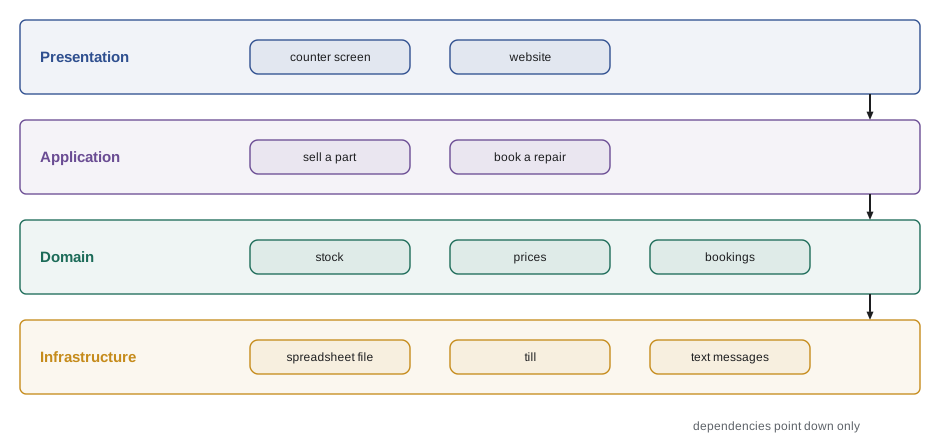
| Layer | Responsible for | In the new CounterApp |
|---|---|---|
| Presentation | Showing information and taking input from people | The counter screen, receipts, later the website |
| Application | Carrying out use cases: one class or method per thing a user wants to do | SellPart, BookRepair, QuoteRental |
| Domain | The business rules and the concepts of the business | Part, Money, Booking, the two-bikes-an-hour rule |
| Infrastructure | Talking to the outside world: files, databases, devices, networks | The parts spreadsheet, the till, text messages |
Different books use slightly different names. Some combine application and domain into a single business layer, or call the infrastructure layer the data access or persistence layer. The idea is the same: keep the code that talks to people, the code that holds the rules, and the code that talks to machines apart.
A request through the layers
To see the layers working, follow one sale through a small version of the new counter program. Each class prints a line when it is called, so the output traces the request down through the layers and back up.
import java.util.*;

public class Main {
    // domain
    record Part(String code, int cents, int onHand) {
        Part take(int n) {
            if (n > onHand) throw new IllegalArgumentException("only " + onHand + " " + code + " in stock");
            return new Part(code, cents, onHand - n);
        }
    }

    // infrastructure
    static final class PartFile {
        private final Map<String, Part> rows = new TreeMap<>(Map.of("BELL", new Part("BELL", 650, 3)));
        Part load(String code) { System.out.println("    infrastructure: read " + code + " from the parts file"); return rows.get(code); }
        void save(Part p) { System.out.println("    infrastructure: write " + p.code() + " = " + p.onHand()); rows.put(p.code(), p); }
    }

    // application
    static final class SellPart {
        private final PartFile parts;
        SellPart(PartFile parts) { this.parts = parts; }
        int sell(String code, int qty) {
            System.out.println("  application: sell " + qty + " " + code);
            Part p = parts.load(code);
            Part after = p.take(qty);
            parts.save(after);
            return p.cents() * qty;
        }
    }

    // presentation
    static final class CounterScreen {
        private final SellPart useCase;
        CounterScreen(SellPart useCase) { this.useCase = useCase; }
        void onSellClicked(String code, String qtyText) {
            System.out.println("presentation: volunteer typed " + code + " x " + qtyText);
            try {
                int cents = useCase.sell(code, Integer.parseInt(qtyText));
                System.out.println("presentation: show 'Charge " + cents + " cents'");
            } catch (IllegalArgumentException e) {
                System.out.println("presentation: show '" + e.getMessage() + "'");
            }
        }
    }

    public static void main(String[] args) {
        CounterScreen screen = new CounterScreen(new SellPart(new PartFile()));
        screen.onSellClicked("BELL", "2");
        screen.onSellClicked("BELL", "2");
    }
}presentation: volunteer typed BELL x 2
application: sell 2 BELL
infrastructure: read BELL from the parts file
infrastructure: write BELL = 1
presentation: show 'Charge 1300 cents'
presentation: volunteer typed BELL x 2
application: sell 2 BELL
infrastructure: read BELL from the parts file
presentation: show 'only 1 BELL in stock'What this code does
The screen only reads what the volunteer typed and shows results, the SellPart use case coordinates loading, the rule and saving, the Part record holds the rule that stock cannot go below zero, and PartFile is the only class that touches storage. The indented trace shows the request going down the layers and the answer coming back up. The second sale fails in the domain rule, and the screen turns that failure into a message for the volunteer.
Each layer in that program does one kind of job, which is the single responsibility principle from lesson 2 applied to whole groups of classes. The price and stock rule lives in exactly one place, the Part record, which is the part the website could reuse.
The dependency rule
The essential rule of a layered architecture is that dependencies point downward. Presentation code may call application code, application code may call domain code, and so on, but a lower layer must never call or even know about a higher one. The domain must never print to the counter screen, and the infrastructure must never decide a price.
When the rule is broken, the layers stop being separable. In CounterApp, the file-reading code showed error messages on the counter screen directly. That meant the file code could not run without a screen, so it could not be reused by a nightly report or tested on its own. The fix is to let the lower layer report the problem, by returning a value or throwing an exception, and let the higher layer decide how to show it.
import java.util.*;

public class Main {
    record LoadResult(List<String> codes, List<String> problems) {}

    static LoadResult loadPartCodes(List<String> lines) {
        List<String> codes = new ArrayList<>(), problems = new ArrayList<>();
        for (int i = 0; i < lines.size(); i++) {
            String line = lines.get(i).strip();
            if (line.isEmpty() || !line.contains(";")) problems.add("line " + (i + 1) + ": cannot read '" + line + "'");
            else codes.add(line.substring(0, line.indexOf(';')));
        }
        return new LoadResult(codes, problems);
    }

    public static void main(String[] args) {
        LoadResult r = loadPartCodes(List.of("BELL;650", "TUBE-700x25 899", "CHAIN-11;3999", ""));

        System.out.println("counter screen: " + r.codes().size() + " parts loaded");
        r.problems().forEach(p -> System.out.println("counter screen warning: " + p));

        System.out.println("nightly log: loaded=" + r.codes().size() + " problems=" + r.problems().size());
    }
}counter screen: 2 parts loaded counter screen warning: line 2: cannot read 'TUBE-700x25 899' counter screen warning: line 4: cannot read '' nightly log: loaded=2 problems=2
What this code does
loadPartCodes is infrastructure code that reads lines, and instead of printing warnings it returns them in a result record. Two different callers in the layer above then decide how to present the same result: the counter screen shows each problem, while the nightly log writes one summary line. Because the loader never prints, both can use it.
A useful test: could this class run inside a program with no screen at all? Domain and application classes should always pass it. Infrastructure classes should pass it too, apart from those whose whole job is to drive a device, such as the receipt printer.
Passing data between layers
Each layer has its own needs for data. The domain needs rich objects with rules, such as a Part that refuses to go below zero. The screen needs simple text to display: a name, a formatted price, a stock level shown as plenty, low or out. A common technique is to give the presentation layer its own small records, often called view models or data transfer objects (DTOs), and to convert domain objects into them at the boundary. Then a change to how the screen displays something never touches the domain, and the screen never calls methods that change stock.
import java.util.*;

public class Main {
    record Part(String code, String name, int cents, int onHand, int minimum) {
        boolean isLow() { return onHand < minimum; }
    }

    record PartRow(String name, String price, String stock) {
        static PartRow from(Part p) {
            String stock = p.onHand() == 0 ? "out" : p.isLow() ? "low (" + p.onHand() + ")" : "plenty";
            return new PartRow(p.name(), String.format("%d.%02d", p.cents() / 100, p.cents() % 100), stock);
        }
    }

    public static void main(String[] args) {
        List<Part> parts = List.of(new Part("TUBE-700x25", "Inner tube 700x25", 899, 14, 10),
                                   new Part("CHAIN-11", "Chain, 11 speed", 3999, 1, 2),
                                   new Part("PUMP-FLOOR", "Floor pump", 3450, 0, 1));
        for (Part p : parts) {
            PartRow row = PartRow.from(p);
            System.out.printf("%-18s %7s  %s%n", row.name(), row.price(), row.stock());
        }
    }
}Inner tube 700x25 8.99 plenty Chain, 11 speed 39.99 low (1) Floor pump 34.50 out
What this code does
Part is the domain object, with its numbers and its isLow rule, and PartRow is a view model with nothing but the three strings the screen displays. The from method is the one place where a domain object becomes screen text, including the decision to show plenty, low or out. The screen code can be redesigned freely without any change to Part.
View models are not always worth it. For a small program where the screen shows exactly what the domain holds, converting between two identical shapes is speculative generality. They pay off when the screen needs a different shape from the domain, or when the domain objects have methods the screen must not call.
Organizing code by layer
In Java, layers usually map to packages, and in larger programs to separate Gradle or Maven modules. Leif sketches the package plan for the redesigned counter program. The domain package depends on nothing else in the program; the application package depends on the domain; the presentation and infrastructure packages depend on the application and domain.
org.secondgear.counter
├── ui              presentation: CounterScreen, ReceiptView, PartRow
├── app             application:  SellPart, BookRepair, QuoteRental
├── domain          domain:       Part, Money, Booking, RentalPricing, Tax
└── infra           infrastructure: PartSpreadsheet, BookingFile, TillDriver, TextSender
What this code does
The four packages of the planned counter program, one per layer, with examples of the classes in each. Arranging packages by layer makes it obvious where a new class belongs and which imports are allowed. In a Gradle build the same four could become modules, so the build itself would refuse a forbidden dependency.
An alternative is to organize by feature: a package for sales, one for bookings and one for rentals, with the layers inside each. Package by feature keeps everything about one feature together, which helps when a team owns a feature; package by layer makes the layer rules easier to see and check. Many programs use features at the top level and layers inside them. For CounterApp, with one developer and three features, Leif suggests starting by layer and revisiting the choice if the program grows.
Checking the rules automatically
Architecture rules that live only in people's heads are broken within weeks. Large teams check them with tools: ArchUnit is a widely used Java library that lets tests assert rules such as no class in the domain package depends on the infra package, and Gradle modules make some rules impossible to break. The idea behind such tools is simple enough to sketch.
import java.util.*;

public class Main {
    static final List<String> ORDER = List.of("ui", "app", "domain", "infra");
    static final Map<String, Set<String>> ALLOWED = Map.of(
        "ui", Set.of("app", "domain"),
        "app", Set.of("domain"),
        "domain", Set.of(),
        "infra", Set.of("app", "domain"));

    record Import(String fromClass, String fromLayer, String toLayer) {}

    public static void main(String[] args) {
        List<Import> imports = List.of(
            new Import("CounterScreen", "ui", "app"),
            new Import("SellPart", "app", "domain"),
            new Import("PartSpreadsheet", "infra", "domain"),
            new Import("Part", "domain", "ui"),
            new Import("BookRepair", "app", "infra"));
        int broken = 0;
        for (Import i : imports) {
            if (i.fromLayer().equals(i.toLayer()) || ALLOWED.get(i.fromLayer()).contains(i.toLayer())) continue;
            broken++;
            System.out.println("rule broken: " + i.fromClass() + " (" + i.fromLayer() + ") depends on " + i.toLayer());
        }
        System.out.println(broken + " of " + imports.size() + " dependencies break the layer rules");
    }
}rule broken: Part (domain) depends on ui rule broken: BookRepair (app) depends on infra 2 of 5 dependencies break the layer rules
What this code does
The ALLOWED map states which layers each layer may depend on, and the loop checks a list of dependencies found in the code against it. Two break the rules: a domain class that reaches up into the user interface, and an application class that depends directly on infrastructure. A test like this, run on every build, stops such shortcuts from creeping back in.
The second broken rule, an application class depending on infrastructure, is allowed in the strict top-to-bottom picture of layers, where each layer may use the one below. Leif deliberately forbids it here, because it means the booking use case cannot be tested without the real file. Allowing infrastructure to depend on the application layer, rather than the reverse, is the dependency inversion principle from lesson 2, and the next lesson builds a whole architecture on that one change.
Strengths and weaknesses
| Strengths | Weaknesses |
|---|---|
| Easy to understand and explain: everybody knows where screens, rules and storage go | In the classic form the domain depends on infrastructure, so rules cannot be tested without storage |
| Each layer can be changed or replaced separately | Simple requests pass through every layer, which can feel like ceremony |
| Teams can work on different layers in parallel | Business logic tends to leak into the application or presentation layer |
| Widely supported by frameworks and tools | Layers say nothing about features, so large programs need another level of structure |
Try it yourself
Move the rule out of the screen
The starter's screen method checks the two-bikes-an-hour rule itself. Move the rule into a domain record Day with a method boolean canBook(int hour) and a method Day book(int hour) that returns a new Day, and make the screen only call those and print the result.
The program should print 10:00 booked, 10:00 booked and 10:00 full.
import java.util.*;

public class Main {
    static final Map<Integer, Integer> booked = new HashMap<>();

    static void onBookClicked(int hour) {
        if (booked.getOrDefault(hour, 0) < 2) {
            booked.merge(hour, 1, Integer::sum);
            System.out.println(hour + ":00 booked");
        } else {
            System.out.println(hour + ":00 is full");
        }
    }

    public static void main(String[] args) {
        onBookClicked(10); onBookClicked(10); onBookClicked(10);
    }
}
Try it yourself
A view model for bookings
Add a record BookingRow(String when, String who) with a static method from(Booking b) that formats the hour as 10:00 and the customer as their first name and the first letter of their last name with a full stop, such as Ana P.. Print the rows instead of the raw records.
The program should print 10:00 Ana P. and 14:00 Ben O..
import java.util.*;

public class Main {
    record Booking(int hour, String first, String last, String phone) {}

    public static void main(String[] args) {
        List<Booking> day = List.of(new Booking(10, "Ana", "Pereira", "555-0101"), new Booking(14, "Ben", "Okafor", "555-0102"));
        for (Booking b : day) System.out.println(b);
    }
}
Common mistakes
MistakePutting business rules in screen event handlers.
InsteadKeep rules in the domain layer and have screens call application use cases.
MistakeLetting lower layers print messages or show dialogs.
InsteadReturn results or throw exceptions and let the layer above decide how to present them.
MistakeDependencies that point upward between layers.
InsteadKeep every dependency pointing down, and check the rule with tests or modules.
MistakePassing rich domain objects to screens that only need text.
InsteadConvert to small view models at the boundary when the screen needs a different shape.
MistakeAdding layers and view models to a tiny program.
InsteadUse as many layers as the program needs; structure should pay for itself.
Summary and key terms
- Software architecture is the large-scale structure of a program: its major parts and the rules about how they depend on each other.
- A layered architecture divides a program into horizontal layers such as presentation, application, domain and infrastructure, each with one kind of responsibility.
- A request travels down through the layers and its result travels back up.
- The essential rule is that dependencies point downward; lower layers report problems by returning values or throwing exceptions instead of talking to the screen.
- View models or data transfer objects give the presentation layer its own simple data and keep domain objects out of the screen.
- Layers usually map to packages or build modules, organized by layer or by feature.
- Tools such as ArchUnit and Gradle modules check the rules automatically.
- In the classic form the domain depends on infrastructure, which makes rules hard to test without storage; inverting that dependency leads to the architecture in the next lesson.
- Software architecture
- The large-scale structure of a program: its major parts and how they may depend on each other.
- Layered architecture
- An architecture that stacks parts in layers, each depending only on layers below it.
- Presentation layer
- The layer that shows information to people and takes their input.
- Application layer
- The layer that carries out use cases by coordinating the domain and infrastructure.
- Use case
- One thing a user wants to do with the system, such as selling a part.
- Domain layer
- The layer holding the business concepts and rules.
- Infrastructure layer
- The layer that talks to files, databases, devices and networks.
- Dependency rule
- The rule that dependencies between layers point only in one allowed direction.
- View model
- A simple object shaped for what a screen displays.
- Data transfer object
- A simple object used to carry data across a boundary between parts of a program.
- Package by feature
- Organizing code into packages by business feature rather than by layer.
- ArchUnit
- A Java library for writing tests that check architecture rules.
Practice problems
Work each problem on paper first, then reveal the answer to check.
Which layer should decide that stock cannot go below zero?
Show answer
The domain layer.
The file loader shows a dialog when a line is bad. What is wrong and how is it fixed?
Show answer
A lower layer talks to the screen; it should return the problems and let the caller present them.
Why might a screen need a view model instead of the domain object?
Show answer
It needs a different shape, such as formatted text, and must not call methods that change the domain.
Name one advantage of package by feature.
Show answer
Everything about one feature is together, which suits teams that own features.
Why did Leif forbid the application layer from depending on infrastructure?
Show answer
So use cases can be tested without real storage; storage should depend on the application instead.
Lesson quiz · 5 questions
Score 60% or more to complete this lesson.
Create a free account to save your progress, take quizzes and earn a certificate.