
JAVA-205 · Lesson 2 of 12 · 18 min
Linear and binary search
▶ Video coming soon A video version of this lesson is on the way.
On Tuesday, September 21, 2027, Kofi brings Ingrid a printout. The shop's supplier sends a price list of 4,096 parts as a file every month, sorted by part code, and the reorder report looks up each of Second Gear's 612 parts in it. The report currently walks down the supplier list from the top for every lookup. Hamza's job tonight is to count how much work that is, and to replace it with the method that makes looking things up in sorted data fast: binary search.
Linear search
The simplest way to find a value in a list is linear search, also called sequential search: look at the first element, then the second, and so on, until you find the value or run out of elements. It works on any list, sorted or not. In the best case the value is first and one comparison is enough. In the worst case the value is last or missing, and all n elements are examined. On average, for a value that is present, about half of them are. Linear search is O(n).
public class Main {
    static int comparisons = 0;

    static int linearSearch(String[] codes, String target) {
        for (int i = 0; i < codes.length; i++) {
            comparisons++;
            if (codes[i].equals(target)) return i;
        }
        return -1;
    }

    public static void main(String[] args) {
        String[] codes = {"BELL", "CABLE-BRAKE", "CHAIN-11", "GRIPS", "PAD-DISC", "PAD-ROAD", "TUBE-26x2.1", "TUBE-700x25"};
        for (String t : new String[] {"BELL", "PAD-ROAD", "TUBE-700x25", "SPOKE-292"}) {
            comparisons = 0;
            int at = linearSearch(codes, t);
            System.out.println(t + " -> index " + at + " after " + comparisons + " comparisons");
        }
    }
}BELL -> index 0 after 1 comparisons PAD-ROAD -> index 5 after 6 comparisons TUBE-700x25 -> index 7 after 8 comparisons SPOKE-292 -> index -1 after 8 comparisons
What this code does
The method compares the target with each code from the start and returns the index as soon as it matches. BELL is found after one comparison and TUBE-700x25 after all eight. SPOKE-292 is not in the list, so every code is checked before the method returns -1.
For Kofi's report the numbers add up quickly. Each of 612 lookups in a 4,096-line list costs up to 4,096 comparisons, so the report can make more than 2.5 million comparisons, and on average, for codes that are present, about 1.25 million. That is still under a second on a modern laptop, but it grows as n × m, and the supplier is about to add its accessories catalogue.
Binary search
When the list is sorted, you can do far better. Look at the element in the middle. If it is the target, you are done. If the target is smaller, it can only be in the left half; if larger, only in the right half. Either way, one comparison throws away half of the remaining elements. Repeat on the half that is left. This is binary search, and it is the method you use without thinking when you look up a word in a printed dictionary.
Each step halves the range, so after k steps at most n / 2ᵏ elements remain. The search ends when the range is empty, which happens after about log₂ n + 1 steps. For the 4,096-part supplier list that is at most 13 comparisons per lookup instead of 4,096, and the whole report needs fewer than 8,000. Binary search is O(log n), but only on sorted data, and only when you can jump to the middle element directly, as you can in an array or an ArrayList.
public class Main {
    static int steps = 0;

    static int binarySearch(String[] codes, String target) {
        int lo = 0, hi = codes.length - 1;
        while (lo <= hi) {
            int mid = lo + (hi - lo) / 2;
            steps++;
            int c = codes[mid].compareTo(target);
            if (c == 0) return mid;
            if (c < 0) lo = mid + 1;
            else hi = mid - 1;
        }
        return -1;
    }

    public static void main(String[] args) {
        String[] codes = {"BELL", "CABLE-BRAKE", "CHAIN-11", "GRIPS", "PAD-DISC", "PAD-ROAD", "TUBE-26x2.1", "TUBE-700x25"};
        for (String t : new String[] {"BELL", "PAD-ROAD", "TUBE-700x25", "SPOKE-292"}) {
            steps = 0;
            int at = binarySearch(codes, t);
            System.out.println(t + " -> index " + at + " after " + steps + " steps");
        }
    }
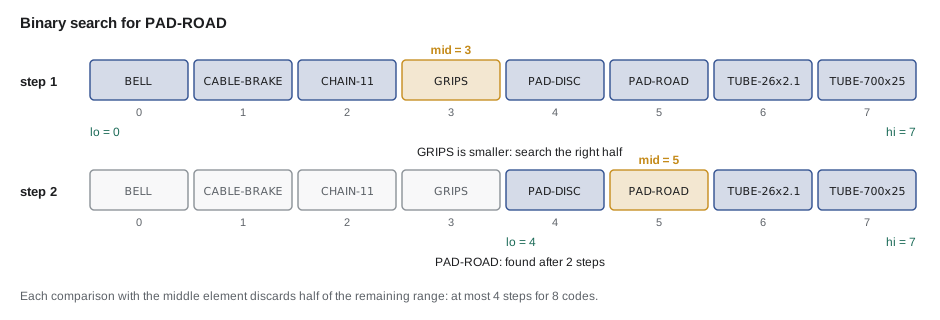
}BELL -> index 0 after 3 steps PAD-ROAD -> index 5 after 2 steps TUBE-700x25 -> index 7 after 4 steps SPOKE-292 -> index -1 after 3 steps
What this code does
The search keeps a range from lo to hi and compares the target with the middle code each time round the loop. When the middle code is smaller, the target can only be to its right, so lo moves past mid; otherwise hi moves before it. No search of these eight codes needs more than four steps, and the missing SPOKE-292 is reported as -1 once the range becomes empty.
Getting the details right
Binary search is short, but it is famous for being easy to get slightly wrong. Three details matter. First, the loop condition is lo <= hi, so a range of one element is still checked. Second, after comparing, the new range must exclude mid, with lo = mid + 1 or hi = mid - 1; otherwise the loop can run forever on a two-element range. Third, the middle index should be computed as lo + (hi - lo) / 2, not (lo + hi) / 2.
Why does the third detail matter? An int holds values up to 2,147,483,647. If lo and hi are both above about 1.07 billion, lo + hi is larger than that and overflows to a negative number, and the search then reads a negative index and crashes. This bug sat in Java's own Arrays.binarySearch, and in many textbooks, for years before it was found in 2006, because nobody had searched an array that large. With lo + (hi - lo) / 2 the subtraction can never overflow.
public class Main {
    public static void main(String[] args) {
        int lo = 1_500_000_000, hi = 2_000_000_000;
        int naive = (lo + hi) / 2;
        int safe = lo + (hi - lo) / 2;
        int shifted = (lo + hi) >>> 1;
        System.out.println("(lo + hi) / 2      = " + naive);
        System.out.println("lo + (hi - lo) / 2 = " + safe);
        System.out.println("(lo + hi) >>> 1    = " + shifted);
    }
}(lo + hi) / 2 = -397483648 lo + (hi - lo) / 2 = 1750000000 (lo + hi) >>> 1 = 1750000000
What this code does
Adding 1.5 billion and 2 billion goes past the largest int and wraps round to a negative number, so the naive midpoint is negative. The safe form subtracts first and gives 1,750,000,000. The unsigned shift is another correct trick that the JDK itself uses.
Binary search in the Java library
You rarely need to write binary search yourself. Arrays.binarySearch searches a sorted array, and Collections.binarySearch searches a sorted List that supports fast access by index, such as an ArrayList. Both return the index of the element when it is found. When it is not, they return a negative number that tells you where it would go: -(insertion point) - 1, where the insertion point is the index of the first element greater than the target. The extra minus one makes sure that a missing element that belongs at index 0 still gives a negative result.
import java.util.*;

public class Main {
    public static void main(String[] args) {
        String[] codes = {"BELL", "CABLE-BRAKE", "CHAIN-11", "GRIPS", "PAD-DISC", "PAD-ROAD", "TUBE-26x2.1", "TUBE-700x25"};
        System.out.println(Arrays.binarySearch(codes, "GRIPS"));
        int r = Arrays.binarySearch(codes, "SPOKE-292");
        System.out.println(r + " -> insert at " + (-r - 1));
        System.out.println(Arrays.binarySearch(codes, "AXLE-NUT"));

        List<Integer> prices = new ArrayList<>(List.of(450, 899, 1250, 1999, 3499));
        int p = Collections.binarySearch(prices, 1500);
        System.out.println(p + " -> insert at " + (-p - 1));
        prices.add(-p - 1, 1500);
        System.out.println(prices);
    }
}3 -7 -> insert at 6 -1 -4 -> insert at 3 [450, 899, 1250, 1500, 1999, 3499]
What this code does
GRIPS is at index 3, so binarySearch returns 3. SPOKE-292 is missing and would go before the TUBE codes at index 6, so the result is -7, and -r - 1 recovers the 6. Inserting 1500 at the recovered position keeps the price list sorted.
Two warnings come with the library methods. They require the data to be sorted in the same order they use, which is the natural order unless you pass a Comparator; on unsorted data the result is simply wrong, with no exception. And if the value appears more than once, they return the index of one of the copies, not necessarily the first. When you need the first or last position of a value, write the search yourself, as below.
Searching for a boundary
Many real questions are not is this value present, but where does a boundary fall. How many parts in the price list cost less than a budget? Which is the first booking on or after a date? These are answered by a variant called lower bound: find the first index whose element is greater than or equal to the target. It uses the same halving, but when the middle element is large enough it keeps mid as a candidate instead of stopping.
public class Main {
    static int lowerBound(int[] sorted, int target) {
        int lo = 0, hi = sorted.length;
        while (lo < hi) {
            int mid = lo + (hi - lo) / 2;
            if (sorted[mid] < target) lo = mid + 1;
            else hi = mid;
        }
        return lo;
    }

    public static void main(String[] args) {
        int[] cents = {450, 899, 899, 1250, 1999, 3499, 6500};
        System.out.println("first at or above 899: " + lowerBound(cents, 899));
        System.out.println("parts under 20.00: " + lowerBound(cents, 2000));
        System.out.println("parts under 1.00: " + lowerBound(cents, 100));
        System.out.println("parts under 100.00: " + lowerBound(cents, 10000));
    }
}first at or above 899: 1 parts under 20.00: 5 parts under 1.00: 0 parts under 100.00: 7
What this code does
Here hi starts one past the end, and the loop keeps the answer inside the range lo to hi until the two meet. The result is the first index whose price is at least the target, so it also counts how many prices are below the target. Five prices are under 20.00, none are under 1.00, and all seven are under 100.00.
Prices here are stored as whole cents in an int, which avoids the rounding errors of double that JAVA-101 showed. The same lower-bound idea is what TreeMap's ceilingKey and floorKey give you in O(log n), as StockRoom used for rental bookings.
When to use which
| Situation | Use | Cost per lookup |
|---|---|---|
| A few lookups in unsorted data | Linear search | O(n) |
| Many lookups in data that changes rarely | Sort once, then binary search | O(n log n) once, then O(log n) |
| Many lookups and frequent inserts | TreeMap or TreeSet | O(log n) |
| Lookups by exact key only, no order needed | HashMap or HashSet | O(1) on average |
| First value at or above a limit | Lower bound, or TreeMap ceilingKey | O(log n) |
Sorting costs O(n log n), more than one linear search. It pays for itself once you search more than about log n times. Kofi's report makes 612 lookups in the same supplier list, so sorting once, or relying on the supplier's own sort order, is clearly worth it. For a single lookup in an unsorted list, a linear search is the right answer.
Try it yourself
Write binary search
Complete indexOf(int[] sorted, int target) with an iterative binary search that returns the index of target, or -1 when it is missing. Use the overflow-safe midpoint.
The program should print 2, 0, 6 and -1, one per line.
public class Main {
    static int indexOf(int[] sorted, int target) {
        return -1;
    }

    public static void main(String[] args) {
        int[] cents = {450, 899, 1250, 1999, 3499, 6500, 9900};
        System.out.println(indexOf(cents, 1250));
        System.out.println(indexOf(cents, 450));
        System.out.println(indexOf(cents, 9900));
        System.out.println(indexOf(cents, 1000));
    }
}
Try it yourself
The last price within budget
Write countAtMost(int[] sorted, int limit), which returns how many prices are less than or equal to limit, using a binary search like lower bound (an upper bound: the first index whose price is greater than limit).
The program should print 3, 0 and 7, one per line.
public class Main {
    static int countAtMost(int[] sorted, int limit) {
        int count = 0;
        return count;
    }

    public static void main(String[] args) {
        int[] cents = {450, 899, 899, 1250, 1999, 3499, 6500};
        System.out.println(countAtMost(cents, 899));
        System.out.println(countAtMost(cents, 100));
        System.out.println(countAtMost(cents, 6500));
    }
}
Common mistakes
MistakeRunning binary search on data that is not sorted.
InsteadSort first, or keep the data sorted; on unsorted data the answer is silently wrong.
MistakeComputing the midpoint as (lo + hi) / 2.
InsteadUse lo + (hi - lo) / 2, which cannot overflow.
MistakeSetting lo = mid or hi = mid in the classic search.
InsteadExclude mid with lo = mid + 1 or hi = mid - 1, or the loop can run forever.
MistakeReading a negative binarySearch result as an error code only.
InsteadUse -result - 1 to get the insertion point.
MistakeSorting a list to do one lookup.
InsteadA single lookup in unsorted data is cheaper with linear search.
Summary and key terms
- Linear search checks elements one by one, works on any list and is O(n).
- Binary search needs sorted data with fast access by index; it compares the target with the middle element and discards half of the range each step, so it is O(log n): at most 13 comparisons for 4,096 items.
- The loop runs while lo <= hi, must exclude mid from the next range, and should compute the midpoint as lo + (hi - lo) / 2 to avoid integer overflow.
- Arrays.binarySearch and Collections.binarySearch return the index when found and -(insertion point) - 1 when not, and with duplicates they return any matching index.
- Lower and upper bounds use the same halving to find where a boundary falls, such as how many prices are below a budget.
- Sorting first pays off when you will search many times.
- Linear search
- Searching by checking each element in turn until the target is found or the list ends.
- Binary search
- Searching sorted data by comparing with the middle element and discarding half the range each step.
- Midpoint
- The index halfway between lo and hi, computed safely as lo + (hi - lo) / 2.
- Integer overflow
- A result too large for the int type that wraps round to a wrong value.
- Insertion point
- The index where a missing value would go to keep the data sorted.
- Lower bound
- The first index whose element is greater than or equal to a target.
- Upper bound
- The first index whose element is greater than a target.
- Sorted order
- An arrangement of elements from smallest to largest by a given comparison.
Practice problems
Work each problem on paper first, then reveal the answer to check.
What is the most comparisons binary search needs for 1,000 sorted items?
Show answer
10, since 2¹⁰ = 1,024.
Why is (lo + hi) / 2 dangerous for very large arrays?
Show answer
lo + hi can overflow the int range and become negative.
Arrays.binarySearch returns -4. Where would the missing value go?
Show answer
At index 3, because -(-4) - 1 = 3.
Which search would you use once on an unsorted list of 50 items?
Show answer
Linear search; sorting would cost more than it saves.
What question does a lower bound answer?
Show answer
Where the first element greater than or equal to a target is.
Lesson quiz · 5 questions
Score 60% or more to complete this lesson.
Create a free account to save your progress, take quizzes and earn a certificate.