
CMPUT-201 · Lesson 2 of 12 · 29 min
The compilation pipeline and the toolchain
In lesson 1 a single command, gcc hello.c -o hello, turned source code into a running program. That command actually runs four separate stages, each done by a different program: the preprocessor, the compiler proper, the assembler and the linker. Understanding the stages explains most of the confusing messages beginners see, such as "undefined reference" errors, and it explains how large programs are split into many source files that are compiled separately and joined together. This lesson walks through each stage with real output, shows how header files and separate compilation work, and introduces libraries, the tools for inspecting object files, and the main compiler options you will use for the rest of the course.
Four stages from source to executable
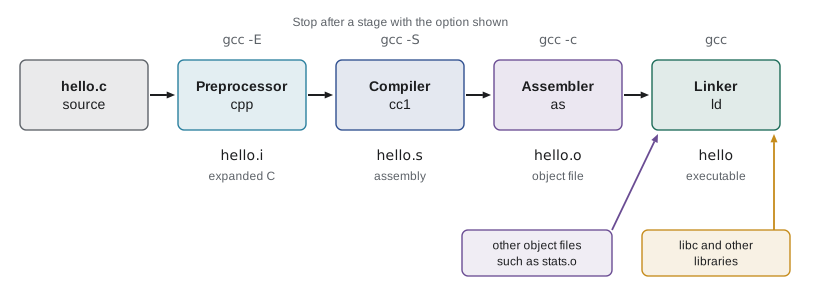
The preprocessor handles every line that begins with #. It copies the contents of included header files into the source, replaces macros defined with #define, and keeps or removes code according to conditional directives such as #ifdef. Its output is still C, but with no # directives left. The compiler proper translates that C into assembly language for the target processor, checking types and syntax and producing most of the warnings and errors you see. The assembler converts assembly language into machine code, packaged in an object file that ends in .o. Finally, the linker combines one or more object files with library code, resolves every function and variable name to an address, and writes the executable.
You can stop gcc after any stage. gcc -E runs only the preprocessor and prints the result; gcc -S stops after compiling and writes a .s assembly file; gcc -c stops after assembling and writes a .o object file; and a plain gcc command with only .o files as input just links. Stopping early is how you inspect what each stage does, and gcc -c is how every real project compiles its files one at a time.
gcc -std=c17 -E hi.c -o hi.i     # preprocess only
wc -l hi.c hi.i
tail -n 3 hi.i 3 hi.c
544 hi.i
547 total
# 3 "hi.c"
int main(void) { printf("%s\n", "Hi"); return 0; }The three-line program became several hundred lines, almost all of them declarations copied from stdio.h and the headers it includes in turn. At the end, the macro GREETING has been replaced by the string "Hi". The compiler proper never sees #include or #define; it only sees this expanded text. This is why a mistake inside a macro can produce an error message that points at a line you did not write.
Assembly and object files
The compiler's output is assembly language: human-readable names for individual machine instructions. You will study assembly properly in CMPUT-229, so here it is enough to see that each C statement becomes a handful of simple instructions that move data between registers and memory, do arithmetic and jump. The -O option asks the compiler to optimize; at -O2 it often removes whole loops whose results it can work out in advance, which is why debugging is usually done at -O0, the default, where the machine code follows the source closely.
gcc -std=c17 -O2 -S square.c -o square.s
sed -n "/^square:/,/ret/p" square.s | grep -v "^\s*\." # code onlysquare: endbr64 imull %edi, %edi movl %edi, %eax ret
On an x86-64 processor the argument x arrives in the register edi, imull multiplies it by itself, movl copies the result into eax, where the caller expects a return value, and ret returns to the caller. The first instruction, endbr64, is a marker added by Ubuntu's compiler for a hardware security feature that checks indirect jumps; it does no computation. On an ARM processor, such as a recent Mac or a Raspberry Pi, the instructions would be completely different, which is why an executable built on one kind of machine will not run on another even though the C source is the same.
An object file contains machine code, but it is not yet a program. It also contains a symbol table that lists the names it defines, such as square, and the names it uses but does not define, such as printf, which the linker must find elsewhere. The nm tool prints the symbol table: T marks a function defined in the file's text (code) section, and U marks an undefined symbol that must come from another object file or a library.
Header files and separate compilation
Real programs are split into many source files. Each .c file is compiled separately into its own object file, and the linker joins them. For this to work, a file that calls a function defined somewhere else must know the function's name, parameter types and return type, so the compiler can check calls and generate the right machine code. That information is a declaration, also called a prototype, and declarations shared between files go in a header file ending in .h. The convention is one header per module: stats.h declares the functions that stats.c defines, and any file that wants to use them includes stats.h.
#ifndef STATS_H
#define STATS_H

/* Return the mean of n values; n must be at least 1. */
double mean(const double values[], int n);

#endif#include "stats.h"
double mean(const double values[], int n) {
double total = 0.0;
for (int i = 0; i < n; i++) {
total += values[i];
}
return total / n;
}#include <stdio.h>
#include "stats.h"
int main(void) {
double marks[] = {72.0, 85.5, 91.0, 64.5};
printf("mean = %.2f\n", mean(marks, 4));
return 0;
}The lines #ifndef STATS_H, #define STATS_H and #endif form an include guard. If a header is included twice in the same file, which easily happens when headers include other headers, the second copy finds STATS_H already defined and is skipped, avoiding errors about things being declared twice. Many compilers also accept #pragma once for the same purpose, but it is not part of the C standard. Note the two forms of #include: angle brackets, as in <stdio.h>, search the system's include directories, while double quotes, as in "stats.h", search the directory of the current file first.
gcc -std=c17 -Wall -Wextra -c stats.c
gcc -std=c17 -Wall -Wextra -c main.c
ls *.o
echo "== nm stats.o"; nm stats.o
echo "== nm main.o"; nm main.o
gcc stats.o main.o -o meanprog
./meanprogmain.o
stats.o
== nm stats.o
0000000000000000 T mean
== nm main.o
U __stack_chk_fail
0000000000000000 T main
U mean
U printf
mean = 78.25The symbol tables tell the story. stats.o defines mean (T). main.o defines main and uses mean and printf (U), which it does not define. It also uses __stack_chk_fail, a library function called by the stack protector that Ubuntu's GCC adds to functions with local arrays; lesson 6 explains what it protects against. When the linker combines the two object files with the C library, every U is matched to a definition, and the program runs. The gain from separate compilation is speed: if you change only main.c, you recompile only main.c and relink, rather than recompiling the whole project. In a program with thousands of files, this is the difference between a few seconds and an hour, and lesson 11 shows how make automates it.
Linker errors
Errors from the linker look different from compiler errors because the linker works with object files, not source code, so it cannot point to a line. The most common is undefined reference: a function was declared, so the compiler was satisfied, but no object file or library supplied a definition. It usually means you forgot to add a source file to the build command, misspelled a function's name in its definition, or forgot to link a library. The opposite error, multiple definition, means two object files both define the same name, typically because a function body was written in a header that is included by two .c files.
gcc -std=c17 -Wall -Wextra main.c -o meanprog/usr/bin/ld: /tmp/ccIFBajR.o: in function `main': main.c:(.text+0x5c): undefined reference to `mean' collect2: error: ld returned 1 exit status
The message comes from ld, the linker, and says that main.c's main refers to mean but nothing defines it. The compiler was happy because stats.h declared mean. The fix is to compile and link stats.c too: gcc main.c stats.c -o meanprog. Learning to tell compiler errors (with a file and line number) from linker errors (mentioning ld and undefined references) saves a great deal of time.
Libraries
A library is a collection of compiled functions packaged for reuse. Every C program links the C standard library, libc, automatically, which is why you never have to ask for printf. Other libraries must be named on the command line with -l. For historical reasons the maths functions in math.h, such as sqrt and sin, live in a separate library on many Unix systems, libm, so a program that uses them must be linked with -lm. The name after -l drops the lib prefix and the file extension, so -lm finds libm, and -lpthread finds libpthread.
Libraries come in two forms. A static library, ending in .a, is an archive of object files; the linker copies the functions you use into your executable, which becomes larger but self-contained. A shared library, ending in .so on Linux (.dylib on macOS, .dll on Windows), is loaded when the program starts, so many programs can share one copy in memory and the library can be updated without relinking them. Most programs today use shared libraries; the ldd command lists the shared libraries an executable needs.
#include <stdio.h>
#include <math.h>

int main(void) {
    double a = 3.0, b = 4.0;
    double c = sqrt(a * a + b * b);
    printf("hypotenuse = %.1f\n", c);
    printf("pi from acos: %.6f\n", acos(-1.0));
    return 0;
}hypotenuse = 5.0 pi from acos: 3.141593
Useful compiler options
GCC has hundreds of options, but a short list covers almost everything in this course. You have met -std, -Wall, -Wextra, -g, -o, -c, -E, -S and the sanitizers. -O0, -O1, -O2 and -O3 choose the optimization level; -Og optimizes without hurting debugging. -I dir adds a directory to the include search path, -L dir adds one to the library search path and -l name links a library. -D NAME=value defines a macro from the command line, which is a common way to switch features or debugging output on and off. -Werror turns warnings into errors, and -pedantic warns about extensions that are not strict standard C.
Worked problem
Diagnosing a build failure
A project has main.c, list.c and list.h. Running gcc -std=c17 -Wall main.c -o app gives: undefined reference to `list_push'. A teammate suggests adding #include "list.c" to main.c to fix it. What is wrong, and what is the correct fix?
Show solution
- The message mentions an undefined reference, so it comes from the linker: main.c compiled successfully because list.h declares list_push, but no object file defines it.
- The build command lists only main.c, so list.c is never compiled. That is the real problem.
- Including list.c in main.c would appear to work, but it breaks separate compilation, and as soon as another file also includes list.c the linker will report multiple definitions. Never include .c files.
- The correct fix is to compile both files: gcc -std=c17 -Wall main.c list.c -o app, or separately with gcc -c main.c and gcc -c list.c followed by gcc main.o list.o -o app.
Answer: It is a linker error caused by leaving list.c out of the build; add list.c to the command (or its object file to the link) instead of including a .c file.
Clang deserves a mention here. It accepts nearly all of the same options as GCC, its error messages are often easier to read, and on macOS the command gcc is actually Clang. Trying a program with both compilers is a cheap way to find portability problems, because the two sometimes warn about different things.
Common mistakes
MistakePutting function definitions (bodies) in header files.
InsteadHeaders hold declarations, macros and type definitions; each function is defined in exactly one .c file.
MistakeUsing #include "file.c" to fix an undefined reference.
InsteadAdd the .c file to the compile command, or link its object file.
MistakeForgetting the include guard, so a header included twice causes redefinition errors.
InsteadWrap every header in #ifndef NAME_H / #define NAME_H / #endif.
MistakePutting -lm before the source files on the command line with some linkers.
InsteadLibraries are searched in order, so put -l options after the files that use them.
MistakeDebugging an -O2 build and finding that variables seem to vanish or lines run out of order.
InsteadDebug with -O0 or -Og and -g; optimize only once the program works.
Summary and key terms
- gcc runs four stages: preprocess (-E), compile (-S), assemble (-c) and link.
- The preprocessor handles #include, #define and conditional compilation and outputs plain C.
- Object files contain machine code and a symbol table of defined (T) and undefined (U) names, which nm displays.
- Headers hold declarations and use include guards; each function is defined once in a .c file.
- Separate compilation lets large projects rebuild only the files that changed.
- The errors undefined reference and multiple definition come from the linker and point to missing or duplicated definitions.
- Libraries are linked with -l; static libraries are copied into the executable and shared libraries are loaded at run time.
- Preprocessor
- The first stage, which processes # directives and macros.
- Assembly language
- A readable text form of machine instructions for a particular processor.
- Object file
- A .o file of machine code with a symbol table, produced by gcc -c.
- Linker
- The program (ld) that combines object files and libraries into an executable.
- Symbol table
- The list of names an object file defines and uses.
- Declaration (prototype)
- A statement of a function's name, parameters and return type without its body.
- Header file
- A .h file of declarations shared between source files.
- Include guard
- Preprocessor lines that stop a header being processed twice.
- Static library
- An archive of object files copied into the executable at link time.
- Shared library
- A library loaded at run time and shared between programs.
Practice problems
Work each problem on paper first, then reveal the answer to check.
Which gcc option stops after preprocessing, and which after assembling?
Show answer
-E stops after preprocessing; -c stops after assembling and writes an object file.
What does U mean in the output of nm?
Show answer
The symbol is used but not defined in this object file and must be supplied by another object file or a library.
Why do headers usually contain only declarations?
Show answer
So that every file can include them without creating multiple definitions; the single definition lives in one .c file.
Write an include guard for a header named queue.h.
Show answer
#ifndef QUEUE_H / #define QUEUE_H / ... / #endif
A build fails with undefined reference to `sqrt'. What is the likely fix?
Show answer
Link the maths library by adding -lm after the source files.
Is 'implicit declaration of function' a compiler or a linker message? What causes it?
Show answer
A compiler message, caused by calling a function without a prior declaration, usually a missing #include.
What is the difference between #include <x.h> and #include "x.h"?
Show answer
Angle brackets search system directories; quotes search the current file's directory first.
Give one advantage of shared libraries over static libraries.
Show answer
Many programs share one copy in memory, and the library can be updated without relinking the programs.
Why debug at -O0 rather than -O2?
Show answer
Optimization reorders and removes code, so source lines and variables no longer match the machine code closely.
Write the commands to compile a.c and b.c separately and link them into prog.
Show answer
gcc -c a.c; gcc -c b.c; gcc a.o b.o -o prog
Lesson quiz · 5 questions
Score 60% or more to complete this lesson.
Create a free account to save your progress, take quizzes and earn a certificate.