
CMPUT-174 · Lesson 3 of 12 · 28 min
Algorithms and programs
A program begins long before anyone types code. It begins with a problem stated in ordinary language, often vaguely, and the first job is to understand that problem well enough to describe a solution precisely. This lesson introduces a dependable problem-solving process, shows how to express algorithms in pseudocode and flowcharts, gets Python running on your computer, walks through your first programs, and explains the three kinds of errors you will meet: syntax errors, runtime errors and logic errors. By the end you should be able to take a small problem from a sentence to a working, tested program.
A problem-solving process
Experienced programmers rarely start by typing. They follow some version of the following steps, often quickly and informally for small problems, carefully for large ones. The process was popularized for mathematics by George Pólya in How to Solve It (1945), and it adapts well to programming.
| Step | Questions to ask | Output |
|---|---|---|
| 1. Understand the problem | What are the inputs? What output is wanted? What are the rules and limits? What should happen with unusual inputs? | A clear statement and a few input-output examples worked by hand |
| 2. Design an algorithm | How would I do this by hand? Can the problem be split into smaller parts? Have I seen a similar problem? | Pseudocode or a flowchart |
| 3. Implement | How do I express each step in Python? | A program |
| 4. Test | Does it give the expected output for my examples, including edge cases? | Evidence that the program works, or bugs to fix |
| 5. Reflect and improve | Is it clear? Is it efficient enough? What did I learn? | A better program and better habits |
Step 1 is where beginners most often cut corners and pay later. Suppose the problem is: "Write a program that tells a student their letter grade." Before designing anything, you need answers. What is the input: one percentage, or a list of marks with weights? What grading scale applies: is 79.5 a B+ or an A-? What if the percentage is negative or above 100? Writing a handful of examples by hand, such as 92 gives A, 79.5 gives B+ under the stated rounding rule and 105 is rejected as invalid, turns a vague request into something you can test. Those same examples become your first test cases in step 4.
Expressing algorithms: pseudocode and flowcharts
Pseudocode is a structured, informal description of an algorithm that uses plain language with a few programming conventions, such as indentation for steps that belong together and words like IF, OTHERWISE, REPEAT and RETURN. It has no strict rules; its purpose is to let you think about the logic without worrying about Python's punctuation. Here is pseudocode for finding the largest number in a list, a problem every programmer solves sooner or later:
FIND-LARGEST(numbers)
    IF numbers is empty
        report an error: there is no largest value
    largest <- the first number
    FOR EACH remaining number x
        IF x > largest
            largest <- x
    RETURN largest
The arrow means "becomes" or "is set to". Note that the pseudocode already handles an edge case, the empty list, that a quick first attempt would forget. It also does not depend on Python: it could be translated into any language. That independence is the point. When a design is wrong, it is far cheaper to discover in pseudocode than after writing and debugging a program.
A flowchart shows the same logic as a diagram. Ovals mark start and end, rectangles are actions, diamonds are decisions with yes and no branches, and arrows show the order. Flowcharts are less used for writing large programs, but they are helpful for explaining a decision-heavy process to someone else, and many people find them easier to check than text.
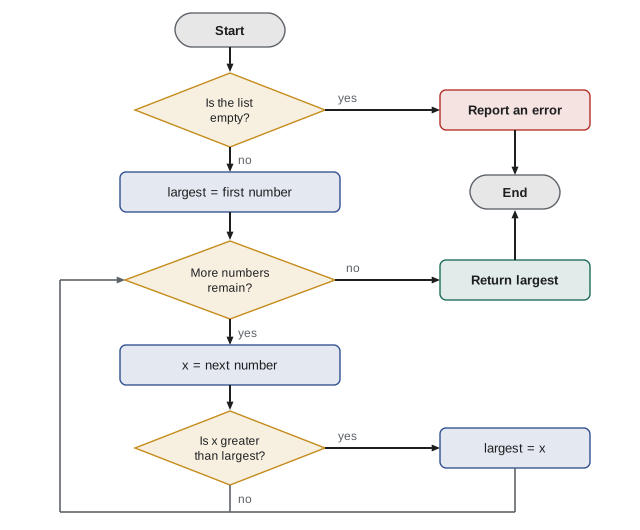
Translating the pseudocode into Python is now almost mechanical. Python already has a built-in max function that does exactly this, and in practice you would use it; writing your own version is how you learn the pattern, which you will reuse for many problems that max does not solve directly, such as finding the student with the highest mark or the warmest day in a weather file.
def find_largest(numbers):
    """Return the largest value in a non-empty list of numbers."""
    if len(numbers) == 0:
        raise ValueError("there is no largest value in an empty list")
    largest = numbers[0]
    for x in numbers[1:]:
        if x > largest:
            largest = x
    return largest

print(find_largest([3, 17, 8, 17, -2]))
print(find_largest([-5, -9, -1]))
print(find_largest([42]))
print(max([3, 17, 8, 17, -2])) # the built-in agrees17 -1 42 17
The tests were chosen deliberately: a list where the largest value appears twice, a list of all negative numbers, which catches the common mistake of starting with largest equal to zero, and a list with one item. Choosing tests that probe the edges of a problem is a skill you will practise all term.
Getting Python running
Python is an interpreted language: you write source code in a text file, usually ending in .py, and a program called the Python interpreter reads and carries it out. To set up, install a current version of Python 3 from python.org (on Windows and macOS) or your system's package manager (on Linux, where Python is often already installed). Python 3.12 or newer is fine for this course. During installation on Windows, tick the option to add Python to your PATH so that you can run it from a terminal.
You can use Python in two ways. In interactive mode, also called the REPL for read-evaluate-print loop, you type one statement at a time after the >>> prompt and see the result immediately. It is ideal for experiments: what does 7 // 2 give? What does "ab" * 3 do? In script mode, you save a program in a file and run the whole file. Real programs are scripts, because they need to be saved, tested, shared and run again.
$ python3 --version
Python 3.13.0
$ python3
>>> 7 // 2
3
>>> "ab" * 3
'ababab'
>>> exit()
$ python3 hello.py
Hello, world!
You also need an editor. Python comes with IDLE, a simple editor and shell that is fine for this course. Thonny is designed for beginners and shows variables changing as a program runs, which is excellent for understanding loops. Visual Studio Code is a popular general-purpose editor that you will probably move to later. Avoid word processors such as Word for code: they insert curly quotation marks and hidden formatting that Python cannot read.
Your first programs
By tradition, the first program in a new language prints a greeting. In Python it is one line. The print function displays its arguments, separated by spaces, followed by a new line. Text in quotation marks is a string, a sequence of characters; lesson 8 covers strings in depth.
print("Hello, world!")
print("Python can do arithmetic:", 2 + 3 * 4)
print("and it follows the usual order of operations:", (2 + 3) * 4)Hello, world! Python can do arithmetic: 14 and it follows the usual order of operations: 20
Most programs follow a simple pattern: get input, process it, produce output. Interactive programs often read input from the keyboard with Python's input function. In this course's runnable examples, input is written directly into the program, often as a list of sample values, so that every example runs the same way every time and its output can be checked. When you write your own interactive programs, you can replace the sample values with calls to input.
# Convert temperatures from Celsius to Fahrenheit.
# In an interactive program you might write: celsius = float(input("Celsius? "))
samples = [-40, 0, 21.5, 37, 100]

for celsius in samples:
    fahrenheit = celsius * 9 / 5 + 32
print(f"{celsius:6.1f} C = {fahrenheit:6.1f} F")-40.0 C = -40.0 F 0.0 C = 32.0 F 21.5 C = 70.7 F 37.0 C = 98.6 F 100.0 C = 212.0 F
The line starting with # is a comment: Python ignores everything after the # on a line. Comments explain why the code does something, for human readers, including you in three weeks. The f before the quotation marks makes an f-string, in which expressions inside braces are replaced by their values; the part after the colon, such as 6.1f, says to show the number six characters wide with one decimal place. Lesson 8 explains formatting fully.
Worked problem
From problem to program: tip calculator
Friends want to split a restaurant bill. Given the bill before tip, a tip percentage and the number of people, print each person's share rounded to the cent. Work through all five steps.
Show solution
- Understand: inputs are bill (dollars), tip percentage and number of people; output is the share per person. Example by hand: a bill of 84.00 with 18 per cent tip for 3 people gives 84 x 1.18 / 3 = 33.04. The number of people must be at least 1.
- Design: total <- bill x (1 + tip / 100); share <- total / people; print share rounded to 2 decimals. If people < 1, report an error.
- Implement: write a function split_bill(bill, tip, people) that follows the design.
- Test: check 84, 18, 3 gives 33.04; 100, 0, 4 gives 25.0, which Python prints without the trailing zero (lesson 8 shows how to display 25.00); 10, 15, 0 is rejected.
- Reflect: rounding each share may leave a cent or two over or under the total, a real issue for payment apps that lesson 8 practice returns to.
Answer: A tested split_bill function that matches the hand-worked examples and rejects zero people.
def split_bill(bill, tip_percent, people):
    """Return each person's share of the bill including tip, rounded to cents."""
    if people < 1:
        raise ValueError("people must be at least 1")
    total = bill * (1 + tip_percent / 100)
    return round(total / people, 2)

print(split_bill(84.00, 18, 3))
print(split_bill(100, 0, 4))
try:
    split_bill(10, 15, 0)
except ValueError as e:
print("rejected:", e)33.04 25.0 rejected: people must be at least 1
Three kinds of errors
Every programmer, however experienced, writes code with errors. What distinguishes experienced programmers is how quickly they find and fix them. Errors fall into three families, and knowing which family you are in tells you where to look.
A syntax error means the code breaks Python's grammar, so Python cannot even begin to run it: a missing closing parenthesis, a missing colon after an if line, mismatched quotation marks or wrong indentation. Python reports the file, the line and a caret pointing near the problem. The reported line is where Python got confused, which is sometimes the line after the real mistake, especially with unclosed brackets.
  File "grades.py", line 3
    if mark >= 80
                 ^
SyntaxError: expected ':'
A runtime error, which Python calls an exception, happens while the program is running, when an operation cannot be carried out: dividing by zero, converting the text "abc" to a number, using a name that has not been defined, or asking for item 10 of a 3-item list. Python stops and prints a traceback, which lists the chain of function calls that led to the error, ending with the error type and a message. Read tracebacks from the bottom up: the last line says what went wrong, and the line above it says where.
Traceback (most recent call last):
  File "average.py", line 7, in <module>
    print(average([]))
          ^^^^^^^^^^^
  File "average.py", line 4, in average
    return sum(values) / len(values)
           ~~~~~~~~~~~~^~~~~~~~~~~~~
ZeroDivisionError: division by zero# Each of these lines raises an exception; we catch them so the program keeps going.
tests = [
("10 / 0", lambda: 10 / 0),
('int("abc")', lambda: int("abc")),
("[1, 2, 3][10]", lambda: [1, 2, 3][10]),
('"total" + 5', lambda: "total" + 5),
("undefined_name", lambda: undefined_name),
]
for text, action in tests:
try:
action()
except Exception as e:
print(f"{text:16s} -> {type(e).__name__}: {e}")10 / 0 -> ZeroDivisionError: division by zero
int("abc") -> ValueError: invalid literal for int() with base 10: 'abc'
[1, 2, 3][10] -> IndexError: list index out of range
"total" + 5 -> TypeError: can only concatenate str (not "int") to str
undefined_name -> NameError: name 'undefined_name' is not definedA logic error is the hardest kind: the program runs without complaint but gives the wrong answer. Python cannot detect it, because the code is perfectly legal; it just does not do what you meant. Typical causes are a wrong formula, a condition with greater than where you needed greater than or equal, a loop that stops one item too early, or using the wrong variable. The only defence is testing: comparing the program's output with answers you worked out independently. That is why step 1 of the process asks for hand-worked examples.
def average_buggy(values):
    total = 0
    for v in values:
        total = v              # logic error: should be total = total + v
    return total / len(values)

def average(values):
    total = 0
    for v in values:
        total = total + v
    return total / len(values)

data = [70, 80, 90]
print("buggy:", average_buggy(data), " expected 80")
print("fixed:", average(data))buggy: 30.0 expected 80 fixed: 80.0
| Kind | When it appears | How Python reports it | How to find it |
|---|---|---|---|
| Syntax error | Before the program runs | SyntaxError or IndentationError with a line and caret | Look at the reported line and the line before it |
| Runtime error (exception) | While running, at a specific operation | A traceback ending with the exception type and message | Read the traceback from the bottom; check the values involved |
| Logic error | Never reported; output is wrong | Not reported at all | Test against hand-worked answers; trace the code; print intermediate values |
Lesson 11 develops debugging into a systematic skill. For now, two habits will save you hours. First, build programs in small steps and run them after every few lines, so that when something breaks you know it was in the last few lines you wrote. Second, when a program misbehaves, form a hypothesis about why before changing anything, then test that hypothesis, for example by printing a value. Changing code at random until it seems to work produces programs that work by accident.
Common mistakes
MistakeStarting to type code before understanding the problem.
InsteadWrite down inputs, outputs, rules and a few hand-worked examples first.
MistakeTesting only with easy, typical inputs.
InsteadInclude edge cases: empty lists, one item, negative numbers, zero, duplicates and invalid input.
MistakeWriting a whole program and running it for the first time at the end.
InsteadWrite a few lines, run, check, and repeat.
MistakeReading a traceback from the top and giving up at the first unfamiliar line.
InsteadRead the last line first for the error type and message, then the line above it for the location.
MistakeAssuming that a program which runs without errors is correct.
InsteadLogic errors produce no messages; compare output with independently worked answers.
MistakeWriting code in a word processor.
InsteadUse a plain-text code editor such as IDLE, Thonny or Visual Studio Code.
Summary and key terms
- Solve problems in five steps: understand, design, implement, test and reflect.
- Hand-worked input-output examples clarify the problem and become the first tests.
- Pseudocode and flowcharts express algorithms independently of any programming language.
- Python can be used interactively at the >>> prompt or by running script files.
- Programs typically get input, process it and produce output; this course writes sample input into the code so results are repeatable.
- Syntax errors stop Python before it runs, runtime errors produce tracebacks, and logic errors give wrong answers silently.
- Read tracebacks from the bottom up, build programs in small steps, and test against independent answers.
- Pseudocode
- An informal, structured description of an algorithm in plain language.
- Flowchart
- A diagram of an algorithm using shapes for actions and decisions connected by arrows.
- Interpreter
- A program that reads and carries out source code directly.
- REPL
- The interactive read-evaluate-print loop, Python's >>> prompt.
- Script
- A program saved in a file and run as a whole.
- Comment
- Text after # that Python ignores, written to explain code to people.
- Syntax error
- Code that breaks the language's grammar, detected before the program runs.
- Exception
- An error raised while a program runs, such as dividing by zero.
- Traceback
- Python's report of the chain of calls that led to an exception.
- Logic error
- A mistake that makes a program give wrong results without any error message.
Practice problems
Work each problem on paper first, then reveal the answer to check.
List four questions you would ask before writing a program to compute a student's letter grade.
Show answer
For example: what is the input, what grading scale applies, how is rounding done, and what should happen with invalid percentages.
Write pseudocode to find the smallest number in a list.
Show answer
Like FIND-LARGEST, with largest replaced by smallest and the comparison reversed: IF x < smallest.
Why should find_largest not start with largest equal to 0?
Show answer
If every number is negative, 0 would wrongly be returned; starting with the first item avoids this.
What is the difference between interactive mode and script mode?
Show answer
Interactive mode runs one statement at a time at the >>> prompt; script mode runs a saved file.
What does print("a", 1 + 2, "b") display?
Show answer
a 3 b
Classify: a missing closing parenthesis; int("twelve"); an average computed by dividing by the wrong count.
Show answer
Syntax error; runtime error (ValueError); logic error.
In a traceback, which line usually tells you the type of error?
Show answer
The last line.
A program reports a syntax error on line 12, but line 12 looks correct. Where else should you look?
Show answer
On the lines before it, especially for an unclosed bracket or quotation mark.
Give three test inputs for a function that returns the average of a list, including edge cases.
Show answer
For example [70, 80, 90] expecting 80, [5] expecting 5, and [] which should be rejected with a clear error.
Why does this course write sample input into programs instead of using input()?
Show answer
So each example runs the same way every time and its output can be checked.
Lesson quiz · 5 questions
Score 60% or more to complete this lesson.
Create a free account to save your progress, take quizzes and earn a certificate.