
CMP-420 · Lesson 8 of 12 · 34 min
Secure software I: memory safety and safe input handling
Most security failures are not breaks of cryptography but bugs in ordinary code. Two families of bugs dominate: memory-safety errors in languages such as C and C++, and failures to handle untrusted input safely in every language. Studies by Microsoft and by Google's Chromium team have each found that roughly 70 per cent of their serious security bugs were memory-safety issues. This lesson explains what goes wrong at the level a developer can control, and concentrates on the defensive patterns: safer languages, safe idioms in C, compiler and runtime checks, and disciplined validation of input. Lesson 9 applies the same thinking to web applications.
CMPUT-201 introduced C's memory model, the stack and heap, and AddressSanitizer; this lesson builds on that without repeating it. The aim is to recognize bug classes and their fixes, not to study how attackers take advantage of them.
Why memory safety matters
C and C++ give programmers direct control of memory: they can index arrays without bounds checks, use pointers after the memory they point to has been freed and treat any bytes as any type. That control makes them fast and suitable for kernels, browsers and embedded devices, but every slip can corrupt memory. A write past the end of a buffer can overwrite neighbouring data or control information; a use-after-free can let freed memory be reused for something else while a stale pointer still refers to it. Such corruption can often be abused to take control of the program, which is why memory-safety bugs in network-facing code are rated critical.
Finding an off-by-one error
The function below copies a user name into a new heap buffer but allocates one byte too few, forgetting the terminating zero byte that C strings need. On a normal build the program might print the right answer and appear to work, which is exactly what makes such bugs dangerous. Compiled with AddressSanitizer, the error is caught at the moment it happens and reported with the exact line.
#include <stdio.h>
#include <stdlib.h>
#include <string.h>
/* Copy a user name into a fresh buffer: the length check is off by one */
char *copy_name(const char *src) {
    size_t n = strlen(src);
    char *buf = malloc(n);            /* bug: no room for the terminating zero byte */
    if (!buf) return NULL;
    strcpy(buf, src);                 /* writes n + 1 bytes into an n-byte buffer */
    return buf;
}
int main(void) {
    char *name = copy_name("ana");
    printf("copied: %s\n", name);
    free(name);
    return 0;
}$ gcc -g -fsanitize=address,undefined toy.c -o toy
$ ./toy
=================================================================
==4242==ERROR: AddressSanitizer: heap-buffer-overflow on address 0x602000000013 at pc 0x602000000023 bp 0x6020000000d0 sp 0x602000000078
WRITE of size 4 at 0x602000000013 thread T0
#0 0x602000000022 in strcpy ../../../../src/libsanitizer/asan/asan_interceptors.cpp:563
#1 0x6020000000fb in copy_name toy.c:9
#2 0x60200000001c in main toy.c:13
#3 0x6020000000c9 in __libc_start_call_main ../sysdeps/nptl/libc_start_call_main.h:58
...
0x602000000013 is located 0 bytes after 3-byte region [0x602000000010,0x602000000013)
allocated by thread T0 here:
#0 0x6020000000c7 in malloc ../../../../src/libsanitizer/asan/asan_malloc_linux.cpp:69
#1 0x6020000000aa in copy_name toy.c:7
#2 0x60200000001c in main toy.c:13
#3 0x6020000000c9 in __libc_start_call_main ../sysdeps/nptl/libc_start_call_main.h:58
...
SUMMARY: AddressSanitizer: heap-buffer-overflow ../../../../src/libsanitizer/asan/asan_interceptors.cpp:563 in strcpy
(shadow memory map omitted)The fixed version addresses the cause rather than the symptom. It bounds the input length, allocates the right size, copies with an explicit length and rejects over-long input instead of silently truncating it, which could change its meaning. Running the fixed code under the same sanitizer shows no errors.
#include <stdio.h>
#include <stdlib.h>
#include <string.h>
/* Fixed: bound the input, allocate n + 1 bytes and copy explicitly */
char *copy_name(const char *src, size_t max_len) {
    size_t n = strnlen(src, max_len + 1);
    if (n > max_len) return NULL;     /* reject over-long input instead of truncating silently */
    char *buf = malloc(n + 1);
    if (!buf) return NULL;
    memcpy(buf, src, n);
    buf[n] = '\0';
    return buf;
}
int main(void) {
    const char *inputs[] = {"ana", "a-name-that-is-far-too-long-for-this-field"};
    for (int i = 0; i < 2; i++) {
        char *name = copy_name(inputs[i], 16);
        if (name) { printf("copied: %s\n", name); free(name); }
        else printf("rejected: input longer than 16 characters\n");
    }
    return 0;
}$ gcc -g -fsanitize=address,undefined toy.c -o toy $ ./toy copied: ana rejected: input longer than 16 characters
Integer overflow often comes first. If a program computes the size of an allocation as count times element size and the multiplication wraps around, it allocates a tiny buffer and then writes a large amount of data into it. Checked arithmetic, here the GCC and Clang builtin __builtin_mul_overflow, or calloc, which performs the check internally, turns the silent wrap into an explicit refusal.
#include <stdio.h>
#include <stdlib.h>
#include <stdint.h>
/* Checked multiplication before allocating count * size bytes */
void *alloc_array(size_t count, size_t size) {
    size_t total;
    if (__builtin_mul_overflow(count, size, &total)) return NULL;  /* would wrap around */
    return malloc(total);
}
int main(void) {
    size_t counts[] = {1000, SIZE_MAX / 4};
    for (int i = 0; i < 2; i++) {
        void *p = alloc_array(counts[i], 8);
        printf("count %zu x 8 bytes -> %s\n", counts[i], p ? "allocated" : "refused: size would overflow");
        free(p);
    }
    return 0;
}$ gcc -g -fsanitize=address,undefined toy.c -o toy $ ./toy count 1000 x 8 bytes -> allocated count 4611686018427387903 x 8 bytes -> refused: size would overflow
Layers of protection for C and C++
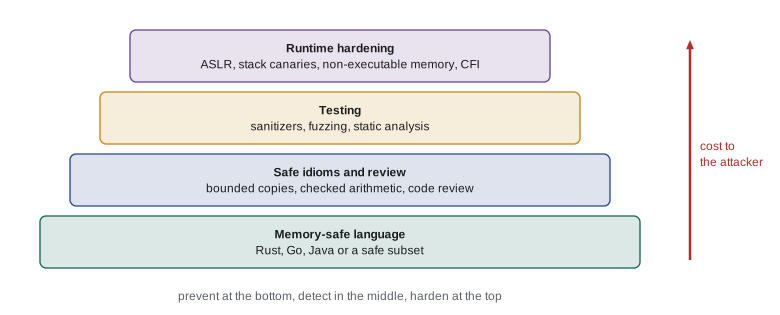
No single measure makes C safe, so practice combines several layers. In development, compile with warnings as errors (-Wall -Wextra -Werror), test with AddressSanitizer and the undefined-behaviour sanitizer (UBSan), and run fuzzers, which feed huge numbers of generated inputs to a program and report crashes and sanitizer findings. Static analyzers find many bugs before code runs. In production, compilers and operating systems add hardening that makes surviving bugs harder to abuse: stack canaries (-fstack-protector-strong), source fortification (-D_FORTIFY_SOURCE=3), non-executable memory, address space layout randomization and control-flow integrity. These mitigations raise the cost of an attack but do not remove the bug, so they complement fixing code rather than replace it.
Memory-safe languages
The most effective long-term measure is to write new code in a memory-safe language. Java, C#, Go, Python and JavaScript check bounds at run time and manage memory automatically, so whole bug classes disappear. Rust achieves memory safety without a garbage collector: its compiler enforces ownership and borrowing rules so that use-after-free and data races are rejected at compile time, and indexing is checked at run time. In the example, safe lookups return an optional value, and an out-of-range index stops the program with a clear message instead of reading someone else's memory.
fn main() {
    let marks = vec![71, 84, 90];
    // Safe lookup: get() returns an Option instead of reading past the end
    for i in [1usize, 5] {
        match marks.get(i) {
            Some(m) => println!("mark {} = {}", i, m),
            None => println!("mark {} does not exist; handled without touching other memory", i),
        }
    }
    // Plain indexing is bounds-checked too: an out-of-range index stops the program safely
    let i = marks.len() + 2;
    println!("about to index position {}", i);
    println!("{}", marks[i]);
}mark 1 = 84 mark 5 does not exist; handled without touching other memory about to index position 5 thread 'main' panicked at main.rs:13:25: index out of bounds: the len is 3 but the index is 5 note: run with `RUST_BACKTRACE=1` environment variable to display a backtrace
Governments now recommend this shift. In June 2025 the NSA and CISA published guidance urging software manufacturers to adopt memory-safe languages and publish roadmaps for doing so, guidance the Canadian Centre for Cyber Security has endorsed through its joint secure-by-design publications with US and allied agencies. For Canadian organizations the practical message is the same: prefer memory-safe languages for new components, isolate legacy C and C++ code, and apply the testing and hardening layers above.
Rewriting everything is rarely possible, so the usual strategy is incremental: write new components in a memory-safe language, rewrite the riskiest parsers and network-facing code first, sandbox what remains, and keep sanitizer and fuzz testing on the legacy core. Android's move to writing new code in Rust and Kotlin led to a sharp fall in its share of memory-safety vulnerabilities within a few years, without rewriting old code.
Untrusted input everywhere
Input-handling bugs occur in every language, including memory-safe ones. Any data from outside the program's trust boundary (form fields, URLs, headers, files, environment variables, messages from other services and even database contents written by others) may be malformed or malicious. Three principles cover most cases. First, validate input against an allow-list of what is acceptable, close to where it enters, rather than trying to list what is forbidden. Second, canonicalize before validating, because the same text can be encoded many ways: Unicode has compatibility forms and look-alike characters, file paths can contain dot-dot segments, and URLs can be percent-encoded. Third, encode output for its destination, such as HTML, SQL, a shell or a log, because validation alone cannot know every context the data will reach. Lesson 9 applies the third principle to the web.
import re, unicodedata
# Allow-list validation: describe what IS acceptable, reject everything else
COURSE = re.compile(r"[A-Z]{2,5}-[0-9]{3}")
USERNAME = re.compile(r"[a-z][a-z0-9_]{2,31}")
def clean_username(raw: str):
    s = unicodedata.normalize("NFKC", raw).strip().lower()   # canonicalize first
    if not USERNAME.fullmatch(s):
        return None
    return s
for raw in ["Ana_Lima", "  ana_lima ", "ana", "an", "ana lima", "ana;drop", "x" * 40]:
    print(f"{raw[:20]!r:<24} -> {clean_username(raw)}")
for code in ["CMPUT-331", "cmput-331", "CMPUT-3311", "CMPUT-331 "]:
print(f"{code!r:<14} valid course code: {bool(COURSE.fullmatch(code))}")'Ana_Lima' -> ana_lima ' ana_lima ' -> ana_lima 'ana' -> ana 'an' -> None 'ana lima' -> None 'ana;drop' -> None 'xxxxxxxxxxxxxxxxxxxx' -> None 'CMPUT-331' valid course code: True 'cmput-331' valid course code: False 'CMPUT-3311' valid course code: False 'CMPUT-331 ' valid course code: False
Note that the full-width letters in the third input are normalized to ordinary ASCII by NFKC before validation, so they are judged on what they will mean to the rest of the system. Validating before normalizing is a classic error: a check sees one string and later code sees another.
Paths, numbers and other structured input
File paths built from user input are a frequent source of trouble. If an application serves files from an upload folder by joining the folder name with a user-supplied name, a name containing parent-directory segments could escape the folder. The robust defence is to resolve the joined path to its canonical absolute form and then check that it still lies inside the intended directory, or better, to never use user input as a file name at all and look files up by an identifier in a database.
from pathlib import Path
import tempfile
BASE = Path(tempfile.mkdtemp()) / "uploads"
BASE.mkdir()
(BASE / "notes.txt").write_text("lecture notes")
def safe_open(user_supplied: str) -> str:
    target = (BASE / user_supplied).resolve()          # canonical absolute path
    if not target.is_relative_to(BASE.resolve()):       # must stay inside the upload folder
        return "rejected: outside the upload folder"
    if not target.is_file():
        return "rejected: no such file"
    return "ok: " + target.read_text()
for name in ["notes.txt", "missing.txt", "../outside.txt", "sub/../notes.txt"]:
print(f"{name:<18} -> {safe_open(name)}")notes.txt -> ok: lecture notes missing.txt -> rejected: no such file ../outside.txt -> rejected: outside the upload folder sub/../notes.txt -> ok: lecture notes
Numbers need the same care: parse with an explicit base, reject non-integers, enforce ranges that make sense for the business rule, and limit length before parsing so a huge string cannot consume resources. The same goes for sizes of uploads, lengths of lists in JSON documents and nesting depth, which should all have limits so that a single request cannot exhaust memory.
# Parsing numbers from untrusted input: type, range and size limits
def parse_quantity(text: str, lo=1, hi=500):
    if len(text) > 6:
        return None, "too long"
    try:
        n = int(text, 10)
    except ValueError:
        return None, "not an integer"
    if not lo <= n <= hi:
        return None, f"outside {lo}..{hi}"
    return n, "ok"
for t in ["12", "0", "-3", "4.5", "1e3", "499", "9999999999"]:
print(f"{t!r:<14} -> {parse_quantity(t)}")'12' -> (12, 'ok') '0' -> (None, 'outside 1..500') '-3' -> (None, 'outside 1..500') '4.5' -> (None, 'not an integer') '1e3' -> (None, 'not an integer') '499' -> (499, 'ok') '9999999999' -> (None, 'too long')
Worked examples
Worked problem
Reviewing a C parser
A routine reads a length field from a network packet and copies that many bytes from the packet into a 256-byte stack buffer. List the checks needed.
Show solution
- Treat the length field as untrusted: check it against both the destination size (256) and the number of bytes actually received.
- Reject, rather than truncate, packets whose length is inconsistent, and log them.
- Use memcpy with the validated length, compile with sanitizers in testing and fuzz the parser with generated packets.
- Consider moving packet parsing into a memory-safe language and keeping the C core behind a narrow, well-tested interface.
Answer: Check the claimed length against both the buffer size and the received data, reject inconsistencies, fuzz with sanitizers, and consider a memory-safe parser.
Worked problem
Normalizing before checking
A site forbids user names containing "admin" by checking the raw input, then stores names after applying NFKC normalization. A user registers with full-width letters that normalize to "admin". What went wrong?
Show solution
- The check ran on the raw text, where the full-width characters are different code points from ASCII.
- Normalization after the check turned the stored name into the forbidden ASCII string.
- Fix: canonicalize (normalize, case-fold, trim) first, then validate the canonical form, and store exactly what was validated.
Answer: Validation ran before canonicalization; always canonicalize first and validate the form you store.
Worked problem
Planning a memory-safety roadmap
A company maintains a 400,000-line C++ image-processing library used by a public web service. What incremental plan reduces memory-safety risk fastest?
Show solution
- Identify the attack surface: code that parses untrusted image files is the highest risk.
- Run the library under sanitizers with continuous fuzzing of each image decoder, and fix findings.
- Rewrite the riskiest decoders in Rust behind a C interface, and run the remaining C++ in a sandboxed process with minimal privileges.
- Require new code to be written in a memory-safe language and publish the roadmap with milestones.
Answer: Fuzz and sanitize the parsers now, rewrite the riskiest ones in a memory-safe language, sandbox the rest, and require memory-safe new code.
Common mistakes
MistakeIf the program prints the right answer, the memory handling is correct.
InsteadTest with AddressSanitizer and fuzzing; memory errors often have no visible symptom.
Mistakestrncpy makes copying safe.
InsteadUse explicit lengths, check them first and terminate strings; strncpy can leave strings unterminated.
MistakeHardening flags such as ASLR fix memory bugs.
InsteadMitigations raise attack cost; fix the bug and prefer memory-safe languages.
MistakeBlock-listing dangerous characters is enough validation.
InsteadAllow-list what is acceptable, canonicalize first, and encode output for each context.
MistakeMemory-safe languages do not need input validation.
InsteadThey remove memory corruption, not logic and injection flaws; validate and encode in every language.
Summary and key terms
- About 70 per cent of serious bugs in large C and C++ codebases are memory-safety issues.
- Off-by-one errors, integer overflows and use-after-free are common; sanitizers catch them during testing.
- Fix the cause: bound input, allocate correctly, check arithmetic and reject inconsistent data.
- Defence in depth combines safe languages, safe idioms, sanitizers and fuzzing, and runtime hardening.
- Memory-safe languages such as Rust, Go and Java remove whole bug classes; governments now recommend roadmaps.
- Treat all external data as untrusted: canonicalize, then validate against an allow-list.
- Resolve paths and check containment, and limit the size and range of every input.
- Memory safety
- The guarantee that a program accesses only memory it is entitled to, in bounds and while valid.
- Buffer overflow
- Writing past the end of an array or allocation.
- Use-after-free
- Accessing memory after it has been released.
- Integer overflow
- An arithmetic result too large for its type, which wraps around.
- AddressSanitizer
- A compiler-based tool that detects memory errors at run time during testing.
- Fuzzing
- Automated testing that feeds many generated inputs to find crashes and errors.
- ASLR
- Address space layout randomization, which places memory regions at unpredictable addresses.
- Allow-list validation
- Accepting only input that matches an explicit definition of what is valid.
- Canonicalization
- Converting input to a single standard form before checking it.
- Trust boundary
- The point where data passes from a less trusted to a more trusted part of a system.
Practice problems
Work each problem on paper first, then reveal the answer to check.
What fraction of serious security bugs did Microsoft and Google find were memory-safety issues?
Show answer
Roughly 70 per cent.
Why did the first copy_name allocate too little memory?
Show answer
It allocated strlen(src) bytes and forgot the terminating zero byte.
What does __builtin_mul_overflow do?
Show answer
It multiplies two values and reports whether the result overflowed instead of silently wrapping.
Name two runtime hardening measures.
Show answer
Any two of stack canaries, ASLR, non-executable memory, control-flow integrity or source fortification.
How does Rust prevent use-after-free?
Show answer
Its ownership and borrowing rules are checked at compile time, so references cannot outlive their data.
Why validate with an allow-list rather than a block-list?
Show answer
Attackers find encodings and characters a block-list misses; an allow-list accepts only known-good input.
What does NFKC normalization do to full-width letters?
Show answer
It converts them to their ordinary compatibility equivalents, such as ASCII letters.
How should a server check that a requested file stays inside its upload folder?
Show answer
Resolve the joined path to an absolute canonical path and check it is relative to the folder.
Why limit the length of a numeric string before parsing it?
Show answer
To prevent huge inputs from consuming excessive memory or time.
Give one reason to fuzz a parser even if it is written in a memory-safe language.
Show answer
Fuzzing still finds crashes, hangs and logic errors such as unhandled exceptions.
Lesson quiz · 5 questions
Score 60% or more to complete this lesson.
Create a free account to save your progress, take quizzes and earn a certificate.